
1:57
Explore
The New Standard for Agile Execution
ClickUp · Jan 2026 · 0:48 · Full motion · AI-annotated
- Length
- 0:48
- Scenes
- 10 · 4.9 s avg
- Product on screen
- 0:06
- Features shown
- 1
- Voiceover
- Yes
- Views
- 461 on YouTube
as of November 27, 2026
00:00:00 / 00:48:17
- Length
- 0:48
- Scenes
- 10 · 4.9 s avg
- Product on screen
- 0:06
- Features shown
- 1
- Voiceover
- Yes
- Views
- 461 on YouTube
as of November 27, 2026
ClickUp’s 0:48 launch film runs 10 scenes, about 4.9 s each. The product shows up at 0:06 and 1 feature is revealed. There is no explicit call to action; a voiceover carries the film. The video opens on a flat animated whiteboard that frames work sprawl as the threat, then flips the interface into a 3D tilted mockup on a pink-to-blue gradient to name ClickUp. It tours the workspace in quick cuts, pairing one voiceover line per screen, and closes on a centered logo reveal.
No filming indicatedEstimated needs: 5 capture groups — your screens or recordings · 1 official logo — reused across the film · 4 3D passages — build or supply
Is this your launch? to your site or press kit.
More like this
1:30

FullSeam Launch Video
FullSeam · B2B · Feb 2026
0:44

ValueMate: Automating Real Estate Appraisals with AI
ValueMate · B2B · May 2025
Similar soundtrack
Films whose music sounds like this one, voice left out
1:20

Motives AI
Motives · Upbeat modern electronic
0:57
Creative SaaS Launch Video | FrenchFry
FrenchFry · Upbeat electronic
1:49

Ajay PV - 483 days ago, @5aitec and I raised $20M from @binnybansal to build Sh
Sloosh · Upbeat modern electronic
The New Standard for Agile Execution, scene by scene
· 10 scenes as text
01 · Hook · 0:00–0:05
A whiteboard in a collaboration app draws a bar chart: green bars climb under a green BUILD arrow while red bars fall under a red KILL arrow, then INNOVATION with lightbulbs pops in below. The view scrolls down to a flow of sticky notes linked by red arrows.
Camera: Push in
02 · Problem · 0:05–0:06
A whiteboard flowchart of pain points sits flat, then the view pulls back into a 3D perspective mockup on a dark background, a red WORK SPRAWL stamp tilted across the center.
On-screen text: “WORK SPRAWL”
Techniques: 3D mockup
Camera: Pull out
03 · Product intro · 0:06–0:07
A tilted 3D mockup of the ClickUp app floats on a pink-to-blue gradient. The view cuts from a whiteboard with a red WORK SPRAWL stamp to a list view. A cursor hovers over New message as a dark tooltip pops in.
On-screen text: “That's why the best teams build in ClickUp!”
Techniques: Masking, 3D mockup, Cursor demo
Camera: Static
04 · Demo · 0:07–0:20
A flat ClickUp sprint board shows a black callout near the sidebar, then the interface tilts into a 3D window with a Backlog panel sliding in. A cursor selects a backlog task, opens a status dropdown, and changes it to In Progress.
On-screen text: “That's why the best teams build in ClickUp!”, “for Today”
Techniques: 3D mockup, Cursor demo
Camera: Pull out
05 · Feature reveal · 0:20–0:22
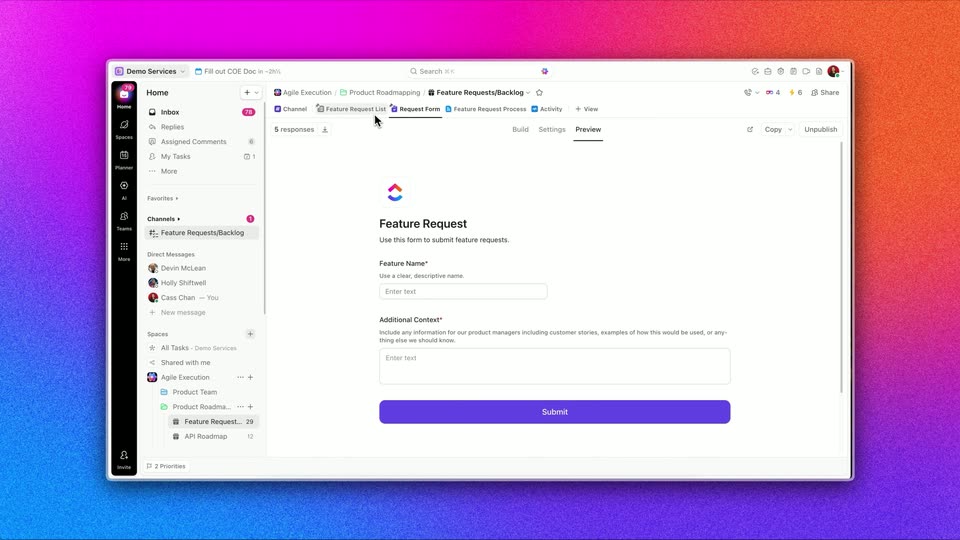
A tilted product interface floats over a pink-to-blue gradient. The screen crossfades from a feature request form to a list of requests, each row tagged with a colored status label.
Techniques: 3D mockup
Camera: Pan
06 · Feature reveal · 0:22–0:24
A project tool's feature-request list sits on a pink-to-blue gradient, a cursor hovering over the rows. The view then blurs and reframes into a detail page titled Add Users via API, revealing a product brief form.
Techniques: UI zoom, Cursor demo
Camera: Push in
07 · Feature reveal · 0:24–0:27
A tilted Jira ticket floats over a pink-and-blue gradient. A status dropdown opens, its option list expands, and the cursor selects In Progress. The panel then blurs and swings away.
Techniques: 3D mockup, Cursor demo, Speed ramp
Camera: Push in
08 · Feature reveal · 0:27–0:32
A 3D-tilted product interface sits on a gradient that shifts from blue-purple to pink. The screen content swaps between an issue detail, an epic task, and a sprint dashboard. A cursor hovers over a link.
Techniques: 3D mockup, Cursor demo
Camera: Pull out
09 · Demo · 0:32–0:43
A ClickUp dashboard window rests on a purple-blue gradient. The view scrolls down, then the frame tightens on the right-hand discussion column. A cursor hovers over a comment, revealing a reply box where a message types in letter by letter.
Techniques: UI zoom, Cursor demo
Camera: Push in
10 · Outro · 0:43–0:48
On a plain white background, the ClickUp lockup reveals at center: the two-arc mark (pink-to-orange top, purple-to-blue bottom) sits left of the bold black wordmark, which sharpens in from a blur as small orange sparkles pop around the letters, then the logo holds still.
Techniques: Particles
Camera: Static