
1:04
Explore
00:00:00 / 00:21:03
- Length
- 0:21
- Scenes
- 3 · 7.0 s avg
- Product on screen
- 0:00
- Features shown
- 1
- Voiceover
- No
- Views
- 519 on YouTube
as of November 27, 2026
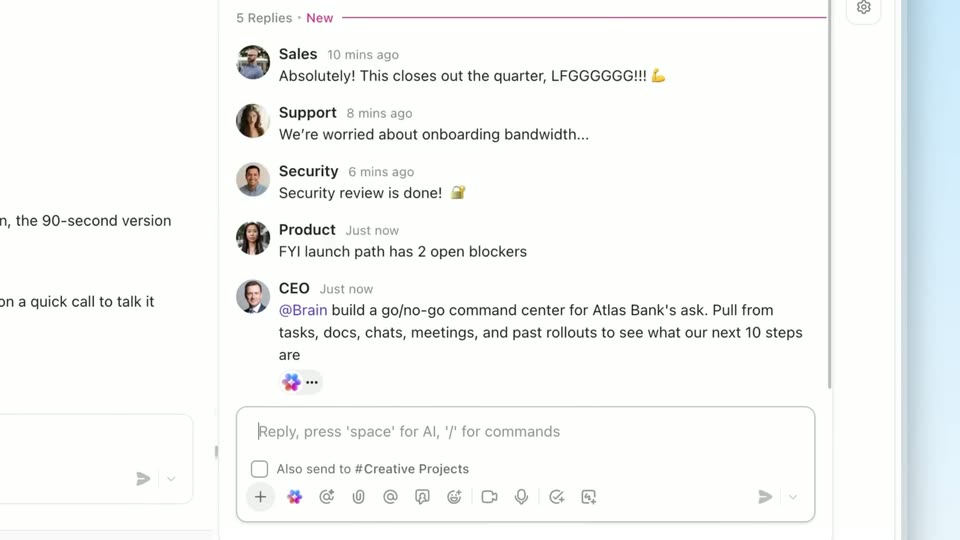
ClickUp’s 0:21 launch film runs 3 scenes, about 7.0 s each. The product is on screen from the first frame and 1 feature is revealed. There is no explicit call to action. One unbroken demo: the camera zooms from the full chat window into a thread, a command is typed, and the agent's reply card expands into a dark dashboard that scrolls from status cards to a ten-step plan. Pacing is steady and UI-led, with a zoom-in opening, a blur-to-focus card reveal, and a defocus plus logo-pieces burst that locks off on the green GO verdict.
No filming indicatedEstimated needs: 1 capture group — your screens or recordings
Is this your launch? to your site or press kit.
More like this


Go or No-Go? Watch Brain² Build a Launch Command Center in Seconds, scene by scene
· 3 scenes as text
01 · Feature reveal · 0:00–0:10
A full chat app window zooms into the CEO's thread panel. A command is typed into the composer, sent as a new reply, and an AI badge shows 'Thinking...' then 'Digging up everything on Atlas Bank.'
Techniques: UI zoom
Camera: Push in
02 · Feature reveal · 0:10–0:12
A blurred close-up of a black embed card pulls back to reveal a Slack thread: a CEO message about launching 5,000 users and a Brain bot reply with the embedded command center card. A cursor hovers over the card's expand icon.
Techniques: UI zoom, Cursor demo
Camera: Pan
03 · Feature reveal · 0:12–0:21
A dark Go/No-Go dashboard scrolls down through workstream status cards, blocker notes and a ten-step plan, then defocuses as small purple shapes burst out, leaving the green GO verdict line in a locked-off frame.
Techniques: Particles
Camera: Pan