1:10

Sentrial: Production Monitoring for AI Agents
Sentrial · B2B · Feb 2026
Char’s 1:05 launch film runs 45 scenes, about 1.4 s each. The product shows up at 0:29 and 2 features are revealed. The call to action lands at 0:56 (86% in), over a voiceover. The video is built as a rapid alternation of black title cards with character-by-character typed text and glitchy live-action cutaways, flipping to a clean white field for the UI demo before returning to black for the close. Its signature moves are the blinking typing caret, halftone line icons that draw and scale, hard black-to-white field flips, and a driving 140 bpm pulse with fast cuts.
Is this your launch? to your site or press kit.
Sentrial · B2B · Feb 2026
Fleetline · B2B · Aug 2025
Films whose music sounds like this one, voice left out
Scuba · Modern electronic
Ramp · Upbeat corporate electronic
ElevenLabs · Modern electronic
On a black background, a white sentence types out character by character with a blinking caret. Then the word They slides off to the left and AI Notetakers slides in, re-centering the line.
On-screen text: “They know everything about you.”, “AI Notetakers know everything about you.”
Techniques: Kinetic type
Camera: Static
A single line of white text is centered on a black background and held completely static for the full duration, with no motion or camera movement.
On-screen text: “AI Notetakers know everything about you.”
Camera: Static
A mustached man in a blue suit speaks into a microphone, the word Privacy-minded scaling in over him. The cut jumps to a thermal night-vision crowd, then to a dark close-up of a face crossed by a glowing scan line.
On-screen text: “Privacy-minded”, “people”
Techniques: Kinetic type
Camera: Pull out
A grainy, out-of-focus macro close-up of a payment card with the word “people” locked in white at center. The card blurs into a green code overlay as the label swaps to “data-sensitive”, which scales up.
On-screen text: “people”, “data-sensitive”
Techniques: Kinetic type
Camera: Static
A centered white headline reads “data-sensitive” over dark abstract light streaks, then cuts to an overhead crowd shot with green, red and yellow detection boxes around pedestrians as the headline swaps to “organizations”.
On-screen text: “data-sensitive”, “organizations”
Techniques: Kinetic type
Camera: Pull out
A white lowercase word, organizations, holds center over a blurred, scan-lined backdrop. The background cuts from a blue numeric display to a hand writing on a paper form, while the centered text stays fixed.
On-screen text: “organizations”
Camera: Pull out
A pixelated code screen with a blurry photo on the left carries the centered white word organizations. It cuts to a tight shot of bold black MASS DATA BREACH lettering on white, where the centered word swaps to banning.
On-screen text: “organizations”, “banning”
Techniques: Kinetic type
Camera: Static
A dark, blurred frame holds the word “tools” centered over a distorted red and white shape. It cuts to a heavy glitch burst of pixelated red, green, blue and yellow blocks with white rounded rectangles, scanlines and digital noise.
On-screen text: “tools”
Camera: Static
A tilted row of rounded app icons, each holding a pixelated glyph (a 9 with a green cursor, a white figure, a pink symbol), slides left across the frame. The backdrop crossfades from dark JavaScript code to a blurred serif document.
Techniques: 3D mockup
Camera: Pan
Four rounded app icons sit on a blue field of vertical scan lines. They glitch and pixelate as the row slides left, the background dissolving into a blurred, desaturated image.
Camera: Pan
On a plain black background, the white word “Why?” appears centered in bold sans-serif, followed by a thin vertical cursor bar like a typing caret. The locked-off frame holds the static text for the rest of the clip.
On-screen text: “Why?”
Techniques: Kinetic type
Camera: Static
On a black background, white lowercase letters appear centered and change rapidly, reading as a short scramble that resolves into a question. The frame stays locked off with no camera movement, the text small relative to the frame.
On-screen text: “Why?l”
Techniques: Kinetic type
Camera: Static
A black screen holds white sans-serif text that types out behind a thin vertical cursor bar. The line builds word by word to read “Zero control over your data.” and re-centers as it grows, the cursor trailing the last letter.
On-screen text: “Zero control over your data.”
Techniques: Kinetic type
Camera: Static
On a near-black grid background, two white dotted line icons draw in side by side: a stopwatch labeled Productivity on the left and a crossed-out eye labeled Privacy on the right. A small square between them resolves into an equals sign as the labels settle beneath each icon.
On-screen text: “Productivity”, “Privacy”
Techniques: Kinetic type
Camera: Static
On a near-black background, two white halftone circular icons form an equation: a stopwatch labeled Productivity equals a crossed-out eye labeled Privacy. The left icon and its label slide down and blur out, leaving the Privacy icon alone.
On-screen text: “Productivity”, “Privacy”
Camera: Pan
A white halftone privacy icon, an eye with a slash inside a circle, sits right of center on a black field and scales up toward the middle. A dotted scan band sweeps across the top as the icon fills in, with the label below it growing to match.
On-screen text: “Privacy”
Techniques: Particles
Camera: Static
A plain black background holds the words “What if” in large centered type, completely static, a brief pause that sets up the voiceover question.
On-screen text: “What if”
Camera: Static
On a black field, large white sans-serif text reads “What if”, its final letters still resolving on the right edge. The line then swaps to “you didn’t have to”, centered, matching the voiceover.
On-screen text: “What if”, “you didn't have to”
Techniques: Kinetic type
Camera: Static
White lowercase sans-serif phrases appear one after another on a black background, each centered and swapping with a brief blur. The line reads you didn't have to, then choose, then What if, the last two words split into a dim What and a bright if.
On-screen text: “you didn't have to”, “choose”, “What if”
Techniques: Kinetic type
Camera: Static
On a black background, white text types out letter by letter behind a cursor: “What if there was an AI-notetaker”, then clears and types “you controlled completely?”, the last word under a yellow pill highlight as the line slides left.
On-screen text: “What if there was an AI-notetaker”, “you controlled completely?”
Techniques: Kinetic type
Camera: Static
The black HYPRNOTE wordmark sits centered on a plain white field. It scales slightly as a soft purple glow blooms behind the letters, the stylized R carrying a lightning cut.
On-screen text: “HYPRNOTE”
Techniques: Kinetic type
Camera: Static
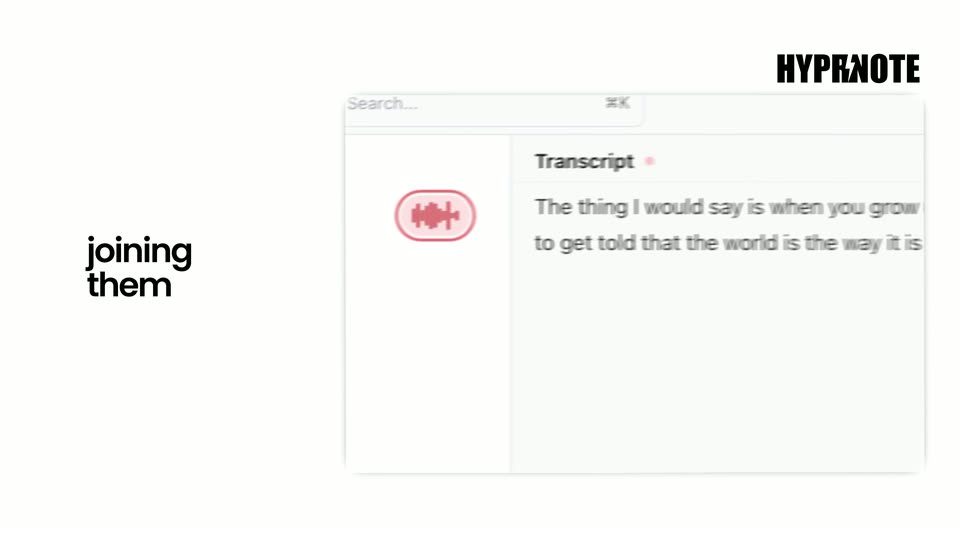
A notes-style app window fills the right side while bold black headlines assemble on the left. The view then zooms into the window, reframing onto the transcript panel as its text fills in.
On-screen text: “Looks like Apple Notes”, “but it listens to your meetings”, “without ever joining them”, “Transcribes & Summarizes”
Techniques: Kinetic type, UI zoom
Camera: Pull out
White field, HYPNOTE logo top right. A flat note-app UI mockup sits center, a document beside a summary panel. Bold black text on the left swaps from “Transcribes & Summarizes” to “not a single byte” with a typewriter cursor; a mouse pointer appears over the interface.
On-screen text: “Transcribes & Summarizes”, “not a single byte”
Techniques: Kinetic type, Cursor demo
Camera: Pull out
A note app window with an AI chat panel sits center-right on a white field while large black words on the left swap in sequence: 'not a single byte', 'leaves your system', then 'EVER' as the window shrinks, blurs and drifts right.
On-screen text: “not a single byte”, “leaves your system”, “EVER”
Techniques: Kinetic type
Camera: Static
A blurred document window and the EVER wordmark on white give way to large black words Laptop, Server, Air-Gapped, each scaling into the center in sequence with the voiceover.
On-screen text: “EVER”, “Laptop”, “Server”, “Air-Gapped”
Techniques: Kinetic type
Camera: Static
Black text reading Air-Gapped sits centered on a plain white field. The word starts with a slight horizontal offset that snaps into a clean lock, holds, then the frame cuts to black.
On-screen text: “Air-Gapped”
Techniques: Kinetic type
Camera: Static
Black text “You decide” slides into center on a white background, then a dark rounded pill carrying “where the” in white slides in from the left, overlapping the first line.
On-screen text: “You decide”, “where the”
Techniques: Kinetic type
Camera: Static
On a white field, a black pill holding white “where the” sits left while the oversized condensed black word “DATA LIVES” builds in on the right, each letter resolving from a gray offset echo into solid ink. Locked-off frame.
On-screen text: “where the”, “DATA LIVES”
Techniques: Kinetic type
Camera: Static
A black pill reading “where the” scales in over a light field, then the background flips to black and the large word “Meetings” cuts in beside it. The clip ends on a full-frame white “DATALIVE S” wordmark.
On-screen text: “where the”, “Meetings”, “DATALIVE S”
Techniques: Kinetic type, Masking
Camera: Pull out
A dim close-up of a hand holding a stylus above a tablet. White bold text reads 'are where' as the letters of 'where' settle into a line, then the phrase cuts to 'work begins' on the right.
On-screen text: “are where”, “work begins”
Techniques: Kinetic type
Camera: Static
Top-down live-action shot of a woman sketching at a white desk with a sewing machine, laptop and fabric, darkened for contrast. A centered white word swaps in the middle of the frame, ending on “together” as her arm moves in blur.
On-screen text: “work begins”, “together”
Camera: Static
Top-down locked-off shot of a team around a grey meeting table, working on laptops and papers. A single white word sits centered over the table, swapping in place from “and” to “just” to “don’t” in time with the voiceover.
On-screen text: “and”, “just”, “don't”
Techniques: Kinetic type
Camera: Static
Top-down locked-off shot of a team around a wooden table with laptops, tablets and papers. White lowercase text in the center swaps from “get” to “action items” over the still frame.
On-screen text: “get”, “action items”
Techniques: Kinetic type
Camera: Static
Top-down locked-off shot of four people around a wooden table covered in charts, a laptop and coffee cups, dimly lit. A white word in the center changes from “you” to “unlock” as the clip plays.
On-screen text: “you”, “unlock”
Techniques: Kinetic type
Camera: Static
A person in a green sweater types on a laptop at a dim desk, a mug and white headphones beside it. Centered white text swaps from “team's” to “collective knowledge” in time with the voiceover.
On-screen text: “team's”, “collective knowledge”
Techniques: Kinetic type
Camera: Static
A person in a white shirt writes in an open notebook at a white desk, a coffee cup to the left and a spiral notepad to the right, all under a dark overlay. The frame is locked off and static.
On-screen text: “collective knowledge”
Camera: Static
A black card opens tight on the white word that's, then the frame pulls back to reveal the full phrase and that's centered, with and set smaller at the left.
On-screen text: “and that's”
Techniques: Kinetic type
Camera: Static
Over a dusk aerial city shot, scattered white and cyan letters converge as the line “Just a start of a new era” slides into place, while thin blue light trails arc across the frame.
On-screen text: “that's”, “and t”, “Just a start of a new era”
Techniques: Kinetic type, Light sweep
Camera: Pull out
A dark cityscape tilts in 3D perspective as a blue four-pointed star spins and pulses at the center, thin light rays radiating outward. Bold white text reads Just a start of a new era across the middle, sliding into place.
On-screen text: “Just a start of a new era”
Techniques: Kinetic type
Camera: Static
A fast flyover of a city street between skyscrapers, streaked with radiating blue light lines, tilts as the camera dives down the avenue. The headline holds center while a blue input pill with typed text shrinks away and the line 'Conversational Intelligence' scales in beneath it.
On-screen text: “Just a start of a new era”, “Conversational Intelligence”
Techniques: Kinetic type, Morph
Camera: Static
On a black background, a white door-like panel rises in front of the centered gray headline “Conversational Intelligence”, hiding its middle letters as they stretch apart; below, the line “Just a start of a new era” begins to slide in.
On-screen text: “Conversational Intelligence”, “Just a start of a new era”
Techniques: Kinetic type
Camera: Static
A white door on a black background swings open, revealing a dark room with the letters AI=N on the wall. Below it, the white bold headline Conversational Intelligence scales up, with a small lowercase a beneath.
On-screen text: “Conversational Intelligence”, “a”
Techniques: Kinetic type
Camera: Push in
A white smartphone stands on a dark desk in a blurred room; it exits frame and a white padlock icon with a lightning bolt appears at center over the typewriter headline.
On-screen text: “Need an AI-Notetaker”, “that you can trust?”
Techniques: 3D mockup, Kinetic type
Camera: Push in
A white padlock icon with a gray lightning bolt cut through its body sits centered on black. The bold wordmark HYPRNOTE flashes in behind it as the icon scales down, then the wordmark clears and the small padlock settles as the closing logo.
On-screen text: “Need an AI-Notetaker”, “that you can”, “otetaker”, “rust?”, “HYPRNOTE”
Techniques: Kinetic type, Morph
Camera: Static
Black background. The white HYPRNOTE wordmark, with a bolt-cut A, holds centered. The italic tagline wipes in from the left beneath it and the small URL fades in at the bottom, then the frame locks off still.
On-screen text: “Where Conversation Stay Yours”, “hyprnote.com”
Techniques: Masking
Camera: Static