1:40

Claude - We’re opening a research preview of Claude Duet, a new app where Clau
Anthropic · AI · Oct 2026
ElevenLabs · Nov 2026 · 2:01 · AI-annotated
ElevenLabs’s 2:01 launch film runs 37 scenes, about 3.3 s each. The product is on screen from the first frame and 6 features are revealed. The call to action lands at 1:52 (92% in), over a voiceover. The video opens with the logo and a single promise, then walks feature by feature, each announced by a short title card and proven with a live UI demo plus one big stat number. Its signature moves are word-by-word text builds, expanding bar charts, and drifting soft-gradient backdrops that keep every frame calm and locked-off.
Is this your launch? to your site or press kit.
Anthropic · AI · Oct 2026
HeroUI · Oct 2026
Runway · AI · Oct 2026
Two short black vertical bars sit centered on a pale gray field, forming the brand mark. The mark scales up and down in place on a locked-off frame.
Camera: Static
A soft blue gradient holds the word Scribe in white at center. A thin pill forms around v3, then Live joins it, and the frame shrinks to a rounded rectangle as the text swaps to The beside a small two-bar mark.
On-screen text: “Scribe”, “v3”, “Live”, “The”
Techniques: Kinetic type, Masking
Camera: Static
A soft blue smoke-like gradient fills a circular window on a pale gray field while thin concentric arcs drift outward and fade. White text builds word by word at the center: “The most”, then “accurate”, then “Speech to Text models”, each word scaling in.
On-screen text: “V3 Live”, “The most accurate Speech to Text models”
Techniques: Kinetic type
Camera: Pull out
A blue circle holding the white headline contracts to a single dot on a light gray field, masking the text out, while thin gray concentric arcs sit at the edges.
On-screen text: “The most accurate Speech to Text models”
Techniques: Masking
Camera: Static
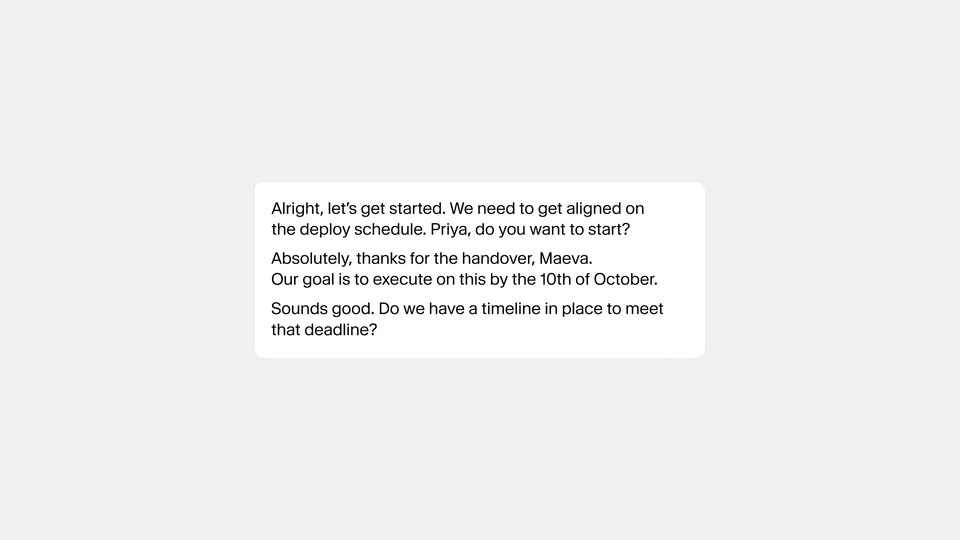
A white rounded card sits centered on a flat light-gray field. A three-paragraph conversation transcript fills it, the first line in bold dark type, the remaining paragraphs fading in one after another from light to full gray.
Camera: Static
A white rounded card holding a meeting transcript sits centered on a light gray field, then quickly slides right out of frame as an outlined card with a spinning loader and a DETECTING VOICES label fades in on the left.
Camera: Static
On a pale gray field of drifting wavy outlines, a white transcript card holds a short conversation. It splits into three stacked cards, each tagged with a speaker name, while a spinning detecting-voices badge sits at left.
Techniques: Kinetic type, Morph
Camera: Static
A large white percentage sits centered on a black field. The figure reads 16% and then updates to 17% as the clip plays, the digits shifting in place while the frame stays locked off.
On-screen text: “16%”, “17%”
Techniques: Kinetic type
Camera: Static
A black stat card sits over a blurred blue sky, pairing a two-bar chart (grey Scribe V2, white Scribe V3) with the title and a large 17%. The card holds locked-off, then its contents dissolve out.
On-screen text: “3 Speakers Audio Improvement”, “17%”, “Scribe V2”, “Scribe V3”
Camera: Static
A white card floats on a cloudy blue sky, showing a bar chart titled “All FLEURS languages / Word error rate” with a tall light-gray bar (Scribe V2) beside a shorter black bar (Scribe V3). A large percentage counts up from 23% to 27% at the lower left while the card holds still.
On-screen text: “All FLEURS languages”, “Word error rate”, “27%”
Techniques: Kinetic type
Camera: Push in
A white transcript page fills the frame: a “Transcript” heading, a Numbers/Digits/Words toggle with Words selected, and two speaker entries. The camera slowly zooms in, pushing the window border out of frame and enlarging the text.
Techniques: UI zoom
Camera: Static
A light gray rounded pill slides in from the right on a white field, the gray RULE label fixed at its left edge while the line Write all dates as YYYY-MM-DD types out in dark gray behind a blinking caret, the pill widening to full width.
Techniques: Kinetic type
Camera: Static
Locked-off white transcript card. A black highlight on a date phrase replaces the spelled-out words with 2026-03-04, then dims to gray. The segmented control slides from Words to Digits; the other highlighted phrases swap to 1790, 4,200 and 3. A rule bar at the bottom stays Applied.
Camera: Static
A dark field of concentric wavy outlines holds the centered Scribe logo, its pill badge expanding to read V3 Live. The lockup then slides left as Diarization Support enters on the right.
On-screen text: “Scribe V3 Live”, “Diarization Support”
Techniques: Kinetic type
Camera: Static
A near-black card holds two white text blocks: the Scribe V3 Live wordmark slides in from the left while Diarization Support stays fixed, a faint grid of rounded squares fades out behind them, and small dots appear at each end of the line.
On-screen text: “Scribe V3 Live”, “Diarization Support”
Techniques: Kinetic type
Camera: Static
A small dark lowercase label with square bullets sits centered on a light gray field, then the view becomes an abstract list of thin horizontal lines with square end caps; two small squares at the middle slide apart to the left and right.
On-screen text: “Scribe v3 Live”, “Diarization Support”
Techniques: Kinetic type
Camera: Static
A dark field of horizontal slats drifts slowly while a centered line builds word by word, then clears. The frame stays locked off and the text remains the focal point.
On-screen text: “Of the whole conversation”
Techniques: Kinetic type
Camera: Static
A field of small beige and teal dots on a light gray background shifts and scatters across the frame, regrouping into loose rows, as the dark serif figure 15% appears in the center.
On-screen text: “15%”
Techniques: Particles
Camera: Static
A ring of small muted green and gray dots sits on a light gray field. A black percentage in the center counts up from 38% to 43% while the dots stay fixed.
On-screen text: “43%”
Techniques: Kinetic type
Camera: Static
Small gray and teal dots float around a centered 43% on a pale gray field. The percentage fades as a white rounded card with three gray bars slides in behind the dots, which settle into a new scattered layout.
On-screen text: “43%”
Camera: Static
A white card with a “Transcription accuracy” headline and a horizontal bar chart eases into the center over a soft green and purple gradient. The black Scribe bar and the lighter gray competitor bars extend to their final lengths as the card settles.
On-screen text: “Transcription accuracy”
Camera: Static
A thin crosshair on a dark background expands into a rectangular grid around a small white square at the center. A thin wavy line draws itself across the square, then fades out.
Camera: Static
Two thin white sine waves undulate inside a central square panel on a near-black field. Thin grid lines cross the frame and small square handles mark the panel's corners as the lines oscillate.
Camera: Static
A tablet angled in 3D on a pale gray backdrop shows a soft pink gradient screen. A frosted chat bubble labeled Agent types Thanks for, and a second panel slides in from the right to reveal a circular pink swirl.
Techniques: 3D mockup
Camera: Pan
A two-panel UI: left, a soft magenta gradient holds chat bubbles labeled Agent and Client that type out a call transcript word by word; right, a white grid of rounded squares frames a circular gradient orb that shifts slowly. The bubbles stack downward as the conversation progresses.
Techniques: Split screen, Kinetic type
Camera: Pan
A soft pink ink circle sits centered on a faint white grid. The circle blurs and fades out as the gray headline fades in across the center, its letters resolving from a soft blur into a clean line.
On-screen text: “Built for global teams”
Techniques: Kinetic type
Camera: Push in
A curved field of small gray letters flattens from a dome into an even grid across the frame, while the dark headline holds still in the center.
On-screen text: “Built for global teams”
Techniques: Morph
Camera: Push in
A soft green and blue gradient drifts slowly behind a centered white word. The word fades in as “Greek”, then “Czech” and “Arabic” slide in to complete the line, all on a locked-off frame.
On-screen text: “Built for global teams”, “Greek Czech Arabic”
Techniques: Kinetic type
Camera: Static
A horizontal line of white language names (Czech, Hindi, Arabic, then German, Dutch, Polish) sits centered over a soft, blurred backdrop that shifts from dusty pink to blue sky. The words scale and reshuffle to mark each language switch, while the camera stays locked.
On-screen text: “Czech Hindi Arabic”, “Arabic Hindi German Dutch Polish”
Techniques: Kinetic type
Camera: Static
A soft blue sky with drifting clouds fills the frame. A row of white language names, from Arabic to Polish, scrolls left across the center, then the line “Without missing a beat” appears.
On-screen text: “Arabic Hindi German Dutch Polish”, “Without missing a beat”
Techniques: Kinetic type
Camera: Static
Over a blurred purple-to-green gradient, white chat bubbles with colored speaker dots type out a bilingual exchange word by word. The stack scrolls up as each message fills, then the bubbles shatter into scattered white squares and the frame fades to a dark blur holding three centered dots.
On-screen text: “Without missing a beat”
Techniques: Kinetic type, Particles
Camera: Static
On a near-black background, a thin white audio waveform sits centered, then expands horizontally to span the frame, its vertical bars pulsing in sync with the audio.
Camera: Static
A row of thin vertical bars of varying heights pulses across a pale gray field like an audio waveform. A single dark bar at the center extends, then groups of bars switch from gray to black and later to blue in time with the voiceover.
Camera: Static
Three vertical panels of soft blue and teal gradient sit side by side. The gradients drift slowly while the words Note, Word, and Number fade into the center of each panel and hold.
On-screen text: “Note”, “Word”, “Number”
Techniques: Split screen
Camera: Static
A soft-focus magenta backdrop drifts slowly behind a centered white rounded note card, tagged with a small gray “Recording...” label. Black sans-serif text types in word by word, filling the card with a site note about rebar spacing.
Techniques: Kinetic type
Camera: Static
A white card with a faint wavy grid of rounded squares. The centered tagline darkens from gray to black while a purple rounded border around the frame fades out.
On-screen text: “Try both models today”
Camera: Pull out
A soft blue gradient fills the frame and drifts slowly. A white two-bar mark holds center, then the wordmark Scribe fades in beside it and a pill badge expands from V3 to V3 Live. The logo lockup stays locked off at center.
On-screen text: “IIScribe”, “V3 Live”
Techniques: Kinetic type
Camera: Static