1:23

How an Anthropic engineer uses Claude Docs
Anthropic · AI · Oct 2026
Capy’s 1:42 launch film runs 30 scenes, about 3.4 s each. The product is on screen from the first frame and 5 features are revealed. The call to action lands at 1:26 (85% in), over a voiceover. The video alternates live-action presenters in a dusk park with tilted 3D fly-throughs of the dark UI, cutting at roughly 19 cuts per minute to a steady 127 BPM pulse. Its signature moves are bold white captions that build phrase by phrase, floating device mockups composited over the presenters, and a plush capybara that recurs as a prop from the Cloud Handoff demo to the closing table shot.
Is this your launch? to your site or press kit.
Anthropic · AI · Oct 2026
Morphik · B2B · May 2025
Films whose music sounds like this one, voice left out
Adobe · Upbeat electronic dance music
Razer · Electronic
A man in a cream hoodie sits at a round concrete table in a park, speaking to camera as white subtitles appear at the bottom. A large white Capy wordmark with a winking capybara icon pops in behind him, then fades. A blurred dark laptop slides in from the right.
On-screen text: “Over the last few months,”, “Capy”, “Capy has become the best”, “cloud coding agent on the market”, “and shipped hundreds”, “of thousands of PRs”, “for some of the best”, “engineering teams”, “around the world”, “Today, we're making it the best way to orchestrate coding agents across all of your devices.”
Camera: Push in
A man in a beige sweater holds a laptop up to the camera in a park. The camera pushes in on the screen, which shows the dark Capy app with a sidebar and chat panel. A white caption sits at the bottom of the frame.
On-screen text: “Introducing the Capy desktop app.”, “In addition to its own cloud VMs,”
Camera: Push in
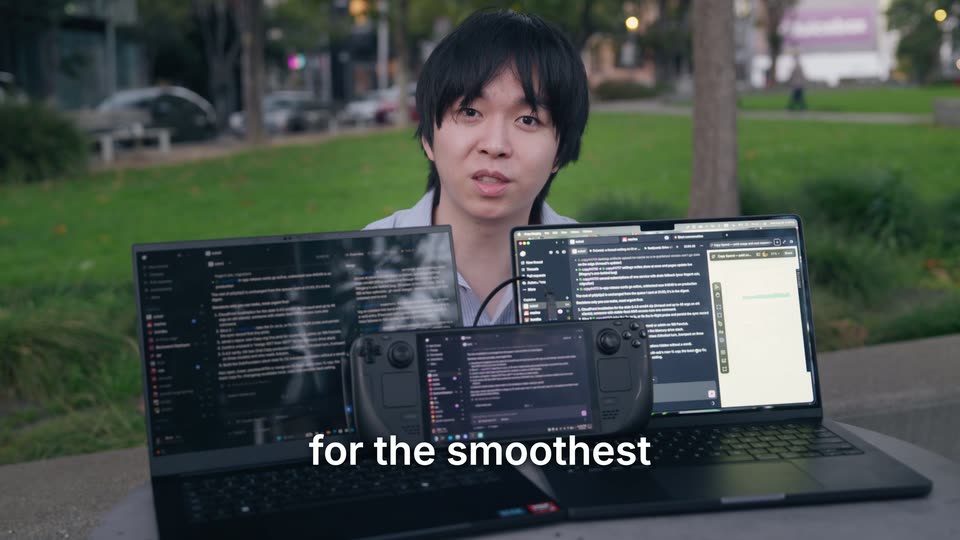
A presenter sits outdoors behind a laptop and handheld console showing the app's dark interface, with a floating laptop screen composited at left. Subtitles roll at the bottom while Apple, Windows and Linux icons pop in above his shoulder; he then lifts a phone showing the same app.
On-screen text: “In addition to its own cloud VMs,”, “Capy can now run locally”, “on any macOS,”, “Windows, or Linux device.”, “Since this agent loop runs”, “decoupled from VMs or devices,”, “you can now steer”, “a local thread from anywhere”, “for the smoothest”, “remote control experience.”
Camera: Push in
A dark settings panel shows an Access dropdown opening and switching from Personal to Shared as a cursor clicks it, the description text updating. A large white caption builds the line across the bottom.
On-screen text: “You can even set up”, “shared devices for your team,”
Techniques: Cursor demo, Kinetic type
Camera: Static
A dark chat bar shows an open device dropdown; the cursor hovers 'Other device' and a submenu lists two remote machines. The menu closes, the top bar updates to 'Office Mac mini', and a bottom caption swaps to the next line.
On-screen text: “like an Office Mac mini”, “or a headless server.”
Techniques: Cursor demo
Camera: Static
A dark device-list interface sits tilted in 3D perspective on a black background while white captions swap at the bottom; the final second cuts to a tilted chat window with a prompt box.
On-screen text: “Every instance of Capy desktop”, “or a headless server.”, “also becomes a machine”, “from any other machine.”
Techniques: 3D mockup
Camera: Static
A dark chat interface is tilted in 3D perspective, showing a user prompt, an agent reply, status lines and an input bar. White captions cycle across the lower center, reading in sequence: from any other machine, on a cloud VM, and access your laptop on demand.
On-screen text: “from any other machine.”, “on a cloud VM,”, “and access your laptop on demand.”
Techniques: Kinetic type, 3D mockup
Camera: Static
A tilted 3D view of a dark AI chat interface logs agent actions line by line while a cursor clicks the Allow button. Large white captions swap in at the bottom as the action list types itself out.
On-screen text: “and the agent can access”, “your computer on demand”, “for local files and services.”
Techniques: Kinetic type, 3D mockup, Cursor demo
Camera: Static
A dark code editor sits tilted in 3D perspective, its prompt bar at the bottom. A cursor opens a small menu that switches the context to Cloud, and the status label cycles from Waking to Sleeping to Ready as bold white captions narrate Cloud Handoff.
On-screen text: “for local files and services.”, “That's not all.”, “With Cloud Handoff,”, “you can teleport Cappy workloads”, “to the cloud at any time.”
Techniques: 3D mockup, Cursor demo
Camera: Static
A code diff panel with red and green changed lines is tilted in 3D perspective against a black background. White captions appear phrase by phrase at the bottom: 'to the cloud at any time.', 'Bring your uncommitted changes', 'to continue iterating'.
On-screen text: “to the cloud at any time.”, “Bring your uncommitted changes”, “to continue iterating”
Techniques: 3D mockup, Kinetic type
Camera: Static
A laptop on a round park table, a plush pig leaning against it, shows a dark task list on screen. A hand reaches in from the top to close the lid. A white caption reads Close your laptop, at the bottom.
On-screen text: “Close your laptop,”
Camera: Static
A plush pig leans on a concrete table at dusk beside a closed black laptop. A hand snaps the lid shut as white captions swap beneath it, and a faint cloud notification panel fades in at the left edge.
On-screen text: “Close your laptop,”, “and your local thread”
Camera: Static
A closed MacBook on a concrete table at dusk, an orange plush beside it, with a dark chat panel floating above showing cloud hand-off activity lines appearing. White captions swap along the bottom, then a cut to the theme settings screen with a cursor on the dropdown.
On-screen text: “and your local thread”, “will automatically continue”, “in the cloud.”, “No more holding”, “the laptop lid open.”
Techniques: Cursor demo
Camera: Static
A dark settings panel shows an open theme dropdown; a cursor moves down the list from Cappuccin to GitHub as the panel's accent colors shift. A large white caption sits across the bottom.
On-screen text: “You can customize Cappy”
Techniques: Cursor demo
Camera: Static
A dark settings screen shows a theme dropdown open over rows like Dark theme, Accent and Background. A cursor hovers the theme list, then the view shifts to color pickers and a second dropdown near a Create theme button. Large white caption text sits along the bottom edge.
On-screen text: “You can customize Cappy”, “to your heart's content”
Techniques: Cursor demo
Camera: Static
A dark app interface fills the frame: a thread list on the left, a chat transcript in the center, and a task panel on the right. A large white caption reads 'to your heart's content' at the bottom. The view holds still.
On-screen text: “to your heart's content”
Camera: Static
A dark three-panel interface fills the frame: a left sidebar of threads, a center chat thread with code references, and a right panel of tasks and pull requests. The caption with custom themes, sits in white bold type across the bottom center.
On-screen text: “with custom themes,”
Camera: Static
A dark app interface fills the frame, with a thread list on the left, a conversation in the center, and a task panel on the right. A large white caption reading 'with custom themes,' sits at the bottom center.
On-screen text: “with custom themes,”
Techniques: Kinetic type
Camera: Static
A darkened chat interface with a left sidebar and right task panel sits over a photo backdrop that crossfades from a beach to a blue sky to a red torii gate. A white caption, with custom themes, stays fixed at the bottom center.
On-screen text: “with custom themes,”
Camera: Static
A dark command bar and thread sidebar sit centered over a full-bleed background that crossfades from a starry sky to an anime figure to a city street. The white caption background images, holds at the bottom.
On-screen text: “background images,”
Camera: Static
A dark app window with a left sidebar and a centered prompt box sits over a background image that switches from an anime portrait to a neon cityscape. The caption 'background images,' holds at the bottom.
On-screen text: “background images,”
Camera: Static
A dark Notifications settings panel shows a completion-sound dropdown that closes on Chime, then cuts to a man in a striped shirt holding a small black device on a tree-lined street.
On-screen text: “and notification sounds.”
Techniques: Cursor demo
Camera: Static
A man in a light striped shirt walks toward a locked-off camera on a tree-lined sidewalk, holding a small black microphone. White captions appear at the bottom while dark UI panels listing sessions, subscriptions, and API providers fade in at the right.
On-screen text: “Getting started is easy.”, “Import your Claude Code”, “and Codex sessions,”, “sign in to your favorite”, “coding subscriptions,”, “and now with Capy Lite,”, “you can bring your own keys”, “and LLM gateways.”, “When you use Capy locally,”, “you don't pay us anything.”
Camera: Pull out
A man in a beige hoodie sits at an outdoor table with an open laptop, talking to a person in a capybara mascot at right. A large white 'capy.ai' title sits behind them as white outlined subtitles appear at the bottom. The frame is locked off.
On-screen text: “capy.ai”, “you don't pay us anything.”, “Download the desktop app”, “today at capy.ai.”
Camera: Static
A man in a cream hoodie sits at an outdoor table with a laptop, a capybara plush on the right. Huge white 'capy ai' text sits behind him while the color grade flashes pink then teal. A caption reads at the bottom.
On-screen text: “capy ai”, “today at capy.ai.”
Camera: Static
A black laptop sits on a round concrete table at dusk beside a pink plush hippo. Its screen plays an editing app whose preview window cycles through clips while a counter ticks from 0 to 3 of 4. The camera slowly pulls back.
Camera: Static
A laptop rests on a round stone table at dusk, a plush pig leaning beside it. The screen runs a video editor, its preview window cutting from a person in a blue shirt to a wall splashed with paint. The camera holds still.
Camera: Static
A dim laptop on a table with a plush toy fades to black, and a faint capybara face outline with the lowercase wordmark appears centered, glowing softly against the dark background.
On-screen text: “capy”
Camera: Static
A dark gray capybara outline and lowercase wordmark sit centered on a black background, static and low contrast.
On-screen text: “capy”
Camera: Static
A white line-art capybara head icon sits left of the lowercase wordmark “capy”. Both fade from dim gray to full white on a black background, then hold centered and static.
On-screen text: “capy”
Camera: Static