
0:32
Explore
How an Anthropic engineer uses Claude Docs
Anthropic · Oct 2026 · 1:23 · Full motion · AI-annotated
- Length
- 1:23
- Scenes
- 21 · 4.0 s avg
- Product on screen
- 0:00
- Features shown
- 2
- Call to action
- 1:09 · 84%
- Voiceover
- Yes
- Views
- 191K on YouTube
as of November 22, 2026
00:00:00 / 01:23:01
- Length
- 1:23
- Scenes
- 21 · 4.0 s avg
- Product on screen
- 0:00
- Features shown
- 2
- Call to action
- 1:09 · 84%
- Voiceover
- Yes
- Views
- 191K on YouTube
as of November 22, 2026
Anthropic’s 1:23 launch film runs 21 scenes, about 4.0 s each. The product is on screen from the first frame and 2 features are revealed. The call to action lands at 1:09 (84% in), over a voiceover. The video is built as a single document with tabs, where each tab names a feature and the demo plays as self-typing text under slow zoom-ins and pull-backs over flat UI panels. Its signature moves are the typing caret, the smooth zoom reframes, and the sliding comment cards, all held on flat blue and cream fields with high-contrast serif headings for a calm, precise feel.
No filming indicatedEstimated needs: 4 capture groups — your screens or recordings · 1 official logo — reused across the film · 1 graphic passage — draw or supply · 1 3D passage — build or supply
Is this your launch? to your site or press kit.
More like this



Similar soundtrack
Films whose music sounds like this one, voice left out
0:56
Anand Paj - We just solved attribution for AI Agents. Introducing Journeys. AI
Scope · Upbeat electronic
1:19
Manoj Sarda - Closing a private credit deal is the easy part. Running it every mont
Elimentary · Corporate electronic
2:59

&Truth - We are out of stealth! As AI writes more code, we're building tools t
andTruth · Modern corporate electronic
How an Anthropic engineer uses Claude Docs, scene by scene
· 21 scenes as text
01 · Product intro · 0:00–0:12
A flat document editor on blue: a cursor selects the heading, bumps it to H1, enlarging the text, then a video thumbnail expands into a playing clip of a man. The page scrolls to reveal his name and a Claude comment bubble with reactions.
On-screen text: “How an Anthropic engineer uses Claude Docs”
Techniques: UI zoom, Cursor demo
Camera: Static
02 · Feature reveal · 0:12–0:13
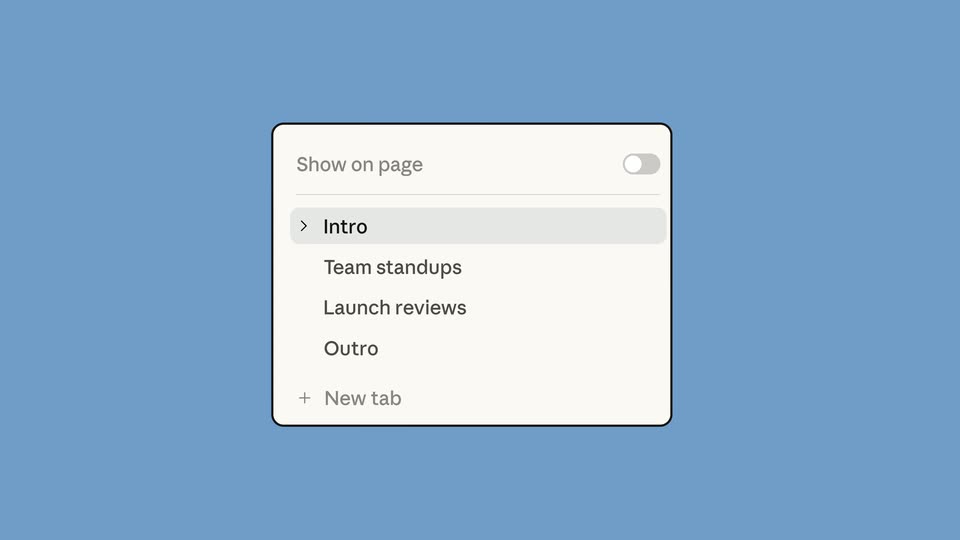
On a flat blue background, a cream dropdown menu listing Intro, Team standups, Launch reviews, Outro and New tab scales up toward the center as a white serif title card slides down out of frame.
On-screen text: “How an Anthropic engineer”
Techniques: UI zoom
Camera: Static
03 · Feature reveal · 0:13–0:14
A cream tab panel sits centered on a flat blue field, listing Intro, Team standups, Launch reviews and Outro. A cursor drifts up from the lower corner and rests on Team standups, which tints light gray.
Techniques: Cursor demo
Camera: Static
04 · Feature reveal · 0:14–0:16
A close-up of a table-of-contents dropdown shows the cursor selecting Team standups. The view then pulls back to a two-pane layout, a chat panel left and the doc right, as a serif heading begins typing.
Techniques: Cursor demo, UI zoom
Camera: Pull out
05 · Feature reveal · 0:16–0:18
Close-up of a white app header with a blue band on top. Colored circular avatars bearing white initials pop in one by one from the right, forming a row beside a chat bubble icon and a black building icon. The frame stays locked off.
Camera: Static
06 · Feature reveal · 0:18–0:23
A white standup document types itself line by line, each cursor paired with a colored name tag (Madeline, Austin, Vivek, Raghav, Yongxing, Claude). The list scrolls down as rows fill in, ending with Claude typing a suggestion under Discussion topics.
Techniques: Kinetic type
Camera: Pan
07 · Feature reveal · 0:23–0:25
A pale document lists discussion topics with @Madeline and @Vivek chips while a line types out behind a caret. The view then shifts up, and a 'Suggested by Claude' caption with a red chip appears above a new @Madeline bullet being typed.
Techniques: Kinetic type
Camera: Static
08 · Feature reveal · 0:25–0:36
A zoomed-in view of a markdown document pulls back to the full page. A cursor highlights the line “Thursday's demo overlaps with the offsite.”, moves it into Discussion topics, and types two nested replies while the list reflows.
Techniques: UI zoom, Cursor demo
Camera: Pull out
09 · Feature reveal · 0:36–0:37
A close-up of a white document interface lists team notes with @handles and a small Madeline badge. The view reframes wider to reveal a left panel, a center card with a Show on page toggle, and a right column of task labels.
Techniques: UI zoom
Camera: Static
10 · Feature reveal · 0:37–0:50
A docs editor opens a tab menu; the cursor picks Launch reviews and the page switches to that document. A summary line types itself, then the view scrolls to an Adoption section and zooms into a prompt box as a chart request is typed.
Techniques: Cursor demo, UI zoom
Camera: Pull out
11 · Feature reveal · 0:50–0:51
A white rounded card holding a line of black sans text and an orange square up-arrow button slides upward on a plain off-white background, the frame locked off.
Camera: Static
12 · Feature reveal · 0:51–0:53
A line chart with three colored lines and shaded area fills draws in from left to right across a Week 1 to Week 4 axis. The title and labels settle into place, then a dashed vertical line labeled “Timelines ship” and the section label “Adoption” fade in at the end.
On-screen text: “Docs with a visual grew every week”, “Docs with each type of visual, by week”, “Adoption”, “Timelines ship”
Camera: Pull out
13 · Feature reveal · 0:53–0:59
A two-pane docs interface shows a chat sidebar beside a report with a line chart. The view zooms into the report as a comment from Doug pings Claude, and after a working status, Claude's reply with For and Against points fills in.
Techniques: UI zoom
Camera: Push in
14 · Feature reveal · 0:59–1:05
A doc page with a yellow-highlighted sentence holds, then the view zooms into the top toolbar as a cursor moves to the Share button. It pulls back to the full app, showing the line chart and a comment card.
Techniques: UI zoom, Cursor demo
Camera: Pull out
15 · Feature reveal · 1:05–1:07
In a two-pane interface, a document with a line chart sits to the right of a chat log. Comment cards for Doug and Claude slide into the right-hand thread one after another while the chart and chat stay still.
Camera: Static
16 · Feature reveal · 1:07–1:09
A product screen split into a three-line area chart on the left and a chat panel on the right. Adrianne's question appears in gray, then turns solid black, and Claude's answer types in beneath it.
Camera: Pull out
17 · CTA · 1:09–1:10
A document window floats in 3D on a pale blue field, tilted at an angle. The view zooms in and squares up on the page, framing a line chart beside a stacked comments thread.
Techniques: 3D mockup, UI zoom
Camera: Pan
18 · CTA · 1:10–1:11
A white post card on a flat blue background scrolls upward, bringing the serif headline into frame above a photo of a man with earbuds and pink flowers. A small Claude comment bubble with reaction chips overlaps the card's right edge.
On-screen text: “How an Anthropic engineer uses Claude Docs”
Camera: Pan
19 · CTA · 1:11–1:13
A cream article page scrolls slowly upward, showing a headshot of a man with earbuds in front of a vase of flowers, with a serif headline above. A white chat card slides in from the right over the page, revealing a short exchange between Claude and Doug with emoji reaction pills.
On-screen text: “How an Anthropic engineer uses Claude Docs”
Techniques: Parallax
Camera: Pan
20 · Outro · 1:13–1:17
On a cream field, a serif sentence types out word by word behind a blinking cursor. An orange Claude tag and a blue You tag pop in above the matching clauses and track the typing, then the line dissolves until only steer it. remains.
On-screen text: “Claude”, “You”, “Claude makes it. You steer it.”
Techniques: Kinetic type
Camera: Static
21 · Outro · 1:17–1:23
On a cream field, the Claude lockup holds center: an orange radial spark mark left of the black serif wordmark. The spark's rays rotate a few degrees while the word stays fixed.
On-screen text: “Claude”
Camera: Static