0:29

Auto - Your prompts no longer have to leave a trace Turn on Privacy Mode in
AutoRouter · Nov 2026
Anthropic’s 2:04 launch film runs 20 scenes, about 6.2 s each. The product shows up at 0:02 and 1 feature is revealed. There is no explicit call to action; a voiceover carries the film. The video alternates between locked-off live-action shots of a presenter at a green desk and a long, uninterrupted screen recording of a Mac desktop, bridged by dark navy title cards. Its signature moves are the split-screen layout that pairs a scrolling cream action-log card with the live UI, and the slow, deliberate cursor movements that let each automated step read clearly.
Is this your launch? to your site or press kit.
AutoRouter · Nov 2026
Screen Studio · Nov 2026
Mistral AI · AI · Apr 2026
Films whose music sounds like this one, voice left out
LemonLime · Lo-fi hip-hop
Craft · Lo-fi hip-hop
Claude · Lo-fi hip-hop
A woman in a black leather jacket and clear glasses sits at a green table, hands clasped, speaking to camera. Behind her a whiteboard holds red marker diagrams and shelves hold books. A white lower-third caption sits bottom left.
On-screen text: “Pujaa Rajan”, “Researcher, Anthropic”
Camera: Static
On a dark navy background, a white cursor icon with small orange tick marks sits above centered text. The line 'Computer use for' fades in first, then 'orchestrating tasks' follows below it, while the frame stays locked off.
On-screen text: “Computer use for”, “orchestrating tasks”
Techniques: Kinetic type
Camera: Static
A white cursor arrow with small orange sparks sits centered on a dark slate field. Three lines of gray disclaimer text hold below it, static in a locked-off frame.
On-screen text: “Claude is generating all the computer actions shown here.”, “This demonstration was recorded in a controlled environment, with some”, “supporting infrastructure simplified to highlight the core capabilities.”
Camera: Static
A woman in a black leather jacket sits at a green desk before a whiteboard of red marker diagrams. She talks and gestures, then lifts a sticker-covered laptop lid toward the camera. A small red block figure sits on the left.
On-screen text: “Claude is generating all the computer actions shown here.”, “This demonstration was recorded in a controlled environment, with some”, “supporting infrastructure simplified to highlight the core capabilities.”
Camera: Static
A woman with clear glasses and a black leather jacket sits in profile in an office, speaking toward a laptop. The background is softly blurred, showing pinned papers and a metal rack as she talks.
Camera: Static
A woman in glasses and a black leather jacket sits at a green table with a sticker-covered laptop, speaking to camera. A red pixel robot stands on the desk and a whiteboard with red diagrams fills the background. The locked-off frame slowly pushes in.
Camera: Static
A woman with dark hair, clear-framed glasses and a black leather jacket sits in profile at a laptop, speaking. The locked-off shot keeps her right of frame against a bright office with a blurred lamp and whiteboard, while a small ANTHROPIC logo bug holds in the corner.
Camera: Static
A woman in a black leather jacket sits at a green table behind a sticker-covered laptop, speaking to the camera. A whiteboard with red diagrams and a bookshelf fill the background. A small red pixel figure sits on the table as she glances down at the screen.
Camera: Static
A white prompt card with an orange Send button floats over a macOS desktop, then slides left and shrinks into an action log panel beside the desktop, labeled Action log and Virtual computer. Agent step entries appear one by one; the Anthropic logo and Claude wordmark close the shot.
On-screen text: “ANTHROPIC”, “Claude”
Techniques: Split screen
Camera: Static
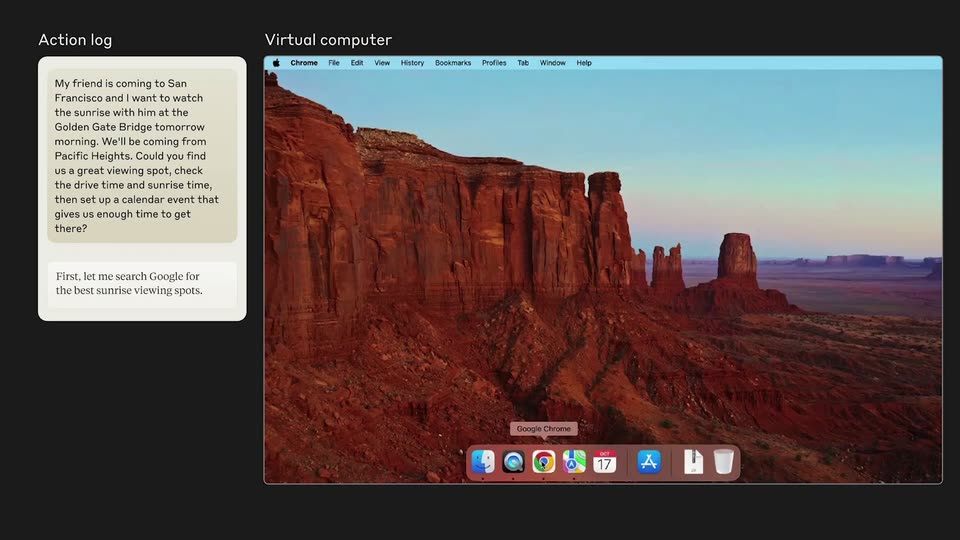
Screen recording of Google Chrome on a Mac, with a cream caption card on the left listing the task and an action log. A cursor types a sunrise search query into the address bar as autocomplete suggestions drop down.
On-screen text: “My friend is coming to San Francisco and I want to watch the sunrise with him at the Golden Gate Bridge tomorrow morning. We'll be coming from Pacific Heights.能”, “First, let me search Google for the best sunrise viewing spots.”, “Move to 472, 682”, “Left click”, “Type”, “best place to watch sunrise over golden gate bridge”
Techniques: Cursor demo
Camera: Static
A Chrome window on a Mac desktop shows a Google search for Golden Gate Bridge sunrise spots loading an AI Overview of results. A left panel logs the assistant's steps as the cursor moves to a Sarowly blog link in the sidebar.
Techniques: Cursor demo
Camera: Static
A split screen pairs an AI agent panel on the left with a Chrome window on the right. The left log scrolls up to reveal new action steps, while the right blog page resolves onto the Battery Spencer article with its body text highlighted in purple.
Techniques: Split screen
Camera: Static
A white step list on the left scrolls up while a Mac browser window on the right shows a blog post with purple-highlighted text. The cursor moves to the Maps icon in the dock, and a Maps window slides up from the bottom over the browser.
Techniques: Split screen, Cursor demo
Camera: Static
A Mac desktop recording shows the Maps app. The cursor types a route query, selects directions from Pacific Heights to Battery Spencer, and the map zooms in as a blue route and travel-time options load. A step list scrolls in a left panel.
Techniques: Split screen, Cursor demo, UI zoom
Camera: Static
A macOS desktop shows a white step-by-step card on the left scrolling upward while a Chrome window on the right fades from a blog article to a fresh tab with the Google logo and search bar.
Camera: Static
A macOS desktop holds a Chrome window on a Google new tab page. A left-side action log scrolls up, appending new entries. In the address bar, the query 'sunrise time san francisco tomorrow' is typed, and a dropdown of search suggestions drops open beneath it.
Camera: Static
A screen recording splits the view: a left panel of automation steps scrolls upward while a right Chrome window holds a Google search result for tomorrow's San Francisco sunrise at 7:22 AM. A dock tooltip shifts from Google Chrome to Calendar.
Techniques: Split screen
Camera: Static
A split view pairs an AI instruction log on the left with a Calendar week view on the right. A cursor clicks the plus button, a quick-event popup fills in, a red block drops into the grid, then an event card opens and a note is typed.
Techniques: Split screen, Cursor demo
Camera: Static
A woman with glasses and a black leather jacket sits at a green table, talking and smiling toward camera. A sticker-covered laptop faces her, a small red blocky figure sits to the left, and a whiteboard with red marker diagrams fills the background. The frame stays locked off.
Camera: Static
The Claude wordmark and an orange starburst icon sit centered on a dark navy field. The starburst's rays rotate slowly while the white text holds still.
On-screen text: “Claude”, “BY ANTHROPIC”
Camera: Static