1:54

Introducing Runway Ads | Runway
Runway · AI · Sep 2026
Screen Studio · Nov 2026 · 1:22 · AI-annotated
Screen Studio’s 1:22 launch film runs 65 scenes, about 1.3 s each. The product shows up at 0:42 and 4 features are revealed. There is no explicit call to action. The film alternates warm low-key live-action close-ups of hands, faces and the desk with tilted macro captures of the interface, moving from a frustrating demo request to a calm product reveal and a series of tagline-led feature beats. Its signature moves are the shallow focus, the white taglines landing over dark frames, and the quick 123 bpm cutting that syncs with the UI motion.
Is this your launch? to your site or press kit.
Runway · AI · Sep 2026
Perceptron ML · B2B
A close-up of a hand holding a black stylus taps and draws on a tablet screen in warm, dim light. The hand lifts the pen and lays it down at the end. Shallow depth of field keeps the background soft and out of focus.
Camera: Static
A rack focus shifts from a blurred black stylus on a wooden desk to a person in a light shirt and glasses seated at the desk, one hand resting beside an open laptop that shows a green landscape, a brass lamp glowing at the left edge.
Camera: Static
A curly-haired person in a white shirt works on a laptop at a wooden desk beside a green brass lamp, the screen changing between views. The shot cuts to an angled close-up of stacked papers printed with the words Demo and Paid Opportunity.
Camera: Static
Macro close-up of a monitor at an angle, showing an email inbox list with rows for Demo, Paid Opportunity, and a gift subject. A hand cursor fades in and rests beside the Demo row.
Techniques: Cursor demo
Camera: Static
A tilted, shallow-focus close-up of an email screen. The line 'Can you send me a quick demo?' is highlighted in pale blue while the recipient name and the 'Rispondi' and 'Inoltra' buttons blur at the edges. A black cursor arrow eases into the top right corner.
Techniques: Cursor demo
Camera: Static
Extreme close-up of a person's eyes behind round glasses, a blue screen glow reflected in the lenses, warm orange light on the skin against a dark background. The frame is locked off with only subtle eye movement.
On-screen text: “Demo”, “Inoltra”
Camera: Static
Extreme close-up of a man in round glasses under warm amber light, a blue screen glow reflected in the lenses. He looks down, and the shot dissolves into a heavy defocus blur by the end.
Camera: Static
Macro close-up of a tilted screen over a blurred green field shows a recording list. A red circular button sits on the row “Nuova registrazione 120” while a cursor hovers at its edge, then a circular “15” countdown badge fades in below as the cursor drops.
Techniques: Cursor demo
Camera: Static
A tilted close-up of a chat interface on a white background, with light blue message bubbles. The conversation reads about showing someone how to use a website and recording the screen. One line of text slides horizontally into place while the frame stays locked off.
Camera: Static
A tight close-up of a dark tag-creation field on a filmed screen. The word “A-roll” types out letter by letter behind a blinking caret, with a mouse arrow hovering above and a blue “Crea tag” suggestion plus a row of color dots below.
Techniques: Cursor demo
Camera: Static
A tight close-up of a man with curly hair, round glasses and a straw hat, head tilted down in warm low light. A green leaf sits at the left edge and a faint blue glow reflects in his lenses. The frame stays locked and still.
Camera: Static
A close-up of a light file-manager screen titled Download, showing three audio file cards with music-note icons. The middle card's filename field is in edit mode, outlined in blue with a blinking text caret inside.
Camera: Static
A macro green leaf texture with a curved horizon drifts slowly. A white rounded coordinate readout and dashed white guide lines with a corner handle track a fixed point on the surface as the frame pans.
Camera: Pan
A red audio waveform of vertical bars scrolls left across a pale gray timeline as playback advances. A fixed red playhead line with dots at each end marks the current position, while timecode labels run along the top and bottom edges.
Camera: Pan
A locked-off, angled close-up of a tablet screen running a recording app. A red waveform sits at the top as the timer counts from 00:16,39 to 00:16,79. A toolbar with an Opzioni menu and a blue Registra button floats over a green grass wallpaper, app icons lining the bottom edge.
Camera: Static
Close-up of hands typing on a laptop keyboard in warm, dim light, locked-off frame. The captions “Opzioni” and “Registra” slide in beside a still timer reading 00:16,7.
On-screen text: “Opzioni”, “Registra”, “00:16,7?”
Techniques: Kinetic type
Camera: Static
A tired man in a white shirt rests his head on his hand behind a laptop at a wooden desk lit by a green lamp. A diagonal blue recording track in 3D perspective wipes in, showing a waveform and a red line with crosshair markers.
Techniques: 3D mockup, Masking
Camera: Static
A tilted close-up of a dark audio timeline shows blue waveforms with a red playhead line. A white cursor moves across the track and a yellow box draws around a clip labeled New Recording 9.
Techniques: 3D mockup, Cursor demo
Camera: Static
A warm-lit MacBook on a wooden desk shows a video editor. A color-correction window over a dark clip shrinks away, revealing a full-frame shot of a curly-haired person with glasses. A hand rests on the trackpad at the bottom edge.
Camera: Static
A tilted white card floats over a soft green grass texture, showing an audio waveform with a red playhead at the right edge. Below it, a large black timer reads 03:23 and its last digit rolls from 59 to 69.
Techniques: 3D mockup
Camera: Static
Extreme close-up profile of a person wearing round glasses, lit by warm low light against a dark background. The head tilts slightly downward while the locked-off frame holds steady.
On-screen text: “03:23,59”
Camera: Static
A macro close-up of a laptop keyboard bathed in warm amber light. A finger slides in from the blurred foreground and presses a dark key marked with a white shield and plus icon. Shallow focus keeps the surrounding keys soft.
Camera: Static
A white rounded dialog card fades in over a soft green leaf background, settling into the center. It holds a small gray icon of two overlapping rounded rectangles, the heading Recording Failed, a line of error text, and a blue OK button. The frame stays locked.
Camera: Static
Extreme close-up of an eye behind a round glass lens in warm amber light, with a soft green bokeh glow in the background. The shot opens with motion blur and settles into focus as the eye shifts slightly.
Camera: Static
Overhead shot of two hands typing on a dark laptop keyboard under warm light, fingers pressing keys in rhythm while the screen stays blurred at the top of the frame.
Camera: Static
A tilted close-up of a device screen shows a pale dialog card reading 'Microphone Unavailable' with a blue OK bar. The shot starts soft and pulls into sharp focus. A muted green wallpaper sits behind the card.
Camera: Pull out
A warm-lit close-up follows a fingertip as it presses a black key bearing a white hexagon-plus glyph on a laptop keyboard; the shallow focus blurs the surrounding keys while the key sinks under the pad.
Camera: Static
A pair of hands types on a laptop keyboard at a wooden desk. The angled screen shows a video editor with a timeline and a floating video-call window of a man in glasses, set over a grassy field wallpaper.
Camera: Static
A man in profile, wearing glasses and a white shirt, sits at a desk at night. A green-shaded lamp glows on the right as he works at a laptop, the room dim and warm with a window and radiator blurred behind him.
Camera: Static
A close-up hand in a light pinstriped shirt taps its fingertips rhythmically on a dark matte surface, the fingers curling and extending in a drumming motion under warm low-key light.
Camera: Static
A hand types on a laptop keyboard as the screen shows a macOS desktop with a green field wallpaper, a video call of a curly-haired man, and an audio waveform window. The waveform and a running timestamp hold steady in a locked-off frame.
Camera: Static
A tight macro shot of a finger pressing a laptop key marked with a white shield and plus icon. Shallow depth of field, warm orange lighting. The finger descends and the key dips slightly under the pressure.
Camera: Static
A tight close-up of a hand in warm, low light, fingers spread as it holds a small thin stick between two fingers. The face behind stays out of focus in the dark. The hand shifts slowly, turning the object slightly.
Camera: Static
A close-up of a macOS dock sits over a green grass wallpaper. A white file icon drags left to right above the dock, carrying a blue New Recording 5.m4a tag, while the cursor follows toward the trash bin. The frame stays locked.
Techniques: Cursor demo
Camera: Static
A cursor drags a blue audio file icon labeled New Recording 6.m4a across the macOS Dock toward a trash bin on the right. The Dock sits over a green grass wallpaper, with app icons to the left. The frame is locked-off at a slight angle to the screen.
Techniques: Cursor demo
Camera: Static
A close-up of a Mac dock over a blurred green grass wallpaper. A white file icon with a cloud badge sits at the right edge; a blue name tooltip appears beside it, then both fade as the cursor lifts off.
Techniques: Cursor demo
Camera: Static
A tight macro shot of two hands clasped together, fingers interlocked, bathed in dim warm amber light. The shallow focus blurs the dark background while the hands hold with a slight, tense motion.
Camera: Static
A defocused close-up in warm amber light shows blurred hands and a small dark rectangular device near center, the frame drifting slightly. The shot stays soft and out of focus throughout, with no sharp detail or readable text.
Camera: Push in
A hand holds a dark stylus over a laptop keyboard in warm amber light. The grainy close-up stays soft and out of focus as the hand shifts and blurs across the frame.
Camera: Pan
A backlit hand in warm amber tones rests on a laptop trackpad, fingers extended and slightly blurred. The keyboard sits out of focus in the background. The shot is grainy and dark, with a subtle handheld drift.
Camera: Static
A low, angled close-up of a laptop screen shows the macOS Dock running diagonally across the frame, the keyboard blurred below. The shot opens with a quick pan that locks off, then a cursor glides to an icon and a 'Screen Studio' tooltip slides in above it.
Techniques: Cursor demo
Camera: Pull out
A laptop sits on a wooden desk in a dim room, two hands resting on the keyboard. The screen shows a screen-recording app over a slowly shifting hillside wallpaper, with a centered Built-in Retina Display label and a blue Start recording button. The camera holds a locked-off frontal view.
Camera: Static
A dark macOS desktop shows a screen-recording overlay: a centered headline reads Built-in Retina Display over a resolution line, with a blue Start recording button. A cursor glides up and clicks the button, which shifts to a recording state. The bottom control bar and dock remain still.
Techniques: Cursor demo
Camera: Static
An angled laptop screen displays a grass desktop with a row of dock icons at the lower left and a rounded profile card of a curly-haired man in glasses at the upper right. His eyes glow blue, then the glow fades as he smiles. The frame stays locked.
Techniques: 3D mockup
Camera: Static
A man in a white shirt types on a laptop at a wooden desk lit by a green lamp, raising one hand in a gesture. A cut to a top-down angle shows his hands on the keyboard and trackpad beside the lamp.
Camera: Static
Top-down view of a wooden desk where a person in a white shirt types on a laptop, beside a glowing green lamp and a tablet. White text builds word by word along the left and right edges of the frame.
On-screen text: “Focus on your ideas”, “We'll take care of the rest”
Techniques: Kinetic type
Camera: Static
A locked-off shot of a laptop on a wooden desk. A hand types on the keyboard while the screen shows a video editor with a transcript panel, and a tooltip appears over a menu item.
On-screen text: “Focus on your ideas”, “We'll take care of the rest”
Camera: Static
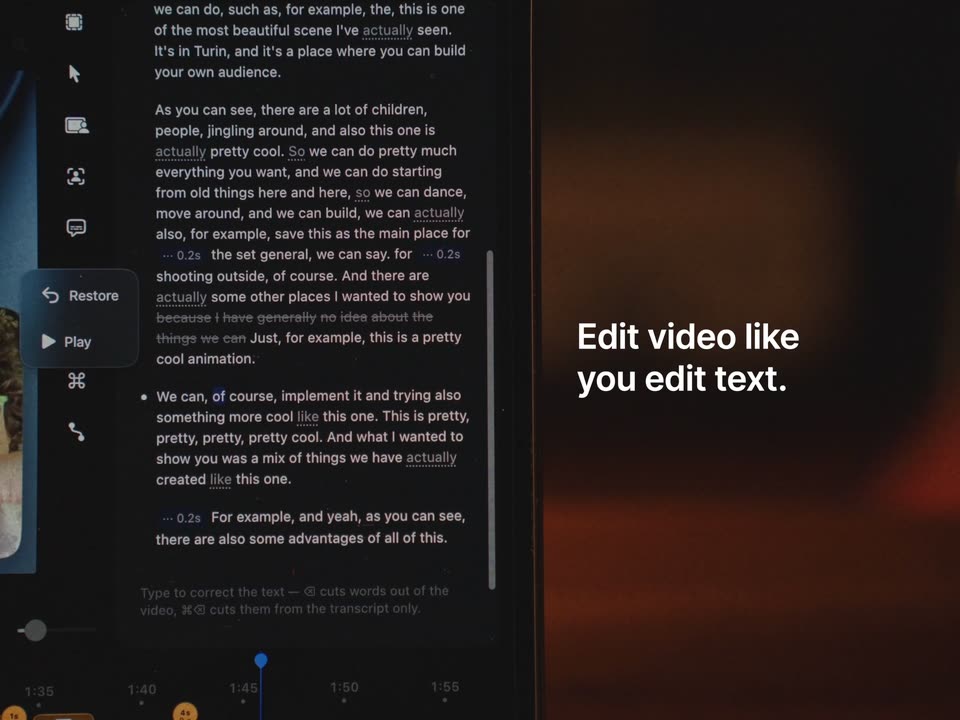
A video editor interface fills the left half, its transcript panel showing white text on black as a dimmed line fades out and a word turns blue while the playhead moves right. On the right, a blurred warm backdrop holds the static white headline. A cursor rests on the timeline.
On-screen text: “Edit video like you edit text.”
Techniques: Cursor demo
Camera: Static
A screen recording of a masonry image grid, with a webcam of a bespectacled man in the lower right. A cursor hovers over a post, then the entire screen tilts into 3D perspective as the white tagline fades in over the center.
On-screen text: “A little closer.”, “A lot clearer.”
Techniques: Cursor demo, 3D mockup
Camera: Static
A tilted, soft-focus shot of a monitor displaying a grid of aerial and diagram images, a man's face blurred in the lower right corner. White caption text sits centered over the grid, static throughout the brief clip.
On-screen text: “A little closer.”, “A lot clearer.”
Camera: Static
A tilted, soft-focus close-up of a screen showing a grid of image thumbnails. A circular magnifier expands in the lower left, revealing a closer crop of one image. A blurred person with glasses sits in the bottom right. White centered text reads “A little closer. A lot clearer.”
On-screen text: “A little closer.”, “A lot clearer.”
Techniques: Masking, UI zoom
Camera: Static
A grainy, tilted grid of images on a screen fills the background while a 3D circular lens tilts and spins in the center, its face reflecting a magnified green plant. The white caption “A little closer. A lot clearer.” holds still over the lens.
On-screen text: “A little closer.”, “A lot clearer.”
Techniques: 3D mockup
Camera: Static
A browser window shows a grid of digital art thumbnails. A circular magnifier lens hovers over the grid and zooms into one tile, revealing a white panel with the red serif word 'Solutions' and a glitched monitor. A video call inset of a young man with glasses sits lower right.
On-screen text: “A little closer.”, “A lot clearer.”
Techniques: UI zoom
Camera: Push in
A whiteboard interface with a network of linked images and a large white circle cuts to a curly-haired man in a white shirt and glasses, seated at a wooden desk under a green lamp, looking down at a laptop.
Camera: Static
A low-angle close-up shows a hand in motion, fingers blurred, pressing down toward a dark matte surface. A person in a pale striped shirt sits behind it under warm side light. Two white labels hold the bottom corners.
On-screen text: “Your camera”, “Your layout”
Camera: Static
A split screen shows a white chat interface on the left, where an Italian prompt sits above a line being typed as main plac, while a curly-haired man in glasses talks to camera on the right, his eyes reflecting blue light.
Techniques: Split screen
Camera: Static
A macOS desktop with the green hills wallpaper fills the frame. A man with curly hair and glasses appears as a cutout on the right, then shrinks to the corner as a Safari window opens in the center. A dock with app icons runs along the bottom, a cursor hovering.
Techniques: Cursor demo
Camera: Static
A white product interface fills the frame, named tabs across the top and a central input box showing the typed string 'ciao copme ashydnwsl'. A cutout of a curly-haired man with glasses sits in the lower right, a black arrow cursor resting at the lower left. frame stays locked off.
Camera: Static
A hand types on a laptop keyboard in a dim room. The screen shows a screen-recording app with a document preview and an audio timeline. White overlay text on the left reads 'Keep private things private.' The preview text changes as the recording plays.
On-screen text: “Keep private things private.”
Camera: Static
A video player shows a Notion page titled Musart Videoclip, with a black-and-white reference photo of a figure in an arch and a blue graphic reading everything. A dotted line with crosshair markers fades out across the title while the page stays static.
Camera: Static
A close-up of a design tool on a pale gray canvas. A gray selection box with black corner handles and a four-way move cursor rests near the top. Beneath it sit a heading and a photo of a figure in a dark tunnel. The frame holds still.
Camera: Static
A locked-off close-up of a dark export dialog. White text reads “Exporting video • 95%” above a purple gradient progress bar, with a gray timer “01:31 • 00:05 left” below.
Camera: Static
A dim desk scene holds a lit green lamp in sharp focus at right while a person in a white shirt works out of focus at left. White centered text sits over the dark middle. The shot cuts to a black card where the product name appears centered.
On-screen text: “Your ideas deserve a simpler way out”, “Screen Studio 4.0”
Camera: Static
A solid black background holds the centered white title “Screen Studio 4.0” for the full shot. The frame is locked off with no motion or camera move, and a tagline line completes the card.
On-screen text: “Screen Studio 4.0”, “Your ideas deserve a simpler way out”
Camera: Static
A white title reads Screen Studio 4.0 centered on a black field, then fades to black while a thin white line draws a short curve in the upper right corner.
On-screen text: “Screen Studio 4.0”
Camera: Static