0:28

Motion Graphics Promo Video | Ahrefs
Ahrefs · Aug 2026
Cal.com’s 1:06 launch film runs 31 scenes, about 2.2 s each. The product shows up at 0:04 and 1 feature is revealed. The call to action lands at 0:48 (72% in), over a voiceover. Tone is deadpan parody of an Apple keynote, built from flat browser-window mockups, meme cutaways and a few 3D canyon shots on a purple gradient. Pacing is quick at roughly 12 cuts per minute, driven by cursor clicks, word-by-word type builds and glitch or flip transitions, with a pastel grid and a recurring white arrow cursor as the signature moves.
Is this your launch? to your site or press kit.
Ahrefs · Aug 2026
The Context Company · B2B · Oct 2025
Films whose music sounds like this one, voice left out
CloudCruise · Modern electronic
Raycast · Electronic
The Wellness Company · Modern electronic
A pastel grid card pulls back from a close-up of the headline to reveal a black clock icon whose hands spin fast and stop at 12. The line programmable? pops in below, then a small window of green code labeled matrix slides in from the bottom left.
On-screen text: “What if time was”, “programmable?”, “matrix”
Techniques: UI zoom, Kinetic type, Speed ramp, Particles
Camera: Pull out
A flat collage of three browser-style cards sits on a purple gradient. The top grid card holds the headline while a cursor hovers; the lower-left card shows green Matrix code, and the lower-right card cuts from a clock icon to a meme figure, then a logo grid.
On-screen text: “What if time was programmable?”
Techniques: Kinetic type
Camera: Push in
A white launch page with a black WHATS NEW badge and a large black headline that builds word by word to the full sentence. A cursor arrow hovers beside a green browser window holding a 3D green figure, which slides into view as the layout settles.
On-screen text: “WHATS NEW”, “Cal.com launches v1.4”, “with the App Store for Time we aim for nothing less!”, “Apps for your Time will change the way you work and live.”
Techniques: Kinetic type
Camera: Pull out
A flat white browser window mockup sits on a purple gradient, showing a cal.com page with a bold headline, body copy, partner logos and a nested green-tinted meme image with a cursor. The whole frame then tears apart into horizontal scanlines and color noise as a glitch transition.
Camera: Static
A white grid card on a purple static-noise background shows the bold headline and a black clock icon. The card then flips in 3D, briefly revealing a YouTube-style screen with a video and thumbnail column, before turning out of frame.
On-screen text: “What if time was programmable?”
Techniques: 3D mockup
Camera: Static
A YouTube watch page on a purple gradient zooms in as a cursor glides down to the red Subscribe button and clicks it, flipping it to a gray Subscribed state. The thumbnail plays black-and-white office footage.
Techniques: UI zoom, Cursor demo
Camera: Push in
A flat YouTube page mockup sits on a purple gradient. A red BBC News banner slides in from the top right, then a black VICE banner stacks above it, while a cursor drifts in to hover over them.
Techniques: Cursor demo
Camera: Pull out
A YouTube-style channel page sits behind a large black circle holding the word remote. The circle expands to fill the frame as the word swaps to async, leaving white type on black.
On-screen text: “remote”, “async”
Techniques: Masking, Kinetic type
Camera: Static
On a plain black background, the white lowercase word “when” sits centered, then cuts to “life” in the same type, each word holding the frame for a beat in sequence.
On-screen text: “when”, “life”
Techniques: Kinetic type
Camera: Static
The word “life” sits centered in a pixelated white typeface on a dark blue, heavily grainy background. The frame is locked off; the text holds still while only the noise flickers around it.
On-screen text: “life”
Camera: Static
A pixelated white word 'life' sits centered on a dark, grainy field that shifts from black to deep blue. The frame stays locked off, the text holding still while the static noise flickers around it.
On-screen text: “life”
Camera: Static
The pixelated lowercase word “life” holds centered on a dark, grainy near-black field, completely static for the short shot.
On-screen text: “life”
Camera: Static
A flat blue screen holds a block of white monospace text in English, French, German and Japanese, all stacked and left-aligned. The text is static for the whole shot, no motion or camera move.
On-screen text: “You need to restart the computer. Hold down the Power button for several seconds or press Resart.”, “Veuillez redémarrer votre ordinateur. Maintenez la touche de démarrage enfoncée pendant plusieurs secondes.”, “Sie müssen Ihren Computer neu starten. Halten Sie dazu die Einschalttaste gedrückt oder drücken Sie die Neustart-Taste.”, “コンピュータを再起動する必要があります。これを行うには、電源ボタンを押し”
Camera: Static
A solid black screen holds for the full clip with no visible elements, text or motion, serving as a pause while the voiceover plays.
Camera: Static
A browser window on a rainbow gradient fades from a dim gray wireframe to a white grid of rounded, multicolored blocks. Pastel tiles holding a small center square then fill to solid color, populating the calendar layout.
Camera: Static
A flat white window with three black dots sits centered on a diagonal multicolor gradient. Inside, a masonry grid of rounded rectangles in red, pink, orange, blue, cyan, green and yellow fills the frame. The shot holds still.
Camera: Static
A flat white browser window holds a masonry grid of colored rounded cards over a rainbow gradient. A cursor glides across the grid, a red card is replaced by a purple one, and a pink ribbon curls in at the bottom right.
Techniques: Cursor demo
Camera: Static
A yellow hand-drawn speech bubble fills the frame over a blurred background. Marker-style all-caps text writes in line by line, each new line fading and scaling into place.
On-screen text: “WITH THE”, “POWER TO”, “MANAGE TIME”, “ON OUR OWN”, “TERMS CAME...”
Techniques: Kinetic type
Camera: Pull out
A comic panel shows three Spider-Man figures pointing at one another. A flat yellow caption box in the top left fills line by line, each line scaling in, while a static white speech bubble top right reads “YOU GUYS DO IT...”. The panel holds still as the handwritten text completes.
On-screen text: “YOU GUYS DO IT...”, “WITH THE”, “POWER TO”, “MANAGE TIME”, “ON OUR OWN”, “TERMS CAME...”
Techniques: Kinetic type
Camera: Pull out
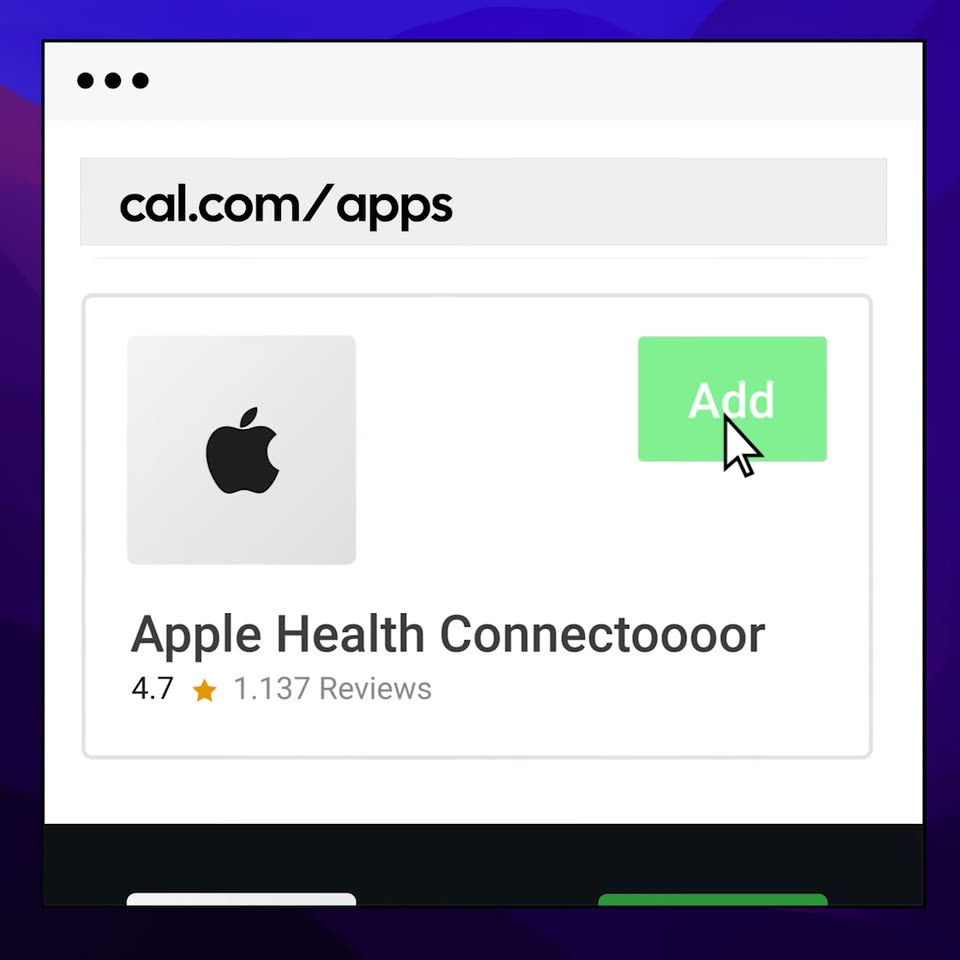
A flat browser window on a purple gradient: the cursor types cal.com/apps into the address bar, the offline dinosaur game gives way to an app list, and the cursor hovers the green Add buttons as the cards scroll from Smart Meeting Notes to Apple Health Connectooor.
On-screen text: “cal.com/apps”
Techniques: Cursor demo
Camera: Pan
A flat browser window on a purple abstract background shows a GitHub page with a green Fork button. A cursor hovers over Fork, moves to the top-left, and the caption types in word by word. The window then collapses into a distorted white shape.
On-screen text: “cal.com/apps”, “Open Source makes it possible!”
Techniques: Cursor demo, Kinetic type, Morph
Camera: Static
A 3D purple canyon of layered ridges fills the frame with a white cursor parked top left. A low-poly bald male head rises from the bottom edge as a tagline and the repo URL sit locked off.
On-screen text: “cal.com/apps”, “Open Source makes it possible!”
Techniques: Cursor demo, 3D mockup
Camera: Static
A purple gradient of layered waves fills the frame as a white app window with a hamburger icon warps into the center at an angle. A 3D bald man's head with glasses rises at the lower left, a cursor on it and a fan of lines flaring behind.
Techniques: 3D mockup
Camera: Static
A flat browser window mockup on a purple gradient backdrop shows a dark screen with the centered white headline “One more thing...”. A white arrow cursor sits at the lower left. The frame is locked off with no motion.
On-screen text: “One more thing...”
Camera: Static
A flat browser window on a purple background holds the caption “One more thing...” while a second window tilts in from the lower left in 3D perspective, revealing an illustration of a top-hatted figure on a flag-striped card.
On-screen text: “One more thing...”
Techniques: 3D mockup
Camera: Static
A dark desktop window shows the headline 'One more thing...' behind a smaller floating window holding a painted Uncle Sam in sunglasses pointing at the viewer, with a white cursor arrow resting below it. The frame stays locked and static.
On-screen text: “One more thing...”
Camera: Static
A white Trending Apps card overlaps two stacked browser windows on a blue gradient background. The card and windows stay locked in place while the app name and review count in the list swap through several entries, and the circular text inside the app icon rotates.
On-screen text: “One more thing...”
Camera: Static
A bald presenter in a white shirt stands before orange curtains, framed inside stacked flat browser windows on a purple background. He raises one finger, then the front window zooms and blurs into an app store view as a large black headline lands over it.
On-screen text: “Apps for your”
Techniques: Kinetic type, Morph, UI zoom
Camera: Pan
A pastel grid of soft gradient tiles fills the frame behind the large black headline Apps for your time, with a black Cal.com badge at the bottom right. Toward the end the words and badge spin and blur out as the grid fades to a plain gradient.
On-screen text: “Apps”, “for”, “your time”, “Cal.com”
Techniques: Kinetic type
Camera: Static
A pastel gradient grid holds a large black “Learn more!” headline beside a vertical black Cal.com bar. A diagonal black band wipes across, revealing the blue Cal.com logo centered on white.
On-screen text: “Learn more!”, “Cal.com”
Techniques: Masking
Camera: Static
The URL Cal.com/apps holds centered on a black field, the word apps in a cyan-to-purple gradient. A faint white grid in two corners dissolves away during the first second, leaving a plain black background for the rest of the shot.
On-screen text: “Cal.com/apps”
Techniques: Masking
Camera: Static