
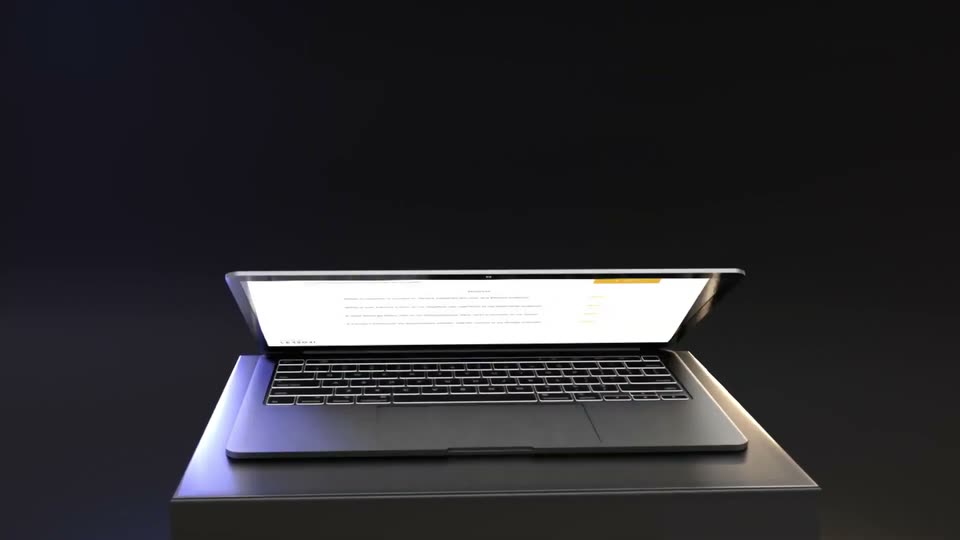
0:30
Explore
Welcome to Sparkboard AI | Natural Language Data Integration
Versori · Jul 2023 · 1:25 · Full motion · AI-annotated
- Length
- 1:25
- Scenes
- 34 · 2.5 s avg
- Product on screen
- 0:28
- Voiceover
- Yes
- Views
- 207 on YouTube
as of November 26, 2026
00:00:00 / 01:25:02
- Length
- 1:25
- Scenes
- 34 · 2.5 s avg
- Product on screen
- 0:28
- Voiceover
- Yes
- Views
- 207 on YouTube
as of November 26, 2026
Versori’s 1:25 launch film runs 34 scenes, about 2.5 s each. The product shows up at 0:28. There is no explicit call to action; a voiceover carries the film. Built as a tight text-card rhythm over a black, light-gray and mustard palette, with the product demo carried by a 3D laptop on a pedestal. Signature moves are letter-by-letter type assembly, yellow highlight wipes, drifting dots and dashed arcs, and a particle/wireframe logo reveal, all cut at a steady mid-tempo.
No filming indicatedEstimated needs: 2 capture groups — your screens or recordings · 1 official logo — reused across the film · 5 graphic passages — draw or supply · 8 3D passages — build or supply
Is this your launch? to your site or press kit.
More like this

Similar soundtrack
Films whose music sounds like this one, voice left out
1:11

Minara AI - Quant trading is solved. Introducing: Minara Strategy Studio. Desig
Minara Strategy Studio · Electronic
0:36
Block - Meet Dessa, our speech model trained from scratch on human conversati
Block · Lo-fi hip-hop
3:59

Phone (2): Lights, camera, less distraction
Nothing · Modern electronic
Welcome to Sparkboard AI | Natural Language Data Integration, scene by scene
· 34 scenes as text
01 · Hook · 0:00–0:00
On a black background, the phrase Data integrations in white bold sans assembles letter by letter. A yellow highlight block wipes across the middle word while two thin gray brackets open on either side, framing the line.
On-screen text: “Data integrations”
Techniques: Kinetic type
Camera: Static
02 · Hook · 0:00–0:02
On a black background, gray curly braces frame a yellow highlight bar that wipes left to right, revealing the white text Data integrations.
On-screen text: “Data integrations”
Techniques: Masking
Camera: Static
03 · Problem · 0:02–0:04
A large yellow circle wipes away, collapsing into a small dot at the left edge, revealing the words one system centered on a light gray field. A second yellow dot pops in on the right as faint dashed curves arc across the corners, linking the two dots.
On-screen text: “Data integrations”, “one system”
Techniques: Kinetic type, Masking, Morph
Camera: Static
04 · Problem · 0:04–0:07
On a black field, large dark gray circles and a small yellow dot drift slowly while a dashed white arc curves across the frame. The gray line to speak to another holds center, then gives way to the bold white sounds simple, right? sliding in before the text clears.
On-screen text: “to speak to another”, “sounds simple, right?”
Techniques: Kinetic type
Camera: Pan
05 · Problem · 0:07–0:10
On a light gray field, the sentence builds word by word in bold dark type. A dashed ring, a small yellow dot, and large solid circles drift across the frame, then a big dark circle expands to fill the right side.
On-screen text: “can feel like a”, “company-wide meeting”
Techniques: Kinetic type
Camera: Static
06 · Problem · 0:10–0:11
On a black field with faint gray circles and a dashed white arc, white words scale and slide into place. The large word shrinks as the next enlarges beside it, while a smaller word holds below. A small orange dot drifts across the left side.
On-screen text: “where”, “every”, “single”, “person”
Techniques: Kinetic type
Camera: Static
07 · Problem · 0:11–0:12
On a black background, white text reads where every single person, with single set much larger. The word shrinks to match person as the block slides down, while yellow circles grow on the right and a dashed arc curves across the top.
On-screen text: “where every single person”
Techniques: Kinetic type
Camera: Static
08 · Problem · 0:12–0:13
On a mustard-yellow field, white words for “language” in many tongues fade in and out across a loose grid, while a black curved shape occupies the lower-left corner.
On-screen text: “言語”, “sprooch”, “valodv”, “jazyk”, “sprache”, “langue”, “language”, “idioma”, “keem”, “wibbàltaal”
Techniques: Kinetic type
Camera: Static
09 · Problem · 0:13–0:15
A blank white frame gives way to a retro dialog box titled Napier asking Connect your systems? with Yes and No buttons. It is quickly buried by a cascade of overlapping Fatal Error popups and a Copying Files progress bar, scattered across the screen.
Camera: Static
10 · Problem · 0:15–0:16
A pile of identical gray Fatal Error dialogs with red X icons fills the frame, each showing a network error line and an OK button. The stack drifts slightly as the windows overlap one another.
Camera: Static
11 · Hook · 0:16–0:17
On a plain light gray background, the bold black text “What if you” sits above the gray text “could use”, which slides in, while a yellow hand-drawn squiggle is drawn from the top and loops down past the words.
On-screen text: “What if you”, “could use”
Techniques: Kinetic type
Camera: Static
12 · Hook · 0:17–0:19
On black, the bold white words Natural language sit center frame, ringed by small yellow dashes. A yellow arc sweeps in from the top right corner, and a line of dark gray text fades in beneath the headline.
On-screen text: “What if you”, “could use”, “Natural”, “language”, “to tell AI exactly how you want your integrations and automations”
Techniques: Kinetic type, Masking
Camera: Static
13 · Hook · 0:19–0:22
A black frame holds a centered white caption beneath a glowing yellow lightning bolt, with yellow arc shapes in the top-right and bottom-left corners. The bolt pulses softly while the text stays locked in place.
On-screen text: “to tell AI exactly how you want your integrations and automations to work?”
Camera: Static
14 · Hook · 0:22–0:27
A mustard card with a folded top corner fills the frame, and the text scrolls upward line by line, two bold white lines followed by two pale cream lines, ending with a small white chevron button.
On-screen text: “to tell AI exactly how you want”, “your integrations and automations”, “to work?”, “and that AI”, “returns a plan”, “to you, which it then”, “completes for you”
Techniques: Kinetic type
Camera: Static
15 · Hook · 0:27–0:28
A vertical stack of bold white “STEP. BY STEP.” repeats and scrolls upward on a black field, while faint dust specks drift across the right side. The lines slide and scale as they pass the frame edge.
On-screen text: “and that Al”, “returns a plan”, “to you, which it then”, “completes for you”, “STEP”, “STEP.”, “BY”
Techniques: Kinetic type, Particles
Camera: Pan
16 · Product intro · 0:28–0:29
A vertical column of glowing yellow particles drifts on black, then the swarm tightens into the outline of a lightbulb with a vertical filament inside.
Techniques: Particles, Morph
Camera: Pull out
17 · Product intro · 0:29–0:30
A golden particle light bulb glows at center on a black starfield, then bursts apart into a spreading cloud of sparks. The white wordmark and a small bulb icon fade in at the center as the particles disperse outward.
On-screen text: “SPARKBOARD”
Techniques: Particles
Camera: Pull out
18 · Product intro · 0:30–0:32
The SparkBoard logo, a yellow bulb icon with a lightning bolt beside a white wordmark, sits centered on a black field. The credit VERSORI appears in smaller type beneath it. The frame stays locked off throughout.
On-screen text: “VERSORI”
Camera: Static
19 · Demo · 0:32–0:33
A silver laptop sits closed on a dark pedestal against a black backdrop, then its lid lifts open to reveal a bright white screen and keyboard. The camera stays locked off while the device opens in 3D perspective.
On-screen text: “SPARKBOARD”, “VERSORI”
Techniques: 3D mockup
Camera: Static
20 · Demo · 0:33–0:37
A laptop rests open on a dark pedestal against a black backdrop, its screen showing a white interface with the SparkBoard logo and a heading. The camera slowly pushes in, tightening on the device.
Techniques: 3D mockup
Camera: Static
21 · Demo · 0:37–0:45
A laptop sits at a 3D angle on a dark backdrop, its screen showing the SparkBoard interface with a heading and an input field. A query is typed letter by letter into the field, ending with the Shopify to QuickBooks automation. The frame stays locked off.
Techniques: 3D mockup, Kinetic type
Camera: Static
22 · Demo · 0:45–0:53
A 3D laptop mockup displays an AI integration builder. A cursor expands two plan steps, then clicks the orange Approve Plan button; the screen fades to a loading spinner and cuts to a flat close-up of a task panel with thoughts, reasoning and an Approve & Continue button.
Techniques: 3D mockup, Cursor demo
Camera: Static
23 · Demo · 0:53–0:54
A laptop at a slight angle displays a white interface: a numbered step list with a Create Board button on the left, and a details panel with Thoughts, Reasoning and Feedback sections on the right. A cursor rests on the orange Approve & Continue button. The frame is locked off with a blurred dark background.
Techniques: 3D mockup, Cursor demo
Camera: Static
24 · Demo · 0:54–0:58
A 3D laptop displays the SparkBoard interface, with a dark code panel and a left task list. The camera zooms in on the screen as a cursor clicks the orange approve button, which switches to a loading state.
Techniques: 3D mockup, UI zoom, Cursor demo
Camera: Pan
25 · Demo · 0:58–1:03
A laptop screen in 3D perspective shows the Sparkboard interface. A cursor clicks through app selection and operation fields as the board configures itself, while green confirmation toasts stack in the top right corner.
Techniques: 3D mockup, Cursor demo
Camera: Static
26 · Demo · 1:03–1:05
A laptop in 3D perspective shows the SparkBoard setup screen, a form with app and operation fields and a left step list. A cursor rests on the orange Create Board button while four confirmation toasts stack on the right. The view eases from an angle to straight-on.
Techniques: 3D mockup, Cursor demo
Camera: Static
27 · Other · 1:05–1:07
A black screen holds the centered phrase 'You know...' which scales up, then the line 'Don't want to do?' sits still, its final word 'do?' lit in white while the rest stays dim gray.
On-screen text: “You know...”, “Don't want to do?”
Techniques: Kinetic type
Camera: Static
28 · Other · 1:07–1:08
On a flat yellow background, the lowercase words “and” and “boom.” start as thin white outlines and fill with solid white. “and” slides in at the top while a small caption “Don't want to do?” sits below, and “boom.” settles in large beneath it.
On-screen text: “Don't want to do?”, “and”, “boom.”
Techniques: Kinetic type
Camera: Static
29 · Other · 1:08–1:12
On black, a large white word slides in and a second huge word pops, then two-line copy appears in sequence, the lower line bold each time. A white search panel with an orange button and an example row slides in at the end.
On-screen text: “and”, “boom.”, “publish”, “Review and”, “your integration”, “right away.”
Techniques: Kinetic type
Camera: Static
30 · Other · 1:12–1:16
On black, a bold white headline sits above a white UI panel with a search field and orange Ask AI button. A caret types a sentence into the field letter by letter. The panel settles into place, then the frame cuts to black.
On-screen text: “Complex data infrastructures can now be connected with just a sentence.”
Techniques: Cursor demo
Camera: Static
31 · Other · 1:16–1:17
On a black background, repeated white lines of THE WORLD OF INTEGRATIONS expand from left to right, each column of letters appearing in turn until the full phrase fills the left half of the frame.
On-screen text: “THE WORLD OF INTEGRATIONS”
Techniques: Kinetic type
Camera: Static
32 · Other · 1:17–1:20
On a black background, the white line HAS NEVER SEEN THIS MUCH builds word by word, then the outlined word POWER scales up to fill the frame with the small circular brand logo at its left. A thin yellow light streak flashes in the center.
On-screen text: “HAS NEVER SEEN THIS MUCH”, “POWER”
Techniques: Kinetic type, Light sweep
Camera: Static
33 · Outro · 1:20–1:20
A glowing yellow wireframe fan spins on a black field, its thin lines fanning out and re-forming into a larger radial shape with a single red accent line.
Techniques: Morph
Camera: Static
34 · Outro · 1:20–1:25
A tangle of glowing yellow and red wireframe lines on a black background tightens and flattens into a yellow lightbulb icon with a lightning bolt. A white tagline sits below it, then the logo and text fade to black.
On-screen text: “Your business, connected.”
Techniques: Morph
Camera: Static