
1:17

Introducing ClickUp Chat
ClickUp · Productivity · Sep 2024
Bolna AI’s 1:03 launch film runs 24 scenes, about 2.7 s each. The product shows up at 0:09 and 4 features are revealed. The call to action lands at 0:53 (84% in), over a voiceover. The video opens on a desaturated live-action office, then drops into a single deep-navy 3D space where a glowing voice orb and audio waveform carry every transition. Features are announced with bold headline cards and proven with rack-focus UI cards and a panning network diagram, all cut at a steady ~111 bpm with a slow, confident pace.
Is this your launch? to your site or press kit.
ClickUp · Productivity · Sep 2024
Lantern AI · B2B
Wondersearch · B2B
Films whose music sounds like this one, voice left out
GojiberryAI · Upbeat electronic music with a steady four-on-the-floor beat, synthesized bass, and bright melodic/s
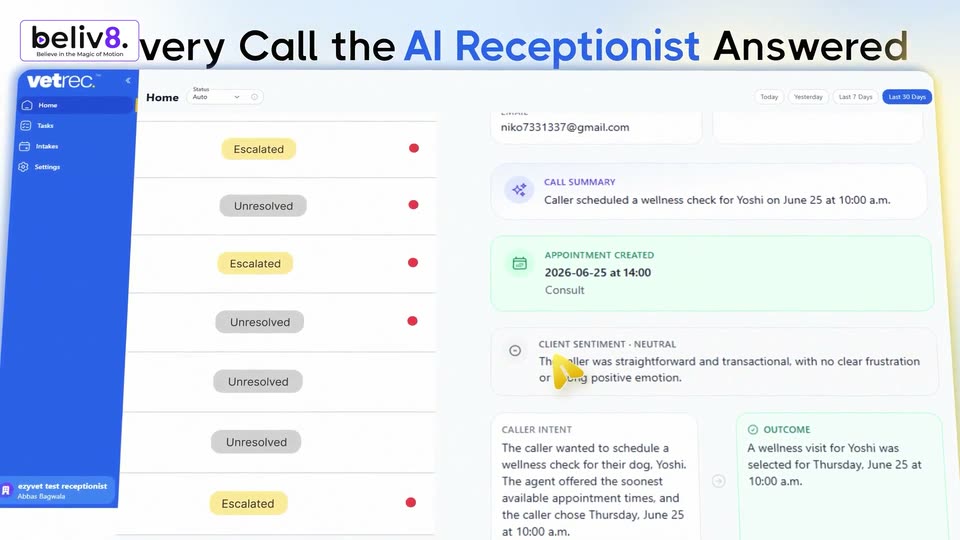
VetRec · Modern electronic, corporate tech
A black desk phone rests in sharp focus on a dark table while blurred office workers move behind it. The camera pans slowly right and the image fades to black and white. A two-line white caption fades in over the phone.
On-screen text: “70% of business calls start this way, leaving customers unsatisfied.”
Camera: Pull out
A black-and-white office desk with a phone fills the frame under centered white text. A blue circular ring wipes inward, tinting the scene blue and revealing a vertical bar chart at the center as the ring closes.
On-screen text: “70% of business calls start this way, leaving customers unsatisfied.”
Techniques: Masking
Camera: Pull out
A glowing blue ring of wavy dotted light tightens around a bright orb on a dark blue field. The wordmark BOLNA fades in at the center, layered over a vertical audio-waveform bar graphic.
On-screen text: “BOLNA”
Techniques: Particles
Camera: Pull out
A glowing blue circular emblem with the BOLINA wordmark and an audio waveform sits centered on a dark blue field. Blurred medical report cards float in perspective behind it, drifting as the frame pulls back and the ring pulses.
On-screen text: “BOLINA”
Techniques: 3D mockup, Parallax
Camera: Static
A glowing blue orb holding the word BOLNA over an animated audio waveform sits at center, its wavy rim pulsing. Blurred patient-report and notes cards float in 3D perspective behind it, tilted and out of focus.
On-screen text: “BOLNA”
Techniques: 3D mockup
Camera: Static
A glowing blue orb with an audio waveform and the word BOLNA floats center over blurred, tilted UI cards. White text Your Custom sits at top while a large blue line Voice AI Agent sweeps across the frame as the orb drifts downward.
On-screen text: “Your Custom”, “Voice AI Agent”
Techniques: 3D mockup, Kinetic type
Camera: Pan
A glowing blue voice orb pulses above a tilted browser mockup in a dark blue 3D space. The headline Your Custom Voice AI Agent holds at top, with the blue line larger. The mockup and orb move subtly.
On-screen text: “Your Custom”, “Voice AI Agent”
Techniques: 3D mockup
Camera: Static
A blurry headline gives way as focus racks onto a glowing blue agent card titled Receptionist; its description line dissolves into a row of bright dots that fills the width while a cursor glides in and rests on the play button.
On-screen text: “Your Custom Voice AI Agent”
Techniques: Cursor demo
Camera: Pan
A glowing blue card rack-focuses into view over a blurred duplicate behind it, settling on the Scheduler panel with its tags and phone line. A bright light line sweeps the card's top edge as a blue cursor hovers at the upper right.
Techniques: 3D mockup, UI zoom, Light sweep
Camera: Pull out
A glowing blue-bordered card floats on a dark blue field, showing a Scheduler label with Front Desk and English tags and a play button. A row of bright dots pulses across the card like a loading bar while a cursor hovers at the top right corner.
Camera: Static
Two glowing agent cards float in a dark blue space. A rack focus sharpens the foreground Sales Rep card while the Scheduler card behind stays blurred and drifts right.
Techniques: Parallax
Camera: Pull out
A glass card with a glowing blue border floats on a dark blue field. Its stacked, overlapping text settles into a clean Sales Rep layout, the body copy dissolves into a pulsing dot waveform, then the card blurs and fades out, leaving the waveform.
Techniques: Particles
Camera: Pull out
A glowing blue sphere pulses at the center of a dark blue field, ringed by rippling concentric light lines. The wordmark BOLNA sits in the middle, its letters built from vertical bars that oscillate like an audio waveform.
On-screen text: “BOLNA”
Camera: Pull out
A glowing blue orb with a wavy ribbed ring floats on a dark blue field. A vertical audio waveform inside it flattens while the light blue wordmark BOLNA sharpens at the center. The orb eases smaller as the text becomes fully legible.
On-screen text: “BOLNA”
Camera: Pull out
Concentric glowing blue rings rotate on a dark background while small circular badges carrying language codes orbit along them. At the center the headline fades in line by line, first “Fluent in” then “10+ Languages”.
On-screen text: “Fluent in”, “10+ Languages”
Techniques: Kinetic type
Camera: Pull out
A glowing blue orb with a bright white core forms on a dark blue background. The word BOLNA and a vertical-bar equalizer appear inside as the wavy ribbon outline smooths into a clean circular ring.
Techniques: Morph
Camera: Pull out
A blue network diagram on a dark field: circular photo nodes of callers at left link by glowing lines to a central pulsing orb with the BOLINA logo and waveform. The view pans right as lines branch into three rounded cards: Call Transcript, Summarization, Data Extraction.
On-screen text: “Call Transcript”, “Summarization”, “Data Extraction”
Camera: Pull out
A glowing cyan card with a gear-and-wand line icon and the label Quick Setup is centered over a blurred app interface. The card's border brightens, the label scales slightly, and a white cursor pointer slides onto the card.
On-screen text: “Quick Setup”
Techniques: Cursor demo
Camera: Pull out
A glowing blue rounded-square icon with a gear and slider, labeled Quick Setup, sits on a dark blue grid field with a cursor below it. The icon then melts into a bright, pulsing blue orb that holds the center of the frame.
On-screen text: “Quick Setup”
Techniques: Kinetic type, Morph
Camera: Pull out
A dark blue interface stays out of focus as the white title Agents library snaps sharp at the top left. Two glowing agent cards rack into focus beneath it, then the whole frame blurs back out.
On-screen text: “seamlessly.”, “Agents library”
Camera: Pull out
A glowing blue input bar floats on a dark starfield. It opens on an Agents library panel with four agent cards, then the panel clears and a prompt types out a custom agent description. Locked-off frame.
Techniques: Kinetic type
Camera: Static
A glowing blue pill-shaped input bar with a round button at its right end floats on a dark, faintly speckled field. White text types out inside the bar as an agent prompt, then the text clears and the bar fades away.
On-screen text: “You are a helpful support agent who handles all customer queries”
Techniques: Kinetic type
Camera: Static
A dark blue gradient fills the frame as the white line 'So why keep customers waiting?' blurs in at center, holds, then fades out on a locked-off shot.
On-screen text: “So why keep customers waiting?”
Camera: Static
On a dark blue gradient, the white BOLNA wordmark sits over a glowing blue-to-gold audio waveform that pulses. The Y Combinator logo holds the top, a Book a demo today button sits below, and a blue cursor drifts toward the button before leaving the frame.
On-screen text: “BOLNA”, “Book a demo today”, “Combinator”
Techniques: Cursor demo
Camera: Static