3:02

Introducing Airbnb Rooms – featuring the new Host Passport
Airbnb · Consumer · May 2023
OpenUI · Oct 2026 · 1:28 · AI-annotated
OpenUI’s 1:28 launch film runs 53 scenes, about 1.7 s each. The product shows up at 0:46, with social proof. There is no explicit call to action; a voiceover carries the film. The video cuts rapidly between a warm live-action studio, grainy archival clips and clean light-gray UI canvases, letting the presenter's voiceover carry the argument while black caption pills narrate each beat. Its signature moves are the graph-paper blueprint diagrams that trace the product's logic, the recurring red-lamp studio set that bookends the story, and the type-driven transitions that scale and blur between ideas.
Is this your launch? to your site or press kit.
Airbnb · Consumer · May 2023
Capto · B2B · Aug 2026
Luca IQ · B2B · Jul 2026
A high-angle locked-off shot of a wooden desk holding a laptop, papers and a red lamp. A man in a dark sweater and beige trousers walks in from the left and sits on the chair. A subtitle bar appears at the bottom.
On-screen text: “We're living in the smartest”
Camera: Static
A mustached man in a dark green shirt lowers himself onto a chair, facing the camera in a dim studio. A long wooden table with a red lamp, papers and a laptop sits to his right. The frame is locked off and the motion is slow.
On-screen text: “We're living in the smartest”
Camera: Static
A man in a teal sweater stands before a warm wooden lattice wall, gazing off to the left with a faint smile. The camera holds a locked-off medium shot while white subtitles caption his voiceover at the bottom of the frame.
On-screen text: “We're living in the smartest”, “yet the most tasteless world at once.”
Camera: Static
A woman seen from behind types at a beige terminal with a CRT monitor and paper feed, shot in grainy archival footage with black side bars. A white caption line sits at the bottom center.
On-screen text: “Thirty years of turning information”
Camera: Static
A high-angle shot of three women seated at vintage data entry consoles, working on keyboards in a grainy archival room. A caption bar sits at the bottom of the frame.
On-screen text: “Thirty years of turning information”
Camera: Static
A grainy black-and-white archival clip shows a typed page on the left and a blurred figure holding a white card on the right. A white caption sits in a dark box at the bottom.
On-screen text: “Thirty years of turning information”
Camera: Static
A bald man in a shirt, vest and red tie sits in a chair facing slightly off camera, hands clasped, in a grainy pillarboxed office shot. A caption box at the bottom carries the line while the camera holds steady on him.
On-screen text: “Thirty years of turning information”
Camera: Pull out
A soft-focus close-up of a dark-bezel device; its teal screen holds the pixelated line 'Good Morning, Bill' at center. A white caption in a dark rounded pill reads 'into amazing interfaces' near the bottom. The frame holds still.
On-screen text: “Thirty years of turning information”, “into amazing interfaces”
Camera: Static
A close-up of an old CRT monitor shows a two-column list of US states and abbreviations in blue monospace type on a dark screen. The list scrolls upward past a blue command bar at the bottom, while a caption reads “into amazing interfaces.”
On-screen text: “into amazing interfaces”
Camera: Static
A close-up of a CRT monitor shows a two-column list of US states and abbreviations in blue monospaced type on a dark screen. New lines type in at the bottom as the list fills. A white caption on a dark pill reads 'into amazing interfaces' along the lower edge.
On-screen text: “into amazing interfaces”
Camera: Static
A man with rimless glasses and dark hair sits in close-up against a blurred red and blue backdrop, speaking with subtle head movement. The frame stays locked-off while two lines of subtitle text appear at the bottom center.
On-screen text: “The graphical user interface.”, “I thought it was the best thing I had ever seen in my life.”
Camera: Static
A white prompt bar sits centered on a light gray background. The query Ask Me Anything types out letter by letter beside a black circular send button; a gray cursor appears at its lower right, then a dark subtitle bar with the voiceover line drops in at the bottom.
On-screen text: “Then came our most intelligent agents,”
Techniques: Cursor demo
Camera: Static
A white prompt bar on a light gray field types out Ask Me Anything! with a blinking cursor, a black up-arrow button at its right. The bar then blurs as two text cards fade in on either side, while a mouse cursor drifts right.
On-screen text: “Then came our most intelligent agents,”
Techniques: Kinetic type, Cursor demo
Camera: Static
Three rounded white cards packed with overlapping body text sit on a pale gray field, a black arrow cursor hovers on the right card, and a dark pill caption anchors the bottom.
On-screen text: “Then came our most intelligent agents,”
Techniques: Cursor demo
Camera: Pull out
A dense grid of text-filled cards fills the frame and drifts slowly, forming a wall of text, while a black cursor hovers near the center. A dark rounded caption pill sits at the bottom center reading the line.
On-screen text: “Then came our most intelligent agents,”, “hiding behind a wall of text.”
Techniques: Cursor demo
Camera: Pull out
A man in a teal sweater stands before a warm wooden slat wall, looking up and speaking. Translucent white response cards float around him and dissolve away. A white caption line holds at the bottom of the frame.
On-screen text: “Ask an agent to find you a hotel in New York.”
Camera: Static
A man in a teal sweater stands in a sunlit room with a wooden lattice wall, speaking, in a locked-off frame. A white rounded search bar appears on the right with a typed query and a blinking caret, and a black caption box reading 'It searches.' shows below it.
On-screen text: “It searches.”
Camera: Static
A white chat screen, locked off. A right-aligned bubble reads “Find me a hotel in New York.” A left bullet line fades in gray, then black, cycling through checking dates, reading reviews, narrowing to two options. A gray caption bar at the bottom updates in sync.
On-screen text: “Checks your dates.”, “Reads the reviews.”, “Narrows it down to two great options.”
Techniques: Kinetic type
Camera: Static
A prompt bubble reading “Find me a hotel in New York” holds top right while two columns of dense hotel-list text fade in side by side, then scroll upward. Gray caption pills swap at the bottom center as the voiceover continues.
On-screen text: “And then...”, “asks you to make a decision based on a paragraph.”, “In most of the cases,”
Techniques: Split screen
Camera: Pan
A man in a teal sweater stands before a warm wooden lattice, gazing off camera while he speaks. On the right, a sentence types out letter by letter behind a blinking cursor, ending on the bold word interface.
On-screen text: “The response should be an interface.”
Techniques: Kinetic type
Camera: Static
A pale gray graph-paper grid fills the frame. A dark rounded caption reading “And finally,” holds at the bottom center, then the line “The response should be an interface.” appears at the center, its second part scaling up.
On-screen text: “And finally,”, “The response should”, “be an interface.”
Techniques: Kinetic type
Camera: Static
'The world is' scales in on a graph grid, 'world' in white on a navy starfield box with a globe o. The globe hops to dot the i as the line scrolls left to 'opening up to this idea', 'idea' in black. Caption 'And finally,' below.
On-screen text: “And finally,”, “the world is”, “opening up to this idea”
Techniques: Kinetic type
Camera: Pull out
A hand holds a phone over a cluttered workshop floor, the screen showing a bike app with a labeled bicycle diagram. The thumb scrolls the screen while boxes and bike parts blur in the background.
On-screen text: “up to this idea”, “*From OpenAI launch video”
Camera: Static
A man kneels in a garage holding a bike wheel over a yellow frame. A white card in the upper left fills in with a line drawing of the bike and step instructions. A black caption reading ChatGPT now appears at the bottom center.
On-screen text: “*From OpenAI launch video”, “ChatGPT now”
Camera: Static
A hand holds an iPhone upright against a soft-focus outdoor background. The ChatGPT screen scrolls slowly upward, bringing a San Francisco map and three destination cards into view. A dark pill-shaped caption sits at the bottom center.
On-screen text: “ChatGPT now”, “*From OpenAI launch video”
Camera: Static
A hand holds a phone showing a ChatGPT gardening plan against a blurred outdoor ground. White headline text frames the device, with the right-side line sliding in. A bottom caption sits over the phone's lower edge.
On-screen text: “GPT-6”, “with”, “Intelligent UI”, “has Intelligent UI.”
Camera: Static
A split view pairs a Claude chat on the left with a bike-share dashboard on the right. The dashboard assembles itself: stat cards, a line chart, an area chart and a station map pop in one after another. A caption bar sits at the bottom.
On-screen text: “Claude has interactive dashboards.”
Techniques: Split screen
Camera: Static
A browser window shows a bike-share dashboard with a line chart. A cursor moves across the chart, popping up date tooltips, while a gray caption box reads “Claude has interactive dashboards” along the bottom.
On-screen text: “Claude has interactive dashboards”, “*From Claude launch video”
Techniques: Cursor demo
Camera: Static
On a plain light gray background, the word But appears large, then But what about your slides in, what about in blue, beside a dark pill with a glowing lightbulb. The line swaps to How can your agent have an intelligent UI? in gray as the pill blurs upward.
On-screen text: “But what about your agent?”, “How can your agent have an intelligent UI?”
Techniques: Kinetic type
Camera: Static
A gray headline with a blue accent phrase sits centered on a pale background while a small blue-green marble drifts across the top. The line blurs and dissolves as a white curved form sweeps in to fill the frame.
On-screen text: “How can your agent have an intelligent UI?”
Techniques: Masking
Camera: Static
On a soft white gradient, a rounded white pill holding “And that's why” starts blurred, then sharpens and scales in, the word “why” in blue. A smaller gray pill reading “we built” fades in below it.
On-screen text: “How can your agent have an intelligent UI?”, “And that's why”, “we built”
Techniques: Kinetic type
Camera: Static
A man in a green sweater sits in a dim studio, talking to camera, with a wooden table holding a red lamp and papers. Doodle dog icons float in, one drops to his lap as a white hand-drawn box with the text OpenUI 1.0. slides in beside it.
On-screen text: “And that's why”, “we built”, “OpenUI 1.0.”
Camera: Static
A chat screen shows the agent's plain-text hotel list; it scrolls up as a card with a hotel photo and a 'Luxury Classic' tag slides in on the right. Pill labels 'Your Agent' and 'OpenUI' sit at the top, and a caption 'An open-source framework' appears below.
On-screen text: “Your Agent”, “OpenUI 1.0.”, “An open-source framework”
Camera: Static
A split view shows a plain-text agent response on the left and a hotel-listing UI on the right, each tagged with a black pill label. The camera pans up and zooms into the UI as a dark banner at the bottom reveals the headline line by line.
On-screen text: “Your Agent”, “OpenUI”, “An open-source framework”, “that lets your agents respond with live,”
Techniques: Split screen, UI zoom, Kinetic type
Camera: Push in
A light travel webpage listing New York City hotels scrolls slowly upward as a black cursor glides up to hover over The Plaza Hotel card. A black caption pill at the bottom reads “that lets your agents respond with live,”.
On-screen text: “that lets your agents respond with live,”
Techniques: Cursor demo
Camera: Pan
A white hotel-booking form fills the screen. A cursor drags the Nightly Budget slider from 300 to 3.5k, then the frame zooms in on the amenities row and the cursor clicks the Michelin Dining pill, outlining it in black. Dark caption pills sit at the bottom.
On-screen text: “interactive interfaces.”, “OpenUI isn't asking the model to freestyle your product.”
Techniques: Cursor demo, UI zoom
Camera: Push in
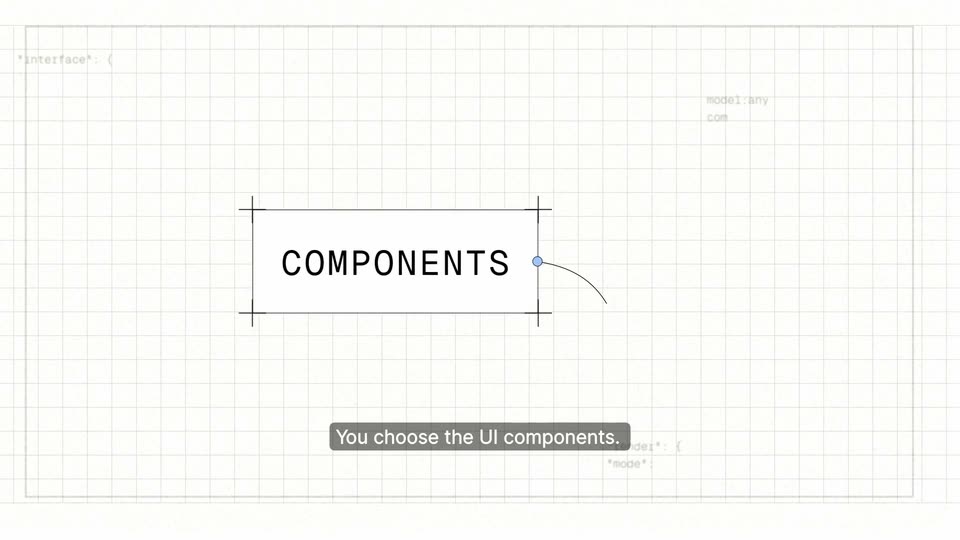
On a cream grid-paper background, wireframe lines with crosshair marks form a rectangle. COMPONENTS slides in to center as a curved line with a blue dot arcs across it. A dark caption pill then reads You choose the UI components. Faint blueprint labels fill the corners.
On-screen text: “COMPONENTS”, “You choose the UI components.”
Techniques: Kinetic type
Camera: Pull out
A cream grid canvas shows a wireframe: a boxed COMPONENTS label with crosshair corners links by a bezier curve to an empty box, faint monospace code below. The view pans left, the label slides off, the right box grows; a dark caption pill stays at the bottom.
On-screen text: “You choose the UI components.”
Camera: Pan
A camera pans across a white grid canvas with design annotations: a selection box around MODEL, a bezier curve with blue handles, code, and a laptop sketch. Metallic 3D shapes drift in the foreground, and a dark caption pill reads “The model decides what the user needs,”.
On-screen text: “COMPONENTS”, “MODEL”, “MODEL USER”, “The model decides what the user needs,”, “You choose the UI components.”
Techniques: Parallax
Camera: Pan
A blueprint grid canvas pans right across a diagram: a curved line links MODEL to USER NEEDS, then to OPEN UI, with isometric 3D props (laptop, database, robot) drifting at different speeds. A blue fill wipes in behind the OPEN UI label as dark pill captions narrate the flow.
On-screen text: “MODEL”, “USER NEEDS”, “The model decides what the user needs,”, “OPEN UI”, “and”, “OpenUI renders it using what you gave.”
Techniques: Kinetic type, Parallax, Masking
Camera: Pan
A blue component box labeled OPEN UI, with selection handles and a fan of colored node wires, slides left across a light grid canvas as a small 3D model scrolls out of the top. A fixed caption reads OpenUI renders it using what you gave.
On-screen text: “OpenUI renders it using what you gave.”
Camera: Pan
A grid with a blue node and colored curves dissolves into plain off-white. A centered two-line headline fades in above a row of five rounded-square app icons, peach asterisk, green swirl, white stick figure, white blue scribble, black lens. A white rounded card slides in from the right.
On-screen text: “And that is how we bring”, “back taste to the”, “OPEN UI”, “OpenUI renders it using what you gave.”
Camera: Static
A rounded search bar sits centered on a near-white field. The answer types in word by word inside it, the trailing words in light gray, beside a black up-arrow button, as faint blurred paragraphs fade in around it.
On-screen text: “After all, intelligence is knowing the answer.”
Techniques: Kinetic type
Camera: Static
A white field of blurred hotel-booking UI mockups, maps and listing cards floats in 3D perspective, sharpening as a centered headline swaps from one line to the next. A black circular up-arrow button rests at the right edge in the first half.
On-screen text: “After all, intelligence is knowing the answer.”, “Taste is knowing how to present it.”
Techniques: Parallax, 3D mockup
Camera: Pan
A man in a dark green sweater sits at a wooden table in a dim studio, talking to camera. A bottom caption reads “OpenUI has crossed”, then a large white counter counts up to “6M” with “DOWNLOADS” beneath it on the right.
On-screen text: “OpenUI has crossed”, “6M”, “DOWNLOADS”
Techniques: Kinetic type
Camera: Static
High-angle view of a man in a green sweater seated at a long wooden table with a laptop and red lamp, speaking to camera. On the right, a large white number ticks up from 9,114 to 10,000, then a small yellow star pops in beside it.
On-screen text: “9,114”, “10,000”
Camera: Static
A man in a dark green sweater sits at a long wooden table in a dim studio, smiling and gesturing as he speaks. A red desk lamp, loose papers and a closed laptop rest on the table, with a small photo easel in the soft-focus background.
On-screen text: “We gave AI a mind.”
Camera: Static
A pale purple wireframe brain built from contour lines and dots rotates slowly in 3D against black. A small white caption 'We gave Al a mind.' appears at the bottom center, then is replaced by 'Now'.
On-screen text: “We gave Al a mind.”, “Now”
Camera: Push in
High-angle locked-off shot of a man in a dark sweater seated on a stool at a wooden table with a laptop, papers and a red lamp; he looks down and smiles. The word Now scales in, and a caption line holds at the bottom.
On-screen text: “Now”, “it finally has the taste to show it.”
Techniques: Kinetic type
Camera: Static
A locked-off wide shot of a dim studio set with two wooden worktables, a chair, a red desk lamp, and an easel holding charts. Warm light pools on the floor while a small caption sits at the bottom of the frame.
On-screen text: “it finally has the taste to show it.”
Camera: Static
A high-angle shot of a sunlit studio set with two wooden desks, a chair and an easel; warm light floods the floor as the frame brightens. The OpenUI cloud logo and wordmark fade in at the bottom center.
On-screen text: “OpenUI”
Camera: Static
A dim, empty studio set with two wooden worktables, a chair and a corkboard on an easel. The white OpenUI dog logo and wordmark sit in the lower center, locked off and still.
On-screen text: “OpenUI”
Camera: Static
The OpenUI wordmark logo sits alone on a black background, locked off and motionless across the brief clip.
Camera: Static