
1:24
Explore
00:00:00 / 00:10:29
- Length
- 0:10
- Scenes
- 5 · 2.2 s avg
- Product on screen
- 0:00
- Features shown
- 1
- Voiceover
- No
- Views
- 128 on X
as of November 15, 2026
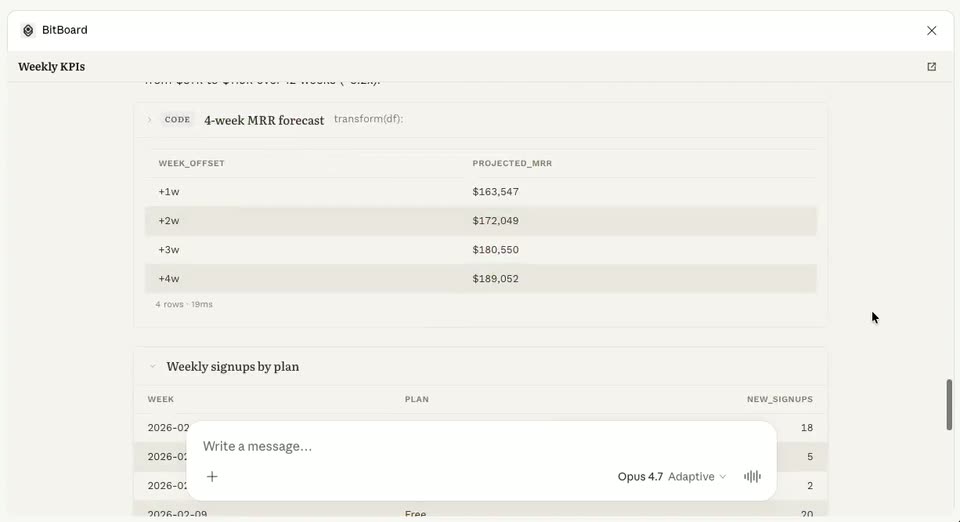
BitBoard’s 0:10 clip runs 5 scenes, about 2.2 s each. The product is on screen from the first frame and 1 feature is revealed. A single uncut screen recording that moves from a chat prompt to an expanded dashboard and back, paced by slow vertical scrolls rather than edits. Signature moves are the expand/collapse morph between the nested card and the full dashboard, and the pinned message box that stays fixed while content moves.
No filming indicatedEstimated needs: 3 capture groups — your screens or recordings
Is this your launch? to your site or press kit.
More like this

BitBoard - No more tab switching. We just shipped an interactive UI for our MC, scene by scene
· 5 scenes as text
01 · Product intro · 0:00–0:01
A light chat interface shows a user prompt bubble and an AI reply with a nested Weekly KPIs preview card. A mouse cursor drifts down from the right and rests on the expand icon of the preview row.
Techniques: Cursor demo
Camera: Static
02 · Feature reveal · 0:01–0:05
A light dashboard titled Weekly KPIs scrolls downward through a signups table, a red bar chart, an MRR forecast line, and a plan line chart. A white message input box labeled Opus 4.7 stays pinned at the bottom; a cursor rests at the right edge.
Camera: Pan
03 · Feature reveal · 0:05–0:06
A light dashboard panel titled Weekly KPIs scrolls vertically, cycling through data tables and a red bar chart labeled MRR by tier. A message input box with a model dropdown stays fixed at the bottom, and a cursor rests at the right edge.
Camera: Static
04 · Demo · 0:06–0:08
A BitBoard chat window resolves from an overlapping dashboard view, settling on a user prompt and an AI reply that includes a nested BitBoard card. A cursor moves from the close icon to the Share button in the top right corner.
Techniques: Cursor demo
Camera: Static
05 · Demo · 0:08–0:10
A light chat screen scrolls down through an AI assistant's reply, passing a gray user prompt bubble, a generated workbook card with a weekly signups table, and ending on a small orange loading spinner.
Camera: Pan