0:32

Introducing Notion AI connectors
Notion · Productivity · Jun 2024
Anthropic · May 2024 · 2:19 · Full motion · AI-annotated
Anthropic’s 2:19 launch film runs 20 scenes, about 7.0 s each. The product shows up at 0:19. The call to action lands at 2:02 (88% in), over a voiceover. Two-sentence summary for a motion designer: The video is built as a single continuous screen-recording scenario framed by flat terracotta serif title cards, with slow zooms and crossfades moving between the floating browser window and full-bleed UI close-ups. Its signature moves are the letter-by-letter serif reveals, the tinted crossfade that dissolves the card into the live interface, and the red starburst that doubles as both brand mark and loading spinner.
Is this your launch? to your site or press kit.
Notion · Productivity · Jun 2024
Microsoft · AI · Jan 2026
Anthropic · AI · Mar 2026
White serif text on a terracotta field: “Coming soon” holds while “to the Team plan” fades in below it, letter by letter. The line holds, then a tinted browser window with a projects list crossfades in behind the text.
On-screen text: “Coming soon”, “to the Team plan”
Techniques: Kinetic type
Camera: Static
A browser window showing the Claude Projects page floats over an autumn hillside photo while a large white serif caption fades out. The frame zooms into the projects list, and a cursor glides down to hover over two project cards.
On-screen text: “Coming soon”, “to the Team plan”
Techniques: UI zoom, Cursor demo
Camera: Push in
A cursor rests on the first project card in a list view, then the screen cuts to the project detail page. The cursor moves onto a document tile in the project knowledge panel.
Techniques: Cursor demo
Camera: Pull out
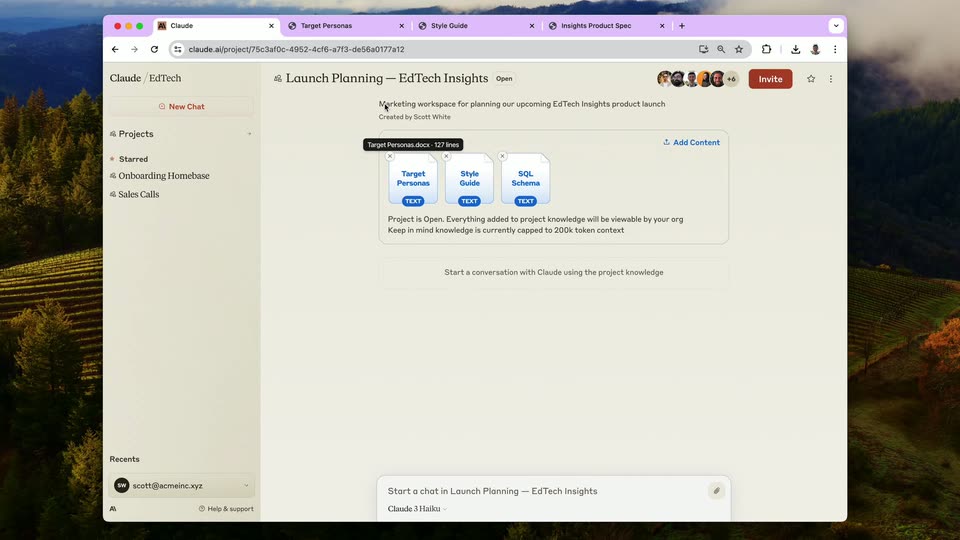
A browser window showing the Claude project page rests over a desktop wallpaper in a locked-off frame. A cursor glides across the three file cards in the Project knowledge panel, pausing on the Style Guide card to reveal a small tooltip.
Techniques: Cursor demo
Camera: Pull out
A desktop screen recording shows a browser with a Target Personas PDF open. The document scrolls up to its title, the frame zooms into the browser window, then a cursor clicks the Style Guide tab and the style guide loads.
Techniques: UI zoom, Cursor demo
Camera: Push in
A browser with tabs for Claude, Target Personas, Style Guide and Insights Product Spec shows the Style Guide PDF; the cursor scrolls the document down through the brand voice and channel sections, page one to page two, then the window shrinks to reveal the desktop.
Techniques: Cursor demo
Camera: Pull out
A full browser view of a Claude project page zooms into the Project knowledge panel. A cursor clicks Add Content, a dropdown opens, and the cursor moves from Add text content to Upload from device.
Techniques: UI zoom, Cursor demo
Camera: Push in
A macOS file dialog sits over a dimmed workspace. The cursor highlights the Insights Product Spec.docx row, activating the Open button. The dialog crossfades away to reveal a Project knowledge card where three text chips, Target Personas, Style Guide and SQL Schema, settle in.
Techniques: Cursor demo
Camera: Static
A Claude project page centers a 'Project knowledge' card holding file chips. A cursor adds a new chip and the row reflows, then the view pulls back to show the browser chrome and left sidebar.
Techniques: Cursor demo, UI zoom
Camera: Pull out
A Safari window on a desktop shows a PDF product spec. The document scrolls up from page two to the title page, and the cursor drifts across the body text. The page counter flips from 2/3 to 1/3.
Techniques: Cursor demo
Camera: Static
A browser window shows the Claude project page on a desktop. The view zooms into the chat box as a cursor hovers over it and a long prompt is typed, then cleared. The send button lights up red.
Techniques: Cursor demo, UI zoom
Camera: Push in
A chat interface shows a user prompt asking for a product launch brief. The AI response streams in line by line beside a red star-shaped spinner, then the view scrolls down to the end of the numbered steps, holds, and scrolls back up to the prompt.
Techniques: Kinetic type
Camera: Static
A close-up of a chat interface shows a numbered launch-brief list; a cursor drags a blue highlight over the first heading. The view pulls back to the full browser window on a desktop, the user types a new prompt, the thread scrolls, and a code result card appears.
Techniques: Cursor demo, UI zoom
Camera: Pull out
A Claude chat finishes streaming a SQL explanation beside a dark code panel. The frame zooms out to the full browser window, a cursor drags a Customer List.docx file into the reply box, a launch-strategy prompt is typed, and the view zooms back in on the input.
Techniques: Cursor demo, UI zoom
Camera: Static
A two-pane Claude screen: the left chat thread scrolls up past a Customer List DOCX card and a user prompt bubble, while the right dark panel holds a static SQL query. A small orange loading spinner pulses below the prompt.
Camera: Static
Split view of the Claude app: a chat thread on the left, a document panel on the right where the launch brief streams in section by section and scrolls down. A cursor types a new prompt into the reply box and sends it, and a new message appears.
Techniques: Split screen, Kinetic type, Cursor demo
Camera: Pan
A two-pane interface shows a chat on the left and a generated brief on the right. The document pane scrolls down through sections of the launch brief while a loading spinner on the left resolves into a finished document card.
Techniques: Split screen
Camera: Pan
A split Claude chat and artifact panel fills the screen; the right panel cycles through marketing copy documents while the left chat scrolls and a cursor clicks a card. The view then pulls back to show the browser window on a desktop with a landscape wallpaper.
Techniques: Cursor demo, UI zoom
Camera: Pull out
A browser window showing the Claude project page sits over a mountain desktop wallpaper. The view zooms into the project knowledge card with four document chips, then pulls back to the full window. A large white URL fades in across the lower half at the end.
On-screen text: “anthropic.com/claude”
Techniques: UI zoom
Camera: Static
A faint product interface fades out at the start, leaving white serif text centered on a solid rust-orange background. The text holds still for the rest of the clip as the sign-off.
On-screen text: “Learn more at”, “anthropic.com/claude”
Camera: Static