1:13

Lovable - You can just start.
Lovable · Developer tools · Apr 2026
Claude · Mar 2026 · 1:13 · AI-annotated
Claude’s 1:13 launch film runs 29 scenes, about 2.5 s each. The product shows up at 0:06. There is no explicit call to action. The video is built as a repeating beat: a flat serif situation card, a terracotta request bubble in the Dispatch phone mockup, then a 3D desktop mockup executing the task while a hand-drawn red squiggle links the two devices. Pacing is slow and deliberate at about three cuts per minute, with locked-off title cards and soft blur-to-focus transitions as its signature moves.
Is this your launch? to your site or press kit.
Lovable · Developer tools · Apr 2026
Endstack · B2B · Aug 2026
A small rounded-square flask icon sits centered on a beige field, then widens horizontally into a pill shape, revealing the word RESEARCH beside it. The flask gains a circular ring that overlaps the middle letters of the word.
On-screen text: “RESEARCH”
Techniques: Morph
Camera: Static
On a flat cream background, a small outlined pill badge with a flask icon reads RESEARCH PREVIEW above a two-line serif headline. The headline lines settle into alignment in the first instant, then the frame holds still.
On-screen text: “RESEARCH PREVIEW”, “Reach your desktop”, “from your pocket”
Techniques: Kinetic type
Camera: Static
A white phone screen on a beige background holds the serif heading “Reach your desktop from your pocket” over two pill buttons. Above it, a line-art illustration of phones and a laptop animates, the phones collapsing into one as a red arrow draws a link to the laptop.
Techniques: Morph
Camera: Static
Two lines of black serif text sit centered on a flat beige background. The lines dissolve in from a ghosted, slightly offset state and settle to full opacity, then hold still for the rest of the locked-off shot.
On-screen text: “Like when the deck is on your laptop,”, “but you aren't”
Camera: Static
A terracotta chat bubble with a user's request fills the frame, then the view pulls back to reveal the full Dispatch chat card on beige. The assistant's reply sits below, and a small bubble with a red scribble pops in at the end.
On-screen text: “Like when the deck is on your laptop,”, “but you aren't”
Techniques: UI zoom
Camera: Pull out
A phone and a laptop mockup stand angled on a cream backdrop, the phone holding a chat thread and the laptop a file browser. The image sharpens from a soft blur as a red hand-drawn loop traces itself into the space between the devices.
Techniques: 3D mockup
Camera: Static
A 3D laptop and a blurred phone mockup sit on a beige background with a small orange squiggle between them. The camera pushes into the laptop screen as PowerPoint opens a File menu, then an Export dialog set to PDF. The squiggle loops and reshapes throughout.
Techniques: 3D mockup, UI zoom, Morph
Camera: Push in
A blurred phone chat sits at left while a PowerPoint export dialog at right fades and blurs away, revealing the slide headline Northgate Digital Strategy. A red hand-drawn line grows from a small curve into a looping squiggle between the two.
Camera: Static
A laptop in 3D perspective on the right displays a Finder window with a file list, the Northgate_Pitch_v3.pdf row highlighted in blue. A blurred phone with chat bubbles sits on the left, linked by a hand-drawn red squiggle. The phone stays out of focus while the laptop remains sharp.
Techniques: 3D mockup
Camera: Static
A 3D perspective frames a Mac running Calendar next to a phone, linked by an animated red loop line. A detail card pops open over an event, listing guests and an attachments box where a cursor moves, then the camera pulls back to show both devices.
Techniques: 3D mockup, Cursor demo
Camera: Pull out
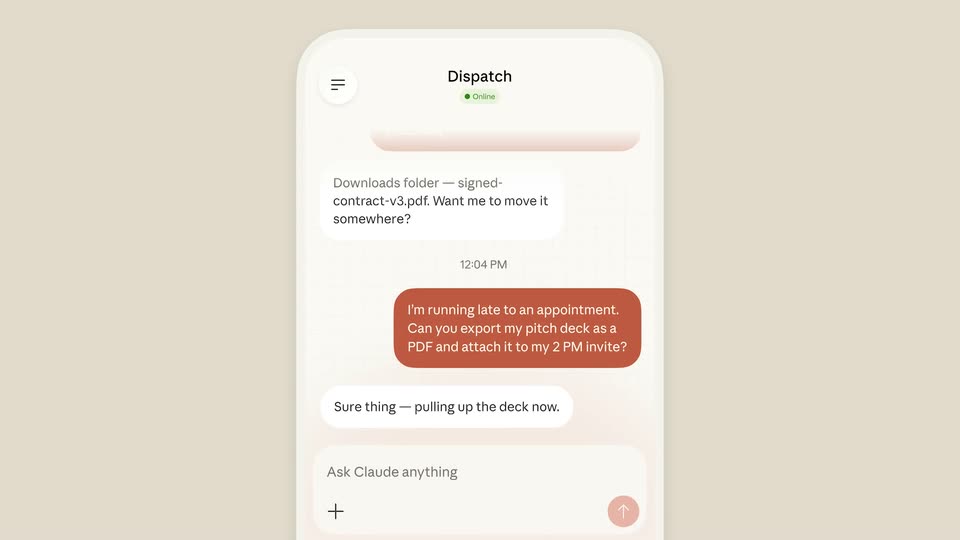
A phone mockup of the Dispatch chat sits centered on a cream background, with faded echoes of the same screen on either side. The conversation shows a red user bubble asking to export a pitch deck, then two white reply bubbles confirming the PDF was attached.
Camera: Static
A flat phone mockup on a beige field shows a Dispatch chat. A terracotta bubble requests a PDF export of a pitch deck; the white replies type out word by word, confirming the attachment to the 2 PM invite.
Techniques: Kinetic type
Camera: Static
A front-facing phone displays a chat thread in the Dispatch app, the messages snapping from blur to sharp. The device then fades to a faint ghost as a large serif headline fades in, centered over the screen.
On-screen text: “Or when it's time to check the build,”
Camera: Static
A plain beige card centers two lines of black serif text. The lines settle into place over a brief overlap at the start, then hold steady for the rest of the beat.
On-screen text: “Or when it's time to check the build,”, “but you're on the train”
Techniques: Kinetic type
Camera: Static
A terracotta rounded card sits centered on a flat beige field, carrying three lines of white text that give a task instruction. The card holds static for the duration, with no entrance or motion.
On-screen text: “Start the dev server, screenshot the library page, and send it to me before the demo at 3PM. Please!”
Camera: Static
The clip opens tight on a terracotta message bubble, then zooms out to a flat phone mockup of the Dispatch chat app. A white reply bubble and a small loading pill appear beneath the message.
Techniques: UI zoom
Camera: Static
A phone mockup fills the center of a beige backdrop, its chat showing a red request bubble and a white reply. The phone shrinks and slides left as a laptop mockup with a blue grid screen settles into 3D perspective on the right.
Techniques: 3D mockup
Camera: Static
A split layout: left, a phone mockup with a chat thread and a red hand-drawn loop on a beige field; right, a macOS desktop where a dark Claude Code terminal prints command output as a white browser window slides in from the left, showing a Library page.
Techniques: Split screen
Camera: Static
A white phone mockup and a laptop showing a dark library page float on a beige background, a red hand-drawn squiggle wiggles between them. The phone grows toward the camera while the laptop slides right out of frame.
Techniques: Parallax
Camera: Pull out
Phone and laptop mockups sit in 3D perspective on a beige background. Chat bubbles appear one by one in the phone app while a red squiggle draws itself between the devices; the phone then scrolls to a screenshot card as the laptop fades out.
Techniques: 3D mockup
Camera: Static
A flat phone mockup on a beige background shows a Dispatch chat. The list scrolls up, revealing a new white message bubble that describes the library rendering, below a dark embedded screenshot. A fixed input bar reads 'Ask Claude anything' at the bottom.
Camera: Static
A flat phone mockup of the Dispatch app, its text scrambling, fades out on a beige background. A centered serif headline then reads “Or when there are 150 photos to process,”.
On-screen text: “Or when there are 150 photos to process,”
Camera: Static
Two lines of black serif text overlap at the center of a plain beige field, then slide vertically apart to settle into a clean centered two-line layout, holding still for the rest of the shot.
On-screen text: “Or when there are 150 photos to process,”, “but you have dinner plans”
Techniques: Kinetic type
Camera: Static
A red chat bubble carrying a batch photo request fills the frame, then the view pulls back to reveal a phone mockup of the Dispatch chat app. The bubble sits in the conversation as a white reply bubble appears, followed by a three-dot typing indicator.
On-screen text: “Or when there are 150 photos to process,”, “but you have dinner plans”
Techniques: UI zoom
Camera: Pull out
A phone mockup on the left and an angled desktop monitor on the right sit on a beige background, linked by a looping red line. The phone shows a chat with a red message bubble; the monitor shows a dark grid of small image thumbnails. The composition holds steady.
Techniques: 3D mockup
Camera: Static
A cream desktop monitor and a phone mockup sit on a beige field with a red looped-line mark between them. The PixelForge canvas cycles through pottery photos as an export panel slides in, then a save dialog opens while the monitor slowly scales up.
Techniques: UI zoom, Morph
Camera: Static
A 3D-angled desktop window with an open save dialog holds the right side of a beige scene. On the left, a phone mockup showing a chat thread scales up from a soft blur into sharp focus, joined to the window by a red hand-drawn squiggle.
Techniques: 3D mockup
Camera: Pull out
A phone mockup of the Dispatch chat sits left of a Mac desktop on a beige field. A red request bubble and two white reply bubbles fill the chat, the last one typing in. On the right, a dark image window fades out to reveal a folder icon.
Techniques: Split screen
Camera: Static
On a flat beige field, a terracotta twelve-point asterisk mark grows from a tight cluster to full size at center, then the black serif wordmark Claude appears to its right and holds still, forming the brand sign-off.
Camera: Static