0:27
Raycast - 🕵️♂️ Announcing Snippet Explorer — our first open source project! A
Raycast · Productivity · Jan 2023
Altrina · Apr 2025 · 0:56 · Full motion · AI-annotated
Altrina’s 0:56 launch film runs 11 scenes, about 5.2 s each. The product is on screen from the first frame and 2 features are revealed. There is no explicit call to action; a voiceover carries the film. A screen recorded product tour that alternates between the app window floating on a gradient desktop and full bleed crops of the node canvas, cutting about nine times a minute. Signature moves are slow zoom ins on individual nodes and dashed edges that trace the workflow logic into place.
Is this your launch? to your site or press kit.
Raycast · Productivity · Jan 2023
Resend · Developer tools · Sep 2026
Sidekick · B2B · Jul 2026
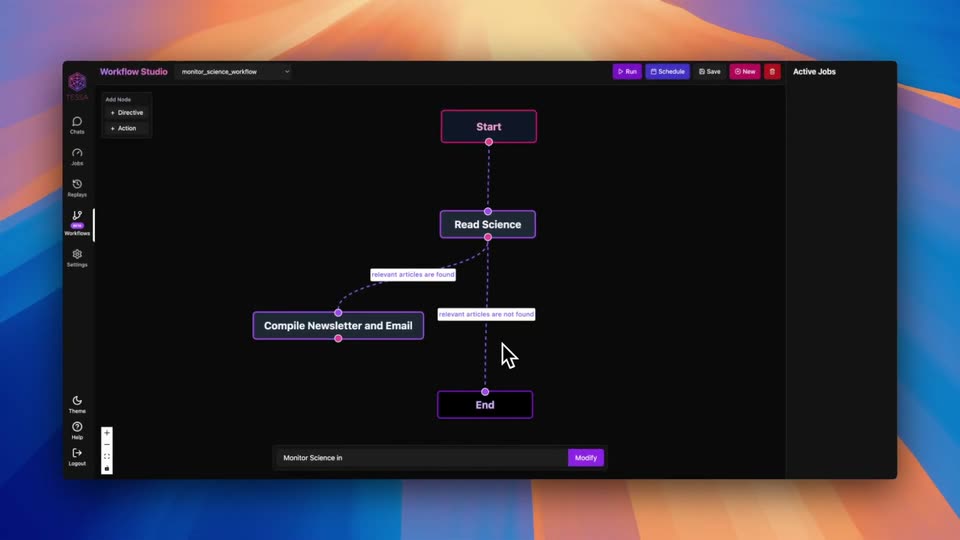
A dark node-based workflow editor sits on a flowing orange and blue gradient. Nodes Start, Read Science, Compile Newsletter and Email, and End connect vertically while a white cursor hovers beside Start. The frame holds for ten seconds, then zooms in on the Start node.
Techniques: Cursor demo, UI zoom
Camera: Push in
A dark workflow canvas fills the screen as the view zooms in from a windowed app over a colorful background. Nodes labeled Start, Read Science and Compile Newsletter and Email connect via dashed lines. A white cursor moves, then a hand cursor grabs the Read Science node.
Techniques: UI zoom, Cursor demo
Camera: Static
A dark node graph (Start, Read Science, End) sits on a dotted canvas. A cursor clicks a dashed link, opens a label box, and types a condition. The shot cuts to the window in 3D on a gradient desktop, then zooms back in to label the other branch.
Techniques: Cursor demo, 3D mockup, UI zoom
Camera: Pull out
A dark workflow status panel fills the frame, its message box and header set in white text. A white cursor glides down from the top bar into the message box, then drifts left. The view reframes slightly tighter on the panel.
Techniques: UI zoom, Cursor demo
Camera: Pan
A dark AI chat panel fills the frame, slightly out of focus, showing body text and a purple View Workflow button. A hand cursor slides in from the right and clicks the button as the view sharpens.
Techniques: Cursor demo
Camera: Pan
A tight crop of the flowchart pulls back to reveal the full workflow editor window over a gradient backdrop. A cursor types a prompt and clicks Modify; the 'Read Science' node updates to 'Read Nature'. The camera zooms into the Start node, whose Initial URL field shows the nature.com address.
Techniques: UI zoom, Cursor demo
Camera: Pull out
A dark node-based workflow editor fills the frame. A white hand icon and an arrow cursor hover over the dotted canvas near a Read Nature node, while the view pans slightly. The top toolbar and the right-side jobs panel stay fixed.
Techniques: Cursor demo
Camera: Static
A dark workflow builder shows a node graph behind a Name Your Workflow dialog with the field filled. The view reframes onto the dialog as a hand cursor moves to the Save button, then the dialog closes and a No workflows are found tooltip appears.
Techniques: UI zoom, Cursor demo
Camera: Pan
A dark workflow canvas shows a vertical flowchart of four nodes linked by dashed purple lines, with a white hand cursor hovering at the right. The view reframes outward to reveal the top toolbar, and the cursor moves onto the purple Run button.
Techniques: UI zoom, Cursor demo
Camera: Pan
A dark dashboard resolves from a blurred ghosting transition into a flat screen view. A cursor hovers over a purple View Workflow button in a chat message, then drifts upward. A left sidebar lists chat history entries and a right panel shows active jobs over a colorful gradient backdrop.
Techniques: Cursor demo
Camera: Pull out
A dark chat interface sits on a warm gradient background. Inside the main panel, an embedded browser preview fades in from a gray placeholder to a loaded nature.com page. A white cursor rests at the top right corner.
Camera: Static