
0:51
Explore
kushagra chitkara - We just killed two biggest limitations of your favourite AI agents:
Almanac · Aug 2026 · 0:55 · Full motion · AI-annotated
- Length
- 0:55
- Scenes
- 18 · 3.1 s avg
- Product on screen
- 0:10
- Features shown
- 3
- Call to action
- 0:49 · 89%
- Voiceover
- Yes
- Views
- 11K on X
as of November 15, 2026
00:00:00 / 00:55:04
- Length
- 0:55
- Scenes
- 18 · 3.1 s avg
- Product on screen
- 0:10
- Features shown
- 3
- Call to action
- 0:49 · 89%
- Voiceover
- Yes
- Views
- 11K on X
as of November 15, 2026
Almanac’s 0:55 launch film runs 18 scenes, about 3.1 s each. The product shows up at 0:10 and 3 features are revealed. The call to action lands at 0:49 (89% in), over a voiceover. The video is built as a short narrative: a teammate announces a week off, the AI assistant quietly handles the week, and the punchline lands on the final logo card. Signature moves are tight zooms between 3D phone mockups and flat UI close-ups, with the scrolling chat thread doing the storytelling.
No filming indicatedEstimated needs: 6 capture groups — your screens or recordings · 1 official logo — reused across the film · 1 graphic passage — draw or supply · 4 3D passages — build or supply
Is this your launch? to your site or press kit.
More like this


1:16

0:26
Input - Stop Googling the people who email you. Get Input to do it for you 🕵
Input Systems · Nov 2026
kushagra chitkara - We just killed two biggest limitations of your favourite AI agents:, scene by scene
· 18 scenes as text
01 · Hook · 0:00–0:08
A white input pill slides in from the right as a message is typed with a blinking caret. The field morphs into a blue sent bubble with a Delivered tag beside a pickle avatar. The frame zooms out to a phone screen where gray reply bubbles stack up below.
Techniques: Kinetic type, Morph, UI zoom
Camera: Pull out
02 · Hook · 0:08–0:10
A tight crop of a chat thread zooms out to frame the whole phone in 3D perspective. The message list scrolls and a video bubble from HQ pops in, showing a man in a fur cloak holding a sword with a BRACE YOURSELF caption.
Techniques: UI zoom, 3D mockup
Camera: Pull out
03 · Product intro · 0:10–0:11
A 3D iPhone mockup on a light background shows the app's chat screen: a message list with avatars, a meme image captioned BRACE YOURSELF, and a centered black logo button with an HQ pill. The back chevron flips from double to single.
Techniques: 3D mockup
Camera: Push in
04 · Product intro · 0:11–0:13
A grid of circular profile avatars and icons on a light gray background scrolls downward, settling into place as a back arrow and a camera icon fade in at the top corners. Two avatars carry a small blue dot beside their names.
Camera: Static
05 · Product intro · 0:13–0:17
A messaging interface fills the frame, then the camera pulls back to reveal the full phone, and finally zooms in on a green pickle avatar with glasses and a tie that appears beside the blue message bubble.
Techniques: UI zoom
Camera: Push in
06 · Product intro · 0:17–0:19
A cartoon pickle avatar in a blue circle, with a name pill beneath, scales up from small to large. The pickle swaps from glasses and a tie to a straw hat and heart sunglasses, the status dot turns gray, and an offline caption fades in below.
Camera: Static
07 · Feature reveal · 0:19–0:21
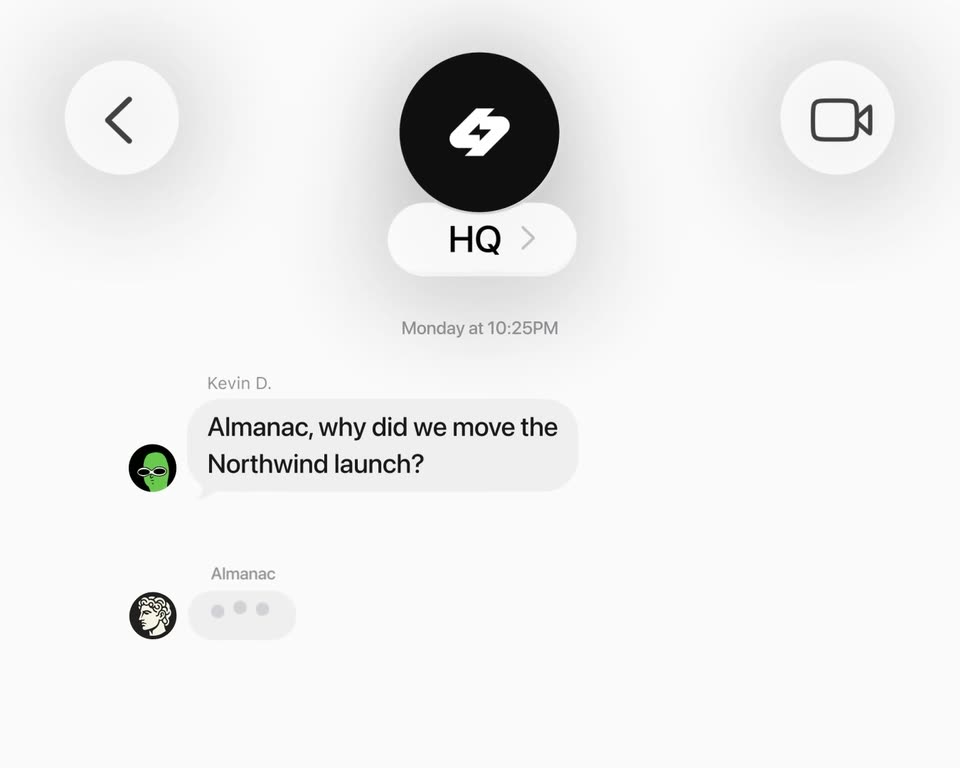
A light chat screen scrolls up, pushing the black bolt avatar and HQ pill off the top edge. A message from Kevin D. reading “Almanac, why did we move the Northwind launch?” settles into view, and three dots pulse as a typing indicator in Almanac's reply bubble.
Camera: Push in
08 · Feature reveal · 0:21–0:24
Four product cards (a call note, a September calendar, a Slack thread, an email thread) start small and faded at center, then scale up and settle into four quadrants on a light gray field. The view cuts to a flat phone mockup showing a chat, overlaid with a large gray question about the moved launch date.
On-screen text: “Northwind launch?”, “Almanac, why did we move the Northwind launch? We're still finishing the integrations, so the launch date had to move.”
Techniques: UI zoom
Camera: Pull out
09 · Feature reveal · 0:24–0:28
A 3D iPhone on a light background shows a chat screen with a black bolt logo and HQ pill. Two message bubbles appear, then the list scrolls up to reveal a third request and a typing indicator under the Almanac avatar. The phone fades to white at the end.
Techniques: 3D mockup
Camera: Pull out
10 · Feature reveal · 0:28–0:30
A small dark circular logo with a cream classical head profile drifts to the center of a plain off-white field as a light-gray file list panel slides in from the right, revealing spreadsheet file cards. A large still “福” character is locked on the frame.
On-screen text: “福”
Camera: Static
11 · Feature reveal · 0:30–0:30
A light file list of spreadsheet rows scrolls up and settles, centering the row with the green icon, framed by a green rounded outline. A circular black-and-cream classical profile logo stays fixed at the left edge.
Camera: Pan
12 · Feature reveal · 0:30–0:31
A flat chat view cross-fades into a front-facing phone mockup. The green highlight around the Final.xls card fades out as the same conversation, with the file and the reply Here!!, settles into the device screen.
Techniques: Morph
Camera: Pull out
13 · Feature reveal · 0:31–0:36
A front-facing phone mockup on a white background displays a chat screen with a fixed black logo header. The message list scrolls upward, revealing new bubbles, then accelerates into a fast motion-blurred scroll.
Techniques: Speed ramp
Camera: Pull out
14 · Feature reveal · 0:36–0:38
A phone frame fades in on white, then the view zooms into the chat screen where a green cactus avatar with glasses and a blue speech bubble pop up, then the avatar shrinks and settles behind the scaling Alex name pill.
Techniques: UI zoom
Camera: Static
15 · Feature reveal · 0:38–0:41
A blue chat bubble with white text and a green avatar sits on a pale background, then the frame pulls back to reveal it inside a phone's chat interface. The phone slides right, exposing a vertical dot carousel and a small black bust avatar at the left edge.
Techniques: UI zoom
Camera: Pull out
16 · Feature reveal · 0:41–0:49
The clip opens zoomed in on a five-item checklist card, then pulls back to a flat iPhone chat with the HQ bot. Checkmarks fill in, and the thread scrolls as short messages from teammates and the user appear, ending with Almanac suggesting Bali.
Techniques: UI zoom
Camera: Pull out
17 · CTA · 0:49–0:50
A light chat screen zooms in on two message bubbles, then the bubbles fade out as a blue line-art face logo grows to the center with the tagline and URL fading in below it.
On-screen text: “Almanac. Consider it handled.”, “usealmanac.com”
Techniques: UI zoom, Morph
Camera: Static
18 · Outro · 0:50–0:55
A circular black logo with a cream classical head sits centered on a pale gray field. The logo and the tagline below it settle from a soft blur into sharp focus within the first second, then hold as a locked-off sign-off.
On-screen text: “Almanac. Consider it handled.”, “usealmanac.com”
Camera: Static