0:45
Explore
Input - Stop Googling the people who email you. Get Input to do it for you 🕵
Input Systems · Nov 2026 · 0:26 · AI-annotated
- Length
- 0:26
- Scenes
- 17 · 1.6 s avg
- Product on screen
- 0:04
- Features shown
- 1
- Call to action
- 0:17 · 66%
- Voiceover
- Yes
- Views
- 650 on X
as of November 16, 2026
00:00:00 / 00:26:24
- Length
- 0:26
- Scenes
- 17 · 1.6 s avg
- Product on screen
- 0:04
- Features shown
- 1
- Call to action
- 0:17 · 66%
- Voiceover
- Yes
- Views
- 650 on X
as of November 16, 2026
Input Systems’s 0:26 launch film runs 17 scenes, about 1.6 s each. The product shows up at 0:04 and 1 feature is revealed. The call to action lands at 0:17 (66% in), over a voiceover. The video alternates between a live-action presenter on a blue couch and slow 3D drifts through a dark inbox UI, capped by black title cards. Its signature moves are word-by-word typed captions with gray keyword chips and the morphing input wordmark.
Footage neededEstimated needs: 1 capture group — your screens or recordings · 1 official logo — reused across the film · 5 filmed passages — shoot, supply or replace · 2 3D passages — build or supply
Is this your launch? to your site or press kit.
More like this

Input - Stop Googling the people who email you. Get Input to do it for you 🕵, scene by scene
· 17 scenes as text
01 · Hook · 0:00–0:02
A bearded man in a black T-shirt sits on a blue couch in a sunlit living room, talking to the camera and gesturing with open hands. A white caption line appears at the bottom, with the word 'everyone' set inside a gray search-box chip.
On-screen text: “You shouldn't have to Google everyone who emails you.”, “Who are they and what do they do?”
Camera: Static
02 · Hook · 0:02–0:04
A man in a black T-shirt sits on a blue sofa in a sunlit living room, gesturing with open hands as he speaks to camera. A white subtitle builds word by word along the bottom, the newest word boxed in light gray.
On-screen text: “Who are they and what do they do?”
Techniques: Kinetic type
Camera: Static
03 · Product intro · 0:04–0:06
A man in a black t-shirt sits on a blue couch in a sunlit room, speaking to camera and gesturing with his hands. White captions appear at the bottom, the second one placing the word Input inside a light gray box.
On-screen text: “Who are they and what do they do?”, “We build Input to do that research for you.”
Camera: Static
04 · Feature reveal · 0:06–0:08
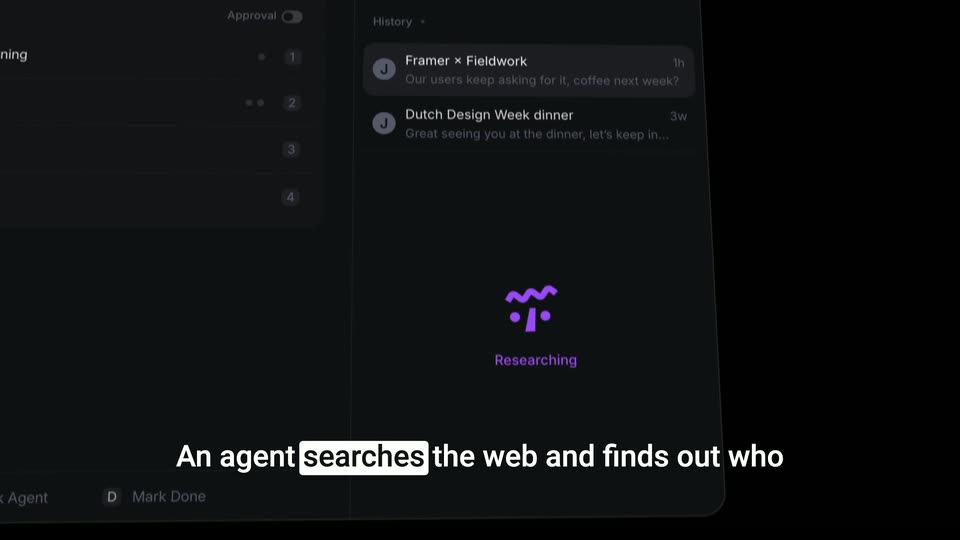
A dark chat interface is framed at a slight 3D angle, with a left task list and a right message panel showing a purple pulsing icon above the word “Researching.” The view drifts slowly upward while a white caption line swaps at the bottom.
On-screen text: “We build Input to do that research for you.”, “An agent searches the web and finds out who”
Techniques: 3D mockup
Camera: Pull out
05 · Feature reveal · 0:08–0:09
A dark contact profile panel scrolls to reveal social links while a purple wavy mark with a shuffling “Researching” label sits at the bottom. A white caption types out word by word along the lower edge.
On-screen text: “An agent searches the web and finds out who it is automatically.”
Techniques: Kinetic type
Camera: Pull out
06 · Feature reveal · 0:09–0:10
A dark two-panel interface shows a message list on the left and a person's profile card on the right, both drifting up slightly. A white caption runs along the bottom, its opening phrase set inside a white highlight box.
On-screen text: “it is automatically, so you can see who's behind”
Camera: Pull out
07 · Feature reveal · 0:10–0:12
A dark email app fills the frame, an inbox list on the left and a profile card on the right. The profile card swaps through three contacts, Julien Bek, Daniela Amodio and Madeleine Simens, while a white caption stays at the bottom.
On-screen text: “it is automatically, so you can see who's behind”
Camera: Static
08 · Feature reveal · 0:12–0:13
A dark inbox and profile panel sit in 3D perspective on black. The profile card swaps between two people as the left list updates. A bottom caption reads 'the email without the detour to LinkedIn.' with 'email' boxed in white.
On-screen text: “the email without the detour to LinkedIn.”
Techniques: 3D mockup
Camera: Static
09 · Feature reveal · 0:13–0:14
A dark contact list fills the left side while a Profile card on the right swaps its avatar and name, moving from a knot logo to a 3D figure holding a rose. A lower-third caption states the email line, with the word detour boxed in white.
On-screen text: “the email without the detour to LinkedIn.”
Camera: Static
10 · Feature reveal · 0:14–0:15
A dark email interface fills the frame, a list of subject lines on the left and a profile card on the right. The profile card cycles from one contact to the next, swapping photo, name and email. A white caption with a highlighted word sits along the bottom.
On-screen text: “the email without the detour to LinkedIn.”
Camera: Static
11 · Product intro · 0:15–0:16
A dark inbox interface tilts in 3D perspective against black; the camera pushes in toward the profile card with a man in a red shirt, his name and a Message field, as the tagline scales up along the bottom.
On-screen text: “Meet Input Mail, the inbox that works.”
Techniques: 3D mockup, UI zoom, Kinetic type
Camera: Static
12 · Product intro · 0:16–0:17
Black frame with the white serif wordmark 'input' centered and the caption 'Meet Input Mail, the inbox that works.' below, a highlight box sweeping across the words. The wordmark then collapses and morphs into a small gray squiggle while the caption fades out.
On-screen text: “input”, “Meet Input Mail, the inbox that works.”
Techniques: Morph
Camera: Static
13 · CTA · 0:17–0:19
On a black field, the white input logo, a curly brace and wavy mark over a serif wordmark, sits centered and settles into place. A caption below reads Meet Input Mail, the inbox that works, with works in a white box, then swaps to Want to try it out?
On-screen text: “Meet Input Mail, the inbox that works.”, “Want to try it out?”
Camera: Static
14 · CTA · 0:19–0:20
The white input logo and wordmark sit centered on black while a caption types out word by word, a gray keyboard key sliding across the phrase. The logo fades and join the waitlist appears in the center as the bottom line settles into Join the wait list or reply below.
On-screen text: “input”, “Want to try it out?”, “join the waitlist”, “Join the wait list or reply below”
Techniques: Kinetic type
Camera: Static
15 · CTA · 0:20–0:23
A man in a black t-shirt sits on a blue couch in a sunlit living room, pointing down while speaking to camera. White captions with highlighted words sit at the bottom of the frame and swap between two lines.
On-screen text: “Join the wait list or reply below”, “and I'll try to get you that invite”
Camera: Static
16 · CTA · 0:23–0:24
A man in a black t-shirt leans forward on a blue couch in a sunlit living room, reaching his open hand toward the camera. A subtitle line sits at the bottom of the frame while he speaks.
On-screen text: “and I'll try to get you that invite”
Camera: Static
17 · Outro · 0:24–0:26
A black screen holds the white serif wordmark input.so centered in the frame. The text stays static and locked for the full duration as a closing sign-off.
On-screen text: “input.so”
Camera: Static