1:30

SimBlox launch film
SimBlox · Business software
Agentbox · Nov 2026 · 1:39 · Full motion · AI-annotated
Agentbox’s 1:39 launch film runs 24 scenes, about 4.2 s each. The product is on screen from the first frame and 5 features are revealed. The call to action lands at 1:33 (93% in), over a voiceover. The video is a single continuous screen-recording tour with a pinned presenter tile, moving from a named-product intro through announced features (inbox, teammate messages, model selector) into a long thread walkthrough, then payoff states and a CTA. Its signature moves are the 3D tilt of the inbox card over a dotted starfield, slow zooms into dropdowns and columns, and intercuts to a macOS desktop and a video-review mockup to show the product in context.
Is this your launch? to your site or press kit.
A dark dashboard opens on a greeting, a prompt bar and two task panels. In the lower left, a small video tile shows the presenter waving at the camera. A cursor drifts in and hovers over the In progress tab.
Techniques: Cursor demo
Camera: Static
A dark inbox list of threads fills the screen behind a small video-call window of a woman in the lower-left corner. The interface eases into place, then a cursor glides to the left sidebar icon.
Techniques: Cursor demo
Camera: Push in
A dark product screen fills the frame, with a small video-call window of a presenter in the lower-left. The main panel shows a team standup feed; a cursor clicks the inbox icon in the left sidebar and the panel switches to an inbox table with status and priority columns.
Techniques: Cursor demo
Camera: Static
The product inbox appears as a tilted 3D card over a dotted background, with a small presenter video in the lower-left corner. It flattens into a full-screen list, then returns to 3D as a cursor clicks the In Progress tab and opens a thread.
Techniques: 3D mockup, UI zoom, Cursor demo
Camera: Static
A dark task panel displays a chat titled Dark mode for charts with a user prompt and a Thinking 5m in the cloud status line. The frame zooms in on the text, while a small video call of a woman remains pinned in the lower-left corner.
Techniques: UI zoom
Camera: Push in
A dark task thread titled “Dark mode for charts” shows a user prompt and a thinking status, with a small video tile of a woman in the bottom left. The view zooms out to reveal a top breadcrumb bar.
Techniques: UI zoom
Camera: Pull out
A dark chat conversation view cross-dissolves into an inbox list of thread rows as the highlighted sidebar icon shifts. A small webcam feed of a woman stays in the bottom-left corner, and a cursor sits at the navigation rail.
Techniques: Cursor demo
Camera: Pull out
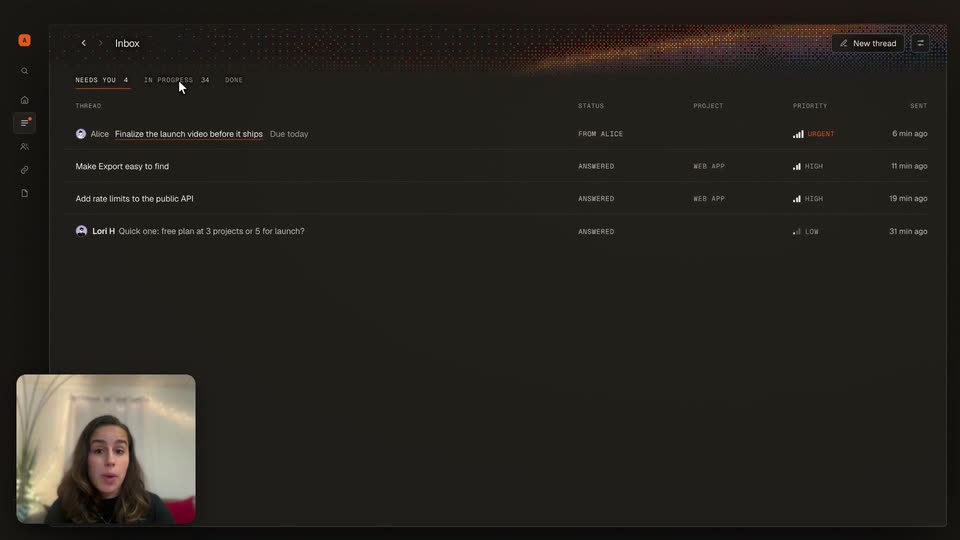
A dark inbox interface with a dotted gradient banner fills the frame; a woman speaks in a small webcam window at bottom left. The cursor hovers the urgent thread, then the view zooms into the status and priority columns before pulling back.
Techniques: Cursor demo, UI zoom
Camera: Static
A dark dashboard shows a task prompt and two task lists, with a small webcam video of the presenter in the lower-left corner. The view zooms into the model selector dropdown, listing Claude Code and Codex options plus an effort scale, then pulls back to the full screen.
Techniques: Cursor demo, UI zoom
Camera: Static
A dark inbox table lists four threads with status, project, priority and sent columns. A cursor glides from the left sidebar to the top row and clicks it, while a small video-call window of a woman stays in the lower-left corner.
Techniques: Cursor demo
Camera: Static
A dark inbox screen zooms out from a close-up of a task message and an embedded video of a talking woman to reveal the full interface with sidebar and top bar. A cursor moves to the launch-video file link while a small face-cam overlay stays in the corner.
Techniques: UI zoom, Cursor demo
Camera: Static
A locked-off screen recording of a video review app: a player frame holds a macOS desktop mockup with a small webcam feed of a woman in the corner. The inner footage cuts from an Agentbox threads list to a desktop showing the agentbox.ac site, while a comment bubble slides into the Notes panel on the right.
Camera: Static
A dark video review app sits locked off on a paused launch frame: the agentbox.ac end card beside a Threads window, a webcam tile in the corner. A timestamp chip leaves the note box and a new comment, 'Hold the end card a second longer,' lands in the right-hand Notes list.
Techniques: Cursor demo
Camera: Static
A dark inbox view of a task titled by a launch video, with a video player and a reply box. A small live-action tile of a talking woman sits in the bottom-left corner while the cursor drifts down to the reply field.
On-screen text: “agentbox.ac”
Camera: Static
A dark inbox thread zooms into an email and scrolls past two report mockups showing export placements, a cursor hovering over row menus, while a woman sits in a small webcam inset at bottom left, then the view lands on a new email about API rate limits.
Techniques: UI zoom, Cursor demo
Camera: Static
A dark code-review window shows a thread titled Add rate limits to the public API, with a video-call tile of a speaking woman in the lower left. The view zooms in on the title, then pulls back as a cursor moves to the change-count button at top right.
Techniques: UI zoom, Cursor demo
Camera: Static
A dark code-review interface fills the frame, a webcam video of a woman anchored bottom left. A cursor opens a top-right menu and selects a teammate, then the screen cuts to an inbox thread showing one short question.
Techniques: Cursor demo
Camera: Static
A dark inbox thread from Lori H fills the screen. A reply field expands at the bottom and the answer is typed, then the cursor moves to the Send button. A small webcam feed of a woman stays in the lower-left corner.
Techniques: Cursor demo
Camera: Static
A dark dashboard with a greeting, a task prompt and two status panels sits over a dotted background. The view zooms in on the panels, holds, then pulls back and cuts to an empty inbox screen. A small webcam inset of a woman speaking stays in the bottom-left corner.
Techniques: UI zoom, Cursor demo
Camera: Static
A dark inbox interface fills the frame, showing an empty state over a starfield with a diagonal band of amber dots and a row of selection chips. A small video feed of a woman speaking sits in the bottom-left corner.
Camera: Static
A macOS desktop shows a social feed and a white 'Who to follow' card on a green wallpaper. The camera slowly zooms into the card as a small video-call window of a woman stays pinned in the bottom-left corner, and a status badge in the card cycles from '20 working' to '3 waiting'.
Techniques: UI zoom
Camera: Push in
A tablet screen shows a social feed beside a 'Who to follow' panel. A white card lists tasks such as 'Pricing page is ready for you' as a cursor taps the '6 waiting' pill at the bottom. A small webcam video of a woman sits in the lower left corner.
Techniques: Cursor demo
Camera: Static
A dark standup screen fills the frame, a sidebar of teammate names left and a column of status entries right, with a small video-call tile of a woman in the lower left. The list scrolls down, expanding into a long bulleted list of shipped items.
Camera: Static
A dark dashboard fills the frame: a greeting, a prompt bar, and two task lists, with a small video of the presenter speaking in the lower left corner. The interface holds steady, then the whole frame fades to black.
Camera: Static