
1:39
Explore
SimBlox launch film
SimBlox · 1:30 · Full motion · AI-annotated
- Length
- 1:30
- Scenes
- 18 · 5.0 s avg
- Product on screen
- 0:00
- Features shown
- 8
- Call to action
- 1:25 · 94%
- Voiceover
- Yes
00:00:00 / 01:30:00
- Length
- 1:30
- Scenes
- 18 · 5.0 s avg
- Product on screen
- 0:00
- Features shown
- 8
- Call to action
- 1:25 · 94%
- Voiceover
- Yes
SimBlox’s 1:30 launch film runs 18 scenes, about 5.0 s each. The product is on screen from the first frame and 8 features are revealed. The call to action lands at 1:25 (94% in), over a voiceover. Built as a badge labeled feature tour: a question card, a platform overview, then eight features each shown as flat browser or phone mockups that scroll inside locked off windows on a dark dot grid stage. Signature moves are the fixed frame internal scrolling, side by side dual windows joined by a blue arrow, and per feature title cards that swap in sync with the voiceover.
No filming indicatedEstimated needs: 8 capture groups — your screens or recordings · 1 official logo — reused across the film · 2 3D passages — build or supply
Is this your launch? to your site or press kit.
More like this

SimBlox launch film, scene by scene
· 18 scenes as text
01 · Product intro · 0:00–0:06
A dark navy field with a faint dot grid holds a centered white headline. “WHAT IF LAUNCHING MOBILE CONNECTIVITY...” holds, then switches to “...DIDN'T REQUIRE BUILDING A TELECOM COMPANY?”, and the Simblox logo fades in below the text.
On-screen text: “WHAT IF LAUNCHING”, “MOBILE CONNECTIVITY...”, “...DIDN'T REQUIRE BUILDING”, “A TELECOM COMPANY?”, “SIMBLOX”
Camera: Static
02 · Demo · 0:06–0:13
A white headline sits above a browser mockup of the Simblox Partner Portal on a dark dotted grid. The dashboard scrolls down inside the fixed window, moving from stat cards past the launch checklist to the Recent Orders and Recent Customers panels.
On-screen text: “THE PLATFORM”, “One operating system.”, “Products, pricing, orders, customers and growth — in one place.”
Techniques: UI zoom
Camera: Pull out
03 · Feature reveal · 0:13–0:22
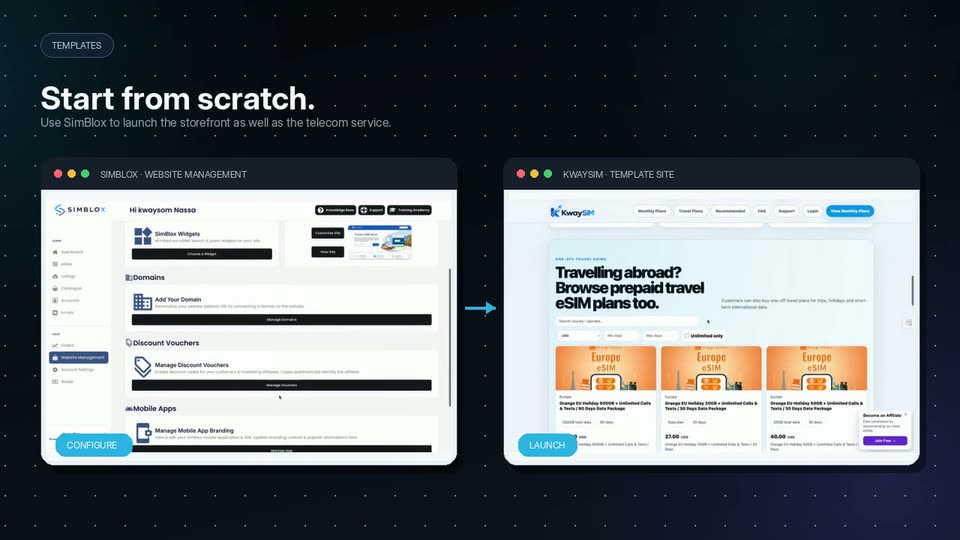
Two flat browser windows sit side by side on a dark dotted grid, a blue arrow linking them. The left management panel and the right storefront template both scroll downward through their sections, while the heading and CONFIGURE, LAUNCH badges stay fixed.
On-screen text: “TEMPLATES”, “Start from scratch.”, “Use SimBlox to launch the storefront as well as the telecom service.”, “CONFIGURE”, “LAUNCH”
Techniques: Split screen
Camera: Pull out
04 · Feature reveal · 0:22–0:26
A dark dotted-grid backdrop holds a white headline and gray subheadline top left. A flat browser mockup of the SimBlox partner portal sits centered, its interface scrolling vertically past widget settings and orange Europe eSIM preview cards. A cyan CONFIGURE button anchors the lower left.
On-screen text: “WIDGETS”, “Configure once inside SimBlox.”, “Choose the widget, layout and products from the partner portal.”
Camera: Static
05 · Feature reveal · 0:26–0:32
Two live website mockups, esim.co.uk and airesim, sit side by side in browser frames on a dark dotted background. Both pages scroll down through hero, destination and plan sections in sync while the headline and subline stay fixed above.
On-screen text: “WIDGETS”, “Then plug into what you already have.”, “The same SimBlox infrastructure can power completely different brands and websites.”, “ESIM.CO.UK”, “AIRESIM”
Techniques: Split screen
Camera: Static
06 · Feature reveal · 0:32–0:43
The clip settles from a crossfade into two flat browser windows, catalogue and retail listings, side by side under a bold white headline on a dark dotted grid. A cursor ticks rows, a toggle flips green, a price jumps, and toasts pop top right.
On-screen text: “COMMERCE”, “Your products. Your pricing.”, “Choose what you sell, then control the retail proposition.”, “CATALOGUE”, “YOUR PRICING”
Techniques: Split screen, Cursor demo
Camera: Static
07 · Feature reveal · 0:43–0:47
A dark dotted stage holds a white headline above a flat browser window. Inside, the Kwaysim storefront page scrolls through data and travel plans, then swaps to a checkout form where a verification modal pops over a dimmed screen.
On-screen text: “CHECKOUT”, “The customer buys from your brand.”, “Your storefront. Your checkout. Your customer relationship.”, “CARD DETAILS OBSCURED”
Camera: Static
08 · Feature reveal · 0:47–0:53
A locked-off frame holds the headline over a dark dotted grid while a centered browser mockup plays a checkout flow: a verification dialog closes, a country dropdown opens and selects United Kingdom, the card number fills in, and the cursor clicks Pay.
On-screen text: “CHECKOUT”, “The customer buys from your brand.”, “Your storefront. Your checkout. Your customer relationship.”, “CARD DETAILS OBSCURED”
Techniques: Cursor demo
Camera: Static
09 · Feature reveal · 0:53–0:56
A flat browser mockup of the SimBlox orders table sits under a static headline. A cursor clicks a row, the view zooms into an order detail panel with status cards, then scrolls down to reveal the eSIM and notes.
On-screen text: “FULFILLMENT”, “SimBlox does the telecom work.”, “Payment, provisioning and eSIM delivery happen behind the brand.”
Techniques: Cursor demo, UI zoom
Camera: Static
10 · Feature reveal · 0:56–0:58
A dark dotted backdrop holds a white headline and subline above a flat browser mockup of the SimBlox orders screen, showing a sidebar and a dense orders table with colored status pills. A blue PAID to PROVISIONED pill sits at lower left. The frame is locked-off and still.
On-screen text: “FULFILLMENT”, “SimBlox does the telecom work.”, “Payment, provisioning and eSIM delivery happen behind the brand.”, “PAID → PROVISIONED”
Camera: Static
11 · Feature reveal · 0:58–1:00
A locked-off slide on a dark dotted grid shows a white bold headline above a browser mockup of the SimBlox dashboard. A centered modal updates through eSIM states, replacing a large QR code with a ready confirmation and a smaller QR.
On-screen text: “FULFILMENT”, “SimBlox does the telecom work.”, “Payment, provisioning and eSIM delivery happen behind the brand.”
Camera: Static
12 · Feature reveal · 1:00–1:03
A white headline sits top left over a dark dotted grid. A browser window mockup shows the SimBlox dashboard; a centered email preview with a QR code fades and slides away, revealing the email list with one row highlighted blue. The window drifts a few pixels up and down.
On-screen text: “FULFILLMENT”, “SimBlox does the telecom work.”, “Payment, provisioning and eSIM delivery happen behind the brand.”
Camera: Static
13 · Feature reveal · 1:03–1:12
A flat browser window of a Stripe partner dashboard sits on a dark dot-grid background. The interface loads from skeleton placeholders into an earnings chart and payments table, then a cursor opens a payment details panel that slides in from the right. Headline and subtext lock in the top left.
On-screen text: “SPLIT PAY”, “Your margin. Your Stripe.”, “Wholesale settles automatically. Partner revenue lands directly in Stripe.”
Techniques: Cursor demo
Camera: Static
14 · Feature reveal · 1:12–1:16
Two angled phone mockups, tagged KWAYSIM and AIRESIM, sit on a dark dotted grid while their screens cycle through app views: home, support list, profile, and a login form. A white headline and gray subhead hold on the left. The frame stays locked off.
On-screen text: “MOBILE”, “Your brand. In their pocket.”, “Real SimBlox-powered apps — browsing, account access and eSIM management.”
Techniques: 3D mockup
Camera: Static
15 · Feature reveal · 1:16–1:20
Two tilted phone mockups, labeled KWAYSIM and AIRESIM, sit on a dark dotted grid, each scrolling through eSIM app screens: QR codes, plan lists, a profile page. A white headline and subhead hold the left under a MOBILE badge.
On-screen text: “MOBILE”, “Your brand. In their pocket.”, “Real SimBlox-powered apps — browsing, account access and eSIM management.”, “KWAYSIM”, “AIRESIM”
Techniques: 3D mockup
Camera: Static
16 · Feature reveal · 1:20–1:23
Two dashboard windows, labeled Affiliates and Resellers, sit side by side on a dark dotted grid beneath a white headline. Each window swaps its data table for an onboarding form modal, the right one triggered by a cursor click.
On-screen text: “GROWTH”, “Build distribution underneath your brand.”, “Affiliates and resellers are managed inside the same platform.”
Techniques: Split screen, Cursor demo
Camera: Static
17 · Feature reveal · 1:23–1:25
Two flat browser mockups sit side by side on a dark dotted grid, tagged AFFILIATES and RESELLERS. The left window switches from an onboarding form to a reseller dashboard while the headline and subhead stay locked at top left.
On-screen text: “GROWTH”, “Build distribution underneath your brand.”, “Affiliates and resellers are managed inside the same platform.”, “AFFILIATES”, “RESELLERS”
Techniques: Split screen
Camera: Static
18 · CTA · 1:25–1:30
The SIMBLOX logo and two-line tagline sit centered on a dark dotted grid; the logo brightens from dim gray to full color in the first second. A gray subtext line and a blue START FREE button fade in below at two seconds.
On-screen text: “YOUR BRAND. YOUR CUSTOMERS.”, “YOUR CONNECTIVITY BUSINESS.”, “Launch a global eSIM buisiness — without building a telecoim company.”, “START FREE”
Camera: Static