1:47
Mireye - One API to Connect AI Agents to the Physical World
Mireye · B2B · Jul 2026
ADYOUNEED · Apr 2021 · 1:47 · Full motion · AI-annotated
ADYOUNEED’s 1:47 launch film runs 27 scenes, about 4.0 s each. The product shows up at 0:21 and 4 features are revealed. There is no explicit call to action; a voiceover carries the film. The video opens with flat character vignettes that pose the pain, then hands off to a repeating unit of typed headline cards on cyan or white fields that slide into rounded white UI mockups, with a confetti burst and the dotted world map bookending the intro and outro. Pacing is steady at roughly two cuts per minute, each feature beat marked by a row of social icons and a single cyan accent color that carries the whole brand.
Is this your launch? to your site or press kit.
Mireye · B2B · Jul 2026
Adobe · Apr 2025
Loom · Productivity · Jan 2024
Films whose music sounds like this one, voice left out
Cursor · Upbeat electronic and funk-inspired background music with a modern, positive feel
Meridian · Electronic, Corporate
Alexandria · Corporate Tech Launch
A flat vector illustration of a clothing store fades in. A man in a blue shirt behind a counter gestures, then rests his chin on his hands. A rack and sign stand left, a mannequin and plant right, a dark cat with a wagging tail sits at the counter's edge.
Camera: Static
A flat illustration shows a shopkeeper at a STORE desk, a thought bubble above him holding a browser with a discount ad and floating dollar coins. His head bobs and coins drift as the scene fades to white, the browser rotating into a 3D monitor.
Techniques: Morph, 3D mockup
Camera: Static
A flat vector office scene on a white background: a desk with a monitor, a potted plant, a filing cabinet with an orange pen cup, a hanging lamp and a wall clock. A bespectacled figure in a dark suit spins in an office chair, swinging from a leaned-back pose to upright with one arm raised.
On-screen text: “STORE”, “ADS”
Camera: Static
A flat illustration shows a man with a headset seated at a desk. Ad cards, gear icons and checklists pop up beside the monitor, then fade as he slumps in frustration before sitting back up to type.
Camera: Static
A flat illustration of a man at a desk slides right as a white dashboard window rises to center, charts and sidebar included. Teal and gray confetti bursts outward across the frame. The blue ADYOUNED wordmark appears at the top over a dotted world map.
On-screen text: “ADYOUNED”
Techniques: Particles
Camera: Push in
On a white dotted world map, blue and gray confetti falls while the orange Product Hunt badge and cyan ADYOUNEED wordmark sit at top. A gray tagline animates in below them. Three flat browser mockups of the dashboard sit in a row at the bottom, the center one largest.
On-screen text: “Product Hunt”, “Makers Edition”, “ADYOUNEED”, “THE SMARTEST WAY TO CREATE THE AD YOU NEED.”
Techniques: Particles, Kinetic type
Camera: Pull out
Three tilted browser mockups of the ADYOUNED dashboard sit at the bottom under a cyan wordmark and gray tagline, while cyan and gray confetti falls over a dotted world map. A solid cyan band wipes up from the bottom, covering the mockups and the lower half of the tagline.
On-screen text: “ADYOUNED”, “THE SMARTEST WAY TO CREATE THE AD YOU NEED.”
Techniques: 3D mockup, Particles, Kinetic type
Camera: Static
Centered white headline 'Focus on your business' sits on a flat cyan field as small white dots, rings and triangles drift. A white rounded panel slides up from the bottom edge, carrying a row of social media icons.
On-screen text: “Focus”, “on your business”, “in”
Techniques: Particles
Camera: Static
A white rounded card slides up over a cyan background while a cyan “Create an Ad” button with a megaphone icon stays locked in the center. A flat-illustration man in a blue tank top runs in a loop around the button, passing in front of it, then drops out of frame as the card settles.
On-screen text: “Focus”
Camera: Pan
A cyan backdrop frames a white rounded panel holding a social post mockup with a shopping illustration and a purple button. The panel widens and a second identical mockup fades in to its left, leaving two cards side by side.
Camera: Static
A white dashboard card sits on a cyan field. The left panel holds a social ad post with a shopping illustration; the right panel's line and bar chart animates in, bars rising and a data point opening a tooltip with cost figures.
Camera: Static
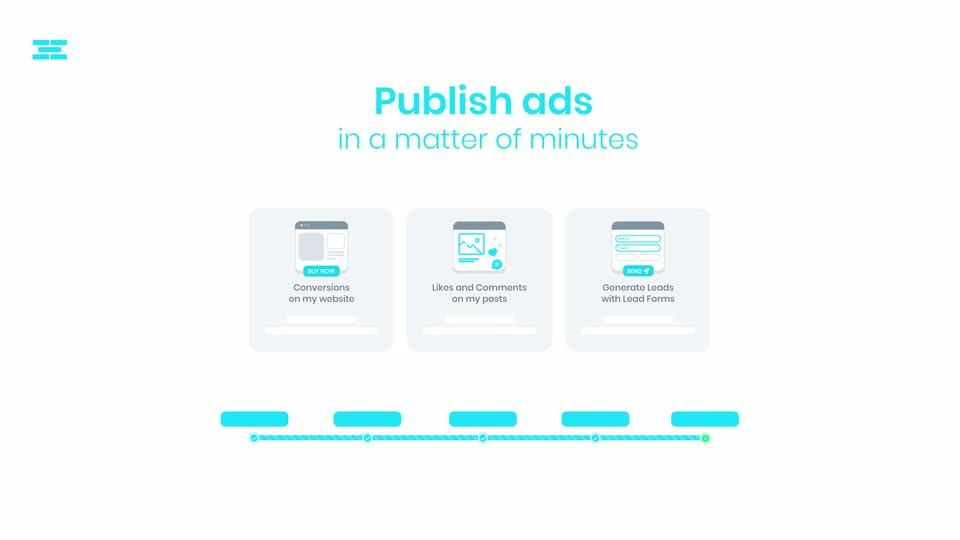
Cyan heading “Publish ads” types in on a white frame, subline fades below, tiny dots and triangles drift, social icons line the bottom. Three gray cards with phone illustrations slide in, a five-step bar fills to a green check, then fades to a check circle with a success note.
On-screen text: “Publish ads”, “in a matter of minutes”
Techniques: Kinetic type, Particles
Camera: Static
A white UI screen holds a bold cyan headline over a lighter subtitle. Center, a cyan circle with a white checkmark and small dots; the dots fade and the checkmark becomes the logo. Below, a caption and campaign card sit above a full progress bar with a green check.
On-screen text: “Publish ads”, “in a matter of minutes”, “Congratulations. Your ad has been created!”
Techniques: Particles
Camera: Static
The pale cyan “Publish ads” title card with its campaign success mockup fades out, and a solid cyan card fades in with the white headline “Reach your clients” above a row of faint social media icons.
On-screen text: “Publish ads”, “in a matter of minutes”, “Reach your clients.”
Techniques: Kinetic type
Camera: Static
White text reads 'Reach your clients where they are!' centered on a cyan field, with a row of social icons and small floating geometric shapes. A flat phone mockup slides up from the bottom as the text fades out.
On-screen text: “Reach your clients where they are!”
Techniques: Particles
Camera: Static
Flat phone mockup on cyan shows a social feed scrolling to an ad; a cartoon man in overalls pops out from behind it and waves. The screen switches to a Google search with a sponsored result, then the phone slides up to a platform card and headline 'Reach your clients.'
On-screen text: “Reach your clients.”
Camera: Pull out
A cyan screen holds a two-column grid of social platform cards that drift into place and lock off, while the white headline sits at the top and small star outlines fade above it.
On-screen text: “A new platform every month”
Camera: Static
Two lines of white text sit centered on a flat cyan field, the lower line filling in word by word, while a row of six social icons and scattered small dots fade up along the bottom edge.
On-screen text: “Let ADYOUNEED A.I.”, “Find your perfect audience”
Techniques: Kinetic type, Particles
Camera: Static
A cyan end card holds two centered lines of white text: an outlined “Let ADYOUNEED A.I.” above a bold italic “Find your perfect audience”, with a row of social icons below and faint dots and triangles scattered around. The frame stays locked off.
On-screen text: “Let ADYOUNEED A.I.”, “Find your perfect audience”
Camera: Static
A white card slides up on a cyan field, showing a row of ten person icons above three feature cards. A window with green edge bars shrinks across the row, graying out unselected icons, as each card lights up cyan in turn.
On-screen text: “Let ADYOUNEED A.I.”, “Find your perfect audience”
Techniques: Masking
Camera: Pan
A white UI panel with a cyan band slides up out of frame, revealing a centered cyan tagline on a plain white background. Small light-cyan triangles and circles drift near the bottom as the logo sits top left.
On-screen text: “Discover many other amazing features!”
Techniques: Kinetic type, Particles
Camera: Static
A cyan two-line headline sits centered on a white background, small cyan dots and triangles drift around it, and six social icons line the bottom. The frame then wipes to a cyan border as a white card fades in reading Make your own design With Canva.
On-screen text: “Discover many other amazing features!”, “Make your own design With Canva”
Techniques: Particles, Masking
Camera: Pull out
On a flat cyan field, a small cyan button reading “Make your own design! With Canva” sits centered on a white rounded card. It expands upward into a larger card, revealing a design template mockup with a logo, headline and dashboard screenshot above the button.
On-screen text: “Make your own design! With Canva”
Techniques: Morph
Camera: Static
A phone mockup and an invite form fade in on a cyan field. Text is typed into the name and email fields, the invite button depresses, and an existing accounts list slides in beneath. The two panels drift left, then the whole frame fades to white.
Camera: Static
A white panel on a cyan field holds three flat UI mockups: a Canva ad template, a dark mode toggle, and a sub-account invite form. The frame sharpens from a soft blur, then a cursor moves to click the ACTIVE button of the dark mode toggle.
Techniques: Cursor demo
Camera: Push in
A flat dashboard UI with a phone mockup, a dark-mode toggle and a sub-account panel sits on a teal field. The background darkens to near black, then the view pans down past the panel to a white field holding a small cyan logo.
Camera: Pan
Three flat browser mockups of the ADYOUNED dashboard, social and settings pages sit in a row over a dotted world map. The orange Product Hunt Makers Edition badge and cyan ADYOUNED wordmark pop in at top, then the tagline types in word by word and holds.
On-screen text: “Product Hunt”, “Makers Edition”, “TIME TO CREATE THE AD YOU NEED, IN THE SMARTEST WAY POSSIBLE.”
Techniques: Kinetic type
Camera: Static