1:13

Introducing Aleph 2.0 | Runway
Runway · AI · May 2026
Adobe’s 1:41 launch film runs 36 scenes, about 2.8 s each. The product is on screen from the first frame and 6 features are revealed. The call to action lands at 1:36 (95% in), over a voiceover. Two-host studio news show that alternates locked-off desk shots with split-screen product demos, each feature introduced by a host line and shown on a right-side screen. Signature moves are the 3D image-tile title sting, the pink split-screen divider, and rounded cutout reframes between set shots.
Is this your launch? to your site or press kit.
Runway · AI · May 2026
Discord · Consumer · Jun 2022
Spacesheep · B2B · Oct 2026
Films whose music sounds like this one, voice left out
HeyGen · Modern electronic
Phaze · Modern electronic
Two hosts sit at a wooden desk in a colorful studio set, speaking into microphones. The woman in a white blazer raises her hand to gesture. An ON AIR sign glows on the desk beside two laptops and letter blocks, with a The Update poster on the wall behind.
On-screen text: “This is The Update, the creative”
Camera: Static
Two hosts sit at a studio desk with microphones and laptops in front of a lit The Update panel. The woman on the right counts on her fingers while speaking, and the man listens. Subtitles swap along the bottom.
On-screen text: “This is The Update, the creative”, “news about the tools you use.”
Camera: Static
A woman with shoulder-length dark hair speaks into a black microphone, gesturing with her right hand. She is framed in a locked-off medium close-up against a colorful studio set with metal shelves and colored panels. White subtitles caption her speech along the bottom.
On-screen text: “Sometimes the logo just”, “doesn't have to be bigger.”
Camera: Static
On a black field, a 3D collage of square and rectangular image tiles (a scooter rider, a bull, a train, colorful abstract shapes) floats around a centered white title. The tiles drift into a tighter cluster, then the view pushes in so the tiles fill the frame and crop the title at the right edge.
On-screen text: “The Update”
Techniques: Parallax
Camera: Pan
On a black background, the white title holds center while rectangular panels of photos and color fields rotate in 3D around it. The panels fly past the letters at varying depths, some passing in front and some behind.
On-screen text: “The Update”
Techniques: Parallax
Camera: Static
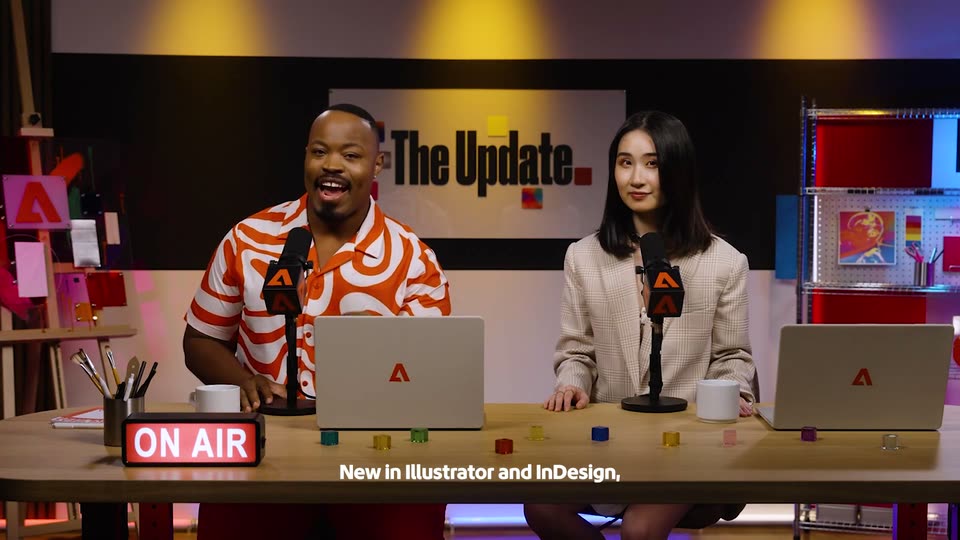
A man in an orange patterned shirt and a woman in a beige blazer sit at a desk with microphones and laptops, speaking to camera. A lit ON AIR sign and a The Update wall logo frame the set. The man gestures as he talks; the frame stays locked off.
On-screen text: “New in Illustrator and InDesign,”
Camera: Static
A man in an orange and white patterned shirt and a woman in a beige plaid blazer sit at a desk with branded microphones, talking to camera. The man gestures with his hand while the woman listens and smiles. A laptop rests on the desk in front of them against a colorful studio set. A white caption line sits at the bottom of the locked-off frame.
On-screen text: “New in Illustrator and InDesign,”, “AI Assistant (beta) rolls out in both.”
Camera: Static
Two hosts sit at a studio desk with microphones and laptops, the man in an orange shirt gesturing as he speaks while the woman in a beige blazer listens. A static medium shot holds on the set with an ON AIR sign and a backdrop title.
On-screen text: “It takes the repetitive edits”, “and the design calls stay yours.”
Camera: Static
Two hosts sit at microphones in a colorful studio, the man in an orange patterned shirt gesturing as he speaks. The frame then splits, keeping him on the left while an Illustrator canvas with a vertical stack of colored rings appears on the right.
On-screen text: “But let's start with Illustrator.”
Techniques: Split screen
Camera: Static
Split screen: a man in an orange patterned shirt talks into a microphone on the left, while an Illustrator artboard on the right shows a vertical stack of colored rings that blend into a gradient column as the cursor clicks the Blend panel.
On-screen text: “Illustrator's Blend tool”, “is one of the most beloved,”, “and now it has its own”
Techniques: Split screen, Cursor demo
Camera: Static
Split screen: a man in an orange patterned shirt speaks into a microphone at a laptop on the left, while the right shows an Illustrator canvas with a rainbow circle shape and a blend panel; white captions read “and now it has its own” then “dedicated panel.”
On-screen text: “and now it has its own”, “dedicated panel.”
Techniques: Split screen
Camera: Static
A woman in a beige blazer speaks into a studio microphone on the left, gesturing, while the right shows a design app artboard with a rainbow spine of overlapping circles. A cursor drags the spine's bottom handle and opens the Easing dropdown as white captions narrate the feature.
On-screen text: “This means spine controls now”, “work on open paths”, “and nested or group shapes,”, “and you can apply a hidden spine.”
Techniques: Split screen, Cursor demo
Camera: Static
Split screen: presenter at a desk with a microphone on the left, design app canvas on the right showing a curved row of rainbow circles with a spine line. A cursor drags the on-canvas easing handle, changing spacing and easing type, while captions swap along the bottom.
On-screen text: “and you can apply a hidden spine.”, “Plus, on-canvas easing handles put”, “object acceleration exactly”, “where you want it on your curve.”
Techniques: Split screen, Cursor demo
Camera: Static
Two hosts sit at a desk with microphones in a colorful studio. The woman gestures while speaking, then a rounded cutout mask reframes to a wide two-shot with an ON AIR sign. The man speaks, and the frame splits to place a dropdown menu UI beside him.
On-screen text: “No more navigating back and”, “forth on the drop down menu.”, “Next up, Content Libraries now”, “have hundreds of new free assets”
Techniques: Masking, Split screen, Cursor demo
Camera: Pan
A man in an orange shirt speaks into a mic at left; at right, a vector app shows a retro sunset. A cursor clicks a red gradient swatch, recoloring the mountains. Captions list the asset types, then a cut reveals a woman beside an ON AIR sign.
On-screen text: “have hundreds of new free assets”, “collections of patterns, gradients,”, “brushes, and graphic styles.”
Techniques: Split screen, Cursor demo
Camera: Static
Split screen: a host in a beige plaid blazer sits at a desk with a microphone on the left, while a design app on the right shows a retro sunset illustration and a dropdown menu with the cursor resting on Brushes. A white caption reads at the bottom.
On-screen text: “brushes, and graphic styles.”
Techniques: Split screen, Cursor demo
Camera: Static
A man in an orange patterned shirt and a woman in a beige blazer sit at a desk with cube-flag microphones, the man talking and gesturing. The shot widens to a full-set view with laptops, an ON AIR lightbox and the The Update. backdrop.
On-screen text: “I just know I'm going”, “to use it so much.”, “On to InDesign, where”, “Check documents spots and fixes”
Camera: Pan
Split screen: a presenter in an orange patterned shirt speaks into a mic on the left, while an InDesign document on the right runs a Check Document scan, opening a date-format panel with a cursor near Fix all.
On-screen text: “Check Document spots and fixes”, “common quality issues”
Techniques: Split screen, Cursor demo
Camera: Static
A man in an orange shirt speaks into a microphone on the left, split by a pink line from a check document panel on the right listing a date format issue, cursor on the Fix all button. Captions swap from common quality issues to in copy and accessibility.
On-screen text: “common quality issues”, “in copy and accessibility.”
Techniques: Split screen, Cursor demo
Camera: Static
A host in an orange patterned shirt gestures at a desk beside a microphone, while the right half shows the product document with a sidebar panel that cycles from a date-format suggestion to an all-caught-up checkmark.
On-screen text: “in copy and accessibility.”
Techniques: Split screen
Camera: Static
Two hosts sit at a studio desk with microphones and laptops; the woman on the right gestures while talking, the man on the left looks at her. A backdrop reads The Update. with colored squares, and an ON AIR sign sits on the desk. White subtitles caption the speech.
On-screen text: “Such as grammar and”, “inconsistent formatting.”
Camera: Static
A woman with shoulder-length black hair speaks into a black microphone with an orange logo, gesturing with one hand. She is framed center in a colorful studio with red, blue and pink panels and a metal shelf behind her. White subtitles swap at the bottom in sync with her speech.
On-screen text: “The worst!”, “It's like a pair of fresh eyes”, “on your content.”
Camera: Static
Split screen: a man in an orange patterned shirt speaks into a mic on the left; on the right a design canvas zooms in on an Explore MIAMI poster as a blue share pill and three collaborator avatars pop in and a cursor hovers the share button.
On-screen text: “Then Co-editing (beta)”, “lets multiple designers work”, “together on the same layout.”
Techniques: Split screen, UI zoom, Cursor demo
Camera: Static
Split screen: a woman in a beige blazer speaks into a microphone with an orange badge on the left, while a design canvas on the right shows an Explore MIAMI poster with selection outlines. The canvas reframes to reveal a dark layer panel with numbered thumbnails.
On-screen text: “And it's not just for designers.”
Techniques: Split screen, Kinetic type, UI zoom
Camera: Static
Split screen: a presenter in a beige blazer talks at a desk on the left while a browser on the right shows an InCopy layout, the body text typing out and the view zooming into the column. A white lower third captions the action on a purple bar.
On-screen text: “Writers and copy editors can”, “edit text in a web browser”, “while designers retain control”
Techniques: Split screen, UI zoom
Camera: Static
Split screen: a presenter in a beige plaid blazer gestures at a microphone on the left, while a browser window on the right shows an InDesign newspaper layout that scales up. A white subtitle sits on the purple lower bar.
On-screen text: “while designers retain control”, “of the layout.”
Techniques: Split screen, UI zoom
Camera: Pull out
Split screen: a woman speaks into a studio mic on the left while a design app on the right shows a magazine page with an aerial kayak photo; collaborator cursors drift over the layout as captions appear below.
On-screen text: “That means easier collaboration”, “and faster workflows.”
Techniques: Split screen, Cursor demo
Camera: Push in
Opens on a close-up of the two hosts over a laptop showing a summer-themed design, then cuts to a wide shot of the studio desk with an ON AIR sign and a The Update backdrop. The male host gestures while speaking; the female host listens.
On-screen text: “Co-editing (beta).”, “Exciting or terrifying for your team?”, “It's exciting.”
Camera: Static
A woman in a beige houndstooth blazer speaks into a studio microphone, gesturing with both hands, in a locked-off medium close-up. A colorful set of red, blue, and purple panels blurs behind her while white subtitles appear at the bottom.
On-screen text: “The Update”, “ON AIR”, “Exciting or terrifying for your team?”, “It's exciting.”, “We can design together”, “and deliver faster.”
Camera: Static
Two hosts sit at a podcast desk with microphones and laptops before a 'The Update' backdrop. The woman gestures while speaking, then the shot cuts to a close-up of the man. White subtitles run along the bottom.
On-screen text: “Also, you can use”, “Al Assistant (beta) to”, “quickly adapt layouts”, “and make bulk edits.”
Camera: Static
A man in an orange and white patterned polo speaks into a studio mic, gesturing, while white subtitles caption his words. The shot cuts to a wide two-shot of the two hosts at a desk with laptops and a lit ON AIR sign.
On-screen text: “And in Illustrator you can use”, “AI Assistant (beta)”, “for repetitive tasks”, “like organizing and batch edits.”
Camera: Static
Two hosts sit at a desk with microphones and laptops, a screen behind them reads The Update. The man in an orange patterned shirt gestures while talking, the woman in a beige blazer turns toward him. A white subtitle line sits at the bottom of the frame.
On-screen text: “for repetitive tasks”, “like organizing and batch edits.”
Camera: Static
A man in an orange and white patterned shirt speaks into a microphone, gesturing with both hands, in front of a set with a large Update sign and an ON AIR lightbox. A white caption reads at bottom center.
On-screen text: “That's The Update.”
Camera: Static
Two hosts sit at a desk with microphones and laptops in a colorful studio set, the woman on the right gesturing as she speaks. A lit ON AIR sign sits on the desk and a backdrop reads The Update, while white subtitles appear at the bottom.
On-screen text: “Update Illustrator and”, “InDesign to try them.”
Camera: Static
A wide locked-off shot of a studio set. A man in an orange patterned shirt and a woman in a white top sit at a curved wooden table with laptops and microphones, gesturing while talking. A wall sign and a colorful shelf fill the background.
On-screen text: “InDesign to try them.”
Camera: Static
A studio set with two costumed hosts at a table sits behind the large white title “The Update”, with a small artwork and caption at the bottom. The frame then cuts to black, where a rainbow gradient square and a red square settle into place.
On-screen text: “The Update”, “InDesign to try them.”
Camera: Static