0:54

Introducing Pika 1.0, An Idea-to-Video Platform
Pika · AI · Nov 2023
Spacesheep · Oct 2026 · 0:57 · AI-annotated · YC Fall 2026
The video alternates a brick-wall talking head with full-screen UI demos, and bold outlined captions carry the narration throughout. Signature moves include the code wall swallowing the frame, the split-screen co-editing, and a rapid montage of browser pages capped by a pixel-sheep logo card.
Pika · AI · Nov 2023
Descript · Design · Oct 2020
Runway · AI · Jun 2026
A man in a green beanie and glasses sits at a wooden desk against a red brick wall, gesturing as he speaks toward a laptop. Bold white captions with yellow highlighted words appear at the bottom, changing phrase by phrase with his speech.
On-screen text: “Some people say Al”, “will destroy humanity”, “in five to ten years”
Camera: Static
A man in a green beanie and glasses sits before a red brick wall, holding a sticker-covered laptop and speaking to the camera. White outlined captions read “and I'll tell you” then “exactly how.” at the bottom. The frame stays locked off.
On-screen text: “and I'll tell you”, “exactly how.”
Camera: Static
A man in a green beanie talks to camera at a desk against a brick wall as bold captions pop up phrase by phrase. A dark panel of scrolling terminal text rises and swallows the frame, ending on a full-screen code wall with the line “So we are fighting back.”
On-screen text: “exactly how”, “Agents will keep”, “sending us”, “walls of text”, “in them.”, “So we are fighting back.”
Techniques: Kinetic type, Masking
Camera: Pull out
A man in a green beanie and glasses sits at a wooden desk against a brick wall, gesturing with his right hand as he speaks, a sticker-covered laptop open in front of him. The frame is locked off and a caption sits at the bottom center.
On-screen text: “So we are fighting back,”
Camera: Static
A man in a green beanie and glasses sits before a red brick wall, talking to the camera with a sticker-covered laptop in front of him. White outlined subtitles appear bottom center line by line, ending with the word spacesheep scaling in.
On-screen text: “So we are fighting back,”, “and that's why”, “we've built”, “spacesheep”
Techniques: Kinetic type
Camera: Static
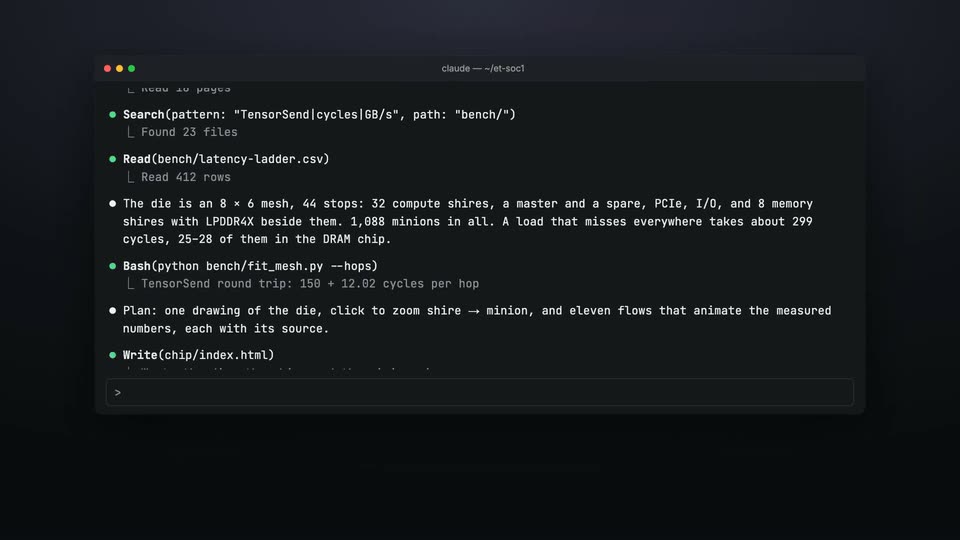
A dark terminal window on a near-black background scrolls its monospace log upward as the agent reads files and plans a die layout. A pixel sheep icon with the white spacesheep wordmark sits centered below the window.
Camera: Static
A dark terminal window shows an agent session log scrolling up while a block cursor types a share command into the input line. Pill labels Claude Code, Codex and Cursor pop in at the top, and large white captions with yellow words appear phrase by phrase along the bottom.
On-screen text: “Just tell your agent,”, “Claude Code”, “Claude Code,”, “Codex”, “Codex:”, “Cursor”, “Cursor:”, ““share this to spacesheep.dev””, “and the whole session”
Techniques: Kinetic type, Cursor demo
Camera: Pan
A dark terminal window fills the frame, its list of session commands scrolling upward while a cursor hovers over a deploy line. Below it, a caption cycles through phrases, with “whole session” highlighted in gold.
On-screen text: “and the whole session”, “becomes a space”, “you can actually”
Techniques: Kinetic type
Camera: Static
A browser window with a dark chip diagram fades in over black. Small purple dots travel along the ladder lines while a tooltip marks one cell. Bottom captions read out a sentence.
On-screen text: “becomes a space”, “you can actually understand.”
Camera: Push in
A flat browser mockup of a dev page shows a cursor clicking the Share button, raising a link-copied toast. The frame then splits into two identical windows, one tagged You and one Alex, while bold caption text builds up at the bottom.
On-screen text: “Share it with your team”, “and all of you”
Techniques: Cursor demo, Split screen, Kinetic type
Camera: Pull out
Two identical browser windows sit side by side on a dark background. A white caption with a yellow word fades out at the bottom. A comment bubble slides into both windows at once, then a second line appears, mirroring the edit for two users.
On-screen text: “can work on it together.”, “You”, “Alex, on their laptop”
Techniques: Split screen
Camera: Static
A close-up of a PC's interior shows a black CPU cooler, crossed metal tubes and a graphics card with red lettering, lit by RGB LEDs. The camera drifts slowly across the hardware as captions appear at the bottom.
On-screen text: “People use it for”, “research,”
Camera: Push in
A browser window showing a live thermal camera page zooms in on the colorful thermal image of a circuit board. The yellow word research, pops in at the bottom center, scales, and disappears.
On-screen text: “research,”
Techniques: Kinetic type, UI zoom
Camera: Static
A browser window shows a dark AI Foundry lab dashboard. The page scrolls up through machine cards, quick links and live circular gauges, while the word dashboards, pops in at the bottom center in yellow extruded lettering.
On-screen text: “dashboards,”
Techniques: Kinetic type
Camera: Pan
A browser window on a dark background shows a Y Combinator data page. The page scrolls down, pushing the stat cards up and out of frame until a line chart of companies funded per year fills the view, its orange area rising to a 765 Total label.
Techniques: UI zoom
Camera: Pan
A flat browser window on a black background scrolls down through a design doc, passing a red line chart and a row of stat cards, while the outlined label “design docs,” slides in at the bottom.
On-screen text: “design docs,”
Techniques: Kinetic type
Camera: Pan
A flat browser window on a black background shows a gender-parity slide: a ranked bar list of countries on the left, a large magenta 120 years figure on the right. The caption slides, in yellow with a dark outline sits at the bottom center, its period bouncing.
On-screen text: “slides,”
Techniques: Kinetic type
Camera: Static
A flat browser window displays a dark web app: a dotted globe spins on the left while a headline card with an orange button sits on the right. A bold yellow caption at the bottom swaps from “micro-apps,” to “vibe-coding,” in sync with the voiceover.
On-screen text: “micro-apps,”, “vibe-coding,”
Techniques: Kinetic type
Camera: Static
A locked-off browser window frames a 3D subway platform with green pillars and PANDA ST signs. The in-scene camera walks forward toward the ticket booth while the caption “and even games.” holds at the bottom.
On-screen text: “spacesheep.dev/@misha/panda-subway”, “and even games.”
Techniques: Parallax
Camera: Static
A browser window frames a low-poly 3D subway station. The view pushes forward down the platform toward a green PANDA ST sign while the caption and even games. sits at the bottom.
On-screen text: “and even games.”
Camera: Static
Twelve project thumbnails in a four-by-three grid fade up from dim to full brightness on a dark navy background. The cards show a subway station render, a line chart, a Mandelbrot fractal, a thermal feed and a globe quiz, all static in a locked-off frame.
On-screen text: “spacesheep.dev/@misha/panda-subway”
Camera: Pull out
A man in a green beanie and glasses sits at a wooden desk against a brick wall, gesturing while he speaks, a sticker-covered laptop open in front of him. A white caption with purple outline reads “Try it at”, then switches to “spacesheep.dev” beside a pixel-art sheep icon.
On-screen text: “Try it at”, “spacesheep.dev”
Camera: Static
A man in a green beanie and glasses sits at a sticker-covered laptop against a red brick wall, talking to camera. Bold outlined captions swap at the bottom, first the URL then a closing line. Locked-off framing, bright even light.
On-screen text: “spacesheep.dev”, “the best things you made.”
Camera: Static
A pixel sheep logo with a rocket flame sits beside the spacesheep wordmark on white. The tagline fades in below, then a gray prompt reads Ask your agent: as a monospace command types out letter by letter in a light gray field, ending with a purple caret.
On-screen text: “Sheep something great.”, “Ask your agent:”, “share this to spacesheep.dev”
Techniques: Kinetic type
Camera: Static