
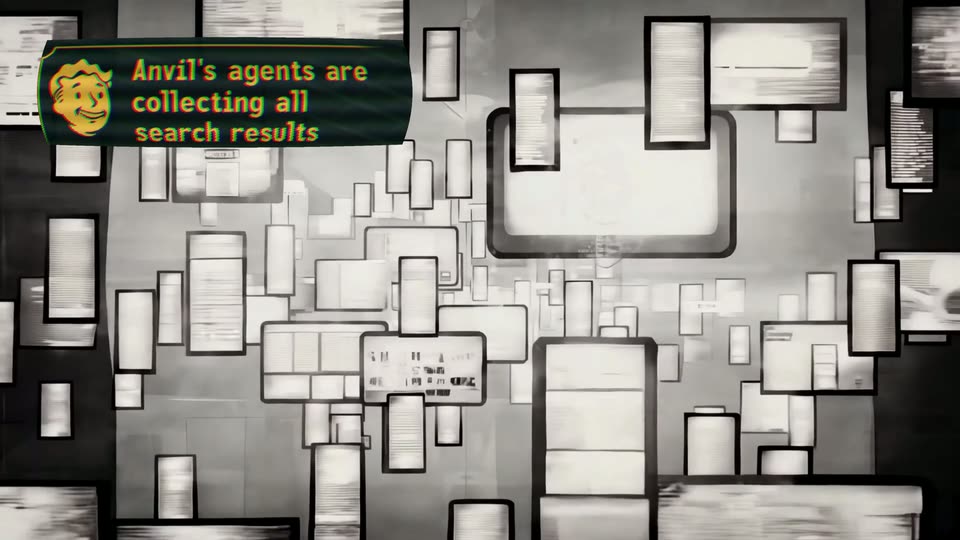
0:47
Explore
Anvil (YC X25) - Launch Video
Acolite · May 2025 · 1:16 · Full motion · AI-annotated
- Length
- 1:16
- Scenes
- 11 · 7.0 s avg
- Product on screen
- 0:02
- Features shown
- 4
- Voiceover
- Yes
- Views
- 1.3K on YouTube
as of November 23, 2026
00:00:00 / 01:16:29
- Length
- 1:16
- Scenes
- 11 · 7.0 s avg
- Product on screen
- 0:02
- Features shown
- 4
- Voiceover
- Yes
- Views
- 1.3K on YouTube
as of November 23, 2026
Acolite’s 1:16 launch film runs 11 scenes, about 7.0 s each. The product shows up at 0:02 and 4 features are revealed. There is no explicit call to action; a voiceover carries the film. The video is built as a film-leader countdown posing a brand-tracking question, a 3D field of documents illustrating agent collection, then a tab-by-tab dashboard walkthrough (Overview, Prompts, Citations, Competition) with a persistent corner webcam, closing on a wordmark scale-in. Pacing is steady and cursor-led at about 129 bpm, with skeleton-load reveals, slow zooms across metric cards, and a consistent light-gray UI accented by a purple bar and yellow captions.
No filming indicatedEstimated needs: 4 capture groups — your screens or recordings · 3 graphic passages — draw or supply · 1 3D passage — build or supply
Is this your launch? to your site or press kit.
More like this

0:23
Introducing: Native Edits - Create and edit your marketing content
Native AI · Nov 2026
0:40
Lightspark - Introducing Grid Global Accounts. Your app can now be a full global
Lightspark · Apr 2026
Anvil (YC X25) - Launch Video, scene by scene
· 11 scenes as text
01 · Hook · 0:00–0:00
A gray film leader countdown holds the number 3 inside a double circle with white crosshair lines, a diagonal light beam sweeping around the disc. A yellow caption states the question at the bottom, the ANVIL logo sits top left.
On-screen text: “How do you track and improve your brand inside LLMs?”
Techniques: Light sweep
Camera: Static
02 · Hook · 0:00–0:01
A gray countdown slate with white crosshairs and a black ring holds the number, which ticks from 3 to 2 as a light beam sweeps diagonally across it. The ANVIL logo sits top left; a yellow caption poses the question along the bottom.
On-screen text: “How do you track and improve your brand inside LLMs?”
Techniques: Light sweep
Camera: Static
03 · Hook · 0:01–0:02
A film-leader circle with crosshairs sits on a gray panel, the digit inside switching from 1 to 2. A yellow caption at the bottom poses the question, then vanishes, while the ANVIL logo holds in the top left.
On-screen text: “How do you track and improve your brand inside LLMs?”
Camera: Static
04 · Feature reveal · 0:02–0:07
A 3D grid of white document panels recedes into a gray void as the camera dollies forward through the field. A black banner with an orange face logo and orange caption holds top-left.
On-screen text: “Anvil's agents are collecting all search results”
Techniques: 3D mockup, Parallax
Camera: Pull out
05 · Demo · 0:07–0:29
A dashboard screen shows a competitor ranking grid and three metric cards. The cursor hovers a chart to reveal a value, then the view zooms in and pans across the cards while a presenter's webcam sits in the corner.
Techniques: Cursor demo, UI zoom
Camera: Push in
06 · Feature reveal · 0:29–0:32
A light dashboard screen shows a Competitors list and three Overview stat cards. A cursor drifts left from the list to the sidebar, hovers over Prompts, and a hand pointer icon appears beside it as the main panel dims.
Techniques: Cursor demo
Camera: Static
07 · Feature reveal · 0:32–0:40
A product dashboard table lists AI topics with mention rate, ranking and share of voice columns. A cursor hovers rows, highlighting them gray, while the list scrolls down slightly. A circular webcam of a bearded man sits in the corner.
Techniques: Cursor demo
Camera: Static
08 · Feature reveal · 0:40–0:43
A data table listing topic metrics fills the screen. A cursor moves from the table to the left sidebar, hovering over the Prompts and Citations menu items. A circular webcam feed of a man remains in the bottom right corner.
Techniques: Cursor demo
Camera: Static
09 · Feature reveal · 0:43–0:58
A screen recording of the ANVIL Citations dashboard loads: skeleton bars resolve into topic rows and a citations table, a Top Domains list appears, and the arxiv.org entry expands into paper paths. A presenter's webcam sits in the bottom-right corner while a cursor clicks through the rows.
Techniques: Cursor demo
Camera: Static
10 · Feature reveal · 0:58–1:05
A white dashboard interface with a left menu and a column of topic labels. The right panel loads from gray skeleton bars into a ranking table as a cursor moves from the sidebar across the rows and hovers the top card. A circular webcam feed sits bottom right.
Techniques: Cursor demo
Camera: Static
11 · Feature reveal · 1:05–1:16
Screen recording of the Anvil dashboard. A cursor hovers over the LLM evaluation topic, and the right panel fills from gray placeholders with a competitor ranking table. A small circular webcam of a man sits in the corner. A large black ANVIL wordmark scales in over the screen.
On-screen text: “ANVIL”
Techniques: Cursor demo
Camera: Static