0:43


Exodus – Effortless Crypto Swapping Made Simple
Exodus · Jun 2026
Zalos’s 0:57 launch film runs 25 scenes, about 2.3 s each. The product shows up at 0:11 and 2 features are revealed. There is no explicit call to action; a voiceover carries the film. The film alternates black text cards that scale up word by word with warm 3D office renders and crisp UI fills, building from a single desk to a grid of thousands of parallel offices. Signature moves are the scanline eye close-ups, the centered scale-up typography, and the office cloning into a matrix.
Is this your launch? to your site or press kit.
Exodus · Jun 2026
Apple · Hardware · Oct 2026
Films whose music sounds like this one, voice left out
Storyteller Tactics · Orchestral and electronic corporate music
Wabi · Electronic
Samsung · Electronic, Orchestral, Cinematic
Black-and-white extreme close-up of a person's eyes behind a scanline grain, a small monitor reflected in the pupils. White words appear one at a time in the center, replacing each other, as the eyes blink and drift.
On-screen text: “Endless”, “manual”, “tasks”, “on”, “matter”
Techniques: Kinetic type
Camera: Push in
Black-and-white macro shot of a human eye, locked off, the lid lifting to open the iris. White lowercase words cycle over the eye in sync with the voiceover, each replacing the last.
On-screen text: “how”, “you”, “stare”
Camera: Static
Black-and-white extreme close-up of a human eye, lit only by a thin horizontal band of light. The white word “stare” sits centered over the open eye, then the eye blinks shut and the word vanishes.
On-screen text: “stare”
Camera: Static
On a black background, the line 'What if you can run your' scales up word by word in white, then 'Finance Operations' in a purple-to-green gradient slides in beneath it, and 'with your eyes shut?' completes the sentence.
On-screen text: “What if you can run your”, “Finance Operations with your eyes shut?”
Techniques: Kinetic type
Camera: Static
A dim, warm 3D-rendered office with a wooden desk, monitor showing a finance dashboard, and two mustard chairs. The white title types out letter by letter across the frame center and settles in place.
On-screen text: “Meet Za”, “Meet Zalos”
Techniques: Kinetic type, 3D mockup
Camera: Pull out
Top-down 3D render of a wooden desk holding a compact keyboard and mouse on a dark pad, with a monitor above and a notebook to the side. The camera pulls back slowly while the title holds still.
On-screen text: “Meet Zalos”
Techniques: 3D mockup
Camera: Pull out
A 3D-rendered wooden desk holds a monitor, a low-profile keyboard, and a white mouse on a dark mouse pad, with a yellow pencil at the edge. The camera drifts right to reveal a white office chair. The monitor displays a document view.
Techniques: 3D mockup
Camera: Pull out
A white mouse with wood side grips rests on a gray mat, a keyboard blurred at the left edge. The camera pans right, sliding the keyboard out of frame and centering the mouse under warm light.
Camera: Static
A low close-up of a slim silver keyboard on a dark desk mat, with a wooden desk and monitor stand blurred behind. The camera drifts slowly as a white mouse slides into the lower right corner of the frame.
Camera: Pull out
A dim office desk with a brass lamp and a small potted plant; a monitor shows the product interface, a page with a side panel of bullet points and a website preview of two people. The camera slowly pans right, centering the monitor.
Camera: Pull out
A 3D mockup of a workflow interface sits against a blurred landscape. The camera starts wide over a browser session on the IRS site, then zooms in on the right panel where execution steps check off sequentially with green icons.
Techniques: 3D mockup, UI zoom
Camera: Push in
A blurred dashboard pans left across a browser window showing a login form, then a Live Activity panel where green checkmarks sit beside each execution step.
Camera: Pan
A browser window displays an ID.me account creation form with the email and password fields already filled. The window eases from a slight 3D tilt to a flat frontal view while the form text cross-dissolves between two states.
Techniques: 3D mockup
Camera: Static
A flat Form 941 tax return sits in a document viewer with a page-thumbnail sidebar. The camera zooms into the header as the business name and address fields fill in, then reframes down to the calculation table where line items populate with numbers.
Techniques: UI zoom
Camera: Pull out
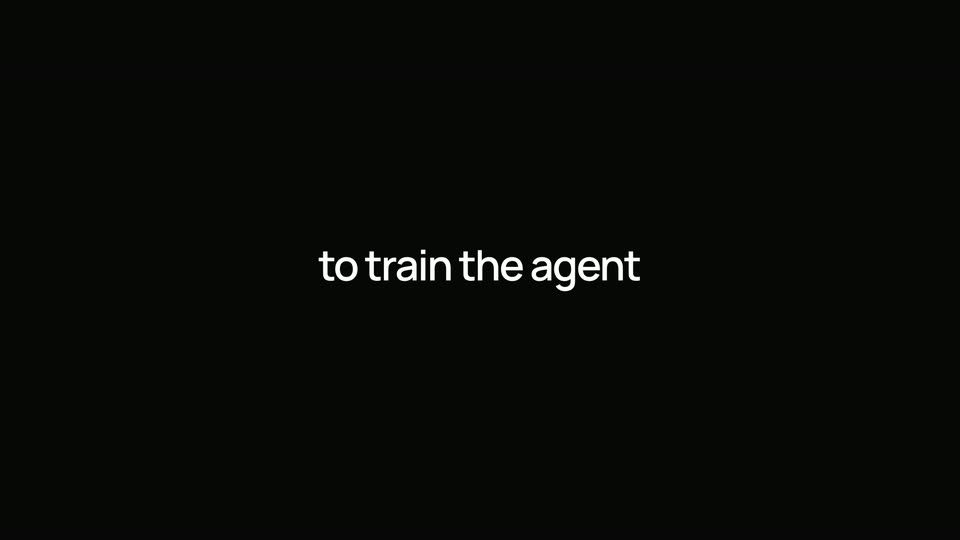
A black screen holds the centered line “And all you need,” which starts small and scales up to full size, then cuts to the still line “to train the agent.”
On-screen text: “And all you need”, “to train the agent”
Techniques: Kinetic type
Camera: Static
A white document page rotates from a tilted 3D angle with motion blur into a flat, front facing view centered on a dark background. The page shows a title, an Overview section and a Process section, with a small embedded interface screenshot near the bottom.
Techniques: 3D mockup
Camera: Static
A red PDF badge overlaps a white document icon on a gray background, a cursor arrow resting at its lower right. The document's top corner folds in, then the whole icon blurs and slides out to the left, leaving the frame empty.
Techniques: Morph
Camera: Static
A white upload card floats in 3D perspective, tilted, ringed by blurred purple video and white PDF icons at varying depths. Near the end it cuts to a 3D man in a suit at a desk, a golden file icon hovering above his laptop.
Techniques: 3D mockup
Camera: Pull out
A top-down 3D render shows a wooden desk with an open laptop, two orange chairs and a white office chair in a hazy sunlit room. The camera pulls back, revealing a window frame, a sideboard and a whiteboard with line charts on the right.
Techniques: 3D mockup
Camera: Pull out
A top-down 3D office with a desk, laptop and orange chairs is framed by white angular shapes. The single view then multiplies into a grid of identical rooms across the screen.
Techniques: 3D mockup
Camera: Pull out
A dark grid of identical office rooms, each with a glowing desk, computer and a standing figure, fills the frame. The grid scrolls vertically, rows sliding up to suggest thousands of parallel environments running at once.
Techniques: 3D mockup
Camera: Pull out
A top-down view of a dim office with rows of desks, chairs and glowing screens spins rapidly, the whole frame blurring as the camera rotates. The space stays dark and blue-toned throughout the short clip.
Camera: Push in
A dim office floor seen from a high angle, the camera tilts and drifts across rows of desks with glowing monitors, chairs and potted plants, all bathed in low blue light.
Camera: Push in
Centered white text on black reads “So you can focus”, then “on what truly matters”. The lines cut to the zalos lockup, a geometric mark beside the wordmark, with the tagline “Computer Agents for Finance Operations” beneath.
On-screen text: “So you can focus”, “on what truly matters”, “Computer Agents for Finance Operations”
Camera: Static
A static black frame holds the white zalos logo, a faceted triangle mark beside the lowercase wordmark, centered in the lower third. The tagline sits directly below it. No motion, no camera move, the lockup stays fixed for the full duration.
On-screen text: “Computer Agents for Finance Operations”
Camera: Static