1:30

Online to in person with the Shop app
Shopify · Business software · Jun 2026
Yarn’s 1:32 launch film runs 34 scenes, about 2.7 s each. The product is on screen from the first frame and 5 features are revealed. There is no explicit call to action; a voiceover carries the film. A founder-to-camera launch video for the Yarn in Slack integration, built as a Day 5 announcement followed by a rapid recap of Days 1 to 4. The style pairs a warm, static talking-head shot with split-screen chat UI demos where a cursor tags @Yarn and a video card slides in, then cuts to black-background title cards and 3D-tilted app mockups for the recap, closing on the fanned multicolored S logo.
Is this your launch? to your site or press kit.
Shopify · Business software · Jun 2026
Google · AI · Aug 2025
Webflow · Design · Oct 2018
Films whose music sounds like this one, voice left out
OuterSignal · Electronic
Akai Professional · Electronic
Vercel · Upbeat electronic
A bearded man in a dark sweatshirt sits in a warm wood-paneled room, speaking to camera and gesturing with his hands. A Day 5 badge and a white headline appear over his chest while subtitles run along the bottom.
On-screen text: “Day 5”, “Today, we're launching Yarn in Slack.”, “@Yarn in Slack”, “Tag @Yarn in any thread,”, “and it makes the video right there.”
Camera: Static
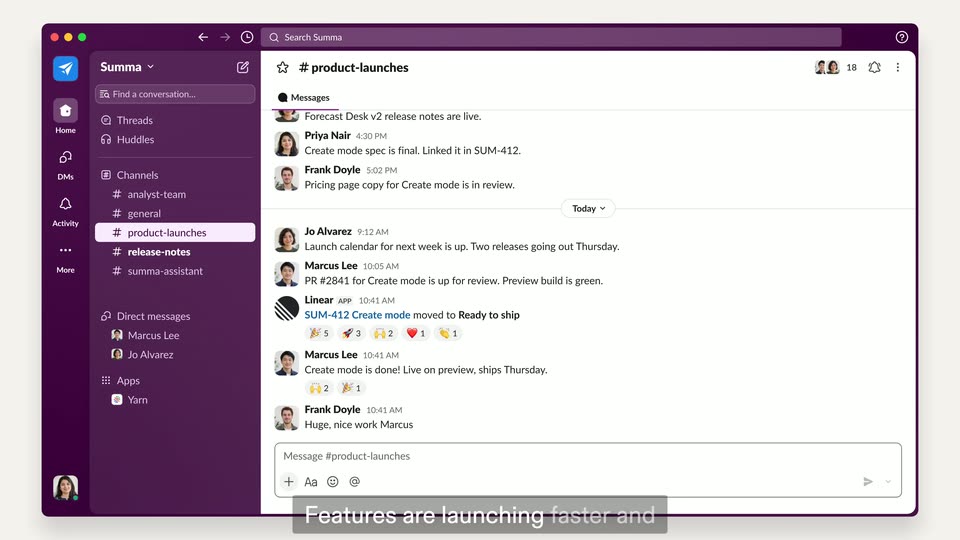
The Summa chat app fills the frame on a light gray backdrop, the #product-launches message list scrolling down to reveal the final posts. A dark gray subtitle bar at the bottom swaps its caption as the list moves.
On-screen text: “and it makes the video right there.”, “Features are launching faster and”
Camera: Static
A white chat thread with a purple left rail scrolls upward as new messages load, while the frame slowly zooms into the conversation. A black cursor appears at the message box, and a gray caption bar at the bottom displays the spoken line.
On-screen text: “Features are launching faster and”, “faster multiple times per week.”, “Just @Yarn, and it'll make the”
Techniques: UI zoom, Cursor demo
Camera: Push in
A Summa chat window sits on a lavender backdrop. A cursor taps the reply link, a thread panel slides in from the right where the Yarn app posts a progress line with a spinner, then a blue video thumbnail, as a lower-third caption builds the sentence.
On-screen text: “Just @Yarn, and it'll make the first draft with full context of your product already.”
Techniques: Cursor demo
Camera: Static
A bearded man in a dark navy sweater speaks to camera in a warm wood-paneled room, gesturing with both hands. A soft lamp and green plants blur in the background. A white subtitle sits locked at the bottom of the frame.
On-screen text: “Yarn in Slack works for sales too.”
Camera: Static
A flat chat app window with a purple sidebar and a #deal-northbeam thread sits on a pale background. The composer at the bottom types out a message about a Salesforce demo, and a gray caption bar with white text holds the bottom edge.
On-screen text: “So an AE writes, “Frank at Northbeam”
Camera: Static
A 3D-tilted mockup of the Kova chat app on a purple backdrop. A cursor clicks the latest message, opening a thread panel on the right, where a reply is typed tagging @Yarn; a Yarn app reply with a loading spinner then appears.
On-screen text: “is asking for a demo about how”, “Salesforce Sync works, and you can”, “just tag Yarn to get that demo out.”
Techniques: Cursor demo
Camera: Static
A bearded man in a dark sweatshirt sits in a wood-paneled room, speaking and gesturing with one hand. A warm lamp glows on the right and a plant sits blurred on the left. White captions run along the bottom edge.
On-screen text: “just tag Yarn to get that demo out.”, “CS is about making your account”
Camera: Static
Split screen: on the left, a Slack thread fills with replies, a loading spinner turns into a green check, and a video card slides in; on the right, a bearded man in a black sweater talks and gestures against a warm wood-paneled room.
On-screen text: “CS is about making your account”, “successful with your product, so just”, “ask Yarn to help connect the dots on”, “the latest launches to each account.”
Techniques: Split screen
Camera: Static
A bearded man in a dark sweatshirt sits centered against a warm wood-paneled wall, a glowing lamp and green plant blurred behind him. He speaks to an off-camera interviewer, hands clasped at chest level, while white subtitles roll along the bottom edge.
On-screen text: “the latest launches to each account.”, “For support, if you're getting lots”
Camera: Static
Split screen: a man in a black sweater talks and gestures on the right against a warm wood background, while a chat thread UI on the left shows a support question and a new reply sliding in. White subtitles roll along the bottom.
On-screen text: “For support, if you're getting lots”, “of tickets coming in or on how”, “a new feature works, just ask”
Techniques: Split screen
Camera: Static
Split screen on a white ground. Left, a Yarn thread view updates: a status line types in, then a green check and a video card slide into the conversation. Right, a bearded man in a black sweater talks and gestures in a warm wood-paneled room.
On-screen text: “in the yarn thread and everyone”, “gets the one-minute how-to.”
Techniques: Split screen
Camera: Static
A man in a dark sweater sits in a warm wood-paneled room, gesturing with both hands as he speaks to the camera. The shot is a locked-off medium close-up with a soft-focus lamp and plant behind him.
On-screen text: “You can even make a launch video”, “before you start building”
Camera: Static
Split screen: a Slack-style thread panel on the left adds a new reply while a URL sits in the input box, and a man in a black sweater gestures and speaks on the right against a warm wooden backdrop. White captions run along the bottom edge.
On-screen text: “before you start building.”, “If you have some initial designs in spec,”
Techniques: Split screen
Camera: Static
Left: a Slack thread panel showing a posted Notion link. Right: a man in a black sweater talks and gestures in front of a warm wooden wall. A white caption sits on a dark bar across the bottom.
On-screen text: “If you have some initial designs”
Techniques: Split screen
Camera: Static
Split screen with a bearded man in a black sweater speaking and gesturing on the right, and a chat thread on the left that types a request to Yarn, posts it, then reveals a purple video card titled 'Meet the OpEx Review Agent'.
On-screen text: “If you have some initial designs”, “in spec, then ask Yarn to”, “preview a feature launch.”
Techniques: Split screen
Camera: Static
Split screen: a product thread on the left scrolls as new messages and a launch-video card appear, while a man in a black sweater talks and gestures on the right against a warm wood backdrop. White captions run along the bottom.
On-screen text: “Launch videos ahead of time are”, “an amazing customer-centric artifact”, “to build around.”
Techniques: Split screen
Camera: Static
A bearded man in a dark sweater sits in a warm wood-paneled room with a lamp and plants behind him, speaking to camera and gesturing with his hands. White subtitles appear at the bottom of the frame on a static shot.
On-screen text: “to build around.”, “You can edit, go back and forward”
Camera: Static
Split screen: a Yarn chat thread scrolls down on the left as a lime green video card appears below the dark one, while a bearded man in a black sweater talks and gestures on the right. Subtitle lines swap at the bottom.
On-screen text: “You can edit, go back and forward”, “with the agent, and always jump into”, “the Yarn editor to polish and refine.”
Techniques: Split screen
Camera: Pan
Split screen holds a Slack thread on the left with a lime title card and chat messages, while a man in a black sweater talks and gestures on the right. A subtitle bar sits at the bottom.
On-screen text: “the Yarn editor to polish and refine.”
Techniques: Split screen
Camera: Static
A bearded man in a dark sweatshirt sits at a desk in a warm wood-paneled room, speaking to camera and gesturing with his hands. The shot is locked-off and static, with soft-focus plants and a lamp behind him. White subtitles sit on a dark bar at the bottom.
On-screen text: “So that's Yarn in Slack,”, “and that's our launch week.”
Camera: Static
A curly-haired man in glasses and a black embroidered shirt sits at a laptop in a warm room, shown in a rounded video-call frame on black. A 'Day 1' badge and 'Highlights' label slide in on the left while white subtitles run along the bottom.
On-screen text: “We started with highlights,”, “Day 1”, “Highlights”, “clips, and recaps from”
Camera: Push in
On black, a center phone card with a video call and a UI window sits still while two more cards slide in from the sides to form a row. The left card shows a man and a recap title, the right card a purple panel with a man and a UI note. A bottom caption reads the line.
On-screen text: “any webinar, podcast, or talk.”
Techniques: Masking
Camera: Static
A row of vertical content cards slides left across a black background, each pairing a video clip with a small UI mockup. A white inbox panel enters from the right edge, and the bottom caption stays still.
On-screen text: “any webinar, podcast, or talk.”
Camera: Pull out
On a black background, the words Generative and Demos scale up in the center, the first in yellow turning white, the second with a pink highlight on its middle letters. Product mockups, a card with a person on the left and a gray list panel on the right, slide off the frame edges while a caption updates at the bottom.
On-screen text: “Generative”, “Demos”, “any webinar, podcast, or talk.”, “On Tuesday, generative demos,”
Techniques: Kinetic type
Camera: Static
A tilted 3D mockup of an email app fills the frame while a large black title scales out. A cursor types a short reply into the input bar, which posts as a message, then the camera pulls back to show the surrounding desktop.
On-screen text: “Generative Demos”, “On Tuesday, generative demos,”, “any product demo from a prompt,”, “no screen recording required.”
Techniques: Kinetic type, 3D mockup, Cursor demo
Camera: Pull out
A man in a black tee speaks to camera in a warm-lit room, framed as a video tile between two app panels. The central tile scales up toward full frame as the side panels slide off-screen, and the title lockup over his chest scales with it.
On-screen text: “Day 3”, “Yarn MCP”, “no screen recording required.”, “Wednesday, with Yarn's new MCP.”
Techniques: Kinetic type, Parallax
Camera: Push in
Split screen: a white chat panel on the left where a gray prompt pill slides in, then a header and two tool rows appear below it, while a bearded man in a black shirt talks and gestures on the right.
On-screen text: “Wednesday was Yarn's new MCP.”
Techniques: Split screen
Camera: Static
A split screen pairs a white product chat panel on the left with a man in a black shirt on the right. The prompt text swaps, then the layout reflows: the man's clip shrinks to a thumbnail and the UI card centers as a second panel enters from the right.
On-screen text: “You can make videos”, “now from where you already work.”
Techniques: Split screen
Camera: Pan
A man in a dark sweatshirt speaks to camera in a warm wood-paneled room, gesturing with both hands. Over his chest, a Day 4 badge and Playbooks appear, then Over 20,000 videos scales in word by word, with captions along the bottom.
On-screen text: “Day 4”, “Playbooks”, “And yesterday, playbooks,”, “everything we've learned from”, “Over 20,000 videos”, “over twenty thousand videos”, “built into the agent.”
Techniques: Kinetic type
Camera: Static
A dense mosaic of small rounded cards (chat threads, design mockups, video clips, code) tiles a black background and keeps updating. A cursor hovers over a center card labeled Design, which switches to a typing prompt, while the caption built into the agent. sits below.
On-screen text: “Over 20,000 videos”, “built into the agent.”
Techniques: Kinetic type, Cursor demo
Camera: Static
A dense grid of small interface windows and video clips fills the black frame. The grid slides left to reveal a man in a video call on the right while the bottom caption changes.
On-screen text: “built into the agent.”, “And today, Yarn in Slack,”
Techniques: Split screen
Camera: Pull out
A man in a dark sweatshirt sits at a desk in a warm wood-paneled room, speaking to camera and gesturing with his hands. A rounded-rectangle mask reveals him over a grid of UI cards at the start, then the shot holds static and fades to white at the end.
On-screen text: “And today, Yarn in Slack,”, “the first agent to get”, “product videos end-to-end”, “where your team already lives.”, “Thank you for following along,”, “and have a good weekend.”
Techniques: Masking
Camera: Push in
On a white background, a multicolored S-shaped logo (green, pink, orange, yellow, blue strokes) starts small at center and scales up, its strokes fanning apart. A gray caption reading 'and have a good weekend.' is locked at the bottom, then disappears.
On-screen text: “and have a good weekend.”
Camera: Static