1:01


Xiaomi MWC 2026 | The New Wave of AI is Here
Xiaomi · Mar 2026
World Labs · Nov 2025 · 1:26 · AI-annotated
World Labs’s 1:26 launch film runs 36 scenes, about 2.4 s each. The product shows up at 0:11 and 6 features are revealed. There is no explicit call to action; a voiceover carries the film. The video opens with a fast-cut montage of generated 3D worlds framed by a spinning glass orb, then settles into a slow, cursor-driven walkthrough of a dark interface on light backgrounds. Signature moves are radial motion blur on the orb, hard cuts between worlds, and smooth 3D tilts and zooms of the UI cards, with a single orange-sofa room carried through the final shots.
Is this your launch? to your site or press kit.
Xiaomi · Mar 2026
Teamble · Jan 2026
Figma · Design · May 2025
Films whose music sounds like this one, voice left out
OpenSea · Electronic dance music
Superlist · Electronic dance music
A glass orb hovers over a dark floor, its surface catching a soft curved highlight. Inside, footage of a guitarist shifts from purple to red to green while a white W-shaped logo holds steady at the center.
Techniques: 3D mockup
Camera: Static
A circular cutout over a black field frames a blurred, earth-toned landscape with a white angular logo at its center. The disc then spins and zooms out fast, radial motion blur smearing the image and the logo into streaks.
Techniques: Masking
Camera: Push in
A 3D camera flies forward through a narrow ivy-covered brick alley, opening with heavy radial motion blur that resolves into a clear view of the cracked path and a bright opening at the far end.
Techniques: Speed ramp, Parallax
Camera: Push in
A 3D hobbit-hole set with a round wooden door, framed by flowers and grass. Two characters stand in the foreground, one in a dark hooded robe and one in red overalls, facing a figure in an orange shirt inside. A wooden sign with a cat and house illustration stands at right. The frame is locked off and the characters idle in place.
Camera: Static
Two stylized 3D figures, labeled Franklin and Iris, face each other on a stone path before a flower-covered hobbit home. The shot cuts to a carnival shooting range where animal targets line a counter under a spiral sign, with a zeroed score HUD.
Camera: Static
A locked-off first-person view of a colorful 3D game arena. A teal arch and a green orb sit in the foreground, a swirling pink disc hangs above, and red ornate patterns line the walls. Four white HUD counters mark the corners.
Techniques: 3D mockup
Camera: Static
Over-the-shoulder shot of a man in a black cap holding a gimbal-mounted action camera, filming a dancer who spins and gestures in a graffiti tunnel. Orange and pink spray paint and a glowing lamp light the scene. A small HUD overlay shows score stats.
On-screen text: “Score: 0”, “Bullets Fired: 0”, “Enemies Killed: 0”
Camera: Static
A person with long hair stands with their back to the camera, gazing out a circular porthole at Earth. The cabin is packed with control panels, and a bed with an orange blanket fills the left foreground. The frame stays static and symmetrical around the window.
Camera: Static
Locked-off night view of a garden path leading to a pale stone monument. A large green wireframe figure and a smaller white one stand either side of the path and shift their arm poses, while a tiny figure hovers near the monument. Corner counters tick from 6/6 to 6/5.
Techniques: Particles
Camera: Static
A white multi-joint robot arm hovers above a marble-topped kitchen with gray cabinets, its left edge left as a gray wireframe mesh. The camera eases right, bringing a bowl of bread into view on the counter.
Techniques: 3D mockup
Camera: Static
A foggy black-and-white street with old buildings and a phone booth hard-cuts to a sunlit ancient stone amphitheater with rows of arches and overgrown ground.
Camera: Static
A sunlit conservatory with terracotta tiles, wooden cabinetry and potted plants cuts to the moss-covered interior of an abandoned train car.
Camera: Static
A 3D stone courtyard with arches, vines and a waterfall feeding a turquoise pool cuts to a pink rocky valley with a single tree under a bright blue sky.
Camera: Static
A fisheye view of an airplane cabin snaps into a circular lens on a black field, showing a distorted outdoor scene with a figure in red. A dark rounded card with a small white marker slides in from the right as a puff of particles drifts at the lens edge.
On-screen text: “0”
Techniques: Masking, Particles
Camera: Pull out
A glass sphere with swirling green marbled texture and a white logo mark floats left, beside a dark rounded input field reading Create with Marble with a blinking caret. Faint green particle dust drifts from the sphere across the black background.
On-screen text: “Create with Marble”
Techniques: 3D mockup, Particles
Camera: Static
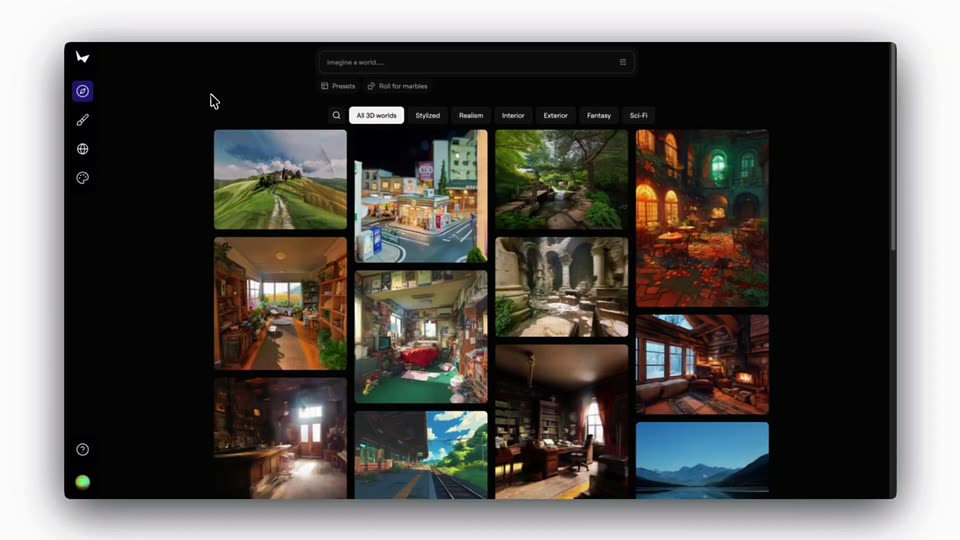
A dark app window on a light background shows a grid of 3D world thumbnails with a search bar and a row of filter chips. A cursor arrow hovers at the top left of the grid while the frame stays locked off.
On-screen text: “Create with Marble”
Camera: Static
A dark app interface floats at a slight 3D tilt on a light gray background, showing a search bar, a row of filter tabs and a grid of 3D scene thumbnails. A cursor rests near the top left. The frame is locked off.
Techniques: 3D mockup
Camera: Static
A dark prompt panel fills as the text 'A cozy cafe' types out letter by letter in the input field. Above sit 2D and 3D input tabs; below, a dashed upload zone with file icons and a row of preset buttons.
Camera: Push in
A teal-walled cafe interior with hanging orange lanterns, wooden shelves of jars and plants, and a patterned orange rug. The camera glides right and tilts down, sweeping across the room toward the tiled bar counter and stools.
Techniques: 3D mockup
Camera: Push in
A dark interface panel fills the frame, locked off. A search bar and a row of filter tabs sit above a grid of 3D environment thumbnails, while a white cursor rests at the left edge.
Camera: Static
A dark world-building interface floats at a slight 3D angle on white. The cursor glides down the left rail and clicks the pencil icon; the gallery of world thumbnails blurs away into the Create page with its 2D input panel and scene suggestions.
Techniques: 3D mockup, Cursor demo
Camera: Pull out
A dark product screen shows an input panel and a list of scene presets. A cursor moves from a sidebar icon to the Presets button, then the frame zooms into a two-by-two grid of preset thumbnails.
Techniques: Cursor demo, UI zoom
Camera: Push in
A dark world-builder interface: the preset grid of scene cards reflows into a compact list of three thumbnails while the view settles. The cursor moves to the Roll for marbles pill and clicks it, and a circular spinner appears in the pill.
Techniques: Cursor demo
Camera: Static
A dark world-builder interface shows a preview thumbnail that cycles through scenes while the cursor slides down from the Roll for marbles button to hover the first preset, Charming bakery with flowers, in a three-item list.
Techniques: Cursor demo
Camera: Static
A dark interface panel is shown close-up with an upload box and a list of scene suggestions; a cursor hovers over the list, then the view zooms out to reveal the full app window with a left icon rail and a right progress panel.
Techniques: Cursor demo, UI zoom
Camera: Pull out
A dark world-builder interface sits flat on screen with a left icon rail, an input panel, and a right-side Create New World card. A white cursor drifts from the prompt field down to the upload hint, then a small click ripple pulses. The frame stays locked.
Techniques: Cursor demo
Camera: Static
A dark product window shows a world-creation form with input fields and prompt rows. A macOS file picker dialog overlays the center, listing two image files under Today, while a cursor hovers over the dialog's top toolbar.
Techniques: Cursor demo
Camera: Static
A dark world-creation app screen with a macOS open-file dialog centered; the cursor hovers over the selected image file, then slides right and clicks the Open button.
Techniques: Cursor demo
Camera: Static
A dark app window shows a file picker dialog centered over the prompt field. The cursor clicks Open and the dialog closes, dropping a small image thumbnail into the input box and revealing an upload panel below.
Techniques: Cursor demo
Camera: Static
A dark world-creation panel shows a prompt field and a blue Create button as the cursor hovers and clicks it. The view then switches to a My worlds list with two world cards, one marked Generating.
Techniques: Cursor demo
Camera: Pull out
A dark app interface dissolves from a generating state to a completed world list, the framed panel zooming to full screen. A cursor glides over the list toward the View button on the first card.
Techniques: Morph, UI zoom, Cursor demo
Camera: Pull out
A dark product window on a light gradient background zooms in toward a card titled Industrial-Bohemian Living Space, where a cursor rests on the View button and a small tooltip reads Keep creating.
Techniques: Cursor demo, UI zoom
Camera: Push in
A product window on a white background frames a dark room built from dense dots, its floor and blocks glowing orange. Toolbars line the edges, a spinner reads loading, and a white cursor hovers in the open space.
Techniques: Cursor demo
Camera: Static
A screen recording of a 3D world viewer. The view zooms into the room as the cursor clicks the keyboard icon, opening a dark Controls panel with WASD keys and mouse toggles. The cursor closes it, and the camera glides through the orange-sofa living room.
Techniques: UI zoom, Cursor demo
Camera: Push in
A screen recording of a 3D world viewer showing a living room with an orange sofa. A cursor clicks the download icon, opening an export options menu, then the share icon, opening a copy-link menu. The view zooms out to a rounded card as the cursor opens the info menu.
Techniques: Cursor demo, UI zoom
Camera: Static
A wide interior of a loft living room with rust-orange modular sofas, a dark green wall holding an orange painting, and potted palms. The camera pushes forward through the space, gliding past the foreground sofa toward the back wall and window.
Camera: Push in