
0:36
Explore
00:00:00 / 00:37:18
- Length
- 0:37
- Scenes
- 23 · 1.6 s avg
- Product on screen
- 0:00
- Features shown
- 4
- Call to action
- 0:29 · 78%
- Voiceover
- Yes
- Views
- 25 on YouTube
as of November 21, 2026
Wondering’s 0:37 launch film runs 23 scenes, about 1.6 s each. The product is on screen from the first frame and 4 features are revealed. The call to action lands at 0:29 (78% in), over a voiceover. A rainy-weekly product update for the learning app Wondering, cut as a host-led interview on a wet Japanese playground intercut with locked-off phone and desktop UI demos. The structure alternates a talking-head announcement with a short screen capture for each shipped feature, bookended by a brand card and a closing URL card, with a wobbly brown star mascot and hand-drawn science doodles as the signature playful accents.
Footage neededEstimated needs: 2 capture groups — your screens or recordings · 1 official logo — reused across the film · 18 filmed passages — shoot, supply or replace
Is this your launch? to your site or press kit.
More like this

0:32


Canva - PSA 📣 You can now turn your ChatGPT-generated images into fully edita
Canva · Design · Jun 2026
0:50


Similar soundtrack
Films whose music sounds like this one, voice left out


a big launch is coming, scene by scene
· 23 scenes as text
01 · Product intro · 0:00–0:03
A man and a woman stand under a clear umbrella in a rainy playground. Large white text overlays the frame while a bottom caption cycles through three lines. At the end a dark star mascot covers the woman's face and a small DNA icon appears.
On-screen text: “Here's”, “everything we shipped”, “this week on Wondering”, “and a big launch”, “coming soon”
Techniques: Kinetic type
Camera: Static
02 · Product intro · 0:03–0:04
A cream-to-blue gradient card holds a brown blob star mascot that wobbles and blinks in the center, above the title and tagline. Hand-drawn science doodles, a planet, a beaker and a globe float gently around the edges, with an App Store badge pinned at the bottom.
On-screen text: “Wondering”, “the Duolingo for learning anything”, “Download on the”, “App Store”
Camera: Static
03 · Product intro · 0:04–0:05
A hand holds a phone showing the app's gentle reminders prompt in front of a window with a blurred city view. The locked-off shot holds steady while tagline text and the app logo sit over the frame.
On-screen text: “Wondering”, “the Duolingo for learning anything”, “Download on the”, “App Store”
Camera: Static
04 · Feature reveal · 0:05–0:06
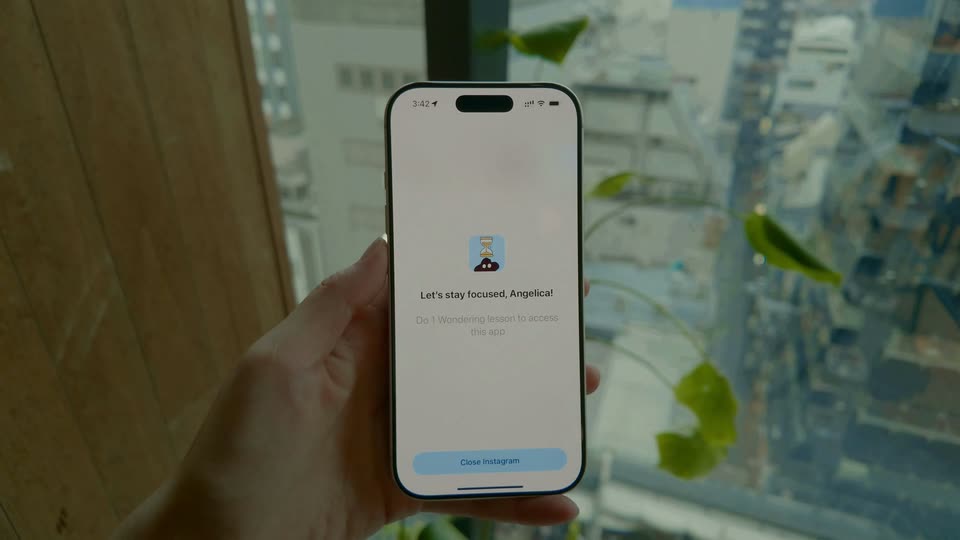
A hand holds a smartphone upright against a window with a blurred city skyline and a trailing green plant. The screen shows a focus prompt with an hourglass icon, a bold line, a gray subline, and a light blue button. The frame is locked-off and static.
Camera: Static
05 · Feature reveal · 0:06–0:07
A hand holds an iPhone upright in a dim cafe, its bright screen showing a chat app with two small avatars and the name Cheng-Wei. The frame stays locked off as a white caption fades in at the bottom edge.
On-screen text: “First, we added”
Camera: Static
06 · Feature reveal · 0:07–0:08
Two people stand on a Japanese street under an overcast sky. A woman in a beige jacket holds a fuzzy lavalier mic and speaks to camera, while a man in a black coat stands behind her. White subtitle captions appear at the bottom as she talks.
On-screen text: “Cheng-Wei”, “First, we added”, “5:451”, “one of our most”, “requested features”
Camera: Static
07 · Feature reveal · 0:08–0:10
A hand holds an iPhone in front of a blurred city window. The Screen Time screen shows the Wondering app's permission request, then settles on a green checkmark confirming approval, as a thumb taps the Done button.
On-screen text: “requested features”
Camera: Static
08 · Feature reveal · 0:10–0:11
A hand holds a phone in front of a window with a city view and a green plant. The screen changes from the home screen to a white focus message. White captions read at the bottom of the frame.
On-screen text: “until you do”, “a Wondering lesson”
Camera: Static
09 · Feature reveal · 0:11–0:12
A hand holds an iPhone showing a lock screen notification, while white captions appear at the bottom of the frame.
On-screen text: “every day”, “Second, we now added”
Camera: Static
10 · Feature reveal · 0:12–0:13
A man in a black coat speaks into a handheld microphone as a woman in a beige trench coat holds an umbrella beside him. They stand on a wet residential street under an overcast sky, light rain on his shoulders. A white subtitle sits at the bottom.
On-screen text: “Second, we now added”
Camera: Static
11 · Feature reveal · 0:13–0:14
A plugins screen with a serif heading and a wide search field. The query types in letter by letter, a Searching panel drops down beneath it, and a list of plugin rows stays below. Two caption lines appear at the bottom right.
On-screen text: “an official plugin”, “for Claude and ChatGPT”
Techniques: Cursor demo
Camera: Static
12 · Feature reveal · 0:14–0:19
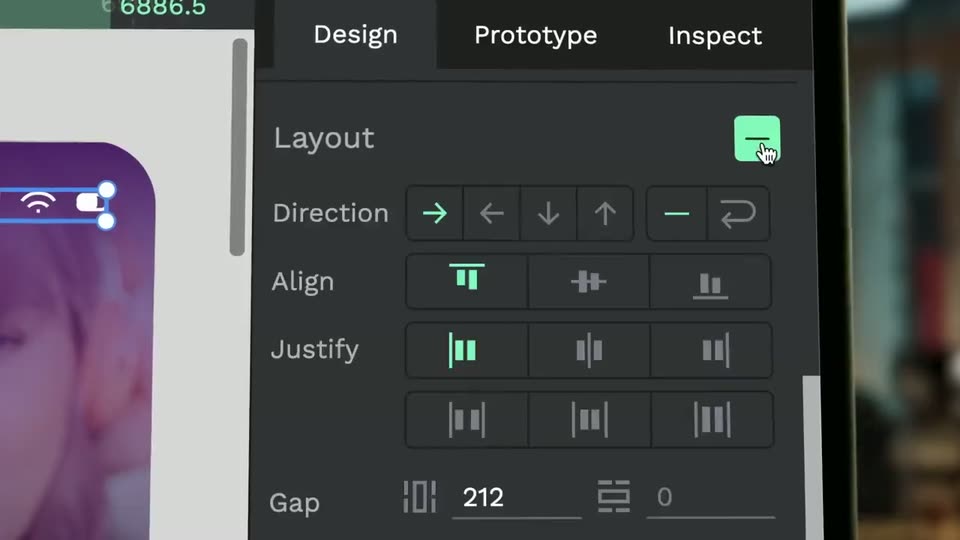
A desktop interface shows the Wondering plugin card, then a chat prompt being typed, then a generated summary document, with a cursor hovering over elements. Captions swap below. It ends on a cut to a woman holding a microphone outdoors.
On-screen text: “for Claude and ChatGPT”, “create a course directly”, “from Claude and ChatGPT”
Techniques: Cursor demo
Camera: Static
13 · Feature reveal · 0:19–0:20
A hand holds a phone before a blurred city window. The screen changes from a vertical milestone list to a 100-days card with a fox and a flying squirrel, while the bottom caption swaps from “We also made” to “learning together”.
On-screen text: “We also made”, “learning together”
Camera: Static
14 · Feature reveal · 0:20–0:21
A hand holds a phone against a blurred street backdrop with a parked bicycle. The app's Profile screen scrolls down past a 100-day streak badge to a Friend Streaks row of three bear avatars, while captions read learning together, then a lot more fun.
On-screen text: “learning together”, “a lot more fun”
Camera: Static
15 · Feature reveal · 0:21–0:23
A woman holds a mic with a purple windscreen and speaks to camera, a man in a black coat stands behind her on a residential street with orange railings. White subtitle lines appear at the bottom in sync with her speech.
On-screen text: “Profile”, “Friend Streaks”, “a lot more fun”, “I challenge you”, “to discover all the ways”, “you can nudge your friend”
Camera: Static
16 · Feature reveal · 0:23–0:24
A hand holds a phone in a dim room, its white screen showing three small illustrations above a name that scales gently. A white caption sits locked at the bottom of the frame while the camera stays still.
On-screen text: “you can nudge your friend”
Camera: Static
17 · Feature reveal · 0:24–0:26
A hand holds a phone at a window with a blurred city view. The screen shows a streak card with two illustrated animals and the number 100, and a finger taps the screen as the card expands. White captions read “streak celebrations” then “with your friends” at the bottom.
On-screen text: “streak celebrations”, “with your friends”
Techniques: Cursor demo
Camera: Static
18 · Feature reveal · 0:26–0:27
A woman holds a small furry microphone and speaks to camera, smiling, while a man in black stands behind her in a wet residential courtyard. White subtitles at the bottom read “with your friends,” then “and with us.”
On-screen text: “with your friends”, “and with us”
Camera: Static
19 · Feature reveal · 0:27–0:27
Two people stand on a wet street in the rain, the woman holding a clear umbrella, the man in front holding a small fuzzy microphone and speaking to camera. White subtitles appear centered at the bottom of the frame.
On-screen text: “and with us”, “Now you can also”
Camera: Static
20 · Feature reveal · 0:27–0:28
A macOS file picker lists research paper PDFs, four of them highlighted blue. The cursor drifts toward the Open button, then the whole window slides off to the right and vanishes, leaving a flat beige backdrop.
On-screen text: “Now you can also”, “create a course”
Techniques: Cursor demo
Camera: Pan
21 · Feature reveal · 0:28–0:29
A locked-off browser window shows the Wonderring course interface: a lesson list on the left and an approval card for a course built from several PDFs on the right. A caption at the bottom reads 'from multiple PDFs', then switches to 'Lastly, we're rolling out'.
On-screen text: “from multiple PDFs”, “Lastly, we're rolling out”
Camera: Static
22 · CTA · 0:29–0:33
A woman in a beige jacket and a man in black stand under a clear umbrella on a rainy street; she holds a furry mic and speaks to camera. The shot cuts wider with a playground behind, a large white URL centered, white captions at the bottom.
On-screen text: “Lastly, we're rolling out”, “something very exciting”, “really soon”, “Sign up here”, “wondering.app/android”, “to get notified”
Techniques: Kinetic type
Camera: Static
23 · Outro · 0:33–0:37
A man holding a lavalier mic and a woman with clear umbrellas face the camera in a rainy playground, closing out the interview as captions appear at the bottom. They step out of frame to the sides while a large white wondering.app text scales into the center over the empty playground.
On-screen text: “Thank you for all”, “the users we interview”, “See you next week”, “wondering.app/android”, “to get notified”, “wondering.app”
Techniques: Kinetic type
Camera: Static