0:52
Explore
Yassir D - Introducing: Witness A system that tracks everything you do and sees
Witness · Oct 2026 · 0:30 · AI-annotated
- Length
- 0:30
- Scenes
- 19 · 1.6 s avg
- Product on screen
- 0:03
- Features shown
- 5
- Voiceover
- No
00:00:00 / 00:30:03
Witness’s 0:30 launch film runs 19 scenes, about 1.6 s each. The product shows up at 0:03 and 5 features are revealed. There is no explicit call to action. The video opens on a live camera feed, then stacks short feature beats (consume, communicate, work, timeline, agent) over a pale field of drifting app cards, each announced by a bold headline that swaps in place. Signature moves include 3D pull-backs from flat grids into perspective timelines, the blue gaze-line trace, and a final wordmark lockup.
Footage neededEstimated needs: 4 capture groups — your screens or recordings · 1 official logo — reused across the film · 1 filmed passage — shoot, supply or replace · 1 graphic passage — draw or supply · 6 3D passages — build or supply
Is this your launch? to your site or press kit.
More like this

Yassir D - Introducing: Witness A system that tracks everything you do and sees, scene by scene
· 19 scenes as text
01 · Hook · 0:00–0:00
A live feed of a person in a black shirt and white VR headset shifts in a sunlit living room with windows onto green fields. The clip sits in a white rounded frame with small HUD labels: WITNESS, a Sunday timestamp, a red LIVE dot.
Camera: Static
02 · Hook · 0:00–0:00
Inside the app frame, a single live feed of a man in VR goggles in a living room splits into a 2x2 grid of four camera angles, the quadrants resolving from a soft blur as the layout assembles.
Techniques: Split screen
Camera: Pull out
03 · Hook · 0:00–0:01
A 2x2 grid of live camera feeds pans left across a light interface, alternating between a clear view of a person in a headset inside a living room and blurred document tiles. A header reads WITNESS with a timestamp, and a LIVE dot sits at the bottom left.
Camera: Static
04 · Hook · 0:01–0:01
A light interface displays a four-column grid of short clips showing a man in reflective AR goggles. The tiles scroll vertically, some sharp and some blurred, while a live clock ticks in the top right corner and a red LIVE badge sits at the bottom left.
Camera: Static
05 · Hook · 0:01–0:03
A light gray field of small product interface cards, showing chats, photos and calendars, drifts across the frame at varying speeds behind a centered black headline.
On-screen text: “Track everything you do.”
Techniques: Parallax
Camera: Pull out
06 · Feature reveal · 0:03–0:04
A centered dark headline over a field of blurred app cards cuts to a left-aligned headline with a small subline, beside a 3D browser mockup that opens a circular magnifier over its photo grid.
On-screen text: “Track everything you do.”, “What you consume.”, “PHOTOS · THE WEB”
Techniques: 3D mockup, UI zoom
Camera: Pull out
07 · Feature reveal · 0:04–0:05
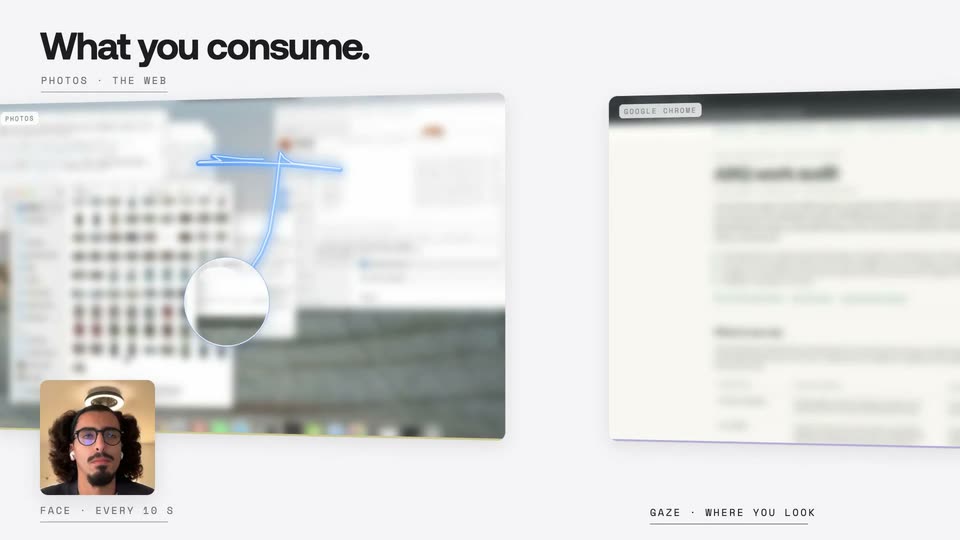
Tilted, blurred app panels scroll left in 3D across a pale field as a blue gaze line with a tracking circle traces over them. A bold headline holds the top left; a small face photo and two small captions sit in the bottom corners.
On-screen text: “What you consume.”, “PHOTOS · THE WEB”, “FACE · EVERY 10 S”, “GAZE · WHERE YOU LOOK”
Techniques: 3D mockup
Camera: Static
08 · Feature reveal · 0:05–0:06
A bold black headline swaps from “What you consume.” to “How you communicate.” as three blurred app windows slide into a row on a light background. A blue line draws from a gaze reticle to a face card, with small uppercase captions below.
On-screen text: “What you consume.”, “PHOTOS · THE WEB”, “CHROME”, “FACE · EVERY 10 S”, “GAZE · WHERE YOU LOOK”, “How you communicate.”, “WHATSAPP”, “IRIS HOME”
Techniques: 3D mockup
Camera: Pull out
09 · Feature reveal · 0:06–0:12
A light frame holds a 2x3 grid of blurred app windows tagged CHROME, WHATSAPP, IRIS HOME and TERMINAL. A small face-cam top right shows a man, first with glasses, then a glowing smart-glasses headset. A thin blue gaze trace with a circle endpoint draws itself across different cards while the top-left headline swaps from communicate to work.
On-screen text: “How you communicate.”, “GAZE · WHERE YOU LOOK”, “How you work.”
Camera: Pull out
10 · Feature reveal · 0:12–0:12
A faint close-up of labeled app panels and a central profile window resolves as the view pulls back, opening onto a wide grid of content tiles (photos, documents, video thumbnails) on white. The light-gray headline sits top-left.
On-screen text: “How you work.”, “GAZE - WHERE YOU LOOK”
Techniques: UI zoom
Camera: Pull out
11 · Feature reveal · 0:12–0:14
Small note thumbnails float in loose horizontal rows over a pale gray field while the caption 542 moments and 3 H 27 MIN AT THE SCREEN sit centered. The thumbnails then slide into a monthly calendar grid beneath an OCTOBER 2026 header.
On-screen text: “542 moments”, “3 H 27 MIN AT THE SCREEN”, “OCTOBER 2026”
Camera: Static
12 · Feature reveal · 0:14–0:15
A light month calendar for October 2026 fills the frame, a few cells holding small screenshot thumbnails, with the bold headline “Every day.” centered. The view transitions to a horizontal day-timeline chart whose colored bars rise, while the headline shrinks and fades.
On-screen text: “Every day.”
Techniques: Kinetic type
Camera: Static
13 · Feature reveal · 0:15–0:17
A flat day timeline with gradient usage bars and a row of small thumbnails sits under the headline “Every minute.” The camera pulls back and tilts into 3D as the headline fades, opening the timeline into a perspective field of floating app windows and thin orange and purple lines.
On-screen text: “Every minute.”, “LIVE”, “SUNDAY 11 OCTOBER · EVERY MINUTE · EVERY APP”
Techniques: 3D mockup
Camera: Push in
14 · Feature reveal · 0:17–0:18
A 3D usage timeline of small app screenshots runs along the bottom of a white space, with thin orange, purple and red lines spiking up and a long gradient bar crossing the middle. The dark headline “Every app. Every day.” fades in at center.
On-screen text: “LIVE”, “SUNDAY 11 OCTOBER · EVERY MINUTE · EVERY APP”, “Every app. Every day.”
Techniques: 3D mockup, Kinetic type
Camera: Static
15 · Feature reveal · 0:18–0:22
Three window previews, each with a webcam photo of a man, scale in over a pale grid of activity thumbnails, labeled with timestamps. A bottom search bar reads 'what was I doing at half six?' as a typed answer appears below, then the Chrome window zooms in.
Techniques: Kinetic type, UI zoom
Camera: Static
16 · Feature reveal · 0:22–0:23
A tilted 3D browser window holding a blurred document sits right of a portrait card and a 6:34:05 PM timestamp on a pale gray field. The window eases forward as the bold headline “It saw.” drops over the document.
On-screen text: “6:34:05 PM”, “GOOGLE CHROME · A DOCUMENT”, “FACE · open 0.38 · smile 0.00 · brow 0.00”, “yaw -15.6° · pitch 2.9° · gaze on-screen 0”, “It saw.”
Techniques: 3D mockup, Kinetic type
Camera: Static
17 · Other · 0:23–0:24
A mosaic of video tiles, some showing a man in a VR headset and a living room, collapses into one full-frame clip. The black headline “For your agents to understand you,” slides in across the center over the fading footage.
On-screen text: “For your agents to understand you,”
Techniques: Masking
Camera: Push in
18 · Other · 0:24–0:27
A blurred split backdrop, landscape on the left and a document page on the right, sits behind a centered headline. Thin light-blue lines and circles link the two halves. The first line of the headline slides in; the second line holds still.
On-screen text: “For your agents to understand you,”, “they need to see what you see.”
Techniques: Kinetic type
Camera: Static
19 · Outro · 0:27–0:30
A two-line sentence slides in on a pale gray field, then the bold WITNESS wordmark with a pink dot settles in; a small uppercase tagline sits below, a faint IRIS HOME label fades in at the bottom edge, and the whole lockup fades out.
On-screen text: “For your agents to understand you,”, “they need to see what you see.”, “WITNESS·”, “YOUR AGENT SEES WHAT YOU SEE”, “IRIS HOME”
Techniques: Kinetic type
Camera: Static