
0:30
Explore
00:00:00 / 01:39:05
- Length
- 1:39
- Scenes
- 25 · 4.0 s avg
- Product on screen
- 0:07
- Features shown
- 1
- Call to action
- 1:32 · 94%
- Voiceover
- Yes
- Views
- 2.2K on YouTube
as of November 27, 2026
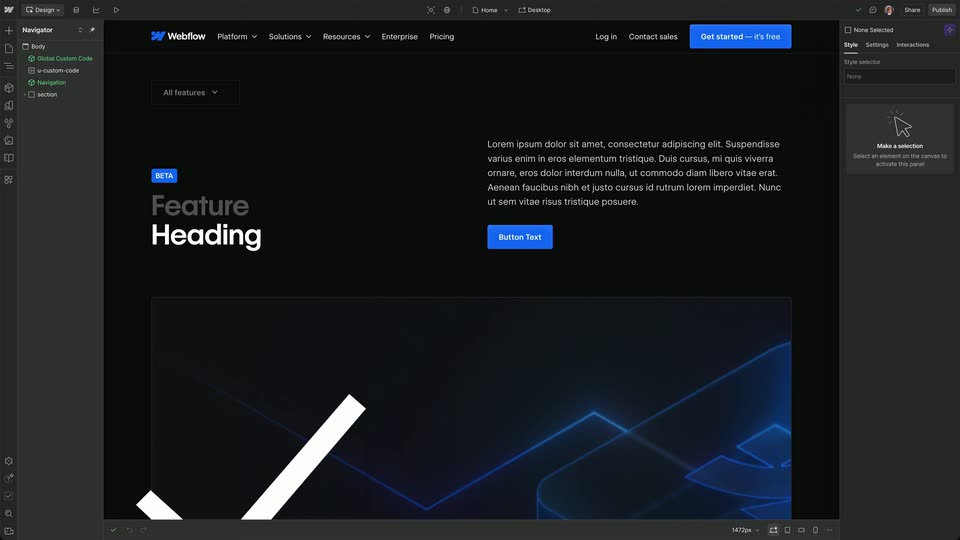
Webflow’s 1:39 launch film runs 25 scenes, about 4.0 s each. The product shows up at 0:07 and 1 feature is revealed. The call to action lands at 1:32 (94% in), over a voiceover. The video is staged as a live demo: black title cards and ringed webcam tiles cut against full-screen Webflow editor shots, showing a last-minute deadline being met by several people editing the same page at once. Pacing is steady around 120 bpm with hard cuts, and each collaborator is tracked by a colored ring and a name-tagged cursor on the canvas.
Footage neededEstimated needs: 2 capture groups — your screens or recordings · 1 official logo — reused across the film · 6 filmed passages — shoot, supply or replace · 1 graphic passage — draw or supply
Is this your launch? to your site or press kit.
More like this


Similar soundtrack
Films whose music sounds like this one, voice left out
0:57

Ayush S - Today we're launching Warp Compliance and our $1,000,000 Payroll Tax
Warp · Corporate electronic
3:10

Windsurf Wave 12: Devin features in Windsurf!
Windsurf · Upbeat electronic
1:50
Shreshth - Today we're launching Oasis Simulations backed by @ycombinator (W27)
Oasis Simulations · Electronic
Real-time collaboration in Webflow is here 🚀, scene by scene
· 25 scenes as text
01 · Problem · 0:00–0:01
A single white line, “The last minute ask...”, slides into the center of a dark gray gradient and holds. The frame is locked off, no other elements move, and the line stays centered for the full second.
On-screen text: “The last minute ask...”
Techniques: Kinetic type
Camera: Static
02 · Problem · 0:01–0:01
On a black background, a white headline sits at top center. A circular video tile of a woman with a purple ring is centered; a second tile of a man in a cap with a yellow ring pops in to the right.
On-screen text: “The last minute ask...”
Techniques: Kinetic type
Camera: Static
03 · Problem · 0:01–0:07
A white headline sits at the top of a black background. Two circular webcam tiles sit side by side beneath it, the left with a pink ring showing a woman in a green top, the right with a yellow ring showing a man in a black cap and glasses. The right tile slides in from the right to align.
On-screen text: “The last minute ask...”
Techniques: Split screen
Camera: Static
04 · Feature reveal · 0:07–0:13
The Webflow editor shows a dark feature section with a BETA badge, “Feature Heading” title, body copy, and a blue button. At 5.5s it cuts to two overlapping circular avatars, a woman in a pink ring and a man in a yellow ring, on black, as a caption slides in.
On-screen text: “The last minute ask...”
Techniques: Kinetic type
Camera: Static
05 · Feature reveal · 0:13–0:20
Two circular video call frames sit side by side on a dark background: a woman in a green top in a pink ring, a man in a black cap and glasses in a yellow ring. They smile, nod and talk, then the frame cuts to a design tool interface.
On-screen text: “00”
Techniques: Split screen
Camera: Static
06 · Feature reveal · 0:20–0:23
A static dark editor canvas shows a placeholder paragraph and a white button. A magenta collaborator cursor labeled Charlene sits at the left edge, then a yellow cursor labeled Jose moves to the button and selects it, drawing a yellow outline around it.
Techniques: Cursor demo
Camera: Static
07 · Feature reveal · 0:23–0:30
A flat dark UI mockup shows a white Feature Heading with a magenta selection box and a white button in the right column. Feature fades to gray while the button turns solid blue with white text, both updating at once.
Techniques: Kinetic type
Camera: Static
08 · Feature reveal · 0:30–0:34
On a black background, two circular webcam tiles with pink and yellow rings show a woman and a man smiling and talking. A third green-ringed tile with a man in front of a bookshelf fades in on the right, and the row shifts left.
Techniques: Split screen
Camera: Static
09 · Feature reveal · 0:34–0:40
Three circular video call tiles with pink, yellow, and green rings sit side by side on a black background. A woman, a man in a cap, and a man with glasses talk and nod inside the circles while the framing stays static.
Techniques: Split screen
Camera: Static
10 · Feature reveal · 0:40–0:46
A dark design-editor screen holds still: a half-cropped headline, a pink box tagged Charlene, a yellow Jose tag over a blue button, and placeholder text. The right panel shows a Make a selection prompt with a cursor icon. Near the end a third avatar pops into the top bar.
Camera: Static
11 · Feature reveal · 0:46–0:49
A dark comment thread: Charlene's magenta-outlined bubble on the left, a block of white lorem ipsum text on the right, with a yellow Jose tag and a blue button below. At 1.6s the tag updates to Jose +1 as the voiceover reacts.
Camera: Static
12 · Feature reveal · 0:49–0:52
Three circular video-call portraits sit side by side on a black background, each in a colored ring: pink, yellow, green. The woman on the left smiles, the bearded man in the middle laughs and leans forward, the man on the right nods slightly.
On-screen text: “O”
Techniques: Split screen
Camera: Static
13 · Feature reveal · 0:52–1:04
A static dark Webflow editor screen shows a magenta selection box hopping between lines as text rewrites in place: the gray heading becomes 'Real-time collaboration', the blue button reads 'Apply for the beta', and the white heading turns into 'Build with your team, not around them.'
Techniques: Kinetic type
Camera: Static
14 · Feature reveal · 1:04–1:08
Three circular video call tiles with pink, yellow and green rings sit on a black background. A fourth tile with a red ring slides in from the right as the others shift left to make room.
Camera: Static
15 · Feature reveal · 1:08–1:11
The Webflow editor fills the frame, locked off, with a dark webpage showing a bold white headline over faded gray text. Three colored collaborator cursors with name tags appear on the canvas, one near the top edge.
Camera: Static
16 · Feature reveal · 1:11–1:15
Five circular video call tiles with colored rings slide in from the left and separate into an evenly spaced row on a dark background. The people inside talk and gesture.
Camera: Static
17 · Feature reveal · 1:15–1:18
A dark webpage mockup sits inside a design editor. Red selection outlines with collaborator name tags pop in one by one on the body paragraph and the image, while tags already mark the headline and button, showing several users editing at once.
Camera: Static
18 · Feature reveal · 1:18–1:21
On a black background, a single line of white text fades in at center reading “Build with your team, not around them.” The line then holds static for the remainder of the clip.
On-screen text: “Build with your team, not around them.”
Techniques: Kinetic type
Camera: Static
19 · Feature reveal · 1:21–1:22
A design editor displays a dark Webflow page where red selection boxes, tagged with collaborator names, frame the headline, body copy and a blue button. The layout stays static across the shot.
Camera: Static
20 · Feature reveal · 1:22–1:24
A design tool canvas displays a dark website layout with colored selection boxes tagged Charlene, Larry, Jose and Carl. A nested browser preview below flashes a yellow headline block on the left, then clears it while a label jumps to the body text.
Camera: Static
21 · Feature reveal · 1:24–1:28
Five circular video feeds with colored rings, pink, yellow, green, pink and orange, sit in a row on a black background. The people look down and shift slightly, and the woman at the right lifts her head and starts to speak.
Techniques: Split screen
Camera: Static
22 · Feature reveal · 1:28–1:32
A white headline sits centered on black as five circular video tiles of smiling people pop in around it, each ringed in a different color.
On-screen text: “Real-time collaboration in Webflow”
Techniques: Masking
Camera: Static
23 · CTA · 1:32–1:34
White text “Available now” sits centered on a black field. A small blue Webflow mark fades in to the left of the line, then the whole composition dissolves to black.
On-screen text: “Available now”
Camera: Static
24 · CTA · 1:34–1:36
The Webflow logo, a blue angular mark beside a white wordmark, sits centered on a black field. A left-to-right reveal brightens the wordmark from gray to full white, then the frame holds still.
On-screen text: “webflow.com/collaboration”
Techniques: Masking
Camera: Static
25 · CTA · 1:36–1:39
On a black background, the URL webflow.com/collaboration reveals left to right in the center of the frame, then holds still for the remainder of the clip.
On-screen text: “webflow.com/collaboration”
Techniques: Masking
Camera: Static