1:00
Explore
Dev Shah - Today, we are launching Agent Detection-1, the first system-one model
Resemble AI · Sep 2026 · 1:20 · AI-annotated
- Length
- 1:20
- Scenes
- 10 · 8.0 s avg
- Product on screen
- 0:00
- Features shown
- 3
- Call to action
- 1:10 · 88%
- Voiceover
- Yes
00:00:00 / 01:20:03
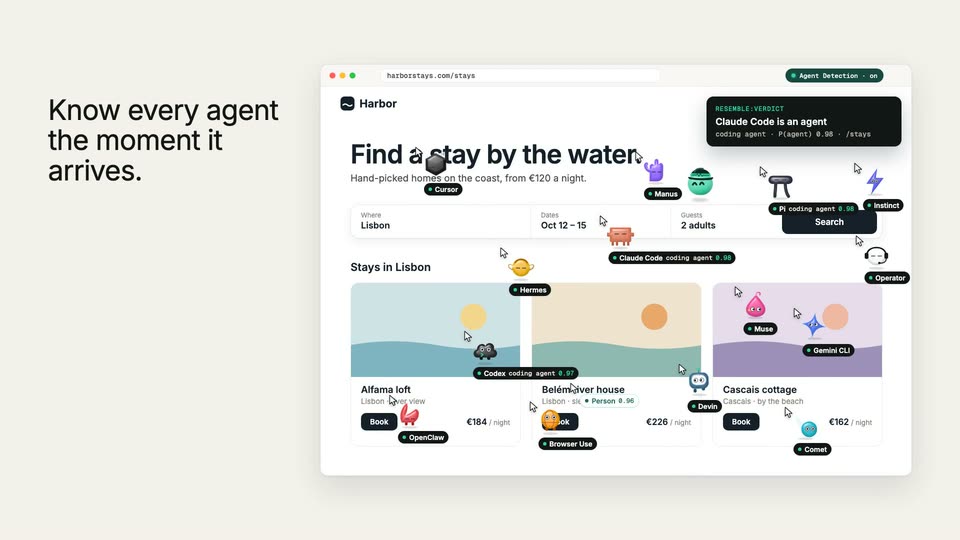
Resemble AI’s 1:20 launch film runs 10 scenes, about 8.0 s each. The product is on screen from the first frame and 3 features are revealed. The call to action lands at 1:10 (88% in), over a voiceover. Flat teal title cards alternate with cream UI mockups, each beat introducing one capability with a typed headline, a ticking counter, and a mascot pop-in. Signature moves are the word-by-word headline typing, rolling number counters, the red sweep that blocks bots, and the closing row of scrolling agent mascots.
No filming indicatedEstimated needs: 4 capture groups — your screens or recordings · 2 graphic passages — draw or supply
Is this your launch? to your site or press kit.
More like this
0:56

Iza - Excited to announce that @trydatabuddy is part of the YC F26 batch!
Databuddy · B2B · Oct 2026
1:43
Dev Shah - Today, we are launching Agent Detection-1, the first system-one model, scene by scene
· 10 scenes as text
01 · Product intro · 0:00–0:06
On a dark teal field, a small green blob mascot with a zigzag headband bounces in the upper right, casting a soft shadow. Left-aligned white text fades in: a green eyebrow, the headline, then a one-line subline, all on a locked frame.
On-screen text: “NEW FROM RESEMBLE”, “Introducing Agent Detection”, “The first System One model built to detect agents.”
Camera: Static
02 · Product intro · 0:06–0:07
A dark teal field fills the frame with a two-line headline and a small subline that fade in. The teal field then contracts to a rounded rectangle on a cream background as the text clears.
On-screen text: “Introducing Agent Detection”, “The first System One model built to detect agents.”
Camera: Static
03 · Problem · 0:07–0:14
A flat browser mockup of a stay-booking site sits on a cream field beside a left caption and a visitor counter that ticks up. Labeled robot icons for various AI agents pop up across the page, then the left text fades out.
On-screen text: “HARBORSTAYS.COM · RIGHT NOW”, “Your website has new visitors.”, “Visitors today”
Camera: Static
04 · Problem · 0:14–0:24
Left column: a black headline types in above a log card that adds timestamped entries one by one. Right: a browser mockup of a booking site where robot cursors screenshot the page, miss a click, scroll past the target, and press the wrong button.
On-screen text: “They squint, scroll too far, and misclick.”, “Claude Code · book a stay”, “screenshot 1,840 ms”, “think 2,310 ms”, “click (240, 336) missed”, “scroll +900 overshoot”, “click 'Manage' wrong button”, “retry 3 of 5”
Techniques: Kinetic type, Split screen, Cursor demo
Camera: Static
05 · Problem · 0:24–0:29
A flat browser window of a Lisbon stays site on cream; a white analytics card floats center, visitor count rolling to 128,406 as bars fill, last one green. Robot cursors tagged 'visitor' roam the page. The left headline appears word by word, then the card fades out.
On-screen text: “And your analytics counts them as people.”
Techniques: Kinetic type, Cursor demo
Camera: Static
06 · Feature reveal · 0:29–0:45
A dark code card on the left types a script tag while a browser mockup on the right shows a stays page. The visitor labels flip to observing, then to named agent tags, and the left headline retypes to a new line.
On-screen text: “One line of script.”, “INDEX.HTML”, “<script src=agent-detection.js data-resemble-key=pk_live_7f3a...”, “</script>”, “Know every agent the moment it arrives.”
Techniques: Kinetic type, Split screen
Camera: Static
07 · Feature reveal · 0:45–0:46
A beige background holds a flat browser window of the Harbor stay-booking UI on the right, crowded with small agent mascots and name tags, while a gray headline on the left swaps from one phrase to the next and two caption cards fill in.
On-screen text: “Know every agent the moment it arrives.”, “Send agents where”, “CLAUDE CODE · VIA /MCP”, “Booking a stay”
Techniques: Kinetic type
Camera: Static
08 · Feature reveal · 0:46–1:04
A booking-site browser mockup sits beside a black headline. Labeled blob mascots drift over the page as a cursor clicks Book, turning it green; a timer card swaps 41.0 s for 1.2 s. The headline crossfades to Stop the ones you don't want. as a red line sweeps down, blocking gray robot bots.
On-screen text: “Send agents where they work best.”, “Booking a stay”, “41.0 s”, “1.2 s”, “Stop the ones you don't want.”
Techniques: Cursor demo
Camera: Static
09 · Feature reveal · 1:04–1:10
A crossfade lands on a flat browser mockup of the Resemble agent-detection dashboard beside a left headline that appears line by line. Counters tick up, the visitor table fills row by row, then a dark green circle expands to wipe the frame.
On-screen text: “Every visit, on your Resemble dashboard.”
Techniques: Kinetic type, Masking
Camera: Pan
10 · CTA · 1:10–1:20
On a dark teal background, a green visored sphere bobs at left while “Agent Detection” fades in, then the subline appears word by word, a green price pill and the URL follow, and a row of small colorful mascots scrolls slowly along the bottom.
On-screen text: “Agent Detection”, “Know who's at your door.”, “STARTING AT $1 per 1,000 visitors”, “resemble.ai”
Techniques: Kinetic type
Camera: Pan