2:59

Introducing Canva Offline | Canva Create 2026
Canva · Design · Apr 2026
Oasis Simulations · Nov 2026 · 1:50 · AI-annotated
Oasis Simulations’s 1:50 launch film runs 19 scenes, about 5.8 s each. The product shows up at 0:24 and 4 features are revealed. The call to action lands at 1:44 (94% in), over a voiceover. Two live-action hosts in a garden anchor the story while dark floating UI panels assemble 3D equipment, tick off checklists and sweep timeline playheads to demo each feature. Cuts are slow and conversational at about two per minute, with corner stat cards, popping green checkmarks and a dim-to-logo transition as the recurring signature moves.
Is this your launch? to your site or press kit.
Canva · Design · Apr 2026
Simular AI · Nov 2026
Films whose music sounds like this one, voice left out
Warp · Corporate electronic
Windsurf · Upbeat electronic
ClickUp · Upbeat electronic
Two men stand in a leafy garden, speaking to camera while the man on the right gestures. Dark stat cards fade in top-left with data-center figures, and white subtitles run along the bottom. Near the end the frame dims and the Oasis Simulations wordmark appears centered.
On-screen text: “We're currently a part”, “of the biggest”, “$7T”, “needed for data centers worldwide by 2030”, “McKinsey & Company”, “physical infrastructure”, “buildout in history”, “but we don't have”, “the skilled tradespeople”, “53% of operators struggle to find qualified candidates, Uptime Institute, 2026 of operators struggle to find qualified candidates Uptime Institute, 2026 of 53% ”
Camera: Static
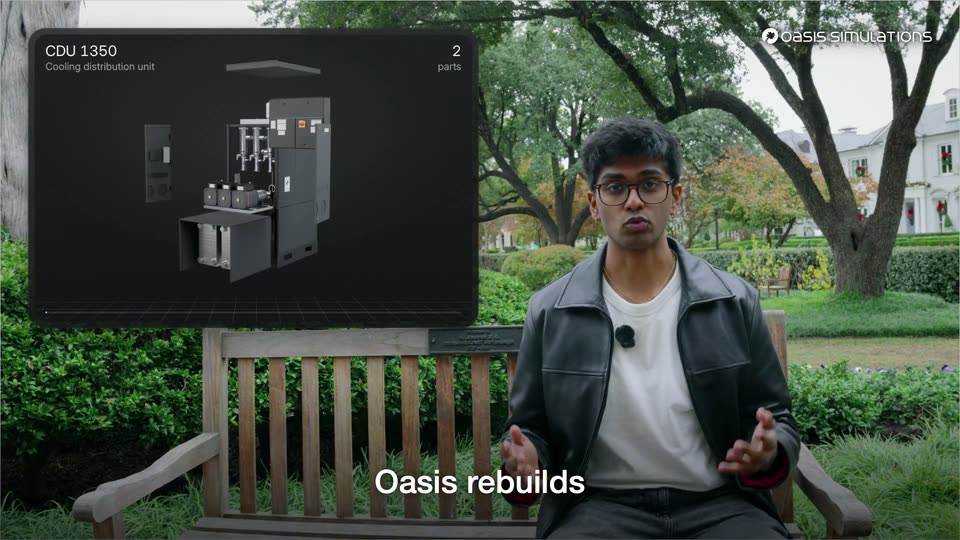
A presenter in a leather jacket sits on a park bench gesturing to camera. A dark 3D viewer panel on the left fades in and builds the CDU 1350 model, its parts counter climbing from 0 to 11. A white caption reads Oasis rebuilds at the bottom.
On-screen text: “Oasis rebuilds”
Techniques: 3D mockup
Camera: Static
A presenter sits on a park bench while a dark 3D panel on the left assembles a cooling unit, its parts count ticking up, then zooms into labeled close-ups of pumps, power panels, server racks, control screens, and alarms as caption lines swap below.
On-screen text: “oasis simulations”, “Oasis rebuilds”, “your equipment”, “in the browser”, “one-to-one”, “Everything from”, “your pumps and valves”, “to your power screens”, “server racks”, “full-fledged HMIs”
Techniques: Split screen, 3D mockup, UI zoom
Camera: Static
A man in a leather jacket sits on a garden bench, gesturing. On the left, dark checklist cards labeled SOP, MOP and EOP appear in sequence, green checkmarks fill each list, and a 'Mapped to your equipment' bar slides in and gets checked. White captions run below.
On-screen text: “that your SOPs”, “MOPs, EOPs”, “and other procedural data”, “is directly mapped”, “onto the equipment”, “already use”, “Again”
Camera: Static
A man in a leather jacket sits on a park bench, gesturing as he talks, while a laptop mockup at the upper left shows a CNC machine rotating and opening in a dark 3D viewer. Green check badges pop in below the laptop; white subtitles roll across the bottom.
On-screen text: “Again”, “Your equipment”, “In any browser”, “everything is on browser”, “so you no longer”, “need clunky AR”, “No headset”, “and VR solutions”
Techniques: 3D mockup
Camera: Static
A presenter in a white sweater sits on a bench in a park, gesturing as he talks. A rounded 3D panel of a data center room with dark power cabinets fades in on the right. Bottom captions read 'It works' then 'like a machine'.
On-screen text: “It works”, “like a machine”
Techniques: 3D mockup
Camera: Static
A man in a white sweater sits on a park bench, speaking to camera. A rounded inset at top right shows a 3D simulation of dark CDU cabinets; a dialog pops up, a cursor clicks Trip P1, and a red fault label appears. White captions roll at the bottom.
On-screen text: “like a machine”, “like one too”, “Your instructor trips”, “the utility power”, “now it's on your”, “to read the alarm”
Techniques: 3D mockup, Cursor demo
Camera: Static
A man in a white sweater sits on a garden bench speaking, while a floating HMI touchscreen mockup with a 3D bezel hovers to his right. A hand cursor rests on a blue button, and a dark pill labeled “Read the alarm” flips to a green check below the screen.
On-screen text: “to read the alarm”, “Read the alarm”
Techniques: Cursor demo, 3D mockup
Camera: Static
A man in a cream sweater sits on a wooden park bench, speaking to camera. A rounded 3D inset shows a data hall: a close-up of a black CDU cabinet with red fault labels, then a wider row of server racks. White captions change at the bottom of frame.
On-screen text: “find the problem”, “make the call”, “Mistakes happen here”, “where nobody loses”, “a server over it”
Techniques: Split screen, 3D mockup
Camera: Static
A presenter in a black leather jacket stands in a garden set, gesturing, while a flat product panel floats at left showing a data-center rack. The panel zooms into the rack view and a Recording badge appears. White captions swap at the bottom.
On-screen text: “We also record”, “and document”, “every person's”, “the valves they turn”
Techniques: UI zoom
Camera: Static
A man in a black leather jacket stands outdoors, gesturing as he speaks. To his left, a digital overlay displays an industrial interface with pipes and a timeline that advances. White subtitles appear at the bottom of the frame.
On-screen text: “the valves they turn”, “the screens they open”
Camera: Static
A presenter in a grey jacket stands in a garden on the right, gesturing, while a rounded panel on the left shows a recorded control screen above a timeline with Valves, Screens and Alarms rows. A playhead advances and an orange alarm dot appears on the Alarms row.
On-screen text: “the screens they open”, “and the alarms”, “Everything gets saved”, “into a shared”, “timeline for you”
Techniques: Split screen
Camera: Static
A presenter in a gray leather jacket stands in a leafy garden, gesturing toward a dark recording viewer on the left. The viewer shows a control screen and a timeline with three tracks and colored event markers. White subtitles read 'timeline for you' then 'and your team'.
On-screen text: “timeline for you”, “and your team”
Camera: Static
A presenter in a leather jacket gestures in a garden beside a floating UI mockup: an evidence list above a timeline with colored event dots and a moving playhead. White captions read at the bottom.
On-screen text: “to go back”, “and analyze afterwards”
Camera: Static
A presenter in a black jacket stands in a garden, gesturing, while a 3D tablet mockup floats to his left showing a timeline interface. The mockup fades out as the bottom caption shifts from “and analyze afterwards” to “The scoring is built.”
On-screen text: “and analyze afterwards”, “The scoring is built”
Techniques: 3D mockup
Camera: Static
A man in a black leather jacket stands in a leafy garden, speaking to the camera with open-hand gestures. Dark rounded notification cards with green checkmarks and a red cross stack in on the upper left, one after another, while white subtitles run along the bottom.
On-screen text: “The scoring is built”, “with your processes”, “and criteria in mind”, “so nothing goes astray”, “That way”
Camera: Static
A man in a leather jacket stands in a leafy garden, gesturing as he speaks. A product results panel floats at left; its timeline highlights a red 14s block, then the header and metrics switch from a failed to a passed state.
On-screen text: “That way you can retrain people understand where they fall short how to improve and make sure they're actually ready for the live equipment”
Camera: Static
Two men stand side by side before a white ornate pavilion; the one in a black leather jacket talks and gestures while the other in a cream sweater stands still. Subtitles cycle at the bottom and a dark stat card with a large 140K appears top right at 7s.
On-screen text: “Almost every company”, “right now relies on”, “mission-critical infrastructure”, “being operated by”, “skilled tradespeople”, “somewhere in the world”, “This buildout needs”, “140K”, “more skilled trades workers the U.S. may need by 2030”, “- CSIS, 2025”
Camera: Static
Two presenters stand before a white ornate gazebo, one in a cream sweater, one in a black leather jacket. The Oasis Simulations logo and a dark CTA pill overlay the frame, then the shot fades to black and the logo with the URL appears centered, holding before fading out.
On-screen text: “oasis simulations”, “Book a demo at oasissimulations.com”, “oasissimulations.com”
Camera: Static