0:39
Explore
ViggleAI - VIGGLE'S NEW MODEL IS HERE! Controllable video generation is our m
Viggle · Mar 2024 · 1:00 · AI-annotated
- Length
- 1:00
- Scenes
- 20 · 3.0 s avg
- Product on screen
- 0:52
- Features shown
- 4
- Call to action
- 0:56 · 92%
- Voiceover
- No
00:00:00 / 01:00:25
Viggle’s 1:00 launch film runs 20 scenes, about 3.0 s each. The product shows up at 0:52 and 4 features are revealed. The call to action lands at 0:56 (92% in). The video opens with a typographic promise, then runs four identical feature blocks: a 'you can /command' title card, a two-slot input UI, and a plus-and-arrow workflow that resolves into a dancing 3D character on a black stage. Cuts land on a mid-tempo beat, text scales in phrase by phrase, chips light up green, and the small V logo anchors the top-left until the final wordmark.
Footage neededEstimated needs: 4 capture groups — your screens or recordings · 1 filmed passage — shoot, supply or replace · 5 3D passages — build or supply
Is this your launch? to your site or press kit.
More like this
3:47
Steve (Builder.io) - Introducing /webmcp - make your agent workflows visual
Builder.io · Sep 2026
0:43
ViggleAI - VIGGLE'S NEW MODEL IS HERE! Controllable video generation is our m, scene by scene
· 20 scenes as text
01 · Hook · 0:00–0:06
Large white sans-serif words hold center on a dark green-to-black gradient, the first giving way to the second. A smaller white line fades in, a green line joining beneath. The frame darkens to a small tag top-left, then a short white phrase scales in at left.
On-screen text: “Controllable”, “Generation”, “starting from making any character”, “move as you want”, “/mix”, “you can”
Techniques: Kinetic type
Camera: Static
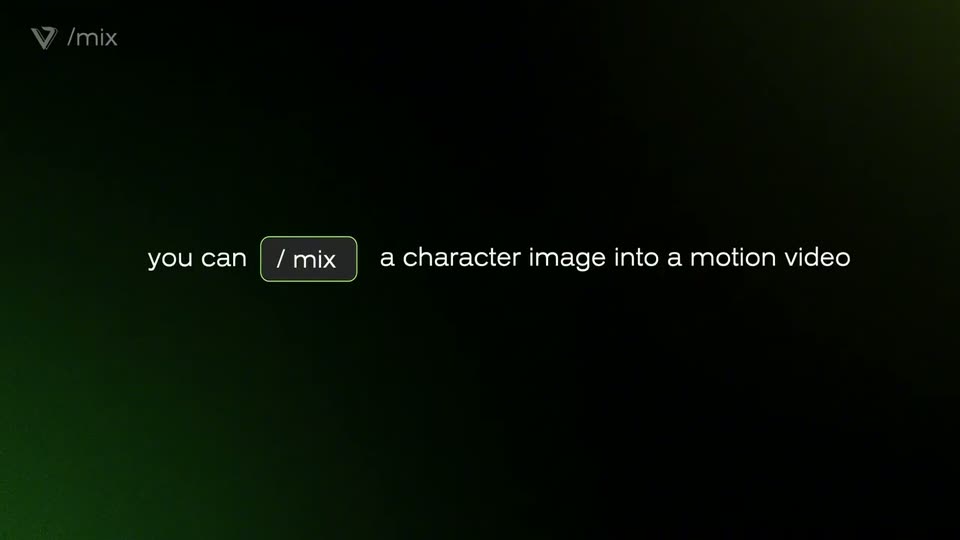
02 · Feature reveal · 0:06–0:08
A near-black background with a soft green glow holds centered text: 'you can' scales in beside a rounded pill labeled '/ mix', then the rest of the line, 'a character image into a motion video', appears to the right. A small /mix logo stays in the top-left corner.
On-screen text: “you can / mix a character image into a motion video”
Techniques: Kinetic type
Camera: Static
03 · Feature reveal · 0:08–0:09
A locked-off dark interface shows two rounded cards, an image icon labeled character and a play icon labeled motion, above a glowing Viggle This! button. A small caption scales in over the static layout.
On-screen text: “you can”
Camera: Static
04 · Feature reveal · 0:09–0:12
A dark green-glowing screen shows two rounded cards, a 3D woman labeled character and a video slot labeled motion, over a Viggle This! button. The motion card plays a dancing woman as a cursor rests on the button.
Techniques: Cursor demo
Camera: Static
05 · Feature reveal · 0:12–0:15
On a black stage with a green glow, a 3D woman on a cream card, a green plus, a square video of a dancer, a green arrow, then the same 3D woman on the right mirrors the dance. A grey 'Viggle This!' button sits below.
On-screen text: “/mix”, “Viggle This!”
Techniques: 3D mockup, Split screen
Camera: Static
06 · Feature reveal · 0:15–0:16
On a green-tinted dark background, a 3D woman in a white tank and green pants stands in a left card, a real dancer plays in a center video, and she dances at right, linked by a plus and an arrow. A gray 'Viggle This!' button sits below.
On-screen text: “Viggle This!”
Camera: Static
07 · Feature reveal · 0:16–0:18
On a grainy near-black green field, a small white V logo and /animate mark sit top-left. The words you can fade in at left, then /animate types into a rounded outline box beside them, and the box border brightens at the end.
On-screen text: “you can”, “/animate”
Techniques: Kinetic type
Camera: Static
08 · Feature reveal · 0:18–0:20
A near-black frame with a faint green glow holds the words 'you can' and a green-outlined chip reading '/ animate' at center-left. The phrase 'a static character with a text motion prompt' then appears to the right of the chip, completing the sentence. A small brand mark sits in the top-left corner.
On-screen text: “you can”, “/ animate”, “a static character with a text motion prompt”
Techniques: Kinetic type
Camera: Static
09 · Feature reveal · 0:20–0:21
A dark interface with a green left gradient holds two rounded panels: a square with an image icon labeled character, a rectangle with a text icon labeled motion, and a centered glowing button reading Viggle This!. The frame stays locked off.
Camera: Static
10 · Feature reveal · 0:21–0:24
A dark UI screen shows a 3D character card labeled character on the left and a motion prompt box on the right. A cursor clicks the prompt, the text ballet, leap into the air and twirl slides in, then the cursor moves to the Viggle This! button.
Techniques: Cursor demo
Camera: Static
11 · Feature reveal · 0:24–0:27
A dark green-lit frame lays out a workflow: a 3D boy in a white card, a green plus, a prompt box, a green arrow, then the same boy mid-air doing a ballet leap and twirl on the right. A gray 'Viggle This!' pill button sits below.
On-screen text: “/animate”, “ballet, leap into the air and twirl”, “Viggle This!”
Techniques: 3D mockup
Camera: Static
12 · Feature reveal · 0:27–0:28
A 3D boy character leaps into the air with arms spread and twirls on the right, matching the prompt that slides into a green-outlined box. The same character stands in a card on the left; a plus sign and arrow connect them, and a button sits below.
On-screen text: “/animate”, “ballet, leap into the air and twirl”, “Viggle This!”
Techniques: 3D mockup
Camera: Static
13 · Feature reveal · 0:28–0:30
A dark, grainy field with a soft green glow in the lower left corner and the /ideate logo top left. The white tagline 'you can' appears mid-left, then a thin rounded outline box containing '/ideate' appears beside it.
On-screen text: “you can”, “/ideate”
Techniques: Kinetic type
Camera: Static
14 · Feature reveal · 0:30–0:33
On a dark background with a soft green glow, the line 'you can / ideate a video purely from text' assembles phrase by phrase, the command boxed in green. It cuts to two prompt cards labeled character and motion above a glowing action button.
On-screen text: “you can”, “/ ideate”, “a video purely from text”
Techniques: Kinetic type
Camera: Static
15 · Feature reveal · 0:33–0:36
A dark, green-edged screen shows two rounded prompt fields captioned character and motion, the left one already filled. A cursor hovers over the right field, which types in motion text, then the Viggle This! button at the bottom brightens.
Techniques: Cursor demo
Camera: Static
16 · Feature reveal · 0:36–0:40
Two prompt boxes, 'young man wears a black T- shirt' and 'dance happily, cross legs and swing arms in waves', link via a green plus and arrow to a man in a black tee and jeans dancing on the right. A 'Viggle This!' button sits below; the shot fades to black.
On-screen text: “young man wears a black T- shirt”, “dance happily, cross legs and swing arms in waves”, “Viggle This!”
Camera: Static
17 · Feature reveal · 0:40–0:44
A dark green gradient holds the frame as “you can” and a rounded “/ stylize” chip fade in left of center. The chip outline lights up green, then the sentence completes with “your character with a text prompt, and viggle it!”
On-screen text: “you can”, “/ stylize”, “your character with a text prompt, and viggle it!”
Techniques: Kinetic type
Camera: Static
18 · Feature reveal · 0:44–0:52
A dark stylize interface with character and motion panels. A cursor drops a portrait into the character slot, a prompt types in and the image restyles into a cyberpunk outfit, then a plus sign and arrow link to a full-body 3D character dancing on the right.
Techniques: Cursor demo, Morph
Camera: Static
19 · Product intro · 0:52–0:56
On a dark green gradient, three white labels fade in from left to right, each under a question mark. The marks swap to green check icons and a large white tagline lands in the center. The VIGGLE logo stays top-left.
On-screen text: “Character Consistency”, “Controllability”, “Real-time”, “Viggle's got it!”
Techniques: Kinetic type
Camera: Static
20 · CTA · 0:56–1:00
Six 3D character models dance in a row along the bottom of a dark green gradient. Centered white text swaps from the VIGGLE wordmark to 'Powered by JST-1' and 'Try it now at viggle.ai', ending on the large V mark.
On-screen text: “Powered by JST-1”, “Try it now at viggle.ai”
Camera: Static