1:00
Explore
Dia - Context everywhere? In Dia, you can now swipe between Profiles, so y
Dia · Aug 2026 · 0:39 · AI-annotated
- Length
- 0:39
- Scenes
- 26 · 1.5 s avg
- Product on screen
- 0:02
- Features shown
- 1
- Call to action
- 0:37 · 93%
- Voiceover
- No
00:00:00 / 00:39:22
Dia’s 0:39 launch film runs 26 scenes, about 1.5 s each. The product shows up at 0:02 and 1 feature is revealed. The call to action lands at 0:37 (93% in). The video loops a dim live-action hand gesture over the glowing orb into a rack-focus UI shot where a prompt types out letter by letter, with the swipe as the recurring transition between Work, Freelance and Personal profile demos. Its style is defined by shallow depth of field, warm amber light against soft green bokeh, and slow deliberate motion that makes each interface feel tactile.
Footage neededEstimated needs: 2 capture groups — your screens or recordings · 9 filmed passages — shoot, supply or replace · 2 3D passages — build or supply
Is this your launch? to your site or press kit.
More like this
Dia - Context everywhere? In Dia, you can now swipe between Profiles, so y, scene by scene
· 26 scenes as text
01 · Hook · 0:00–0:02
A low-light close-up frames a dark laptop trackpad and keyboard. A hand enters from the bottom edge and taps the pad with two fingertips, the motion slow and deliberate against the black surface.
On-screen text: “山”
Camera: Static
02 · Hook · 0:02–0:02
Extreme close-up of a silver laptop trackpad, keyboard edge blurred at right. A dark hand enters from the top left, one finger taps the pad, then the hand lifts away, leaving the empty surface.
Camera: Static
03 · Product intro · 0:02–0:03
Macro close-up of an angled app dock; shallow depth of field blurs the green background. The central white icon, a blue-to-orange gradient arch, bounces up and down under a small tooltip while a cursor arrow rests at its base. A dark blue Pr and a green Spotify mark sit soft.
Techniques: Cursor demo
Camera: Static
04 · Feature reveal · 0:03–0:05
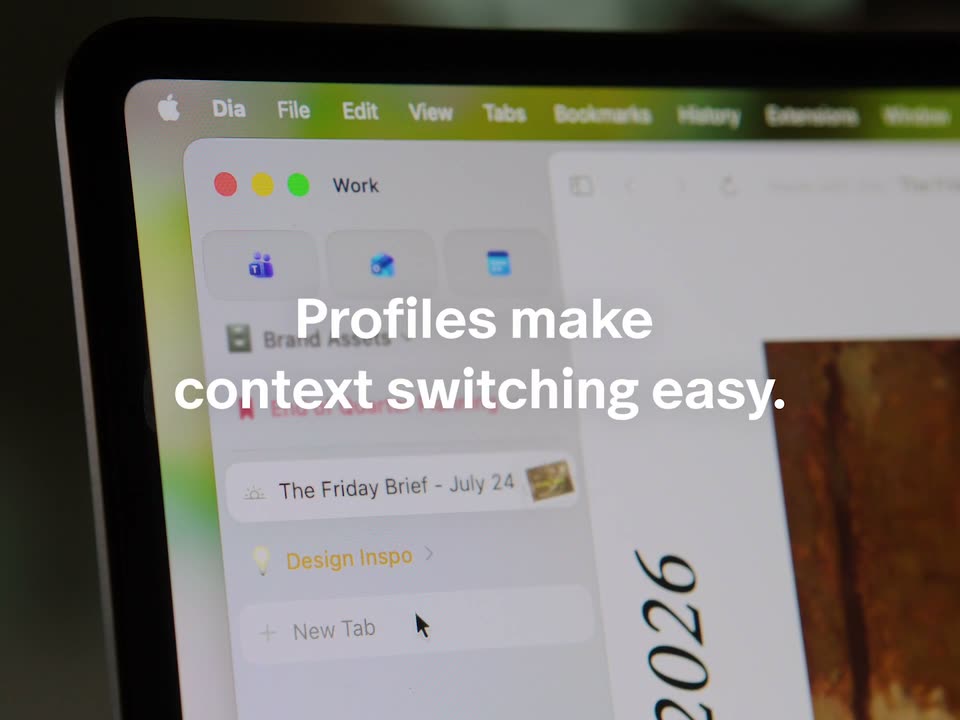
A tight close-up of a laptop screen shows a browser sidebar with a Work profile and tab list, angled with soft focus on the top menu bar. A white caption fades in over the center while a cursor drifts down toward the New Tab row.
On-screen text: “Profiles make context switching easy.”
Techniques: Kinetic type, Cursor demo
Camera: Static
05 · Feature reveal · 0:05–0:07
A dark, out-of-focus laptop brightens and pulls into focus, revealing a glowing white orb on its screen against a soft green bokeh background. The white caption stays locked in the center throughout the shot.
On-screen text: “All it takes is a swipe.”
Camera: Static
06 · Feature reveal · 0:07–0:08
A browser window hovers over a soft green blur, then the view zooms into the centered search bar as the words Catch me are typed in. A static headline, All it takes is a swipe, settles over the frame.
On-screen text: “All it takes is a swipe.”
Techniques: UI zoom
Camera: Static
07 · Feature reveal · 0:08–0:09
A white rounded chat bar sits centered on a pale background, with a small translucent dome shape floating above it. The prompt text types out letter by letter behind a blinking blue caret, then a light purple speech bubble fades in to the right echoing the typed line.
Techniques: Kinetic type
Camera: Static
08 · Feature reveal · 0:09–0:11
A light chat interface on a white background. A lavender message bubble scales in on the right, then three activity cards with icons and skeleton lines fade in below a channel label, and an assistant reply line with a small gray logo appears at the bottom.
Camera: Static
09 · Feature reveal · 0:11–0:12
A hand reaches into a dim, warm-lit frame and covers a glowing half-circle light on a laptop surface, blurred keys behind. The fingers close over the dome as it flares, in a locked-off shot.
On-screen text: “Catch me up on the homepage redesign”, “Recent activity in the homepage-redesign channel >”, “I'll research the homepage redesign across your work tools.”
Camera: Static
10 · Feature reveal · 0:12–0:13
An angled close-up of a laptop screen shows the Dia browser with a Freelance sidebar listing project links. The frame begins soft and out of focus, then racks into sharp focus on the sidebar icons and text.
Camera: Static
11 · Feature reveal · 0:13–0:15
A light browser window with a left sidebar sits on a blurred green background. The frame zooms into the central search bar, where a query types out letter by letter and a green Chat button fills in on the right.
Techniques: UI zoom
Camera: Static
12 · Feature reveal · 0:15–0:16
On a white background, a light green chat bubble holds the question about invoicing instructions for Pretzel Logic Foods. Beneath it, a heading and four result cards with colored app icons and gray placeholder bars fade in from a faint state to full contrast.
Camera: Static
13 · Feature reveal · 0:16–0:17
In a dark frame, a hand reaches in from the left and pinches a glowing circular light on a device surface, then withdraws to the right, leaving the warm amber glow centered against a blurred keyboard grid.
Camera: Static
14 · Feature reveal · 0:17–0:18
A close, angled shot of a laptop screen shows the Dia browser, with a bookmarked-items sidebar on the left and a document on the right. The frame opens soft and racks into sharp focus over the first second.
Camera: Static
15 · Feature reveal · 0:18–0:21
A 3D laptop mockup shows a two-pane workspace, a report document on the left and an AI chat panel on the right. The view zooms into the chat input as the prompt 'Create Jira tickets for the requested UI changes' types out letter by letter.
Techniques: 3D mockup, UI zoom
Camera: Push in
16 · Feature reveal · 0:21–0:21
A hand enters from the right and spreads its fingers in front of a glowing amber orb that emits a vertical light beam. The shot is a tight close-up on a dark panel with a small cyan strip at the bottom, shallow focus, slow motion.
Camera: Static
17 · Feature reveal · 0:21–0:23
A close-up of a laptop screen shows a browser sidebar listing project names such as Pretzel Logic Foods and Brand Exploration. The frame racks from blur into focus as the sidebar's header and icon grid settle in, the right panel reading as plain white.
Camera: Static
18 · Feature reveal · 0:23–0:28
A browser window mockup floats over a blurred green background. The invoicing notes in the document crossfade into a new version as the camera zooms in. The view settles on the input field, where a prompt is typed letter by letter beside a green send arrow.
Techniques: Morph, UI zoom
Camera: Push in
19 · Feature reveal · 0:28–0:29
A tight close-up of two hands moving around a glowing amber circle on a dark surface. The shallow focus and motion blur keep only the disc sharp as the fingers sweep in from the left and right, framing the light.
On-screen text: “+”
Camera: Pan
20 · Feature reveal · 0:29–0:30
Close-up of a tablet screen at an oblique angle with shallow focus. A browser sidebar lists work items such as Brand Assets and Homepage Redesign Repo beside a webpage headed Homepage. The sidebar content shifts slightly.
Camera: Static
21 · Feature reveal · 0:30–0:31
A laptop screen is filmed at an angle with shallow depth of field, the focus sharpening on the interface. The browser sidebar lists tabs beside a Gmail window, and a cursor moves up to highlight a New Tab row.
Techniques: Cursor demo, 3D mockup
Camera: Static
22 · Feature reveal · 0:31–0:32
A pink-tinted browser window floats in 3D over a blurred green backdrop. The view zooms into the centered search bar as the words Where c type in and a pink Chat button slides in at the right edge.
Techniques: 3D mockup, UI zoom
Camera: Push in
23 · Feature reveal · 0:32–0:34
A white rounded search bar floats on a pale pink background, with a small pink tab shape hovering above it. A query about Tommy's IBS types out character by character behind a blinking caret, filling the field toward the pink Chat button.
Techniques: Kinetic type
Camera: Static
24 · Feature reveal · 0:34–0:37
Two hands pinch over a glowing phone screen, the warm light flaring between the fingertips, then open into a heart shape. The caption “Swipe away.” holds centered in white over the glow. The motion is slow and gentle, the framing locked off.
On-screen text: “Swipe away.”
Camera: Static
25 · CTA · 0:37–0:37
A locked-off close-up shows two hands parting around a warm circular glow on a dark surface. The glow settles into a semicircle as the URL appears centered.
On-screen text: “Swipe away.”, “diabrowser.com”
Camera: Static
26 · CTA · 0:37–0:39
A black frame holds the white serif URL centered, while a soft warm glow behind it fades to black over the shot. The text stays locked and static throughout the scene.
On-screen text: “diabrowser.com”
Camera: Static