1:45
Explore
Lukas Frey - Introducing Flock PHP 1.0 beta! A 100% free and open source local de
Flock PHP · Oct 2026 · 0:43 · AI-annotated
- Length
- 0:43
- Scenes
- 13 · 3.4 s avg
- Product on screen
- 0:05
- Features shown
- 9
- Call to action
- 0:38 · 88%
- Voiceover
- No
00:00:00 / 00:43:20
Flock PHP’s 0:43 launch film runs 13 scenes, about 3.4 s each. The product shows up at 0:05 and 9 features are revealed. The call to action lands at 0:38 (88% in). A rapid feature montage where each flat UI mockup is announced by a bold one-line headline with a cyan accent phrase, cut on a steady 136 BPM pulse. Signature moves: the bird flock that assembles and disassembles, typed terminal commands, and crossfading headlines over static mockups on a dark navy field.
No filming indicatedEstimated needs: 9 capture groups — your screens or recordings · 1 official logo — reused across the film · 1 3D passage — build or supply
Is this your launch? to your site or press kit.
More like this
1:07

New Year, New Inbox
Superhuman · Productivity · Jan 2025
3:23


Introducing GPT-6 Astra for developers
OpenAI · AI · Sep 2026
Lukas Frey - Introducing Flock PHP 1.0 beta! A 100% free and open source local de, scene by scene
· 13 scenes as text
01 · Problem · 0:00–0:05
On a dark blue gradient, the words Docker, VMs and Config files appear one by one in white. A flock of small white bird shapes flies across while an orange line strikes through each word, then the flock converges at center and forms the gray Docker whale logo.
On-screen text: “Docker. VMs. Config files.”
Techniques: Kinetic type, Particles, Morph
Camera: Pull out
02 · Product intro · 0:05–0:09
A white hummingbird mark and the wordmark scale in at center on a dark navy field dotted with faint plus signs. Below, a single-line tagline fades in, its closing phrase in cyan.
On-screen text: “Your Laravel stack. Running natively.”
Camera: Static
03 · Feature reveal · 0:09–0:11
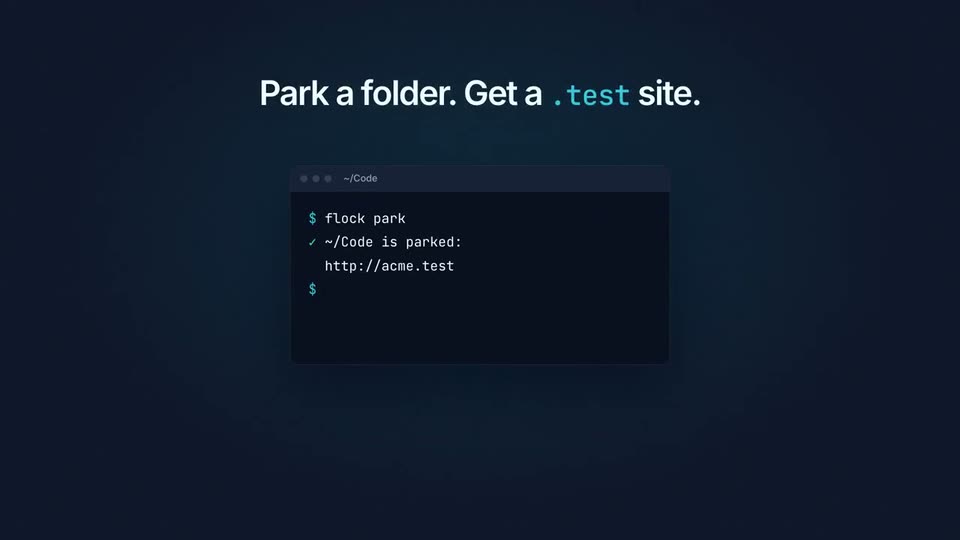
A flat terminal window on a dark navy field sits under the headline Park a folder. Get a .test site. The prompt types flock park, then a checkmark line and the URL http://acme.test slide in.
On-screen text: “Park a folder. Get a .test site.”
Camera: Static
04 · Feature reveal · 0:11–0:14
The headline crossfades from “Park a folder. Get a test site.” to “Trusted HTTPS. One click.” over two flat mockup windows. The left dissolves from a terminal to the Sites settings as a cursor flips the HTTPS toggle; the right browser's address bar switches to https with a green padlock.
On-screen text: “Park a folder. Get a test site.”, “Trusted HTTPS. One click.”
Techniques: Cursor demo
Camera: Static
05 · Feature reveal · 0:14–0:21
A dark service panel lists databases while a headline cycles PostgreSQL, MySQL, Redis, 'all of them.'; a cursor clicks Install and rows turn green Running with ports. A monospace command shows below, then it cuts to a card: 'PHP 8.1 to 8.5, side by side.'
On-screen text: “One click for PostgreSQL”, “or $ flock services install postgres 18”, “One click for MySQL”, “or $ flock services install mysql 8.4”, “One click for Redis”, “or $ flock services install redis”, “One click for all of them.”, “PHP 8.1 to 8.5, side by side.”
Techniques: Cursor demo
Camera: Static
06 · Feature reveal · 0:21–0:24
A dark settings window fades in, listing PHP versions with status labels and action buttons. A cursor clicks Install on PHP 8.2; the row updates to Up to date with a Make Default button, then the scene cuts to the headline Every email, caught. on a plain dark background.
On-screen text: “PHP 8.1 to 8.5, side by side.”, “Every email, caught.”
Techniques: Cursor demo
Camera: Static
07 · Feature reveal · 0:24–0:26
A flat window mockup is centered on a dark dotted background beneath a white headline. Three email rows populate the list, then the headline and title change to 'Every dump(), in one window.' with faint rows.
On-screen text: “Every email, caught.”, “Every dump(), in one window.”
Camera: Static
08 · Feature reveal · 0:26–0:29
A dark screen holds a centered headline above a flat window mockup titled Dumps, listing three timestamped log entries with colored code snippets. The composition stays static for the full duration.
On-screen text: “Every dump(), in one window.”
Camera: Static
09 · Feature reveal · 0:29–0:33
A centered white headline sits above a flat terminal window on dark navy. The install command types out, then five agent rows with green CONNECTED dots fade in one by one, and the window blurs out as a small caption appears below.
On-screen text: “MCP for your AI agents.”, “Works alongside Laravel Boost.”
Camera: Static
10 · Feature reveal · 0:33–0:35
Dark navy background. A white headline sits above two flat interface mockups that fade from dim to sharp, one a Windows tray panel, one a macOS menu-bar dropdown. An orange subline and two OS captions fade in below.
On-screen text: “Native on Windows & macOS.”, “No Docker. No VM.”, “Windows 10+ in your tray”, “macOS 15+ in your menu bar”
Techniques: Split screen
Camera: Static
11 · Feature reveal · 0:35–0:35
Two UI mockups sit side by side on a dark background while the headline cross-fades with a blur between two claims. The left panel tilts into 3D and swaps in a Debugger window; the right swaps in a Terminal.
On-screen text: “Native on Windows & macOS.”, “No Docker. No VM.”, “Windows 10+ in your tray”, “macOS 15+ in your menu bar”, “Xdebug & Node, built in.”
Techniques: Split screen, Kinetic type, 3D mockup
Camera: Static
12 · Feature reveal · 0:35–0:38
Two dark feature panels, a Debugger card and a Node card, sit side by side under the headline. The panels brighten as their toggles flip on and a terminal line types, then the whole frame blurs out.
On-screen text: “Xdebug & Node, built in.”, “Xdebug on demand”, “Node per project”
Camera: Static
13 · CTA · 0:38–0:43
The white flock bird logo and wordmark sit centered on a dark navy field. The tagline fades in below, then a dark pill types out flockphp.com behind a blinking cursor while small airplane icons drift across the background.
On-screen text: “Flock 1.0 beta, out now. Free & open source.”, “flockphp.com”
Techniques: Kinetic type, Particles
Camera: Static