1:48

Introducing Oz: the orchestration platform for cloud agents
Warp · Developer tools · Feb 2026
Beam · Oct 2026 · 1:45 · AI-annotated
Beam’s 1:45 launch film runs 31 scenes, about 3.4 s each. The product shows up at 0:11 and 9 features are revealed. The call to action lands at 1:38 (94% in), over a voiceover. A chain of short, locked off UI demos on a dark desktop, each introduced or capped by a black title card that names the next feature, cut at a steady mid tempo. The look is defined by the near black teal palette, glowing colored window outlines, the zoom through the dock reveal, and 3D device frames floating on a starfield.
Is this your launch? to your site or press kit.
Warp · Developer tools · Feb 2026
Mistral AI · AI · Apr 2026
ChatAndBuild · Nov 2026
A locked-off macOS desktop shows a dark green wallpaper with a flowing teal ribbon. The cursor moves to the dock, hovers the Screen Sharing icon, then the app window opens at center with a recent-connections list and a blue Connect button.
Techniques: Cursor demo
Camera: Static
On a dark desktop with a teal ribbon wallpaper, a Screen Sharing dialog lists recent connections; the cursor selects Studio and the dialog morphs into a full window that loads a remote terminal view.
Techniques: Cursor demo, Morph
Camera: Static
A locked-off Mac desktop shows a Screen Sharing window holding a remote desktop, which holds a dark terminal. The cursor drifts across the inner screen, then the remote view zooms out to reveal its dock, nesting window inside window.
Techniques: Cursor demo, UI zoom
Camera: Static
On a black background, a centered white headline fades in, holds, then fades out. The line stays static while on screen, with no motion or secondary elements.
On-screen text: “Share the window. Not the screen.”
Camera: Static
A dark Beam window lists seven devices with colored avatars and green status dots over a black backdrop with flowing green light streaks. A cursor glides up the list and the Studio row highlights as it is selected, while a static tagline holds on screen.
On-screen text: “Share the window. Not the screen.”
Techniques: Cursor demo
Camera: Static
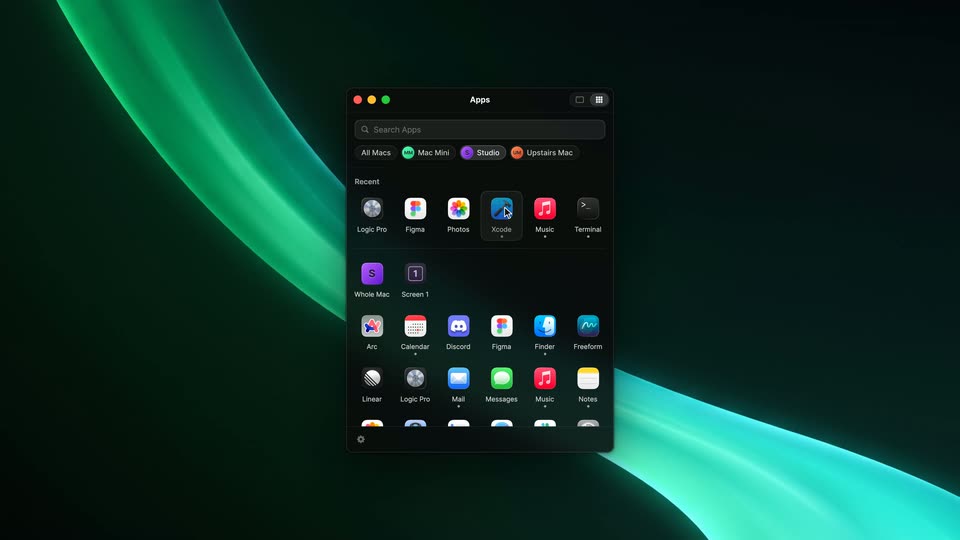
A dark app window floats on a teal ribbon background, listing remote screens and windows under the title Studio. A cursor taps the grid icon at the top right, and the panel switches to an Apps view with a search bar, device chips and a grid of app icons.
Techniques: Cursor demo
Camera: Pull out
A static macOS desktop shows a dark teal ribbon wallpaper and the dock at the bottom. A translucent window outline with three green dots fades in over the center, marking a selected window, while the cursor rests motionless in the middle.
Camera: Static
A dark Xcode window fills the desktop, then the camera zooms down to the Dock as the cursor lands on a custom Xcode icon, raising the tooltip Xcode (Studio), before pushing into the Swift code.
Techniques: UI zoom, Cursor demo
Camera: Push in
A horizontal row of macOS app icons floats over a Swift code editor. The label Beam sits centered under the bar, then a gray highlight lands on the Xcode icon and the label Xcode (Studio) appears beneath it as the code editor blurs out.
Camera: Pull out
A black screen holds a centered white headline that fades in from nothing, then stays locked off and static for the remainder of the short clip.
On-screen text: “Feels native at any size.”
Camera: Static
On a dark macOS desktop, a Safari window with a cyan glow border shows the Beam site. A cursor drags the right edge in and out, resizing the page so the headline and buttons scale live. Then it scrolls down to feature cards and a row of app icons.
Techniques: Cursor demo
Camera: Pull out
A static macOS desktop shows a browser window on a dark Beam page, its border outlined in cyan. The page presents two headlines, a row of app icons, and three feature cards; a cursor sits at the right edge.
Camera: Static
A dark macOS control-center panel floats over a green abstract wallpaper. It shows the Xcode icon, then a Safari icon slides in and the label updates to '2 windows are on Loft'. A cursor clicks the chevron, the panel expands to list each window with action buttons, then collapses.
Techniques: Cursor demo
Camera: Static
A dark macOS desktop with a flowing teal ribbon wallpaper. Four app windows materialize one by one, each framed by a glowing colored border: Xcode top-left, Safari top-right, Terminal bottom-left, Music bottom-right, each showing content from a different Mac.
Camera: Static
A locked-off Mac desktop shows four app windows in a 2x2 grid, each framed by a colored outline: Xcode with Swift code, a Safari blog page, a Terminal, and the Music app. The Music window holds still, showing album art and a track list while a song plays.
Camera: Static
A white headline, “Every window, from every Mac.”, is centered on a black screen. A dark macOS desktop with two Finder windows, Exports and Downloads, fades in behind it and holds still.
On-screen text: “Every window, from every Mac.”
Camera: Static
Two dark Finder windows sit side by side on a macOS desktop. A cursor right-clicks the video file in the left list, picks Copy, then right-clicks the right window and picks Paste, so the file and app icons pop in with a green plus.
On-screen text: “Every window, from every Mac.”
Techniques: Split screen, Cursor demo
Camera: Static
A dark Beam window lists several Macs with colored avatars and IP addresses. A cursor selects the Studio row, its status dot turning green, then the view reframes right to reveal a detail panel showing the Studio's screen and open windows.
Techniques: Cursor demo, UI zoom
Camera: Static
A dark Studio window shows an unlock dialog with a password field and a Whole Screen dropdown over a list of app windows. The dialog closes, revealing a Screens section on top. A cursor moves up and highlights the Whole Screen row.
Techniques: Cursor demo
Camera: Pull out
A dark macOS desktop shows a virtual screen window holding an email app and a calendar side by side. The windows slide into place, the cursor clicks the calendar to bring it forward, then a code editor window slides in from the right.
Techniques: Split screen, Cursor demo
Camera: Pan
A macOS screen capture inside a purple-glow frame shows two windows: a code editor on the left and a sharebeam.app page on the right with the BEAM logo and tagline sliding in. The windows swap content mid-clip while the dock sits below.
Camera: Pan
A macOS desktop shows the Music app on the left with the album “Beams Can Come True” and a Photos grid of album covers on the right. The cursor drifts from the track list down onto the empty purple wallpaper.
Techniques: Cursor demo
Camera: Static
A black background holds a single centered line of white text that fades in and stays locked in place for the duration of the shot.
On-screen text: “Share any window. With anyone.”
Camera: Static
A dark share panel with a glowing teal QR code, a Local/Tailscale toggle, a link field and a teal Copy Link button sits centered on a black starfield, a cursor resting at the button's edge. The whole panel fades to black by the end.
Camera: Static
A rounded device frame floats in a black starfield, a small grid of teal dots glowing at its center. The Final Cut Pro interface fades in inside the frame, showing a media browser, preview window, and timeline.
Techniques: 3D mockup
Camera: Static
A tilted Final Cut Pro window floats on a black starfield. In its monitor the word BEAM assembles from green star-dust above a glowing horizon while the playhead runs the timeline. The window then rises and a second device with a link slides up beneath it.
Techniques: 3D mockup, Particles
Camera: Pull out
A laptop mockup sits in 3D perspective on a black starfield, its screen showing a video editor with a green BEAM logo in the preview. Named cursors for Jonas, Sam and Liam drift across the panels while the timeline playhead runs left to right.
Techniques: 3D mockup, Cursor demo
Camera: Pan
On a near-black background with a faint teal glow, three white line icons (Wi-Fi symbol, Ethernet port, 3x3 dot grid) brighten in sequence from left to right, each small label fading in beneath it. A bold white headline appears below the row, then the whole frame fades to black.
On-screen text: “Wi-Fi”, “Ethernet”, “Tailscale”, “Direct. Encrypted. No cloud in between.”
Camera: Static
A black screen holds the centered white headline “Every Mac you own.” as it fades in from gray, then stays locked in place.
On-screen text: “Every Mac you own.”
Camera: Static
Two white lines hold center on a black field with a faint green glow: “Every Mac you own.” is replaced by “On the one in front of you.” A dim BEAM app icon and wordmark fade in at the end.
On-screen text: “Every Mac you own.”, “On the one in front of you.”, “BEAM”
Camera: Static
A locked-off end card on near-black with a faint green glow and faint drifting specks. A teal rounded icon showing a browser window and two green arcs sits above the white wordmark BEAM, a green Download for Free pill, and the small URL beam.win.
On-screen text: “BEAM”, “Download for Free”, “beam.win”
Camera: Static