1:14

Perplexity - We are excited to launch the next version of Introducing login, threa
Perplexity · AI · Apr 2023
Vercel’s 2:48 launch film runs 17 scenes, about 9.9 s each. The product is on screen from the first frame and 4 features are revealed. The call to action lands at 2:20 (83% in), over a voiceover. The video is built as one continuous demo: a locked-off close-up of the presenter frames each feature, then the frame cuts to full-screen or split-screen dark UI captures that follow the cursor. Pacing is slow and deliberate at under three cuts a minute, with signature moves like character-by-character prompt typing, streaming thinking text, and small tooltip pop-ins that name each feature.
Is this your launch? to your site or press kit.
Perplexity · AI · Apr 2023
Films whose music sounds like this one, voice left out
Judgment Labs · Modern electronic
Qantum · Modern electronic corporate background
Honen · Upbeat electronic
A man in a black hoodie sits at a laptop before a dark slat wall, speaking to camera in a locked-off close-up. A lower-third chip with his name and title fades in bottom left, then fades out. Vercel and v0 logos hold in the top corners.
On-screen text: “Rickey McGregor”, “Software Engineer | v0”
Camera: Static
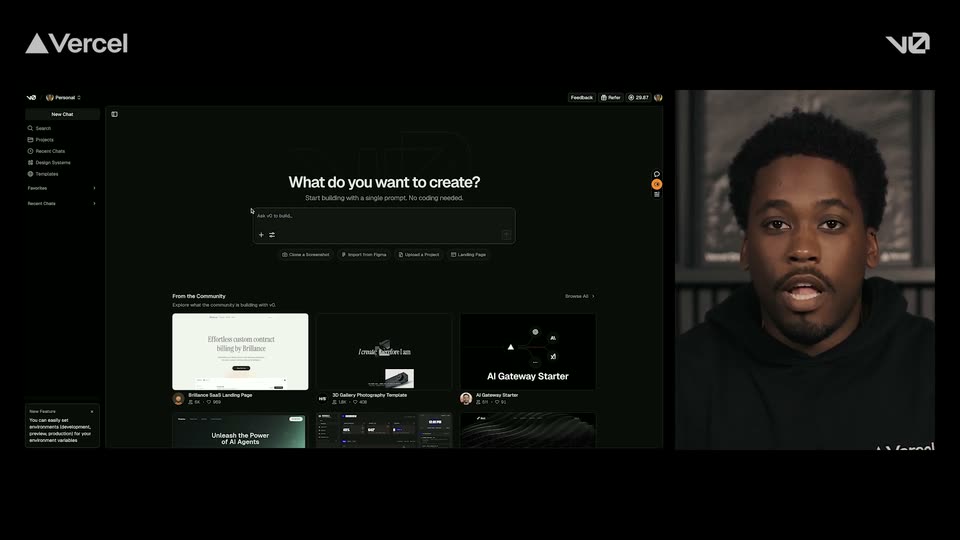
A man in a black Vercel hoodie sits at a laptop and speaks to camera against a dark slatted wall. The Vercel wordmark sits in the top left corner and a v0 mark in the top right. The frame is locked off.
Camera: Static
Split-screen on black: the left shows the dark v0 interface with its prompt field and a grid of community templates; the right shows a man in a black hoodie speaking to camera. The frame stays locked off and a cursor rests beside the input box.
On-screen text: “Vercel”
Techniques: Split screen
Camera: Static
A locked-off dark dashboard holds a large white heading above a prompt field. Text is typed into the field character by character behind a blinking caret, forming a sentence about a Next.js app, while a grid of community project cards sits below.
Techniques: Cursor demo
Camera: Static
A dark v0 chat screen stays locked off. A user prompt bubble sits top right, an input bar with a Stop button sits at the bottom, and a small Thinking label fades in beneath the prompt as the breadcrumb reads Next.js order history.
Camera: Static
A split screen pairs the Vercel chat interface on the left, where a Thinking panel streams lines of reasoning, with a man in a black hoodie speaking on the right. The locked frame holds as the text types out.
Techniques: Split screen
Camera: Static
A dark AI coding chat shows a prompt and a thinking block. A list of task steps with countdown timers ticks upward, then a large white play triangle fades in at center as the steps collapse into completed lines.
Techniques: Speed ramp
Camera: Static
A dark AI-coding interface fills the frame, a centered play glyph over the right preview. The preview flips from a loading skeleton to a finished lookup page while the left chat logs the build. A cursor then hovers over VARS in the left rail, opening a tooltip.
Techniques: Cursor demo
Camera: Static
A dark product screen shows a left chat panel beside a right app preview titled Order History Lookup. The left panel switches to an empty Environment Variables view as the cursor moves onto the Add button, while the right preview stays static.
Techniques: Cursor demo
Camera: Static
A dark dashboard sits behind a centered modal titled Add Environment Variables. A cursor moves into the Name field, types a key, then jumps to the Value field and types a value, while the dimmed Order History Lookup page stays still.
Techniques: Cursor demo
Camera: Static
A dark dashboard shows an Order History Lookup form on the right. A cursor glides left into the sidebar and rests on the Connect item, which pops a small tooltip reading Connect an Integration.
Techniques: Cursor demo
Camera: Static
A dark integrations dashboard fills the frame as a cursor hovers across the service cards in the left panel. The view then splits, the dashboard shrinking to the left half beside a man in a black hoodie who speaks to camera.
Techniques: Cursor demo, Split screen
Camera: Static
A dark Vercel dashboard with an integrations panel and an Order History Lookup preview sits left of a man in a black hoodie who speaks to camera. A cursor hovers over the Installed label, popping a small tooltip.
Techniques: Split screen, Cursor demo
Camera: Static
Dark product screen with an integrations sidebar. The cursor hovers the Vercel AI Gateway card, a tooltip pops up, then the cursor clicks the code toggle and the main panel swaps from the Order History Lookup form to a file tree with package.json.
Techniques: Cursor demo
Camera: Static
A dark IDE view with an integrations sidebar on the left. A cursor selects page.tsx, types a sentence into the editor, then opens the Publish and Create Repository panels in the top right corner.
Techniques: Cursor demo
Camera: Static
A man in a black Vercel hoodie sits at a laptop, speaking to the camera against a dark slatted wall. A code editor overlay fades out at the start, then he gestures with his hands and ends with a pinched-finger gesture.
Camera: Static
A dim, near-black shot of a man at a laptop, with Vercel and v0 marks in the corners, fades to black. A small white v0 logo then sits centered on the black field and holds for the rest of the clip.
Camera: Static