1:01

Akash Anand - We just killed Loom and Screen Studio. Clueso agent can capture any
Clueso · B2B · Aug 2026
Unity · Nov 2026 · 0:25 · Full motion · AI-annotated
Unity’s 0:25 launch film runs 9 scenes, about 2.8 s each. The product shows up at 0:02 and 2 features are revealed. There is no explicit call to action; a voiceover carries the film. The video runs as a problem-solution arc: a scrolling Asset Store grid, then a sunlit low-poly courtyard where the CLI and the Asset Library plugin are demoed back to back. Signature moves are the store window dissolving to transparency, the terminal sliding over a blurred set, and the hexagonal mask wipe that resolves into the Unity logo.
Is this your launch? to your site or press kit.
Clueso · B2B · Aug 2026
Reducto · Jul 2026
Theo · B2B · Nov 2026
Films whose music sounds like this one, voice left out
Warp · Corporate electronic
Windsurf · Upbeat electronic
Raycast · Electronic
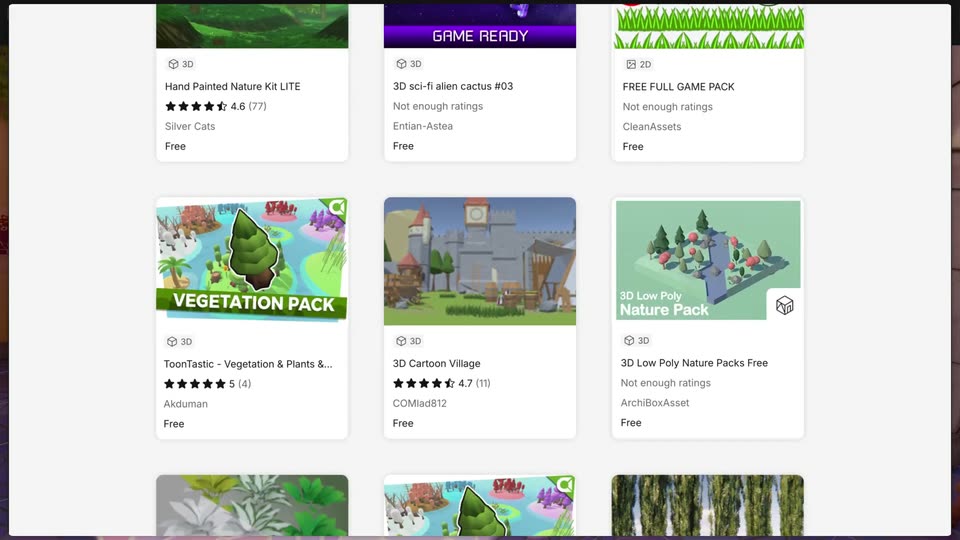
The Unity Asset Store page, with a fixed dark header and a search bar reading Plants, scrolls down to reveal two rows of plant asset cards, each with a thumbnail, title and creator.
Camera: Pan
A three-column grid of asset store cards scrolls upward, each card showing a plant or nature 3D thumbnail, a title, a star rating and a Free tag. The list moves continuously past the static frame.
Camera: Pan
A Unity Asset Store grid of 3D asset cards zooms out to reveal the full editor window, then the view reframes onto the 3D viewport, showing a low-poly nature scene with trees, rocks and grass.
Techniques: UI zoom
Camera: Pull out
The Unity editor shows the Asset Store window, a grid of asset cards floating over a 3D village viewport, then the whole window dissolves to transparency.
Camera: Static
A locked-off view of the Unity editor's 3D scene shows a sunlit courtyard with an easel bearing the Unity logo, a cat on a stool, and paint cans on the tiled floor. A Terminal window slides in at the center near the end.
Techniques: 3D mockup
Camera: Static
A dark terminal window floats over a blurred 3D courtyard; a CLI command types out word by word, then the window slides up to show import output and a key-value result table. The terminal exits, revealing the painter at an easel in the full 3D scene.
On-screen text: “Terminal”, “Unity assetlibrary search painting”, “still on screen at save time.”, “The long working-folder path in each PowerShell prompt is”
Techniques: Kinetic type
Camera: Static
Inside the Unity editor, a 3D courtyard with an easel and paint cans fills the viewport. The cursor opens the Asset Store menu, selects Asset Library, and drags a potted plant thumbnail into the scene, dropping it on the floor. The frame closes into a hexagonal mask.
Techniques: Cursor demo, Masking
Camera: Static
A hexagonal mask holds a colorful clip with a white cube at its center, then the mask fades to leave the white Unity mark, and the Unity wordmark fades in to its right on a black background.
Techniques: Masking
Camera: Static
The white Unity logo, a hexagonal cube mark beside the wordmark, holds centered on a near-black background. The frame is locked off with no motion across the clip.
Camera: Static