0:33
Explore
Unitree - Unitree Introducing: UniUni Intelligent Swarm Control System🎉 It enab
Unitree Robotics · Oct 2026 · 0:50 · AI-annotated
- Length
- 0:50
- Scenes
- 33 · 1.5 s avg
- Product on screen
- 0:00
- Features shown
- 4
- Voiceover
- Yes
- Views
- 6.5M on X
as of November 28, 2026
00:00:00 / 00:50:23
- Length
- 0:50
- Scenes
- 33 · 1.5 s avg
- Product on screen
- 0:00
- Features shown
- 4
- Voiceover
- Yes
- Views
- 6.5M on X
as of November 28, 2026
Unitree Robotics’s 0:50 launch film runs 33 scenes, about 1.5 s each. The product is on screen from the first frame and 4 features are revealed. There is no explicit call to action; a voiceover carries the film. The video is built as a behind-the-scenes story: a crew races to fix a robot dance performance while last-minute requests land, and each request is answered by a feature callout covering LiDAR mapping, choreography, monitoring and AI. Pacing is fast with hard cuts between live action, UI close-ups and 3D point-cloud renders, anchored by a dark neon-lit stage and the recurring cyan-faced robots.
Footage neededEstimated needs: 5 capture groups — your screens or recordings · 1 official logo — reused across the film · 22 filmed passages — shoot, supply or replace · 4 3D passages — build or supply
Is this your launch? to your site or press kit.
More like this


Similar soundtrack
Films whose music sounds like this one, voice left out
0:50

Unitree Introducing: UniUni Intelligent Swarm Control System
Unitree · High-energy electronic and rock
1:35
xTerra Robotics - Introducing DHAV-Hy, our lightweight wheeled-legged quadruped platfor
xTerra Robotics · Electronic rock / Big beat
0:48

Advanced Prototyping Teaser (Config 2023)
Figma · Indie rock / Alternative pop
Unitree - Unitree Introducing: UniUni Intelligent Swarm Control System🎉 It enab, scene by scene
· 33 scenes as text
01 · Product intro · 0:00–0:00
A dark studio holds two humanoid robots with glowing cyan faces, one mid-motion. In the foreground a person's hands rest on a laptop showing a swarm control screen with a red and green dot field, while the back of their head frames the right edge. Cyan and white titles hold still in the top left.
On-screen text: “Unitree UniUni”, “Intelligent Swarm Control System”
Camera: Static
02 · Problem · 0:00–0:01
A woman in a dark polo stands at a laptop on a stage, wiping her face before resting her hand on the lid. Behind her, a large screen shows three humanoid robots performing synchronized moves under the uni logo. White captions frame the shot top and bottom.
On-screen text: “Real Footage Throughout No Speed-Up”, “Okay, let's do it once more”
Camera: Push in
03 · Problem · 0:01–0:02
A short-haired person in a gray polo holds a black controller to their mouth and speaks on a dark stage, white humanoid figures and a glowing uni sign blurred behind. The camera pans left, a second shoulder enters frame left, and the bottom caption swaps.
On-screen text: “Real Footage Throughout No Speed-Up”, “Okay, let's do it once more”, “New request. Need to adjust movements and add pathing”
Camera: Pan
04 · Problem · 0:02–0:08
Close-up of two women in a dark studio: one points at white humanoid robots with glowing blue heads, the other grabs her head in frustration. Cut to a wide shot: the pair hunch over a laptop while the robots hold running poses on stage beneath a lit uni sign.
On-screen text: “New request. Need to adjust movements and add pathing”, “The performance is starting soon, how are we gonna make it in time?”, “Let's test it”
Camera: Pull out
05 · Demo · 0:08–0:09
Hands hold a tablet in a dark room, its screen filling the frame with the robot software: a point-cloud trajectory grid, a Trajectory Library list and a blue-green action timeline. The screen brightens and settles from a ghosted dissolve as the subtitle sits at the bottom.
On-screen text: “Let's test it”, “uni”, “Very convenient to edit and use”
Techniques: Kinetic type, UI zoom
Camera: Push in
06 · Feature reveal · 0:09–0:10
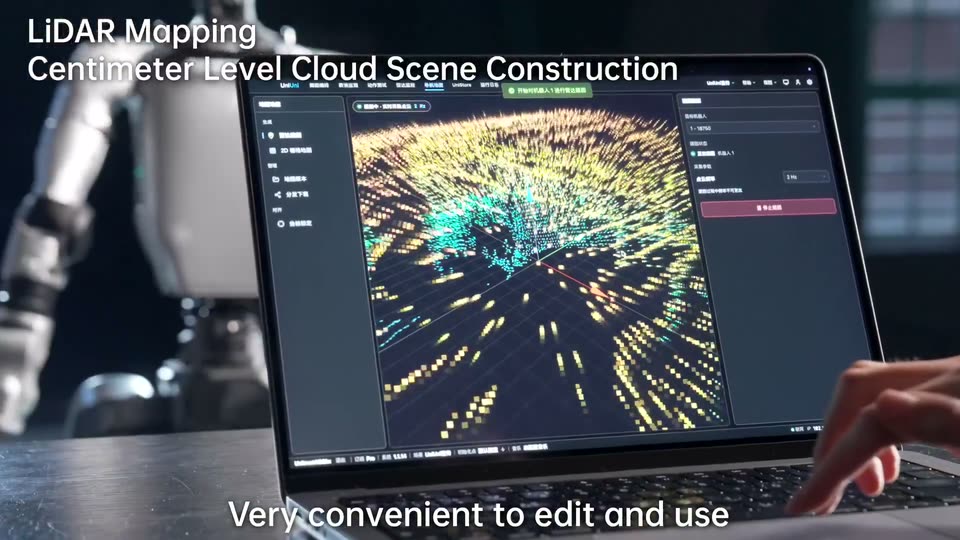
A locked-off close-up frames a laptop on a desk, its screen filled with a colored LiDAR point cloud in a 3D viewer. A hand rests on the trackpad at right while a blurred humanoid robot stands behind on the left. White headlines sit top-left, a caption at the bottom.
On-screen text: “LiDAR Mapping”, “Centimeter Level Cloud Scene Construction”, “Very convenient to edit and use”
Camera: Static
07 · Feature reveal · 0:10–0:11
Split screen: left, a colored LiDAR point cloud of a room rotates in 3D with a coordinate axis and two arrow cursors; right, a silver humanoid robot is seen from behind under bright studio lights. White headline text sits top left throughout.
On-screen text: “LiDAR Mapping”, “Centimeter Level Cloud Scene Construction”, “Very convenient to edit and use”
Techniques: Split screen, Cursor demo
Camera: Static
08 · Feature reveal · 0:11–0:12
Split screen: left shows the choreography software with a 3D point cloud view and an action list, then a timeline where a cursor drags a popping1 clip; right shows white humanoid robots dancing on a dark stage under a UNI logo. A Done caption appears at the bottom.
On-screen text: “Dance Choreography”, “Single Robot, Single Track, Easy to Use”, “Done”
Techniques: Split screen, Cursor demo
Camera: Static
09 · Demo · 0:12–0:14
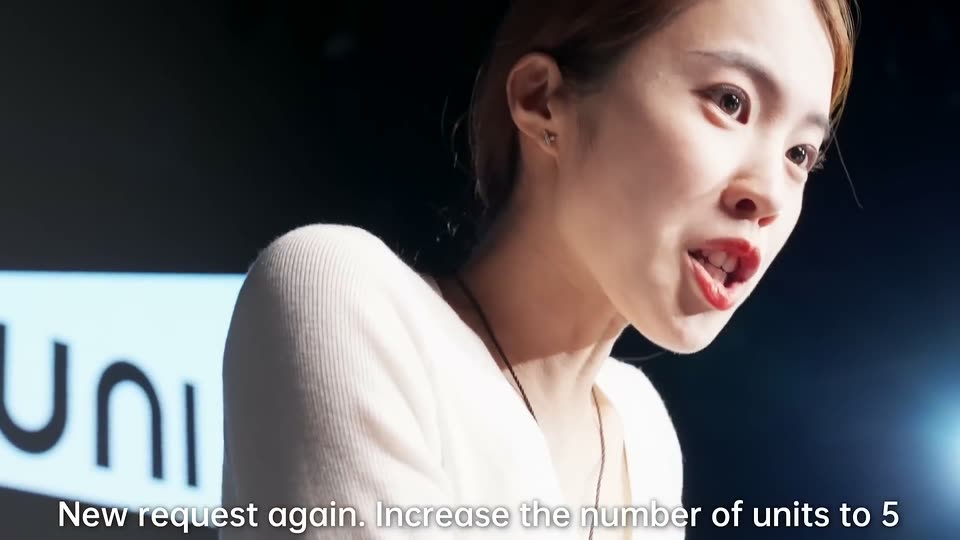
A woman in a cream top speaks in a dark studio, a lit Uni sign glowing behind her left shoulder. A white subtitle line sits at the bottom of the frame, translating her request.
On-screen text: “New request again. Increase the number of units to 5”
Camera: Pan
10 · Demo · 0:14–0:15
A woman with auburn hair in a white ribbed top speaks in three-quarter profile on a dark stage; a bright screen with partial lettering glows behind her left shoulder. A white caption runs along the bottom edge. The frame stays locked as she talks.
On-screen text: “New request again. Increase the number of units to 5”
Camera: Static
11 · Demo · 0:15–0:16
A close-up of a short-haired person looks down at a laptop edge while speaking, a hand gestures at the right. The dark background keeps focus on the face, which shifts slightly as the line is delivered.
On-screen text: “New request again. Increase the number of units to 5”, “JOI”, “No problem, leave it to me”
Camera: Static
12 · Demo · 0:16–0:17
A close-up of two hands types on a black laptop keyboard in shallow focus, fingers pressing keys from left to right while a small caption sits still in the frame.
On-screen text: “No problem, leave it to me”
Camera: Push in
13 · Demo · 0:17–0:17
A tight close-up of a woman's face in profile, her eye and brow filling the frame against a black background. She looks downward, her gaze shifting slightly as the camera holds still on her features. A small silver earring sits at her ear.
Camera: Push in
14 · Demo · 0:17–0:18
The camera glides across a dark timeline editor, blue and green clip blocks scrolling past, then reframes onto a top help panel and a right-hand column of numbers as a cursor hovers over the tracks.
Techniques: Cursor demo, UI zoom
Camera: Push in
15 · Demo · 0:18–0:20
A short-haired person in a black polo at a dark control desk looks up and forms an OK sign with their hand, facing a blurred figure in the foreground. A white caption reads OK at the bottom center.
On-screen text: “OK”
Camera: Push in
16 · Demo · 0:20–0:21
Three humanoid robots dance in sync on a stage, arms raised and legs kicking, before a giant LED screen showing a neon blue and pink tunnel. The camera tracks sideways with motion blur, stage lights glowing at the screen's base.
On-screen text: “OK”
Camera: Push in
17 · Demo · 0:21–0:22
A white humanoid robot dances at center stage, one arm raised, its face visor glowing. A large screen behind it pulses with blue and pink light streaks. As the camera pans, more robots with raised arms enter the frame at the edges.
Camera: Push in
18 · Demo · 0:22–0:23
A group of humanoid robots with glowing cyan accents strike poses and move across a dark stage, arms raised, holding glowing props. A large LED wall behind them displays pink and cyan geometric patterns while cyan stage beams cut through the haze.
Camera: Push in
19 · Demo · 0:23–0:25
Humanoid robots with glowing face screens dance on a dark stage lit by pink and blue neon beams. A low wide shot tracks the central robot as it pumps its arms while others move in the background.
Camera: Push in
20 · Demo · 0:25–0:27
Low-angle stage shot of two humanoid robots with glowing white faces, cream torsos and black joints, running and striking dance poses. Blue and pink stage lights wash the floor as the camera tracks at ground level, catching their striding legs and swinging arms in motion blur.
Camera: Pull out
21 · Feature reveal · 0:27–0:29
A dark monitoring dashboard pairs a map with green coordinate readouts and a status panel of battery, temperature and E-Stop rows. The view zooms onto the status rows as a cursor taps an E-Stop button ringed by a white circle.
On-screen text: “Performance Monitoring”, “Status Early Warning, Safe Braking”
Techniques: UI zoom, Cursor demo
Camera: Pull out
22 · Feature reveal · 0:29–0:30
Four white humanoid robots with glowing cyan heads dance in a row on a dark stage beneath a lit uni logo, filmed over the blurred shoulders of two audience members. The robots shift poses between frames while the camera stays locked off. A white caption runs along the bottom.
On-screen text: “Unit 1 battery critical,emergency stop activated”
Camera: Pan
23 · Demo · 0:30–0:33
Two women stand in a dark industrial hall, one in a black polo, one in a white top, speaking urgently toward an off-screen crew. The low-angle two-shot cuts to a close-up of the woman in white as she gestures. White subtitles sit at the bottom.
On-screen text: “I told you to fully charge it before use.”, “Quick, swap it out.”, “Everyone stay sharp. Final segment.”
Camera: Push in
24 · Demo · 0:33–0:34
Four silver humanoid robots with glowing blue faces dance in sync on a dark stage beneath a large white uni sign, framed over the blurred shoulders of two audience members. The sign slides left across the top as the robots strike a pose.
On-screen text: “Everyone stay sharp. Final segment.”
Camera: Static
25 · Feature reveal · 0:34–0:36
A dark chat interface fills the frame. A headline overlay sits top left while a bordered input box holds a long natural-language prompt for a robot routine. The view reframes slightly right as a status pill appears above and the send button switches to a stop control.
On-screen text: “AI Choreography”, “Supports Natural Language Choreography”
Techniques: UI zoom
Camera: Static
26 · Feature reveal · 0:36–0:37
A dark editor screen shows a timeline table on the left and a description panel on the right. The cursor glides to the blue Apply to Timeline button and a circular ripple pulses around it as the panel text refreshes.
On-screen text: “AI Choreography”, “Supports Natural Language Choreography”
Techniques: Cursor demo
Camera: Static
27 · Feature reveal · 0:37–0:38
A dark coordinate grid recedes in 3D perspective while a cluster of pale-blue speech-bubble markers, each with a short colored tail, hovers over the center. An orange diamond and a red (0,0) label mark the origin as the camera drifts, sliding the axis numbers across the frame.
Techniques: 3D mockup
Camera: Pan
28 · Feature reveal · 0:38–0:39
A low-angle macro shot follows a finger as it presses a key on a black laptop keyboard. The shallow focus blurs the surrounding keys while the fingertip and the pressed key stay sharp.
Camera: Push in
29 · Feature reveal · 0:39–0:40
A group of white humanoid robots with blue glowing necks walk in loose formation from left to right across a dark stage. A single spotlight lights the gray tiled floor, casting long shadows behind each robot.
Camera: Static
30 · Feature reveal · 0:40–0:43
A cluster of white humanoid robots with glowing cyan visors stands in a round spotlight on a dark tiled floor. They step apart into two columns and walk forward toward the camera under a high angled view, casting long shadows.
Camera: Push in
31 · Demo · 0:43–0:46
Opens on a close-up of a laptop control interface, then cuts to a person walking on a phone in front of a stage where three white humanoid robots stand before a large neon blue and pink LED screen.
On-screen text: “Boss, check this out.”
Camera: Pull out
32 · Demo · 0:46–0:48
A person on a dark stage holds a phone to their ear and gestures, then rests a hand on their hip. Behind them, a large screen shows a neon blue tunnel with humanoid robots walking in a line. White captions read at the bottom.
On-screen text: “Boss, check this out.”, “That fast”
Camera: Push in
33 · Outro · 0:48–0:50
A black sign-off card holds the white UNITREE wordmark above a centered block of safety disclaimer text. Both fade in from dim gray to full white over the first second, then hold still.
On-screen text: “We have always placed great emphasis on product safety and information security. We welcome everyone's suggestions, and we will continue to make improvements. *”, “We kindly request that all users refrain from making any dangerous modifications or using the robot in a hazardous manner.”, “*Please have all customers let people and robots maintain a safe distance of at least 2-3 meters or more.”, “* Extreme testing. No imitation!”, “* Features vary by models and versions”, “*Please visit Unitree Robotics Website for more related terms and policies, and comply with local laws and regulations.”, “*Currently, the humanoid robot field is in the early stages of exploration worldwide. Individual users are advised to thoroughly understand the limitations of”
Camera: Static