0:31

Suno iOS App is Here! Make any song you can imagine
Suno · AI · Jul 2024
Topview · Aug 2026 · 0:31 · Full motion · AI-annotated
Topview’s 0:31 launch film runs 24 scenes, about 1.3 s each. The product shows up at 0:03 and 4 features are revealed. There is no explicit call to action; a voiceover carries the film. The video opens with a question card, names the product, then runs four short feature beats (typography, social, UI, data) each paired with a white prompt card and a settling animation, before a longer overview of the interface and a kinetic-typography style reel. It closes on a brand tagline and the logo. Stylistically it is a fast, gradient-washed cut: dotted pastel backdrops, blur-to-crisp text reveals, floating 3D props and a flat blue mascot, all synced to a steady 121 BPM pulse.
Is this your launch? to your site or press kit.
Suno · AI · Jul 2024
Sila · B2B · Aug 2026
FlashDrive · Nov 2026
Films whose music sounds like this one, voice left out
BYT · Upbeat electronic
Playad · Upbeat electronic
Sentrial · Electronic
On a blue-to-white gradient, three phrases swap in place: “What if motion design”, “could be as simple”, “as an idea?”, the last word highlighted in yellow. Then a purple app icon, big letters, a party emoji and a clapperboard fly in from the edges around the text.
On-screen text: “What if motion design”, “could be as simple”, “as an idea?”
Techniques: Kinetic type
Camera: Static
A white-to-purple gradient card shows 'Motion Studio' in black sans; the word 'Studio' assembles letter by letter with a blue-purple gradient while 3D props (a purple W cube, a party emoji, a blue clapperboard) and two black arrows float around it. The card blurs and slides right to exit.
On-screen text: “Motion Studio”
Techniques: Kinetic type
Camera: Static
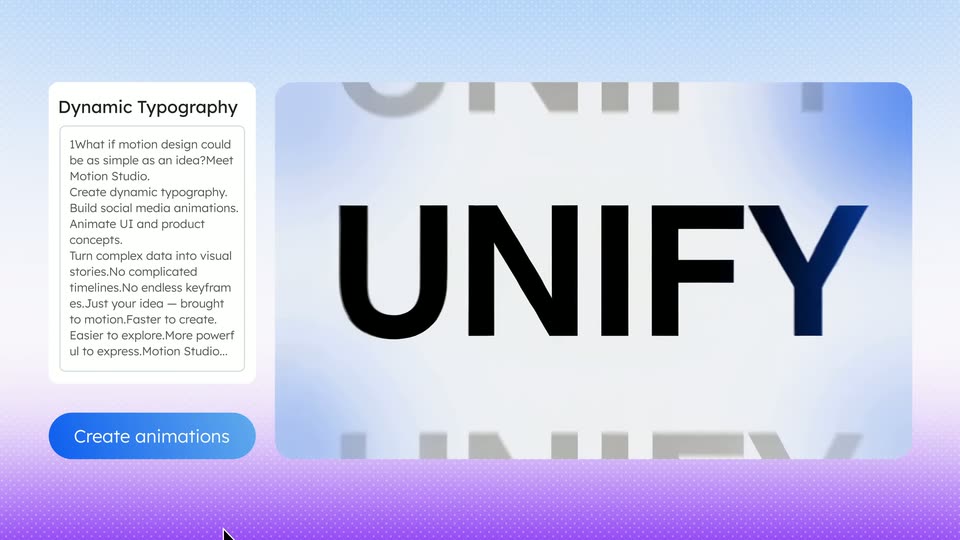
Two rounded cards float on a purple gradient. The left card holds a static heading and paragraph with a blue pill button below. The right card shows the word UNIFY in heavy black and blue caps, settling from a vertical motion-blur echo into a crisp lockup.
Techniques: Kinetic type
Camera: Static
A product interface view on a blue-to-purple dotted gradient. A left card holds a text field and a blue Create animations button with a cursor, while a right canvas shows the NEXAMEMO wordmark settling from a brief blur into crisp dark blue type.
Camera: Static
A white card titled Social Media with body copy and a blue Create animations button sits left of a flat illustration of a person lying on a bed, scrolling a phone feed, on a pink-to-blue dotted gradient. A cursor arrow hovers on the button.
On-screen text: “Social Media”
Camera: Static
A flat vector scene splits the frame: a white card on the left holds a heading, a paragraph and a blue button, while the right shows a person reclining on a couch scrolling a phone in a blue living room with a cat. The right panel resolves from a blurred offset into a sharp illustration at the start.
On-screen text: “Social Media”, “Create animations”
Camera: Static
A warm gradient screen holds a white UI card with a blue button and a cursor on the left. On the right, a large rounded gradient panel shows the headline IN ONE FLOW in bold white type that crossfades between overlapping letter states.
On-screen text: “IN ONE FLOW”
Techniques: Kinetic type
Camera: Static
A dotted orange-to-pink gradient holds two panels side by side. The left white card keeps a static title, paragraph and blue button with a cursor. The right rounded panel spins a blurred 3D collage of UI cards under rotating color blobs, then settles on a laptop mockup whose screen cycles through a typography layout and a dark dashboard.
On-screen text: “UI Mockups”, “Create animations”
Techniques: 3D mockup, Split screen
Camera: Static
On a blue gradient backdrop, a white 'Visualize Data' card and a blue 'Create animations' button with a cursor sit static on the left. The right dashboard morphs, folding from a line-and-bar chart with a walk widget into a line chart beside a large blue donut gauge.
On-screen text: “Visualize Data”, “Create animations”
Techniques: Morph
Camera: Pull out
A grid of project cards, each pairing a motion-design thumbnail with a prompt caption, drifts upward and then pulls back to reveal the full interface, its left icon rail and top bar.
Techniques: UI zoom
Camera: Pull out
A flat app interface shows a sidebar of icons and a header reading Motion Studio, with a grid of motion design project cards filling the screen. The grid of colorful animated thumbnails pans horizontally, new cards sliding in from the right as the layout shifts.
Camera: Static
A grid of motion template cards fills the screen behind a left icon sidebar. One card in the center is enlarged over the grid, and its preview switches from a spinning red letter to a wall of colored 3D letters.
Techniques: UI zoom
Camera: Static
A multicolored Motion Design wordmark built from mismatched letter tiles resolves from soft motion blur into sharp focus at the center, set over a backdrop of faded cartoon character portraits in tilted frames. The letters hold still once aligned.
On-screen text: “Motion”, “Design”
Camera: Pull out
A wall of grayscale cartoon sketches, a dog, skeleton, girl, monkey and robot, frames a hanging lamp. The words Motion Design sit centered in tilted, multicolor letter tiles with drop shadows, holding still.
On-screen text: “Motion Design”
Camera: Pull out
A hanging lamp spotlights the words Motion Design in colorful cutout letters on a board of grayscale cartoon sketches. A robot character waves under the title while the letters stay still.
On-screen text: “Motion”, “Design”
Camera: Static
Colorful letter tiles spelling Motion Design float over cartoon Polaroids of a punk, a goggle girl and a robot. The frame splits horizontally; the top band keeps the photos while 3D letters roll in on a dark blue field below, spelling MOTION and DESIGN.
On-screen text: “Motion”, “Design”, “MOTION”, “DESIGN”
Techniques: Kinetic type, Split screen
Camera: Pan
3D extruded letters spelling MOTION DESIGN settle into place on a blue gradient, each letter a different material: chrome, marble, terrazzo, blue, yellow, orange. Small dark tags reading TOPVIEW AI, DYNAMIC and KINETIC TYPOGRAPHY slide in around the words, with tiny sparkles popping below.
On-screen text: “MOTION DESIGN”, “TOPVIEW AI”, “DYNAMIC”, “KINETIC TYPOGRAPHY”
Techniques: Kinetic type
Camera: Static
A 3D title block of MOTION DESIGN, each letter in a different material (glass, marble, metal, plastic), tilts and rotates in perspective over a black-to-blue gradient. Small tags reading TOPVIEW AI, KINETIC TYPOGRAPHY and DYNAMIC, plus a star, squiggle and arrow, float around the letters.
On-screen text: “MOTION DESIGN”, “TOPVIEW AI”, “KINETIC TYPOGRAPHY”, “DYNAMIC”
Techniques: Kinetic type
Camera: Pan
Mixed-material 3D letters reading MOTION DESIGN slide out over a 3D office desk, then clear away to reveal a flat blue office where a monitor fades in the words Motion Studio.
On-screen text: “MOTION”, “DESIGN”, “KINETIC TYPOGRAPHY”
Techniques: Kinetic type, 3D mockup, Parallax
Camera: Push in
A flat blue-toned illustration of an office desk with a monitor, chair, lamp, potted plants and a wall shelf. A diagonal beam of light falls from the window. The monitor screen reads Motion Studio in blue italic type, held static.
On-screen text: “Motion Studio”
Camera: Push in
A flat vector cartoon face, a dark silhouette head with two white eyes and a thin smile set in blue hair, sits on a pale blue background and tilts gently to one side.
On-screen text: “Motion Studio”
Camera: Pull out
A flat blue-toned illustration shows a short-haired character in a hoodie jabbing a finger toward the camera over a keyboard, the ENTER key in the foreground, with a motion-blur arc behind the hand and radiating burst shapes in the background.
Camera: Static
A flat blue-toned illustration of a character with blue hair reaches a foreshortened hand toward the camera, then closes it into a fist to slam an oversized ENTER key. Colorful shard shapes burst outward from the impact against a radiating light background, all on a locked-off frame.
Techniques: 3D mockup, Morph
Camera: Static
A purple rounded icon with a white chart line and sparkle holds left of the wordmark, which fades in from a soft blur to crisp. The pair sits centered on a white-to-purple gradient with a faint geometric network pattern.
On-screen text: “Topview Motion Studio”
Camera: Static