1:13
Explore
00:00:00 / 01:27:05
- Length
- 1:27
- Scenes
- 25 · 3.5 s avg
- Product on screen
- 0:40
- Features shown
- 3
- Call to action
- 1:21 · 94%
- Voiceover
- Yes
- Views
- 337 on YouTube
as of November 23, 2026
Tinfoil’s 1:27 launch film runs 25 scenes, about 3.5 s each. The product shows up at 0:40 and 3 features are revealed. The call to action lands at 1:21 (94% in), over a voiceover. The video is built as a red-versus-green argument: flat node diagrams in red dramatize the AI data risks, then the same diagram language flips to green to show Tinfoil's protection. Pacing is steady at about nine cuts per minute, using scale-in logos, self-drawing connector lines, and word-by-word text reveals on alternating black and white fields.
No filming indicatedEstimated needs: 2 capture groups — your screens or recordings · 1 official logo — reused across the film · 13 graphic passages — draw or supply
Is this your launch? to your site or press kit.
More like this




Similar soundtrack
Films whose music sounds like this one, voice left out
1:17

Sygaldry: Quantum-Accelerated AI Servers
Sygaldry Technologies · Modern electronic
1:00

CURA 1 min video subtitles
CURA · Upbeat corporate electronic
2:55

DJI - Introducing the Zenmuse XT Thermal Camera and Gimbal Powered by FLIR
DJI · Corporate electronic
Introducing Tinfoil: Verifiable Privacy for Cloud AI, scene by scene
· 25 scenes as text
01 · Problem · 0:00–0:05
A white card with a green Privacy policy heading and a short notice fades in on a dark background; its teal button gains a green check mark, the word Agree, and a white swirl logo. The card dims as a green laptop illustration with a slider bar appears.
Camera: Static
02 · Problem · 0:05–0:11
A flat teal browser icon with a starburst sits center on black, framed by side captions. A speech bubble pops in reading “We don't use your data”, flips to “Or maybe we do!” as colors shift green to red, then the icon collapses into a red square with a chevron.
On-screen text: “The best privacy policies state that”, “We don't use your data”, “they don't train on or sell your data”, “Or maybe we do!”
Techniques: Kinetic type
Camera: Static
03 · Problem · 0:11–0:17
Four red rounded-square icons (paper plane, arrow into a box, cloud with lightning, skull) slide in from the right with a fading ghost trail on a near-black background. White lines then draw themselves, linking the icons in a zigzag path from bottom to top and back down.
Camera: Static
04 · Problem · 0:17–0:20
Flat vector layout on white: four dark teal rounded cards with white line strokes and checkmark boxes, a green padlock tile centered between them. The padlock tile pulses with a light green halo while the rest of the layout stays still.
Camera: Pull out
05 · Problem · 0:20–0:22
Four dark rounded cards with white line strokes and red x badges rotate slowly at different angles around a red unlocked padlock icon centered on a white background. One x badge pulses in scale.
On-screen text: “x”
Camera: Push in
06 · Problem · 0:22–0:29
A white prompt bar types “How do I tell my boss that I want to quit?” on a dark background, linked by a green line to an “AI” node. A “BOSS” node with a person icon drops in below, then the AI node flashes red and the bar dims.
On-screen text: “How do I tell my boss that I want to quit?”, “AI”, “BOSS”
Camera: Static
07 · Problem · 0:29–0:30
On a dark charcoal field, two red rounded-square tiles with white “AI” text slide leftward, ending side by side left of center. The question “How do I tell my boss that I want to quit?” and the word “BOSS” appear as captions.
On-screen text: “How do I tell my boss that I want to quit?”, “AI”, “BOSS”
Camera: Static
08 · Problem · 0:30–0:34
On a near-black field, a red AI tile grows into a wide maroon band while white lines draw rightward, linking the tile to a warning hexagon and joining a user icon above with an eye-and-dollar icon below.
Techniques: Morph
Camera: Static
09 · Problem · 0:34–0:40
A red rounded square with a white knot mark sits centered on white, then gains a black outline. Black right-angle lines branch out from it, and red boxes labeled Leaks, Third Parties, Hackers plus a skull icon pop in at the ends as the frame pulls back.
On-screen text: “Al”, “Leaks”, “Third Parties”, “Hackers”
Camera: Static
10 · Product intro · 0:40–0:41
On a black field, the white triangle mark scales up in the center, then the wordmark Tinfoil glitches in beside it, letters blurred and doubled before snapping crisp and holding.
On-screen text: “Tinfoil”
Techniques: Morph
Camera: Static
11 · Product intro · 0:41–0:41
The white Tinfoil wordmark and triangle mark sit centered on a near-black field, fading up to full brightness and holding as the sign-off.
Camera: Static
12 · Feature reveal · 0:41–0:45
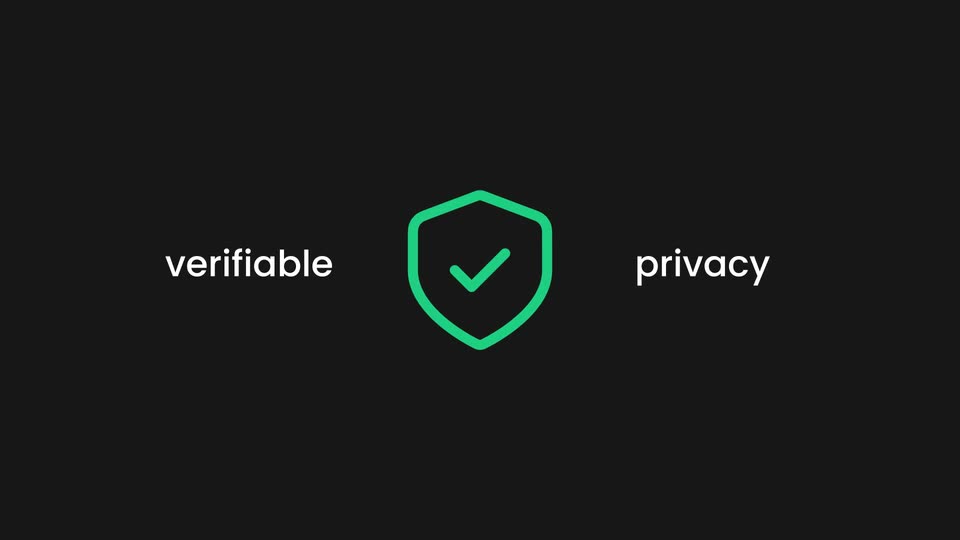
A green shield with a checkmark brightens at center on a near-black background, with “verifiable” and “privacy” settling on either side. A red rounded-square keyhole badge then slides in over the left word, trailing a thin line across the shield.
On-screen text: “verifiable”, “privacy”
Camera: Static
13 · Feature reveal · 0:45–0:49
On a dark background, a teal triangle icon links to a red padlock, which branches into three red boxes labeled Leaks, Hackers, Data Breaches. The padlock then turns green with a checkmark as a red diagonal slash strikes through the connecting line, severing the path to the threats.
On-screen text: “Leaks”, “Hackers”, “Data Breaches”
Techniques: Morph
Camera: Static
14 · Feature reveal · 0:49–0:52
On a white field, a green rounded tile with a white padlock icon sits at left while a dark teal checkmark strokes in at center, then a matching tile with a white key icon settles at right, all joined by thin horizontal lines.
On-screen text: “Data Breaches”, “Leaks”, “Hackers”
Camera: Static
15 · Feature reveal · 0:52–0:53
A white card with the green NVIDIA eye logo and wordmark hangs at the end of a teal and black perspective corridor. The camera pushes straight in, the card and logo scaling up until they fill the frame.
Techniques: Parallax
Camera: Push in
16 · Feature reveal · 0:53–0:54
The green NVIDIA eye mark and black wordmark sit centered on a plain off-white field. A dark teal frame border around the edges drops away as the lockup scales up slightly.
On-screen text: “NVIDIA”
Camera: Static
17 · Feature reveal · 0:54–0:56
The green NVIDIA logo scales in at the center of a white background, then gives way to a black line-art GPU card icon, flanked by the words Confidential and Computing.
On-screen text: “NVIDIA”, “Confidential”, “Computing”
Techniques: Kinetic type
Camera: Static
18 · Feature reveal · 0:56–1:02
On a plain off-white background, a centered line of text builds word by word, new words fading in gray before the phrase settles to black. The line 'secures all computations at the hardware level' assembles, then gives way to 'even when running in the cloud'.
On-screen text: “secures all computations at the hardware level”, “even when running in the cloud”
Techniques: Kinetic type
Camera: Static
19 · Feature reveal · 1:02–1:05
On a dark background, a green pill labeled Speed with a lightning icon sits centered. A teal pill labeled privacy with a lock slides in beneath it, then a white pill labeled verifiability with a shield stacks at the bottom, each scaling into place.
On-screen text: “Speed”, “privacy”, “verifiability”, “even when running in the cloud”
Techniques: Kinetic type
Camera: Static
20 · Feature reveal · 1:05–1:09
On a plain white background, a centered sentence builds word by word: “You don't have to trust anyone,” then “not even Tinfoil,” then “with your data when using AI,” each line fading in as the previous one clears. A larger word, “verifiability,” holds on the same locked-off frame.
On-screen text: “verifiability”, “You don't have to trust anyone”, “not even Tinfoil”, “with your data when using AI”
Techniques: Kinetic type
Camera: Static
21 · Feature reveal · 1:09–1:15
A green-and-white verification card sits centered on a black background. Three checklist rows type out and pop with checkmarks in sequence, then the card slides up to reveal a green shield icon joined by a vertical line and a horizontal bracket below.
On-screen text: “with your data when using Al”
Camera: Pan
22 · Feature reveal · 1:15–1:16
A green rounded square holding a white shield icon sits on a vertical line above a horizontal bracket. The whole diagram drifts upward and the icon slides out of the top edge against a flat dark background.
Camera: Static
23 · Feature reveal · 1:16–1:21
Green shield icons fill a grid on a dark background, the empty rows lighting up at the start. In the center gap, white phrases cross-fade one after another: scaling to the largest workloads, from chat, to inference, to agentic workloads, and more!
On-screen text: “scaling to the largest workloads”, “from chat”, “to inference”, “to agentic workloads”, “and more!”
Techniques: Kinetic type
Camera: Static
24 · CTA · 1:21–1:22
On a near-black field, a white impossible-triangle mark and the gray wordmark Tinfoil fade in at center, settling into a locked logo lockup as a small caption reads and more!
On-screen text: “and more!”
Camera: Static
25 · CTA · 1:22–1:27
On a near-black background, the white Tinfoil triangle logo and wordmark hold centered. The wordmark settles from a brief ghosted crossfade, then the URL line fades in beneath and the frame holds static to the end.
On-screen text: “Tinfoil”, “visit tinfoil.sh”
Camera: Static