1:27

Superserve - Computers for long-running agents
Superserve · B2B · Oct 2026
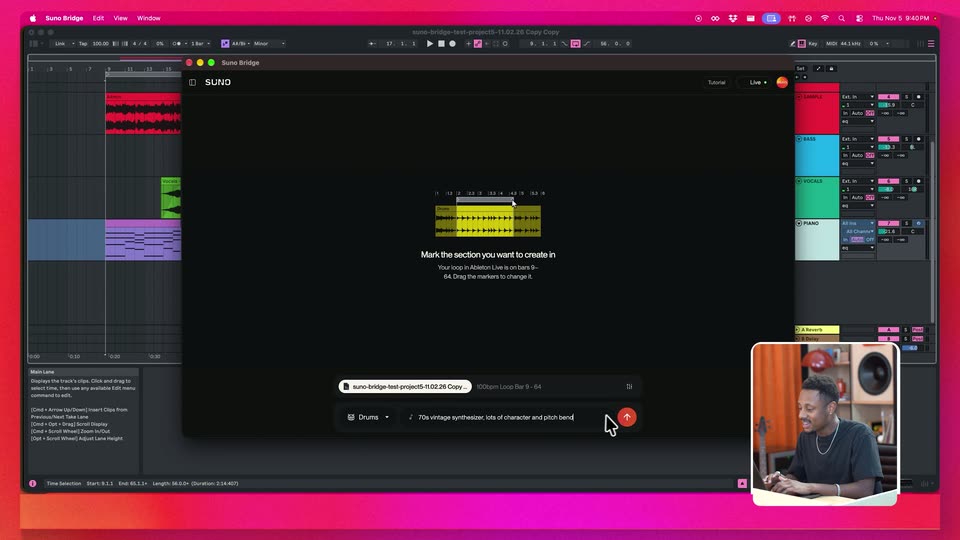
Suno’s 4:12 launch film runs 45 scenes, about 5.6 s each. The product shows up at 0:08 and 2 features are revealed. The call to action lands at 4:01 (96% in), over a voiceover. The video is built as a tutorial that hard-cuts between locked-off talking-head shots in a warm studio and full-screen DAW captures, keeping the presenter visible in a rounded corner inset during every demo. Pacing runs at about 10 cuts per minute over a 100 BPM funk groove, with the pink-orange gradient and the SUNO wordmark as the recurring brand signatures.
Is this your launch? to your site or press kit.
Superserve · B2B · Oct 2026
Replit · Developer tools · Sep 2024
Films whose music sounds like this one, voice left out
Affinity · Upbeat corporate electronic
Lamina Labs · Electronic
Resend · Upbeat electronic
A man in a black T-shirt sits at a desk with an open laptop in a music studio, speaking to the camera. The clip then cuts to a vertical phone video of a singer wearing headphones, singing into a microphone, framed against a blurred backdrop.
Camera: Pull out
A man in a black leather jacket and over-ear headphones sings into a handheld microphone, eyes closed and head tilting. The vertical clip is centered on a blurred, dark background fill.
Camera: Static
A man in a black puffer jacket and headphones sings into a studio microphone, centered in a medium shot. Dark walls and Marshall amplifiers fill the background, with a second musician partly visible at the right edge.
Camera: Static
A man in a white tee stands in a pink-lit bedroom studio, gesturing with open hands toward a wall monitor and a laptop, both showing a colorful DAW session. The vertical clip sits inside blurred side bars as the camera drifts slowly, revealing the desk and office chair.
Camera: Static
A man in a black tee and silver chain sits behind a closed laptop at a studio desk, talking to camera and gesturing with his hands. The frame is locked off in a music studio lined with large speakers, vinyl shelves and an orange lamp.
On-screen text: “V8”
Camera: Static
A locked-off macOS desktop shows the Suno Bridge panel on the left beside a multitrack DAW on the right. An orange guitar clip fills the timeline as the cursor works, and a small inset video of a man in a studio plays in the lower-right corner.
Techniques: Cursor demo
Camera: Static
A dark DAW timeline with pink and green audio clips sits right of a plugin panel, where a cursor drags the Weirdness and Style Influence sliders. A small video call of a man speaking is pinned in the lower right corner.
Techniques: Cursor demo
Camera: Static
A man in a black t-shirt and silver chain sits at a wooden desk, speaking to camera and gesturing with both hands. A laptop and tablet sit in front of him; orange curtains, a red lamp and studio monitors fill the background.
Camera: Static
A gridded DAW timeline holds a green brass clip at top right. A light-blue guitar clip with a green header is dragged into the center by a hand cursor. A small corner inset shows a man in a black shirt talking.
Techniques: Cursor demo
Camera: Static
A DAW session with two amp plugins fills the screen; a mouse cursor turns the Gain and Bass knobs, values updating, while a small picture-in-picture shows the presenter talking. The scene cuts to the presenter full-frame at a desk with a laptop.
Techniques: Cursor demo
Camera: Static
A man in a black t-shirt and silver chain sits at a light wooden desk in a studio with orange curtains and guitars. He gestures with both hands while talking, then looks down and taps the open laptop before him.
Camera: Static
A macOS desktop with a pink gradient wallpaper fills the frame. A DAW window on the right displays colored audio tracks, while a small video inset in the lower right shows a man with headphones seated at a desk. The frame stays locked off.
Camera: Static
A desktop shows the dark SUNO app with a tutorial card on the left and a multitrack DAW on the right, plus a face-cam of a man in the corner. A cursor hovers across the DAW timeline, popping tooltips, then clicks the dock to close the right window.
Techniques: Cursor demo
Camera: Static
A man in a black tee sits at a desk with an open laptop, talking and gesturing with both hands in a studio set with orange curtains, guitars and speakers. A small caption reading Live holds on screen.
On-screen text: “Live”
Camera: Static
A pink gradient macOS desktop fills the frame, its dock of app icons running along the bottom and a small floating video-call window in the lower right showing a man at a laptop. The cursor hovers over the dock near the Ableton Live icon.
Techniques: Cursor demo
Camera: Static
A pink-gradient macOS desktop holds the Suno Bridge window, which fills from black with a centered headline and a launch button. A small presenter video preview sits in the lower right corner.
Camera: Static
A dark macOS window shows a Suno Bridge screen with a Suno logo linked to Ableton Live and a white Launch button. A cursor clicks the button, the view crossfades to a large 12 Suite project card, and a facecam inset of a person at a laptop sits in the corner.
Techniques: Cursor demo
Camera: Static
The Ableton Live window fills the frame as the cursor opens the File menu and the Recent Set list, hovers over a project file, then closes as the session loads. A small webcam inset in the lower right shows the presenter at his desk.
Techniques: Cursor demo
Camera: Static
A static screen recording of a DAW timeline with red, green and purple audio clips and a moving cursor. A central dialog with the Suno logo and an Upload project button appears. A small webcam window in the corner shows a man at his desk.
Techniques: Cursor demo
Camera: Static
A dark Suno Bridge window sits inside a DAW session. The cursor clicks the Upload project button, then the status line cycles through Gathering, Uploading and Analyzing as the progress bar fills. A small studio video of a man in the lower right cuts to a closer angle.
Techniques: Cursor demo
Camera: Static
A man in a black t-shirt sits at a desk in a music studio, talking to the camera while typing on a laptop and gesturing with his hands. Behind him, an orange curtain, two bass guitars and a studio monitor on a shelf. Locked-off medium shot.
On-screen text: “Preparing your project”, “Analyzing your project.”
Camera: Static
A screen capture of the Suno Bridge app shows a dark live panel with a marked loop and prompt bar. A cursor clicks the orange send button, swapping the view to two generating takes; a small inset video of a man with a stringed instrument sits bottom right.
Techniques: Cursor demo
Camera: Static
A dark SUNO panel floats over an Ableton Live session, listing a drum prompt and two takes with yellow waveforms. A bottom status label cycles from Composing to Cooking to Vibing. A small inset shows a man gesturing at a desk, then cuts to him full frame.
Techniques: Cursor demo, Split screen
Camera: Static
A man in a black tee sits at a desk in a studio with orange curtains and guitars, talking and gesturing over a laptop. The shot cuts to a Logic Pro session with red, green and purple clips, a cursor on the timeline, and a small picture-in-picture of him in the corner.
Techniques: Cursor demo
Camera: Static
A pink-framed DAW shows a multitrack timeline of red, green and purple clips; the playhead glides right as the project plays. A white cursor rests over the tracks, and a rounded webcam inset in the lower right shows a man at a laptop, his head dipping toward the screen.
Camera: Static
A man in a black t-shirt sits at a wooden desk in a music studio, an open laptop before him. He speaks and gestures with both hands, turning between the screen and the camera, orange curtains and guitars behind.
Camera: Static
A dark music app fills the frame. A prompt is typed into a bottom bar, Guitar is chosen from a dropdown, and a red send button is clicked. Two orange waveforms labeled Take 1 and Take 2 appear center, beside a small inset of a talking man.
Techniques: Cursor demo
Camera: Static
A screen recording of the Suno Bridge app fills a pink desktop, a stem modal listing two guitar waveforms above a status line that cycles through loading phrases. A picture-in-picture of a man gesturing at a desk with a guitar sits in the bottom right corner. The frame stays locked-off.
Camera: Static
A man in a black t-shirt sits at a wooden desk in a studio, talking and gesturing over a laptop. Orange curtains and two guitars fill the background. He looks up, raises both hands to emphasize a point, then returns to the keyboard.
Camera: Static
The dark Suno Bridge interface fills the frame, listing guitar takes with orange waveform bars. A cursor hovers over one row, and a small rounded video inset in the lower right shows a man watching and smiling.
Techniques: Cursor demo
Camera: Static
A man in a black t-shirt and silver chain sits at a wooden desk in a studio with orange curtains and guitars. He smiles at a dark laptop, his hands resting on the keyboard as he reacts to the screen, in a static medium shot.
Camera: Static
A dark DAW timeline lists guitar takes with yellow and orange waveforms. A white cursor drags the playhead along the orange Take 2 bar, while a rounded video-call window in the lower right shows a red-haired man speaking.
Techniques: Cursor demo
Camera: Static
A man in a black t-shirt and chain sits at a wooden desk in a studio lined with orange curtains, guitars and speakers. He speaks while gesturing with one hand, glancing between the open laptop in front of him and the camera.
Camera: Static
A dark DAW interface lists guitar takes with waveform bars. A cursor clicks an Insert button, raising a tooltip that reads Inserting clip into timeline. A colored track timeline runs down the right edge, and a small video of a man at a desk fills the lower right corner.
Techniques: Cursor demo
Camera: Static
Ableton Live's arrangement view with colored audio clips fills the screen. The cursor drags the orange Guitar + Voca volume knob down in the mixer while the timeline scrolls right. A corner inset shows a man talking in his studio, switching from close-up to a desk shot.
Techniques: Cursor demo, UI zoom
Camera: Static
A man in a black t-shirt sits at a wooden desk in a studio, smiling and gesturing as he works a laptop. Orange curtains, guitars and a studio speaker fill the background. He looks at the screen and claps his hands.
Camera: Static
The Ableton Live session fills the screen, its colored audio tracks laid out across the timeline. A cursor drags a clip along the orange track while a rounded video inset in the lower right shows the presenter gesturing and talking.
Techniques: Cursor demo
Camera: Static
A man in a black tee and silver chain sits at a wooden desk with a dark laptop in a music studio, orange curtains and guitars behind. He talks to camera, glancing at the screen and gesturing. The shot cuts to a centered wide angle with monitors flanking him.
On-screen text: “User Library”
Camera: Static
A man in a black t-shirt sits at a desk in a music studio, talking to camera and gesturing with both hands. An open laptop with its lid to camera sits before him, shelves of speakers, records and a keyboard behind.
Camera: Static
A close-up of a dark SUNO input panel shows a cursor typing a synth prompt, then a fast blurred zoom-out reveals the full Ableton Live session. The cursor clicks to insert a new pink clip into the timeline. A small webcam feed of the presenter sits in the lower right.
Techniques: Cursor demo, UI zoom
Camera: Pull out
Two app windows fill a macOS desktop: a dark Suno Bridge panel with a yellow step sequencer and caption, and an Ableton Live arrangement view with multicolored audio tracks. A rounded inset at bottom right shows a man gesturing in a studio while the cursor hovers over the timeline.
Techniques: Split screen, Cursor demo
Camera: Static
DAW timeline with red, green and purple tracks. A cursor right-clicks a clip, picks Freeze Track, a progress bar fills, then the Edit menu opens on the same command. A small inset shows a man playing a kalimba; the frame dissolves to him at his desk.
Techniques: Cursor demo
Camera: Static
A man in a black t-shirt and silver chain sits at a desk behind a closed laptop, speaking to the camera. The studio set is symmetric, with large speakers and shelves of records on either side. He makes small hand gestures while talking. The frame stays locked off.
Camera: Static
A man in a black t-shirt sits at a wooden desk in a music studio, speaking to the camera and gesturing with both hands. A laptop with its lid to the viewer blocks his lower torso. Shelves of speakers, records, and an orange lamp fill the background. The shot stays static at medium distance.
Camera: Push in
The white SUNO wordmark sits centered on a blurred pink and orange gradient, scaling gently in place, then the frame fades to black.
On-screen text: “SUNO”
Techniques: Kinetic type
Camera: Static