1:05
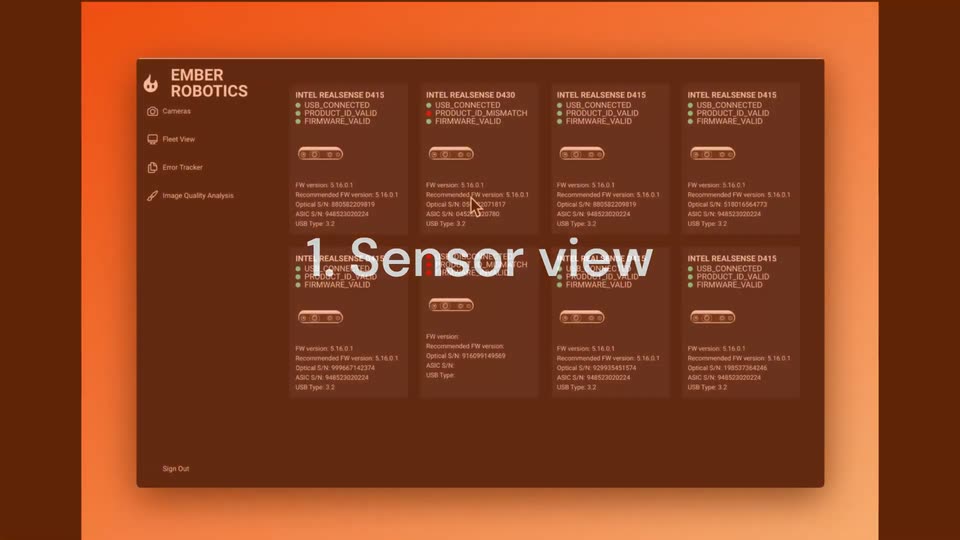
🔥 Introducing Ember Assistant 🔥- Robotics Camera System Assistant!
Ember Robotics · Industrials · Aug 2024
Starton · Sep 2023 · 1:52 · Full motion · AI-annotated
Starton’s 1:52 launch film runs 31 scenes, about 3.6 s each. The product is on screen from the first frame and 7 features are revealed. There is no explicit call to action; a voiceover carries the film. The video is a linear feature tour: it opens on the Starton dashboard under a glitching promise headline, then walks through each capability in turn with a fixed bottom caption bar, and closes on the hexagon logo. Its signature moves are RGB-split glitch text reveals, slow zoom-ins on dark UI panels, and teal accent highlights against a near-black palette.
Is this your launch? to your site or press kit.
Ember Robotics · Industrials · Aug 2024
Leonardo AI · Dec 2023
Airtable · Productivity · Oct 2026
Films whose music sounds like this one, voice left out
Narrative · Upbeat electronic
ArzuleAI · Upbeat electronic
Q2Q · Upbeat electronic
A dark project dashboard with five cards sits behind a large headline that fades in over the cards, then shatters into horizontal glitch slices with red and cyan fringing before vanishing.
On-screen text: “ALL THE TOOLS YOU NEED FOR YOUR WEB3 PROJECTS IN ONE PLACE”
Techniques: Kinetic type
Camera: Static
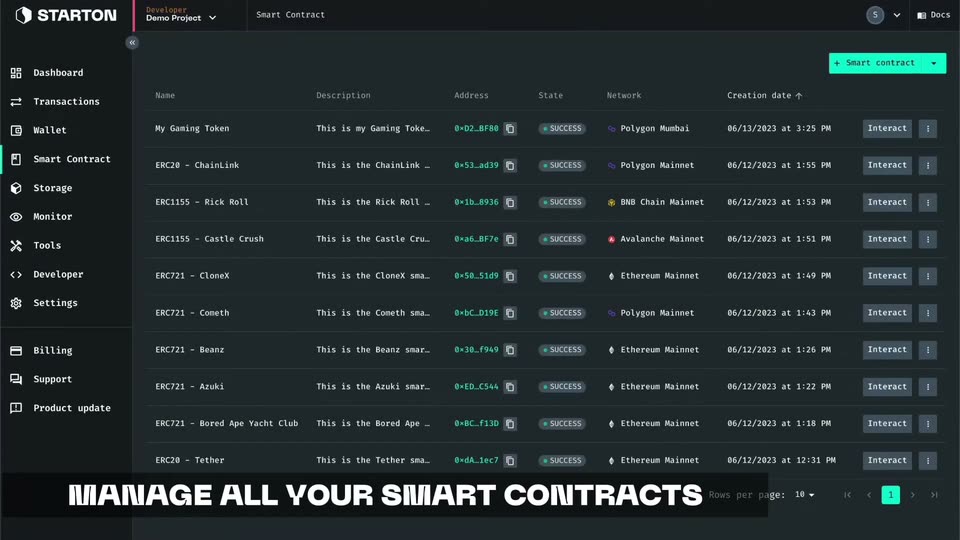
A dark dashboard fills the frame, a left sidebar lists menu items and the main panel shows a table of smart contracts with status badges. A black bar slides up from the bottom edge carrying the white caption. The interface stays static.
On-screen text: “MANAGE ALL YOUR SMART CONTRACTS”
Techniques: Kinetic type
Camera: Static
A dark Starton dashboard shows a smart contract list, then cuts to a New Smart Contract page with three deploy options. A white bold caption reads MANAGE ALL YOUR SMART CONTRACTS on a black bar at the bottom.
On-screen text: “MANAGE ALL YOUR SMART CONTRACTS”
Camera: Static
A dark product screen shows three stacked option cards, each with a line icon and a teal arrow. The view zooms in on the cards while a bold white caption on a black bar at the bottom swaps to a new line.
On-screen text: “MANAGE ALL YOUR SMART CONTRACTS”, “DEPLOY YOUR OWN SMART CONTRACTS OR USE OUR TEMPLATES...”
Techniques: UI zoom
Camera: Push in
A dark template library screen scrolls downward through rows of NFT and token contract cards. A bold white all-caps caption stays fixed at the bottom over the moving interface.
On-screen text: “DEPLOY YOUR OWN SMART CONTRACTS OR USE OUR TEMPLATES..”
Camera: Pan
A dark dashboard lists smart contracts in a table, then crossfades into a contract detail view with a function list and a code panel. A bold white caption reads AND INTERACT WITH THEM at the bottom left, resolving from a glitch.
On-screen text: “AND INTERACT WITH THEM”
Techniques: Kinetic type
Camera: Static
A dark developer dashboard fills the frame. A function list scrolls left as the burn function is selected and a value typed into the amount field. The run button is clicked, a gas modal opens, then a JSON result fills the output panel. The shot fades to black.
On-screen text: “...AND INTERACT WITH THEM”
Camera: Static
A dark IPFS upload interface lists three options, File, CID and JSON, each with a right arrow. The frame zooms in on the rows as a white headline glitches in with red and cyan offsets at the bottom left.
On-screen text: “STORE ALL YOUR NFT ASSETS ON OUR IPFS NODES”
Techniques: Kinetic type, UI zoom
Camera: Push in
A dark IPFS panel dissolves from a three-row list into an upload screen as a macOS file picker opens over it. A cursor moves through the file list, selects an image, and rests on the Open button. A white caption holds at the bottom left.
On-screen text: “STORE ALL YOUR NFT ASSETS ON OUR IPFS NODES”
Techniques: Cursor demo
Camera: Static
A dark IPFS upload screen shows a two-step bar, a file drop zone, a folder toggle and a file entry named all blockchain.jpg. A black caption box at the lower left carries the headline while the whole interface fades from dim to full brightness.
On-screen text: “STORE ALL YOUR NFT ASSETS ON OUR IPFS NODES”
Camera: Static
A dark IPFS upload form sits blurred behind a centered modal showing a green loading spinner. A green success toast slides in at the bottom right. A black caption bar at the bottom left carries the white headline about storing NFT assets.
On-screen text: “STORE ALL YOUR NFT ASSETS ON OUR IPFS NODES”
Camera: Static
A dark file-storage dashboard fills the frame, listing NFT files with CID and status columns, while a success toast sits bottom right. A black box with bold white caps text slides down the lower left, reading the NFT storage tagline.
On-screen text: “STORE ALL YOUR NFT ASSETS ON OUR IPFS NODES”
Techniques: Kinetic type
Camera: Static
A dark dashboard table of running watchers holds still on screen. At the bottom left a black bar wipes open to reveal the white headline, the text resolving from a glitched slice into a clean line.
On-screen text: “TRACK ON-CHAIN EVENTS...”
Techniques: Masking
Camera: Static
A dark 'NEW WATCHER' dialog demonstrates a four-step form. The left panel moves from Type to Settings to Confidence, scrolling an event list and dragging a slider, while the right code panel updates live. A black caption bar reads 'TRACK ON-CHAIN EVENTS...' at the bottom.
On-screen text: “TRACK ON-CHAIN EVENTS...”
Camera: Static
A dark product interface with a code panel on the right and a setup form on the left sits behind a centered modal. The modal shows a spinning teal loader, and a black bar at the bottom carries the white caption TRACK ON-CHAIN EVENTS..
On-screen text: “TRACK ON-CHAIN EVENTS...”
Camera: Static
A dark dashboard page loads a watcher: a hexagon spinner with Loading text sits center, then identity and blockchain fields fill in. A bold white caption on a black bar reads TRACK ON-CHAIN EVENTS, then glitches with RGB split as the screen fades to dark.
On-screen text: “TRACK ON-CHAIN EVENTS...”, “CREATING WATCHER...”
Camera: Static
A screen capture of the Webhook.site dashboard; the left column lists POST requests while the JSON payload in the center panel scrolls upward through log entries. A white italic caption bar reading “… AND RECEIVE WEBHOOK NOTIFICATIONS” sits along the bottom edge.
On-screen text: “… AND RECEIVE WEBHOOK NOTIFICATIONS”
Camera: Static
A dark interface showing JSON code dims as a SPEED / GAS settings modal fades in at the center, while an all-caps caption with red and cyan glitch slides up along the bottom edge.
On-screen text: “SAVE GAS FEES BY CHOOSING YOUR GAS STRATEGY”
Techniques: Kinetic type
Camera: Static
A dark SPEED / GAS modal sits over a dimmed dashboard. The radio selection steps down the speed list, then the Custom tab opens with expert fee fields. The panel scrolls to a Gas Limit toggle and a RISKY ACTION warning, and the modal closes. A white caption stays fixed below.
On-screen text: “SAVE GAS FEES BY CHOOSING YOUR OWN STRATEGY”
Camera: Pan
A dark dashboard scrolls down through usage charts, a line graph, a pink circular risk gauge, and a radar chart. A black bar with white caption text stays fixed at the bottom. The view ends on a project settings page with a users table.
On-screen text: “TRACK YOUR USAGE AND ADOPTION”
Camera: Pan
A dark settings screen shows the Users tab, then an Invite Users modal opens where an email is typed and sent, ending on a pending invitations list with a success toast. A white caption on a black bar flickers with a glitch at the bottom.
On-screen text: “COLLABORATE ON YOUR PROJECTS”
Camera: Static
A dark wallet dashboard fills the frame, showing wallet sections and a table row. An ADD WALLET panel opens over it, listing three KMS options with hexagon and AWS logos. A black caption bar holds the integration line across the bottom.
On-screen text: “INTEGRATE ALL THESE FEATURES INTO YOUR PRODUCTS THANKS TO...”
Camera: Static
A dark Add Wallet screen with three option cards holds still. A black banner with bold white text spans the lower third. A white card slides in from the right at the bottom edge, showing the label TX SIGNATURE AUTOMATION.
On-screen text: “INTEGRATE ALL THESE FEATURES INTO YOUR PRODUCTS THANKS TO...”, “TX SIGNATURE AUTOMATION”
Camera: Static
A dark transaction table fills the screen as a centered TRANSACTION LOGS modal opens, listing status rows with timestamps. The NONCE_ASSIGNED row expands to reveal a JSON snippet. A bold white caption sits bottom left, while a white box caption glitches in at bottom right.
On-screen text: “INTEGRATE ALL THESE FEATURES INTO YOUR PRODUCTS THANKS TO...”, “CLEAR LOGS & STANDARD ERRORS”
Camera: Push in
A dark dashboard opens on a transaction logs modal, then cuts to a developer API view pairing an input form with a JavaScript code panel. The camera slowly zooms into the code while a bold white caption and a white label box remain at the bottom.
On-screen text: “INTEGRATE ALL THESE FEATURES INTO YOUR PRODUCTS THANKS TO...”, “CLEAR LOGS & STANDARD ERRORS”, “OUR DEVELOPER API”
Techniques: UI zoom
Camera: Push in
A dark API documentation page scrolls down past headings and parameter tables, the left sidebar fixed. A bold white caption and a white box reading OUR DEVELOPER API remain pinned at the bottom of the frame.
On-screen text: “INTEGRATE ALL THESE FEATURES INTO YOUR PRODUCTS THANKS TO...”, “OUR DEVELOPER API”
Camera: Push in
A dark code editor fills the frame, reframing from the full IDE to two side-by-side code panels with a blinking caret. Bold white all-caps text at the bottom left sits beside a white box reading OUR DEVELOPER API.
On-screen text: “INTEGRATE ALL THESE FEATURES INTO YOUR PRODUCTS THANKS TO...”, “OUR DEVELOPER API”
Camera: Static
A dark code editor window holds the left edge, then clears to a black terminal where a command types out and mint lines with hex hashes scroll in. A bold white headline and a boxed OUR DEVELOPER API label sit at the bottom, glitching with RGB split at the end.
On-screen text: “INTEGRATE ALL THESE FEATURES INTO YOUR PRODUCTS THANKS TO...”, “OUR DEVELOPER API”
Camera: Static
A white hexagon logo with a curved inner cutout pops onto a black background with a digital glitch effect. Its edges split into red and blue chromatic aberration, then the mark holds steady and centered.
Camera: Static
The STARTON logo, a hexagonal mark beside a bold wordmark, sits on black with red and blue chromatic aberration. A horizontal slice tears through it as the mark compresses and slides toward the center.
Camera: Static
The STARTON wordmark with a hexagon icon appears centered on black, distorted by a horizontal glitch and red-blue chromatic fringing, then snaps to clean white. It holds briefly before fading to black.
Camera: Static