0:36


deepeye TPS, easy to use AI assistant for optimizing IVI therapy planning.
Deepeye Medical · Jan 2025
Leonardo AI · Dec 2023 · 0:26 · AI-annotated
Leonardo AI’s 0:26 launch film runs 21 scenes, about 1.2 s each. The product is on screen from the first frame and 5 features are revealed. There is no explicit call to action. A fast-cut launch video built from five feature beats, each opened by a bold white headline over a live prompt-to-image demo, closing on the brand logo. Signature moves: glitch-tear wipes between examples, typed prompt bars under each render, and images that scale down to thumbnails before the next beat.
Is this your launch? to your site or press kit.
Deepeye Medical · Jan 2025
ZoomInfo · Oct 2026
A near-black frame holds a dim collage of a cat in red sunglasses, a horse, a dog and a face. The word Introducing in white bold sans fades in at center and holds, locked off.
On-screen text: “Introducing”
Camera: Static
A black screen holds the white word Introducing, then cuts to a 3x3 grid of pink and purple squares, circles and a play triangle above the title Realtime Gen. Both sit static and centered.
On-screen text: “Introducing”, “Realtime Gen”
Camera: Static
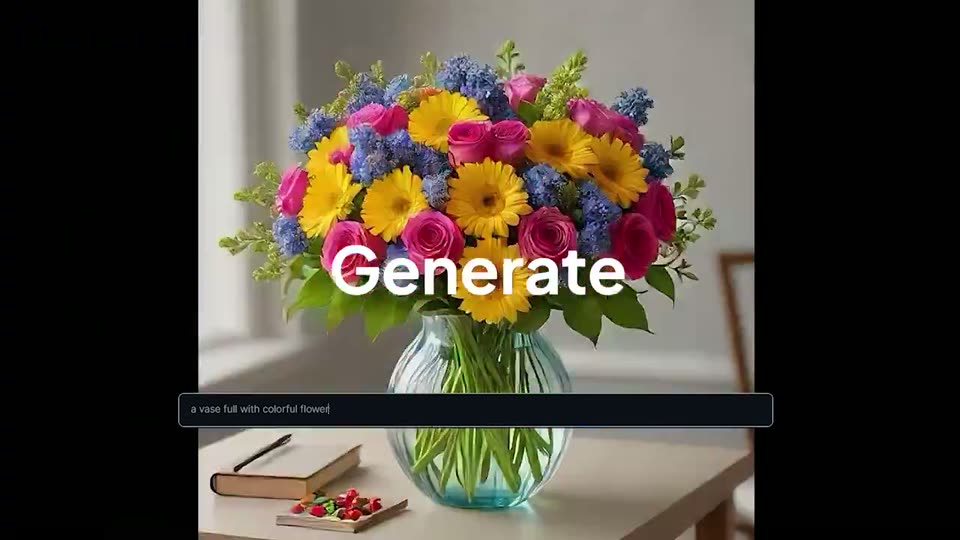
A portrait image of a colorful bouquet in a glass vase on a wooden table fills the center, framed by black side bars. The word Generate overlays the flowers as a bottom prompt bar types out the scene description.
On-screen text: “Generate”
Camera: Static
A glass vase of multicolored flowers sits on a wooden table against a soft neutral wall. A dark caption bar at the bottom types out the line describing the scene.
On-screen text: “a vase full with colorful flowers, sitting on a wooden table”
Techniques: Kinetic type
Camera: Static
A still photo of a glass vase filled with colorful gerberas and roses on a wooden table sits above a caption box. A glitch effect then distorts the image with color fringing and arrows, tearing it into a thin diagonal red-edged strip that wipes away to black.
On-screen text: “a vase full with colorful flowers, sitting on a wooden table”
Techniques: Masking
Camera: Static
A square generated image of a white horse fills the center of a black screen, shifting from a sepia dust scene to a green field as it refines. A prompt line types out in a rounded box below while the headline stays locked over the image.
On-screen text: “In Real Time”
Camera: Static
A white horse gallops rightward across a sunlit green field inside a portrait video preview, framed by black side bars. A prompt line types out letter by letter in a rounded input bar along the bottom.
On-screen text: “In Real Time”
Camera: Static
A photorealistic white horse runs across a golden grass field in a portrait frame, with a dark prompt bar at the bottom showing the typed query and a blinking caret. The image then scales down into a small centered thumbnail on a black background.
Techniques: UI zoom
Camera: Static
A clay burger monster with large eyes sits on a wooden table in a soft-focus kitchen. Its mouth opens and closes. A dark caption bar at the bottom shows a typed description.
On-screen text: “A burger monster made of clay, sitting on a table”
Camera: Static
A square 3D render of a clay burger monster with googly eyes sits on a table beside a small sauce cup, centered on a black field. A dark rounded caption bar with the prompt text runs along the bottom edge. The image holds static.
Camera: Static
A rendered monster burger with a sesame-bun head and small hands fills the frame, then scales down into a centered card on a dark background, revealing a table with a juice jar and a plate. A dark toolbar with small icons sits beneath the card.
Techniques: UI zoom
Camera: Pull out
A 3D-rendered hamburger monster with a sesame bun head, big eyes and teeth sits on a wooden table, a mason jar of orange juice to the left, as the camera tilts down to reveal its arms and a plate of cucumber slices.
Camera: Pan
A dark image-generation interface shows a woman's portrait on the left and an Elements slider panel on the right. The portrait brightens as a cursor clicks the style dropdown, and the headline Multiple Presets fades in across the center.
On-screen text: “Multiple Presets”
Techniques: Cursor demo
Camera: Static
An 'Elements' panel with four purple sliders slides in over the right side of a generated portrait of a woman; below the canvas a prompt bar and a Photography dropdown sit under a hovering hand cursor.
Camera: Static
A dark AI-generation interface shows a woman's portrait next to an Elements slider panel. A chromatic glitch shatters the layout, pulling the face into a neon ring with arrows while the prompt bar and style dropdown swap to a new setting.
Techniques: Cursor demo
Camera: Static
A locked-off view of the Leonardo.AI Realtime Gen interface shows a generated dog portrait with the white headline Stylize With Elements overlaid. A cursor drags the Folk Art Illustration slider, restyling the image, then opens the upscale-mode menu at top right.
On-screen text: “Stylize With Elements”
Techniques: Cursor demo
Camera: Static
Over a blurred dark interface, a cursor opens the Creative Upscale dropdown in the top right, then a Personal Feed tooltip appears while the centered white headline Refine And Download fades out.
On-screen text: “Refine And Download”
Techniques: Cursor demo
Camera: Static
A dark product interface shows a Normal Upscale control and a tooltip, then cuts to a glitch-styled photo of a cat in orange sunglasses, with a blue circle and colored arrows marking the glasses.
Techniques: Cursor demo
Camera: Static
A blue 3D dog wearing orange sunglasses and a glowing red harness sits on a red floor against a dark backdrop. Its head tilts and turns as the frame slowly pushes in. Small circular arrow buttons sit at the left and right edges.
Camera: Push in
A blue 3D dog in orange square sunglasses and a red collar sits against a dark blue backdrop. The camera pushes in until the tinted lenses fill the frame, then pulls back to the torso as a red harness and a glowing leash line come into view.
Camera: Push in
On a black field, a circular mark of a bearded face ringed by multicolored lines holds left of the wordmark Leonardo.Ai, the .Ai in purple. A soft white glow around both elements fades during the static hold.
On-screen text: “Leonardo.Ai”
Camera: Static