2:51

ClickUp Release 4.08: Meetings Hub, Super Agent Cloning, and more!
ClickUp · Productivity · Sep 2026
Spotify · Mar 2021 · 0:40 · AI-annotated
Spotify’s 0:40 launch film runs 11 scenes, about 3.6 s each. The product is on screen from the first frame and 5 features are revealed. There is no explicit call to action. The video is built as a feature walk-through: a 3D tilt from a flat yellow title card into a laptop mockup, then five beats, each a magenta headline over a front-facing laptop on a flat yellow field with the camera zooming into the screen for the demo. Pacing is slow on the cut (about 1.5 cuts per minute) with motion carried by internal zooms and headline swaps, closing on a rippling concentric-ring logo outro.
Is this your launch? to your site or press kit.
ClickUp · Productivity · Sep 2026
Shopify · Business software · May 2026
A magenta two-line headline and the Spotify brand lockup sit centered on a flat yellow field. The whole frame then tilts back into 3D perspective, revealing the Spotify desktop app interface behind the text.
On-screen text: “There's more to love on the new Spotify desktop app”, “Spotify Listening is everything”
Techniques: 3D mockup
Camera: Static
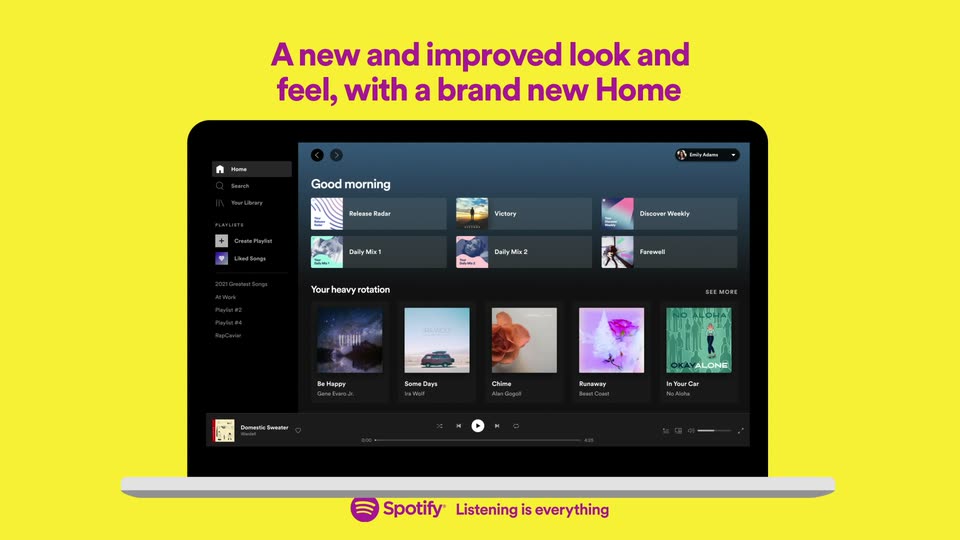
A front-facing laptop mockup of the Spotify desktop app sits on a flat yellow field, zooming out from a tight screen crop to the full device. A magenta headline animates in above it, then the Spotify logo and tagline fade in below.
On-screen text: “A new and improved look and feel, with a brand new Home”, “Listening is everything”
Techniques: 3D mockup, Kinetic type
Camera: Pull out
A front-facing laptop mockup on a yellow background shows the Spotify Playlists view. The playlist grid scrolls up inside the screen while a magenta headline reads “Easier access to the content you love in Your Library”, then swaps to “Simpler playlist creation, now with integrated search” as a white search field with “My Playlist #1” appears over the grid.
On-screen text: “Easier access to the content you love in Your Library”, “Spotify”, “Listening is everything”, “Simpler playlist creation, now with integrated search”
Camera: Static
A front-facing laptop on a yellow field shows the Spotify playlist view. The camera zooms into the screen as a search field fills with Victory, a result appears, and a cursor clicks Add, then pulls back to the full laptop with the new track listed.
On-screen text: “Simpler playlist creation,”, “now with integrated search”, “Listening is everything”
Techniques: UI zoom, Cursor demo
Camera: Push in
A cursor lifts the now-playing track from the bottom bar and drags it up into the playlist, dropping it as the third row. The view then pulls back to show the interface on a tilted tablet against a yellow field.
Techniques: Cursor demo, 3D mockup
Camera: Pull out
A front-facing laptop mockup on a yellow background shows the Spotify playlist view. The header and track list swap from playlist one to playlist two with new album art. A magenta headline sits above and the Spotify tagline below, both static.
On-screen text: “Drag and drop tracks straight into your playlists”, “Spotify Listening is everything”
Techniques: 3D mockup
Camera: Pull out
A front-view laptop mockup on a yellow background shows the Spotify playlist screen. A magenta headline slides in at the top, then the view zooms into the screen as a cursor clicks the download button, turning it green, and hovers a track.
On-screen text: “Go Premium and download your favorite music and podcasts for when you're offline”, “Listening is everything”
Techniques: Kinetic type, UI zoom, Cursor demo
Camera: Push in
A purple-and-yellow concentric target scales up from the center, its rings growing over a laptop mockup behind them. The Spotify logo and the tagline “Listening is everything” appear in the middle of the yellow disc.
On-screen text: “Listening is everything”
Camera: Push in
Concentric purple rings ripple outward on a yellow field, centered on the purple Spotify logo and tagline. The whole lockup scales up gently as the rings expand.
On-screen text: “Listening is everything”
Camera: Static
Concentric purple and yellow rings expand outward from the center. The Spotify logo and wordmark hold the middle, with the tagline beneath. The lockup scales up slightly as the rings ripple, on a locked-off frame.
On-screen text: “Listening is everything”
Camera: Static
The Spotify wordmark and the line “Listening is everything” sit centered on a magenta field, ringed by two yellow circles. The rings and text scale, then clear away to leave a flat purple frame.
On-screen text: “Spotify”, “Listening is everything”
Techniques: Kinetic type
Camera: Static