0:40
Explore
Splice - Find your spark in seconds ⚡️ We’ve expanded Create mode so you can
Splice · Oct 2023 · 0:30 · AI-annotated
- Length
- 0:30
- Scenes
- 14 · 2.1 s avg
- Product on screen
- 0:03
- Features shown
- 6
- Voiceover
- Yes
00:00:00 / 00:30:00
Splice’s 0:30 launch film runs 14 scenes, about 2.1 s each. The product shows up at 0:03 and 6 features are revealed. There is no explicit call to action; a voiceover carries the film. The video chains a black title hook, a 3D fly-through of loop tiles, and six captioned feature demos over animated neon bars, closing on the splice wordmark. Fast 123 BPM cuts and light-flash transitions keep the pace, with a white 3D cursor and drifting four-point sparkles guiding the eye through each demo.
No filming indicatedEstimated needs: 1 capture group — your screens or recordings · 1 official logo — reused across the film · 7 graphic passages — draw or supply · 3 3D passages — build or supply
Is this your launch? to your site or press kit.
More like this
0:57

New MacBook Pro with PROLED XDR Display and Touch: The world’s best laptop display
Apple · Hardware · Oct 2026
1:27
Perplexity - Announcing Personal Computer. Personal Computer is an always on, loc
Perplexity · AI · Mar 2026
Splice - Find your spark in seconds ⚡️ We’ve expanded Create mode so you can, scene by scene
· 14 scenes as text
01 · Hook · 0:00–0:02
Centered on black, the gray phrase brightens to white and scales up as a flash of light bursts behind the word spark, scattering small glowing particles.
On-screen text: “Find your spark in seconds”
Techniques: Kinetic type, Particles
Camera: Static
02 · Hook · 0:02–0:03
On a black starfield, the white headline “Find your spark in seconds” scales up as a pink and blue glow blooms behind the word spark. A large thin wireframe outline of SPARK then echoes outward across the frame, its letters stacking into a 3D ribbon.
On-screen text: “Find your spark in seconds”
Techniques: Kinetic type
Camera: Push in
03 · Feature reveal · 0:03–0:05
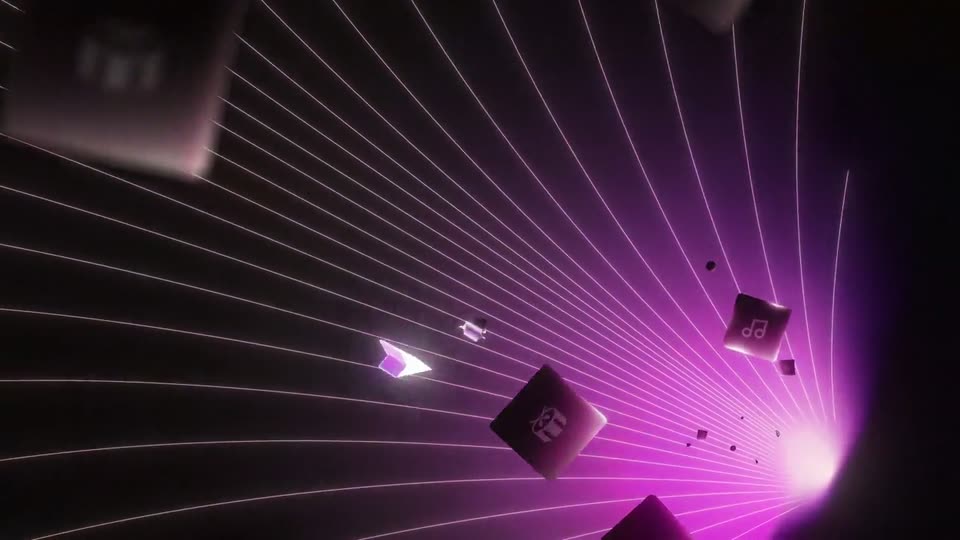
A white flash resolves into a dark 3D space where thin lines radiate from a magenta glow on the right. Dark square tiles bearing white icons drift past the camera at varying depths as it flies through the field.
Techniques: Parallax
Camera: Push in
04 · Feature reveal · 0:05–0:09
3D app icon tiles float in a dark wireframe grid as the white caption “Discover a loop on Splice” slides in from the right. A glowing cursor arrow and a four-point star drift through the depth, then a purple tile flares and settles above three empty outlined slots.
On-screen text: “Discover a loop on Splice”
Techniques: 3D mockup, Kinetic type, Parallax
Camera: Pan
05 · Feature reveal · 0:09–0:12
A bright white flash resolves into four glowing horizontal bars, each with a colored icon tile and a white waveform. The caption 'Create a Stack' fades in over the bars, then fades out as the stack settles. A cursor arrow and small sparkles drift at the edges.
On-screen text: “Create a Stack”
Techniques: Light sweep, Kinetic type
Camera: Static
06 · Feature reveal · 0:12–0:14
A white 3D cursor glides right across a dark blue field, trailing a glowing extruded wave shape, while a thin waveform line and a scrolling number scale tighten into faster cycles below. The headline “Change tempo” holds fixed at the top, blurred as the layers move.
On-screen text: “Change tempo”
Techniques: 3D mockup, Parallax
Camera: Push in
07 · Feature reveal · 0:14–0:16
A dark purple interface view centers the white headline Switch styles. A white cursor moves upward as a five-line style list scales in, then stops beside the pink Dance Pop option.
On-screen text: “Switch styles”
Techniques: Kinetic type, Cursor demo
Camera: Static
08 · Feature reveal · 0:16–0:17
A dark gridded backdrop holds four neon bars (purple, pink, orange, blue) with white waveform lines and small icons. Five genre labels sit over them, the pink one glowing, then scale out to expose the icon rows as a white cursor slides to the lower left.
On-screen text: “Chill Lounge”, “Dance Pop”, “Disco Fever”, “Synthwave”, “Hit Hop”
Techniques: Kinetic type, Cursor demo
Camera: Pull out
09 · Feature reveal · 0:17–0:19
Four gradient bars, each with a white icon (music note, piano keys, gift box, slider) and a waveform line, sit stacked on a soft pink background. The stack drifts right while the gift bar stretches wider and a cursor arrow appears beside it.
Techniques: Cursor demo
Camera: Push in
10 · Feature reveal · 0:19–0:20
A pale pink band runs between two purple bars. Two rounded gradient tiles, one holding a white drum icon and one a white arrow, glide rightward and exit the frame, leaving the band empty.
On-screen text: “d”
Camera: Static
11 · Feature reveal · 0:20–0:23
Four gradient audio-track bars with icons (music note, piano keys, vinyl, xylophone) and waveform lines shuffle their vertical order on a soft pink gradient background, while a white cursor arrow points at them and the caption “Shuffle layers” scales in at center.
On-screen text: “Shuffle layers”
Techniques: Kinetic type
Camera: Static
12 · Feature reveal · 0:23–0:26
Glowing audio waveforms in orange, purple, and pink ripple across horizontal bands on a dark grid as rectangular panels slide apart. The white text “Export to DAW” slides in at center, holds, then exits, while a white cursor arrow drifts nearby.
On-screen text: “Export to DAW”
Techniques: Kinetic type, Masking
Camera: Pull out
13 · Outro · 0:26–0:27
On a black field, a glowing magenta wave wrapped in thin white and purple wireframe lines holds center, then contracts toward the left as a bright vertical pink beam flares up on the right.
Techniques: Light sweep, Morph
Camera: Pull out
14 · Outro · 0:27–0:30
On black, a soft white light flare blooms and sharpens into the splice wordmark and icon, which slide to center and settle into focus, then hold still.
On-screen text: “splice”
Techniques: Kinetic type
Camera: Static