0:15
Intelligent Eyewear with Warby Parker | Samsung
Samsung · Nov 2026
Sona8 · 1:21 · AI-annotated
Sona8’s 1:21 launch film runs 28 scenes, about 2.9 s each. The product is on screen from the first frame and 10 features are revealed. There is no explicit call to action; a voiceover carries the film. Built as a steady feature by feature tour on a pale off-white field, each beat holding a fixed serif headline top left while flat product mockups animate in place beneath it. Pacing is even and unhurried, with a single violet accent, a recurring purple serial number and the Sona smiley carrying the thread across screens.
Is this your launch? to your site or press kit.
Samsung · Nov 2026
Apple · Hardware · Oct 2026
A serif headline tops a pale layout holding two flat interface cards. The left shows an AI interview transcript with audio waveforms; the right fades in to reveal a three-step workflow with one purple box, joined by an arrow. A black caption bar cycles the voiceover below.
On-screen text: “Interview employees. Understand how work gets done.”, “Sona8 interviews employees and”, “captures their workflows,”, “so teams can see”, “what needs to change.”
Camera: Static
A light Sona8 webpage shows a serif headline and three audience cards, the purple Strategy & operations card highlighted. A second row of use-case chips fades in, a black lower-third caption updates at the bottom, and a light sweep crosses the purple card.
On-screen text: “Strategy and operations teams,”, “consultants and PE operations”
Techniques: Light sweep
Camera: Static
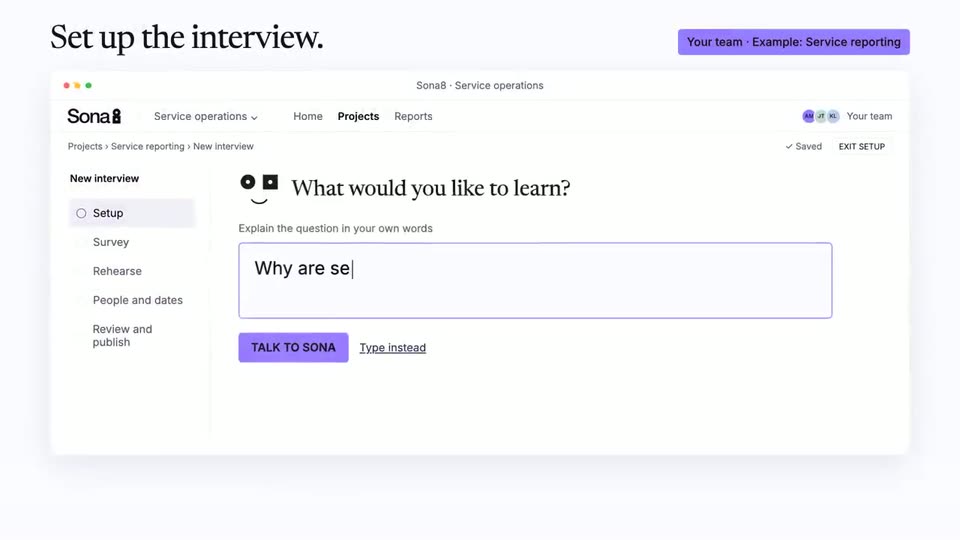
A flat Sona8 interface window sits on a light background under a serif headline. The view dissolves from a team list to a question screen where text types into a field, while a black caption bar rolls at the bottom.
On-screen text: “Set up the interview.”, “Your team - Example: Service reporting”, “consultants and PE operations teams start with a”
Techniques: Cursor demo
Camera: Static
Under a serif headline, a flat Sona setup screen cycles through three steps: a question typed in a text field, two employee checkboxes ticked, then a review page with a cursor over the publish button. Black caption chips appear at the bottom.
On-screen text: “Set up the interview.”, “Your team · Example: Service reporting”, “teams start with a question,”, “choose the employees,”
Techniques: Cursor demo
Camera: Static
A flat Sona8 interface shows the Review and publish page. A cursor slides to the PUBLISH button and clicks it; it becomes PUBLISHED and a LIVE badge pops in top right. Edit text: serif headline top left, purple label top right, black caption pill bottom.
On-screen text: “Set up the interview.”, “Your team - Example: Service reporting”, “and publish.”
Techniques: Cursor demo
Camera: Static
A gray serif headline on white darkens and settles as a flat email invitation card fades in beneath it, showing a purple envelope, a recipient line and a purple action button. A dark pill caption at the bottom swaps its text.
On-screen text: “Invite the people who do the work.”, “Employees get a link”, “by email,”
Techniques: Kinetic type
Camera: Static
Email, Slack and SMS mockup cards sit on a white field under a serif headline. A black pill caption swaps phrases bottom-center while a cursor glides onto the purple Start conversation button.
On-screen text: “Employees · Share experience and ideas”, “Invite the people who do the work.”, “Reach people by email, Slack or SMS”, “by email,”, “Slack or SMS.”, “In their own language,”, “they explain what makes”, “work difficult and what”
Techniques: Kinetic type, Cursor demo
Camera: Static
A flat conversation window card sits centered on a pale background, its face icon, serif greeting and purple waveform visible. Two flanking cards fade out as the center card resolves to solid white. A serif headline holds top left and a black caption pill rolls at the bottom.
On-screen text: “Employees · Share experience and ideas”, “Invite the people who do the work.”, “work difficult and what”, “could help.”
Camera: Static
A flat Sona8 chat mockup sits under a serif headline. Sona's question types in, a technician bubble fades in with a purple highlight, a chip row slides in, then the question changes and the Share screen button lights up, while caption pills read the narration.
On-screen text: “Example: Service reporting · Employee interview”, “The same details. Entered again.”, “Here's an example:”, “a technician keeps entering”, “the same service details.”, “Sona asks them to”, “show the task.”
Camera: Static
A flat browser mockup of a service report form occupies the right; a share dialog clears to reveal it, a cursor points at the purple-highlighted serial number field, and a left-side note plus a Paper-to-SAP flow row fade in while dark caption pills roll across the bottom.
On-screen text: “Example: Service reporting · Live screen share”, “Share your screen. Explain the step.”, “During the interview,”, “they share their screen”, “Where do you enter this again?”, “and show which fields”, “Technician”, “Here. Then the office copies it into SAP.”, “they copy into another”, “Paper · SN-4831 → ServiceHub · SN-4831 → SAP · SN-4831”
Techniques: Cursor demo
Camera: Static
A flat ServiceHub visit-report window sits on a light field beside a serif headline and a left caption block, with a three-step flow underneath. The whole composition fades out as a second mockup, an Employee computer window over a workday timeline, fades in and a black caption pill rises at the bottom.
On-screen text: “Example: Service reporting · Live screen share”, “Share your screen. Explain the step.”, “Where do you enter this again?”, “Technician Here. Then the office copies it into SAP.”, “Paper · SN-4831 → ServiceHub · SN-4831 → SAP · SN-4831”, “Employee computer”, “A normal workday”, “Sona8 can also capture”
Camera: Pull out
A light employee-computer window shows a ServiceHub visit report form sliding in as a clock ticks from 09:16 to 10:45 and a purple timeline bar advances. A black caption pill at the bottom reads Sona8 can also capture.
On-screen text: “Employees - Throughout the workday”, “See the work across apps.”, “Sona8 can also capture”
Camera: Static
A flat product UI shows an employee computer window with a SAP service form and a right-hand step list. The clock ticks from 12:24 to 13:51, the timeline progress bar extends, and the form crossfades to a new state. A black caption pill at the bottom reads the phrase.
On-screen text: “Employees · Throughout the workday”, “See the work across apps.”, “how they work across”, “apps throughout the day,”
Camera: Static
A flat mockup of a computer screen displays a word document and a timeline of work steps. The clock ticks from 16:29 to 17:00, a progress bar fills, and a highlighted serial number in the timeline becomes solid. A black caption box at the bottom reads “without a live interview.”
On-screen text: “Employees - Throughout the workday”, “See the work across apps.”, “without a live interview.”
Camera: Static
Left, a 3D phone mockup plays live camera footage of a hand working an electrical panel. Right, a transcript panel fades in with a serif question, body copy and three chips, then a detail card appears. A black caption box at the bottom cycles the narration phrases.
On-screen text: “Example: Service reporting · Live interview on phone”, “Show the physical workspace.”, “For physical work,”, “they open the interview”, “on the phone and”, “show the equipment and”, “happens.”
Techniques: Split screen
Camera: Static
A flat white Sona8 reports mockup sits on a light gray field beneath a black serif headline. A violet panel wipes off the right edge to reveal the page, and a dark caption pill at the bottom swaps from 'Analyse everything together.' to 'Explore a finding,'.
On-screen text: “Explore a finding. Check the evidence.”, “Analyse everything together.”, “Explore a finding,”
Techniques: Masking
Camera: Static
A centered Sona8 report window on a pale background shows a Repeated data entry report. Its tab switches from Teams & locations bar charts to an Employee evidence quote card. A serif headline sits above and a black caption pill below swaps phrases.
On-screen text: “Explore a finding. Check the evidence.”, “Explore a finding,”, “compare teams and locations,”, “and check the evidence”, “behind it.”
Camera: Static
A light gray slide holds a serif headline and small eyebrow text top left. Three white cards, each tagged with a role label and a quote, fade in staggered across the middle. A black pill caption sits centered at the bottom.
On-screen text: “For your team · Example: Service reporting”, “See how the work connects.”, “The process map connects”
Camera: Static
A process map builds on a light canvas: four cards pop into three swimlanes, linked by purple arrows that draw in. Two cards flash purple, a dark tooltip and a purple badge appear, while a black caption box at the bottom updates phrase by phrase.
On-screen text: “For your team · Example: Service reporting”, “See how the work connects.”, “The process and reveals”, “the steps and reveals”, “the same service record”, “is entered four times.”
Camera: Static
A flat product dashboard fills the frame: a horizontal bar chart of recurring themes on the left, an evidence panel on the right that fades in with a quote and a link. A serif headline sits above, and black pill captions cycle at the bottom.
On-screen text: “For your team · Recurring themes”, “See what comes up across the company.”, “Themes show how often”, “problems come up across”, “teams and sites”
Techniques: Kinetic type, Cursor demo
Camera: Static
A purple panel wipes off to the right, revealing a flat product page with a Claude interface mockup. The left card text resolves from scrambled letters, and a black pill caption pops in at the bottom.
On-screen text: “Go deeper in Claude or ChatGPT.”, “in Claude or ChatGPT”
Techniques: Masking
Camera: Static
A flat Claude app window displays a theme-by-function data table under a serif headline. A black caption pill at the bottom cycles short phrases, and the table crossfades to a location grouping as the Location toggle and Process map tab turn purple.
On-screen text: “Go deeper in Claude or ChatGPT.”, “to investigate your own”, “questions.”, “Compare functions and locations.”, “Choose what you need:”, “a detailed process map,”
Techniques: Kinetic type, Morph
Camera: Static
Beneath a static serif headline, a flat product window shows a four-row process map. The Finance row fades in from gray to full color while a black caption box at the bottom of the frame fades out.
On-screen text: “Go deeper in Claude or ChatGPT.”, “Your team · Connected to Sona8”, “Choose what you need:”
Camera: Static
A light Claude interface shows a process map flowchart of labeled boxes and arrows. The output tab switches from Process map to Product specification, swapping the flowchart for a spec table, while a black caption bar reads a detailed process map.
On-screen text: “Go deeper in Claude or ChatGPT.”, “Your team - Connected to Sona8”, “a detailed process map,”
Camera: Static
A flat product interface window sits on a white field under a serif headline. The spec card fills in row by row, the right-hand list fades from gray to black, and a black pill caption at the bottom swaps its words to match the voiceover.
On-screen text: “a product specification,”, “or reusable instructions for”
Techniques: Kinetic type
Camera: Static
A flat Claude app mockup on a white page shows a “Reusable instructions for AI agents” panel; its labels briefly overlap as the step list gains a fourth row. A black caption box below swaps from “or reusable instructions for” to “AI agents.”
On-screen text: “Go deeper in Claude or ChatGPT.”, “or reusable instructions for”, “AI agents.”
Camera: Static
Serif headline top left. A white service-record card stays left as a browser window slides in right, revealing a quote and two chips. A black caption pill at the bottom cycles phrases; the left card fades out at the end.
On-screen text: “Your team + employees”, “Make a change. Check it together.”, “Then make a change”, “and ask employees again.”, “See what improved,”, “what still needs work,”, “and decide together what”, “comes next.”
Techniques: Kinetic type
Camera: Static
A purple side panel and a purple smiley icon fade out, revealing a white background where the black serif headline fades in beside a black smiley icon, with the Sona logo locked at the top left.
On-screen text: “Listen and move forward”
Camera: Static