2:50
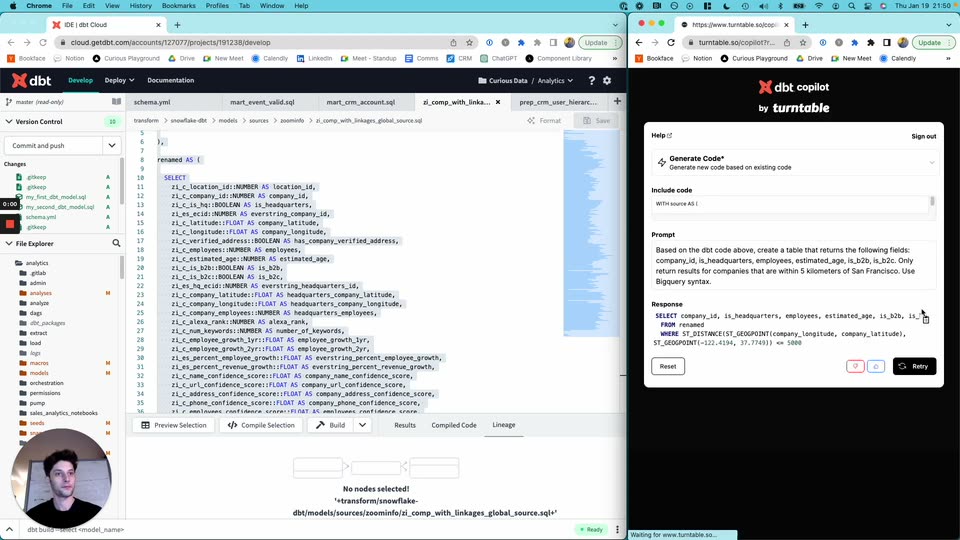

Introducing dbt copilot by Turntable
Turntable · B2B · Jan 2023
Rystic · Oct 2026 · 0:37 · Full motion · AI-annotated
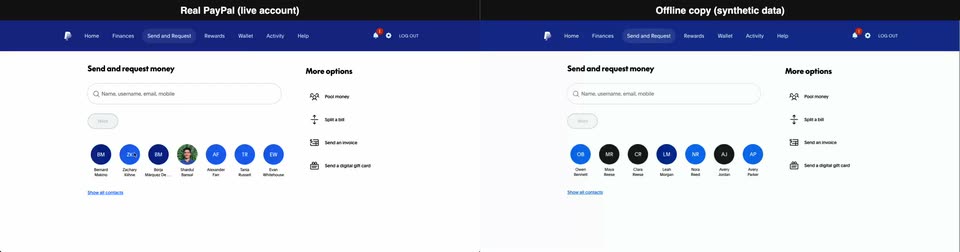
Rystic’s 0:37 launch film runs 8 scenes, about 4.7 s each. The product is on screen from the first frame. There is no explicit call to action. The video is a single continuous split-screen screen capture that mirrors a live PayPal send-money flow against a synthetic offline copy, cutting only at each step of the flow. Pacing is slow and methodical, with the cursor performing identical actions on both panels to prove visual parity.
Is this your launch? to your site or press kit.
Turntable · B2B · Jan 2023
Rindler · B2B · Jul 2026
Rystic · B2B · Nov 2026
Two PayPal dashboards sit side by side under black header bars labeled Real PayPal and Offline copy. The right dashboard holds still while a blue debit-card promo banner appears over its Apply now panel.
On-screen text: “Real PayPal (live account)”, “Offline copy (synthetic data)”
Techniques: Split screen
Camera: Static
A split screen compares two PayPal send-money views, the left live account and the right synthetic copy. The left panel scrolls past a rewards banner to match the right's clean contact row, then a cursor moves over a contact avatar on the right.
On-screen text: “Real PayPal (live account)”, “Offline copy (synthetic data)”
Techniques: Split screen, Cursor demo
Camera: Static
A split screen compares a live PayPal account on the left with an offline copy on the right. A cursor types a dollar amount into both request forms, then the payment method breakdown slides in beneath each.
On-screen text: “Real PayPal (live account)”, “Offline copy (synthetic data)”
Techniques: Split screen, Cursor demo
Camera: Static
Two PayPal payment modals sit side by side under the labels Real PayPal and Offline copy. A cursor drifts across each panel, hovering the Next and Back buttons while the bank list stays static.
On-screen text: “Real PayPal (live account)”, “Offline copy (synthetic data)”
Techniques: Split screen, Cursor demo
Camera: Static
Two PayPal checkout windows sit side by side, captioned Real PayPal (live account) and Offline copy (synthetic data). Both scroll from the $1.00 bank list to the Choose a payment type page, where a cursor clicks For friends and family on the left.
On-screen text: “Real PayPal (live account)”, “Offline copy (synthetic data)”
Techniques: Split screen, Cursor demo
Camera: Static
A split screen shows two PayPal payment pages side by side, both scrolling down to reveal the payment-type options and the total, with a cursor hovering over the left list.
On-screen text: “Real PayPal (live account)”, “Offline copy (synthetic data)”
Techniques: Split screen, Cursor demo
Camera: Static
A split screen shows two PayPal send-money pages side by side under black caption bars. A cursor clicks the Send button on the left live page while the right synthetic page resolves into a green-check success card stating the amount sent.
On-screen text: “Real PayPal (live account)”, “Offline copy (synthetic data)”
Techniques: Split screen, Cursor demo
Camera: Static
A split screen shows two PayPal views side by side under black header bars. The left view loads a confirmation card after a spinner, while the right view holds a static confirmation. A cursor on the left hovers the summary link.
On-screen text: “Real PayPal (live account)”, “Offline copy (synthetic data)”
Techniques: Split screen, Cursor demo
Camera: Static