1:19
Explore
RunRL
RunRL · May 2025 · 1:15 · Full motion · AI-annotated
- Length
- 1:15
- Scenes
- 10 · 7.6 s avg
- Product on screen
- 0:00
- Call to action
- 1:04 · 85%
- Voiceover
- Yes
- Views
- 856 on YouTube
as of November 23, 2026
00:00:00 / 01:16:00
- Length
- 1:15
- Scenes
- 10 · 7.6 s avg
- Product on screen
- 0:00
- Call to action
- 1:04 · 85%
- Voiceover
- Yes
- Views
- 856 on YouTube
as of November 23, 2026
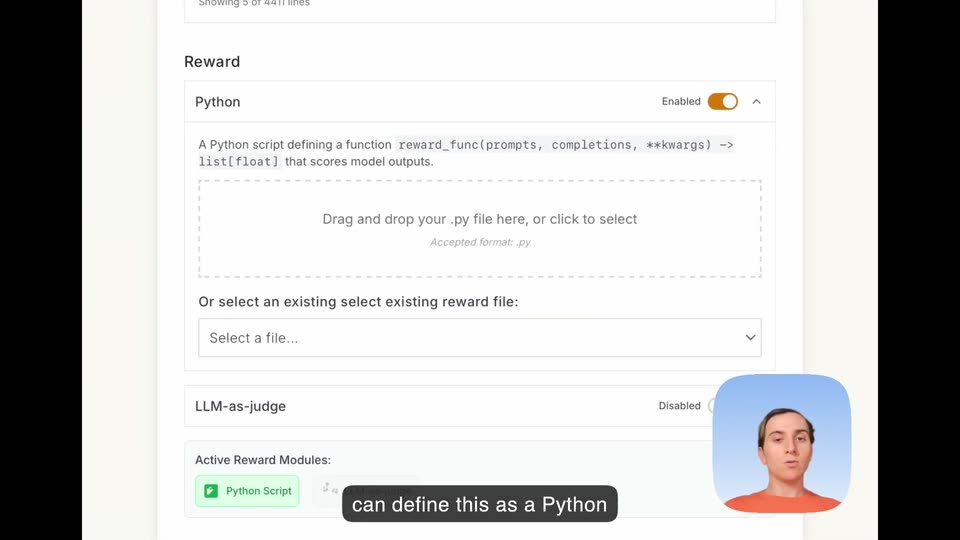
RunRL’s 1:15 launch film runs 10 scenes, about 7.6 s each. The product is on screen from the first frame. The call to action lands at 1:04 (85% in), over a voiceover. The video is one continuous screen recording of the RunRL web app, opened by a named-product intro over the landing page, then a long uninterrupted walkthrough of the submit form, training charts and deploy modal, and closed by an email CTA and a static wordmark card. The browser is treated as a 3D object that tilts and zooms while the cursor scrolls and clicks, all anchored by a persistent rounded face-cam and caption pill floating on a soft multicolor gradient.
No filming indicatedEstimated needs: 3 capture groups — your screens or recordings
Is this your launch? to your site or press kit.
More like this

0:22

Dia - Never late, always prepared. Meeting Tab Groups, now in Dia.
The Browser Company · Productivity · Jan 2026
0:25
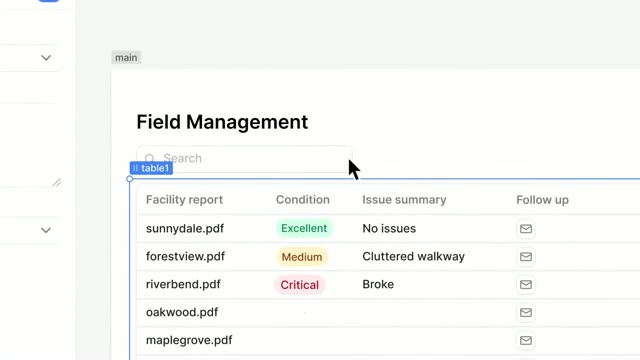

Introducing Retool AI—powerful AI building blocks
Retool · Developer tools · Sep 2023
RunRL, scene by scene
· 10 scenes as text
01 · Product intro · 0:00–0:06
A flat browser window shows the RunRL landing page over a colorful gradient, its starry-sky hero image slowly shifting from sunset orange to dusk blue. A rounded face-cam of the presenter in an orange shirt sits in the lower right corner, with caption subtitles at the bottom.
On-screen text: “Hey, I'm Derek and this is”, “RunRL. We've made it really”, “easy for you to run”
Camera: Static
02 · Product intro · 0:06–0:07
A browser window of the RunRL homepage rests on a multicolor gradient, its hero headline and chemistry chart visible. A rounded video of a man in an orange shirt talks in the lower right corner. White captions on a dark pill read out at the bottom.
On-screen text: “easy for you to run”, “reinforcement learning on”
Camera: Static
03 · Product intro · 0:07–0:14
A browser window shows the RunRL homepage with a starry sunset hero, headline, buttons, a chart card and university logos. A man in an orange shirt speaks from a rounded face-cam box at the lower right, while white captions cycle through a black bar at the bottom.
On-screen text: “reinforcement learning on”, “LLMs, so you can”, “beat Anthropic and OpenAI”, “models on the tasks you care”, “about. Let me show you an”
Camera: Static
04 · Demo · 0:14–0:47
A tilted 3D browser window over a gradient background shows the RunRL submit form, with a presenter's face in a rounded card at bottom right. The page scrolls down through the prompt preview, reward section and run configuration as the cursor moves and selects files, while captions roll along the bottom.
On-screen text: “example. Let me show you an”, “example. I'll start with a prompt”, “file, which is just a list of tasks I”, “want the model to do. In this”, “case, some physics problems.”, “we have a reward function. I”, “can define this as a Python”, “instructions for an LLM judge.”, “This is a target metric that we”, “train the model to do better at. Then I can just”
Techniques: 3D mockup, UI zoom, Cursor demo
Camera: Pull out
05 · Demo · 0:47–0:56
A browser window on a colorful gradient background shows a Run Details dashboard; the view scrolls past parameter tables into line charts and a Stored Completions table as a cursor clicks the Older button. A face-cam of a man in an orange shirt sits bottom right.
On-screen text: “Then I can just”, “samples generated from”, “training. And when training is”
Techniques: UI zoom, Cursor demo
Camera: Pan
06 · Demo · 0:56–0:57
A dashboard window with training charts and a completions table scrolls upward while a small picture-in-picture of a presenter in an orange shirt sits in the lower right corner over a colorful gradient background.
On-screen text: “done, I can download the”
Camera: Pull out
07 · Demo · 0:57–0:59
A browser window showing the RunML details page sits in 3D on a multicolor gradient, then the view zooms into the page. A cursor hovers over the download and deploy buttons while a small face inset stays in the lower right.
On-screen text: “done, I can download the”, “model weights or deploy it for”
Techniques: 3D mockup, UI zoom, Cursor demo
Camera: Push in
08 · Demo · 0:59–1:04
A web UI screen shows a Model Deployment modal over a dimmed page; a cursor clicks the orange button, which turns to a loading state, then the view zooms out. A man in an orange shirt sits in a small box at bottom right, white subtitles below.
On-screen text: “model weights or deploy your”, “use as an API model. If you”
Techniques: Cursor demo, UI zoom
Camera: Pull out
09 · CTA · 1:04–1:13
A static RunRL dashboard with a Model Deployment modal sits on a colorful gradient, while a rounded picture-in-picture of a talking man in an orange shirt occupies the lower right. Subtitles change at the bottom and a large RunRL.com watermark fades in over the interface.
On-screen text: “want help designing a reward”, “function or running RL on AI”, “agents, we can also help with”, “that. Just email us at”, “[email protected]”, “RunRL.com”
Camera: Static
10 · Outro · 1:13–1:15
A plain black frame holds the white serif wordmark RunRL.com, centered and completely static for the full shot, serving as a closing card. A small Run Details caption is also present on the frame.
On-screen text: “Run Details”, “RunRL.com”
Camera: Static