1:09

Introducing Zapier Agents: The Future of Automation is Here!
Zapier · Productivity · Jan 2025
flavors design · Oct 2026 · 2:37 · AI-annotated
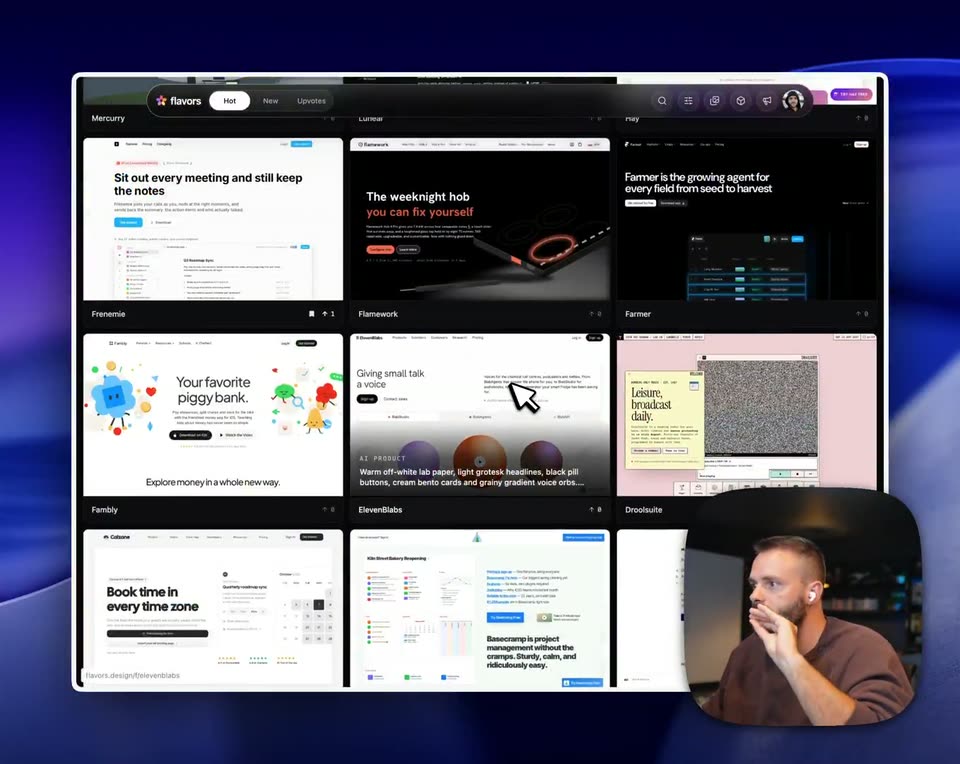
flavors design’s 2:37 launch film runs 60 scenes, about 2.6 s each. The product is on screen from the first frame and 6 features are revealed. There is no explicit call to action; a voiceover carries the film. The video is a continuous screen tour of the flavors app, where a browser window floats tilted in 3D over a deep blue gradient while a face-cam presenter narrates from a rounded inset in the bottom right corner. Pacing is fast at about 28 cuts per minute, and the signature moves are the 3D window tilts, grid slides, and zooms into template cards that keep the static UI in motion.
Is this your launch? to your site or press kit.
Zapier · Productivity · Jan 2025
Mosaic · B2B · Aug 2026
A dark blue 3D backdrop frames the flavors interface as a tilted window mockup, its grid of design-project cards filling the frame. A rounded video inset bottom-right shows a bearded man in a brown sweater gesturing while talking. The view then zooms into the grid.
Techniques: 3D mockup, UI zoom
Camera: Push in
A grid of website preview cards fills the frame on a dark blue backdrop, topped by a flavors tab pill and a small presenter video at bottom right. A white cursor glides across the central Slaydate card.
Techniques: Cursor demo
Camera: Static
A browser interface floats in 3D perspective against a blue gradient, its tabs arranged in a grid of website previews. A white cursor hovers over the center column, and a rounded video-call window shows a man adjusting an earbud in the lower right.
Techniques: 3D mockup
Camera: Pull out
A 3D-tilted window of the flavors app floats over a purple gradient, its grid of design product cards scaling and sliding into place while a white cursor hovers. In a rounded inset at the lower right, a bearded presenter gestures and talks.
Techniques: 3D mockup, Cursor demo
Camera: Pan
A browser window showing a grid of design project cards sits over a blue gradient, a white cursor resting on the middle card. In a rounded inset at the bottom right, a bearded man in a brown shirt talks and gestures with his hand.
Techniques: Cursor demo
Camera: Static
A browser window shows a grid of design portfolio cards on a dark blue abstract background, with a cursor resting over the Basecamp card. A rounded video inset in the lower right shows a bearded man in earbuds gesturing as he speaks.
Techniques: Cursor demo
Camera: Static
A dark browser window displays a grid of website thumbnails that scrolls upward, revealing new rows. A small rounded video call of a man in a brown shirt sits in the bottom-right corner, gesturing as he speaks against a dark blue gradient background.
Camera: Pan
A browser window shows a grid of design-style template cards that scrolls, revealing new rows at the bottom, with a white arrow cursor held at the center. A small picture-in-picture of a gesturing man in earbuds sits in the bottom-right corner over a blue gradient backdrop.
Techniques: Cursor demo
Camera: Pan
The flavors app appears as a tilted 3D window on a dark blue backdrop, its grid of design cards scrolling past while a white cursor hovers over one. A small rounded inset at bottom right shows the presenter talking and gesturing.
Techniques: 3D mockup, Cursor demo
Camera: Pan
A Mac window holding a 3x3 grid of website thumbnails scales into place on a blue 3D backdrop. A cursor glides across the middle row while a small picture-in-picture video of a talking man stays in the lower right corner.
Techniques: Cursor demo
Camera: Static
A tilted 3D view of the flavors app displays a grid of design cards over a dark blue abstract backdrop. A white cursor hovers on the center card. A rounded inset at the lower right shows a bearded man in earbuds gesturing as he speaks. The card grid slides gently.
Techniques: 3D mockup, Cursor demo
Camera: Pan
A rounded product window fills the frame, showing a grid of design cards that scrolls upward as a white cursor drifts across them. A small rounded webcam inset in the lower right shows a man in a brown shirt against a dark background.
Techniques: Cursor demo
Camera: Pan
A 3D-tilted grid of app windows fills the frame on a blue backdrop and drifts slightly upward, while a small rounded inset of a man gesturing toward his face sits in the lower right corner.
On-screen text: “piggybank.”
Techniques: 3D mockup
Camera: Push in
A dark product interface fills the frame, its top toolbar showing icons and a Published tag, while a white hand cursor hovers over the empty canvas. A small webcam inset of a bearded presenter sits in the bottom-right corner, and a ghosted grid of website mockups fades out at the start.
Techniques: Cursor demo
Camera: Push in
The yymroad landing page fills the frame, pink sticker shapes and a yellow stats bar, with the presenter in a corner video. A cursor opens a Tweak panel on the right and clicks a swatch, recoloring the page pink to red and swapping fonts.
Techniques: Cursor demo
Camera: Static
A browser window shows the yumroad landing page with red sticker shapes and a yellow stats bar. A panel on the right lists color swatches and font dropdowns, a cursor rests on the Shuffle tab. A bearded presenter gestures in a small video inset at the bottom right.
Techniques: Cursor demo
Camera: Static
A dark product page sits in a browser window with a settings panel on the right. A cursor clicks the Shuffle button as a small video of a presenter plays in the bottom-right corner.
Techniques: Cursor demo
Camera: Static
A browser window displays the yumroad site beside a Tweak panel. A cursor clicks the Shuffle button, and the page's red circles and serif headings shift to pink with new fonts. A small inset in the corner shows the presenter talking.
Techniques: Cursor demo
Camera: Static
A browser window shows the yumroad hero 'Go from 0 to $6' on a dark page, with a Tweak panel on the right offering color schemes and font pickers. A cursor hovers the Shuffle button as the hero text settles, and a presenter picture-in-picture sits in the corner.
Techniques: Cursor demo
Camera: Static
A browser window shows the yumroad site with a dark Tweak panel open on the right, listing color swatches and sliders. A cursor hovers over the Shuffle tab while a small video of a man talking sits in the bottom right corner.
Techniques: Cursor demo
Camera: Static
A browser view of a website shows a Tweak panel on the right. A cursor clicks a shuffle control, and the page flips from a dark theme to a cream one while its display and body fonts change. A small video of the presenter gestures in the bottom-right corner.
Techniques: Cursor demo
Camera: Static
A browser window shows the yumroad site with a Tweak panel docked on the right. The cursor clicks shuffle and the page flips to a low-contrast dark-on-dark scheme; the panel then closes and reopens. A face-cam of a gesturing man sits in the bottom-right corner.
Techniques: Cursor demo
Camera: Static
A cursor hovers the Shuffle tab of a dark theme panel over the yumroad site, the panel closes as the pink stickers rearrange, then the cursor opens an Image prompts dropdown. A bearded presenter gestures in a small corner video.
Techniques: Cursor demo
Camera: Static
A dark modal over the product interface displays an illustration of pink coins and yellow stars beside a long prompt text. A cursor moves across the result thumbnails and to the top bar, while a small webcam video of the presenter stays in the lower corner.
Techniques: Cursor demo
Camera: Static
A design-tool screen shows the yumroad website. A white cursor clicks a top-bar icon, opening a 3D components menu, then moves to Coin tumble. A small webcam of a bearded man in a brown shirt sits in the lower right as the page begins to cross-fade.
Techniques: Cursor demo
Camera: Static
A dark app window shows a canvas with a pink 3D coin and a yellow star bobbing and tilting. The shot pulls back to the full browser window as a hand cursor moves over the top bar; a presenter appears in a small video box at the bottom right.
Techniques: UI zoom, Cursor demo
Camera: Static
A gallery interface tilts in 3D perspective against a dark blue field, its grid of design cards animating with sliding and scaling type. A hand cursor drifts across the cards while a small presenter video plays in the lower right corner.
Techniques: 3D mockup, Cursor demo
Camera: Static
A light interface showing a grid of design project thumbnails dissolves to a dark empty canvas, leaving the top toolbar and a white cursor hovering mid-frame. A small video of a bearded man in white earbuds stays pinned to the bottom-right corner.
Techniques: Cursor demo
Camera: Static
A rounded browser window shows the Thinks landing page on a dark blue field, with a small webcam feed of a gesturing man in the lower right. A cursor opens a dark copy-and-download menu, then clicks Tweak to slide in a theme panel that recolors the page green.
Techniques: Cursor demo
Camera: Static
A dark design-tool screen shows a Thinks landing page with a glowing blue cloud icon and serif title, while a Tweak panel of sliders sits on the right. A cursor hovers over the Shuffle all button and a small corner video shows a bearded man gesturing.
Techniques: Cursor demo
Camera: Static
A browser window shows the Thinks landing page with a green cloud logo, beside a dark Tweak panel holding theme swatches and sliders. A cursor slides from the Show all button to the close icon. A small gesturing presenter video sits in the bottom-right corner.
Techniques: Cursor demo
Camera: Static
A browser window holding the Thinks website, green cloud icon and headline, tilts in 3D against a dark blue gradient. A large hand cursor glides from the top-left corner toward the center, and a rounded webcam feed of a man talking sits in the lower right.
Techniques: 3D mockup, Cursor demo
Camera: Static
A dark app window on a blue-purple gradient holds a nine-card grid of website screenshots. A white hand cursor drifts from the top-middle card to the middle-right card and rests, hovering over the tile with the black triangle.
Techniques: Cursor demo
Camera: Static
A design tool window shows a blurred grid of overlapping website mockups that collapses into one dark template titled Detour Infrastructure. A hand cursor hovers mid-frame while a small face-cam of a bearded man in a brown shirt stays in the bottom-right corner.
Techniques: Cursor demo
Camera: Static
A light web page titled Detour Infrastructure fills a browser window, a black triangle centered under a hand cursor. The cursor jumps to the top bar, then the page scrolls down past a stats row to a section with embedded mockups. A rounded video of a talking man sits bottom-right.
Techniques: Cursor demo
Camera: Static
A browser window holding a grid of website thumbnails pulls back from a blurry close-up into a sharp full view, gray captions fading out over the tiles. A small video call tile with a bearded man sits in the bottom right corner.
On-screen text: “Route agents around outages before they notice”, “Every parcel, any detour.”
Techniques: UI zoom
Camera: Pan
A masonry grid of product cards scrolls upward inside the flavors window while a floating search bar with the flavors logo and Hot tab stays pinned at the top. A small webcam feed of a man in a brown shirt sits in the lower right corner.
Camera: Pan
A dark browser window frames a three-column grid of colorful website template cards beneath a flavors toolbar with Hot, New, Updates tabs. A hand cursor hovers on the center blue card as a diagonal light streak glints across the top right corner.
Techniques: Light sweep
Camera: Pan
A tilted 3D grid of browser windows scrolls across a dark blue abstract backdrop, each pane showing a different product page. A man in a video call sits in a rounded window at the lower right. The panes shift and reposition as the grid moves.
Techniques: 3D mockup
Camera: Pull out
A tilted 3D view of a website gallery grid fills the frame against a dark blue abstract background, with a small rounded video of a man gesturing in the lower right. A cursor glides across the top toolbar and hovers over an icon.
Techniques: 3D mockup, Cursor demo
Camera: Push in
A dark flavors app window fills the frame, showing an Image prompts page with filter tabs, a search bar, and a grid of prompt cards that fade up from black. A rounded video inset of a man talking sits in the bottom right corner over a dark blue background.
Camera: Static
A dark grid of image-prompt cards in the flavors web app fills a white-framed window on a blue background. The grid scrolls upward to reveal new cards while a cursor hovers over them, and a small video inset of a gesturing presenter sits in the bottom-right corner.
Techniques: Cursor demo
Camera: Pull out
A tilted 3D view of the flavors image-library grid fills the frame on a dark blue backdrop, a white cursor glides across the cards. A rounded inset at the lower right shows a bearded man in a brown shirt gesturing while speaking.
Techniques: 3D mockup, Cursor demo
Camera: Pan
A flat browser window of the flavors interface floats over a blue abstract backdrop, its grid of image-prompt cards scrolling upward while a white cursor hovers mid-grid. A rounded live-action inset in the lower right shows a bearded presenter gesturing.
Techniques: Cursor demo
Camera: Pan
A dark gallery window of image cards scrolls vertically, revealing new thumbnails and a pink Start selling button, while a presenter gestures inside a rounded picture-in-picture frame at the bottom right. The window floats over an abstract blue 3D backdrop.
Camera: Static
A dark flavors app interface floats tilted in 3D over a blue gradient. A white cursor glides to the 3D tab and clicks it, swapping the prompt grid from clouds and mascots to amber bottles and jars. A rounded inset in the lower right shows a man gesturing.
Techniques: 3D mockup, Light sweep, Cursor demo
Camera: Push in
A dark component-library screen shows a grid of 3D asset cards under the heading 3D components. A white hand cursor drifts down from the top nav and hovers over the middle card, raising a small tooltip, while a circular inset of the presenter sits bottom right.
Techniques: Cursor demo
Camera: Static
A browser window shows a grid of 3D component thumbnails on a dark background. A hand cursor hovers over the middle tile as the grid scrolls up a few rows. A small webcam inset of a talking man sits in the bottom-right corner.
On-screen text: “3D components”
Techniques: Cursor demo
Camera: Pan
A dark web grid of 3D asset tiles fills a rounded browser window set on a blue gradient. The window tilts into 3D perspective, and a small talking-head video of a man in earbuds plays in the lower right corner.
Techniques: 3D mockup
Camera: Static
A browser window shows a grid of design assets: an open book, a pink badge, paper blobs, a red card, a radio, a holo sphere, a green headline and a man in a video. A hand cursor hovers over the cards as the grid scrolls up.
Techniques: Cursor demo
Camera: Static
A tilted browser window mockup of the flavors gallery sits on a dark blue backdrop and scrolls down through a grid of template cards, each pairing a thumbnail with a title bar.
Techniques: 3D mockup
Camera: Pan
A dark web gallery of 3D asset thumbnails fills the frame in a labeled grid. A hand cursor glides from one card to the next, and a link preview at the bottom left updates to match the hovered item.
Techniques: Cursor demo
Camera: Static
A tilted browser window floats in a dark blue space, showing a grid of 3D object cards. A white cursor glides from tile to tile, hovering over each, while a small talking-head video plays in the lower right corner.
Techniques: 3D mockup, Cursor demo
Camera: Static
A browser window floats on a dark blue 3D backdrop, its grid of design thumbnails scrolling upward as a white hand cursor hovers at the top-left. A rounded video of a man overlays the bottom-right corner.
Techniques: Cursor demo
Camera: Static
A browser window tilted in 3D perspective floats on a dark blue gradient, showing a grid of flavor cards with a hand-drawn cursor resting on the flavors tab at top left. The cards shift upward as the layout reflows, while a blue 3D shape sits at the right edge.
Techniques: 3D mockup
Camera: Static
A dark design gallery fills the frame with a three-by-three grid of project cards, each pairing a preview image with a label, under a top bar holding the flavors logo and Hot, New, Updates tabs. A white hand cursor hovers over the middle-right card. The shot stays locked-off.
Camera: Static
A dark 'flavors' browser window floats at an angle on a purple gradient, filled with a grid of design cards. A white hand cursor glides across the grid, pausing over the 'Wrap' and 'Toasthog' cards.
Techniques: 3D mockup, Cursor demo
Camera: Static
A green Toasthog landing page sits in a browser window that slides left and right, its copy menu left open. A cursor moves along the top bar as a presenter gestures in a corner video.
Techniques: Cursor demo
Camera: Static
A 3D-tilted browser window shows the green Toasthog interface on a dark blue backdrop. A cursor taps the back arrow and a Copy tooltip flashes, while a presenter in a rounded inset at the bottom right gestures.
Techniques: 3D mockup, Cursor demo
Camera: Static
A dark app window with a grid of six product cards tilts in 3D over a deep blue abstract background. A white cursor glides across the cards and top bar, and the view zooms in on the header around 14 s. A rounded inset at bottom right shows a man talking and gesturing.
Techniques: 3D mockup, UI zoom, Cursor demo, Split screen
Camera: Pull out